

Gorgon ransomware is malware that locks up files and demands 0.3 BTC ransom for the decryptor
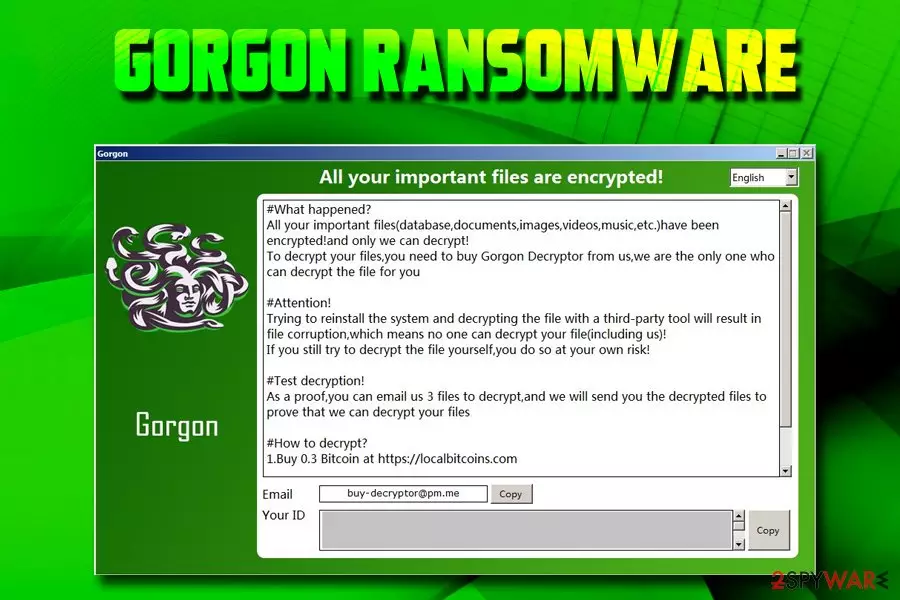
Gorgon ransomware is a newly-discovered cyber threat that is created in order to obtain money by holding personal files of victims' hostage. Once the virus gets into the machine, it performs a series of system modifications and then locks up databases, documents, pictures, videos with the help of a strong encryption algorithm. Files are modified and the .[buy-decryptor@pm.me] extension added, preventing victims from opening or using any personal data. Gorgon ransomware also swaps the wallpaper and drops a ransom note #DECRYPT MY FILES#.HTML where hackers demand 0.3 Bitcoin for decryption key which is stored on a remote server. Bad actors also offer test decryption of three files that do not contain valuable information. According to experts, this cyber threat is “a twin brother” of FilesL0cker ransomware, although it is not a variant of the latter.[1]
| Name | Gorgon |
| Type | Ransomware |
| Infiltration | Spam emails, malicious websites, fake updates, etc. |
| File extension | .[buy-decryptor@pm.me] |
| Ransom note | #DECRYPT MY FILES#.HTML |
| Contact | buy-decryptor@pm.me |
| Ransom size | 0.3 BTC |
| Elimination | Use security software like FortectIntego or SpyHunterCombo Cleaner[2] |
It is not known how the Gorgon virus is distributed, but it is highly likely that developers use typical ransomware distribution methods, such as:
- Exploit kits;
- Fake updates;
- Obfuscated executables;
- Spam emails;
- Malicious websites;
- Etc.
Once inside the system, Gorgon ransomware modifies Windows registry, removes Shadow Volume copies and launches a variety of processes that help the virus run. Once the encryption procedure is finished, malware contacts C&C server in order to upload a ransom note on victim's computer which states:
All your important files are encrypted!
#What happened?
All your important files(database,documents,images,videos,music,etc.)have been encrypted!and only we can decrypt!
To decrypt your files, you need to buy Gorgon Decryptor from us,we are the only one who can decrypt the file for you
#Attention!
Trying to reinstall the system and decrypting the file with a third-party tool will result in file corruption,which means no one can decrypt your file(including us)!
If you still try to decrypt the file yourself,you do so at your own risk!
#Test decryption!
As a proof,you can email us 3 files to decrypt,and we will send you the decrypted files to prove that we can decrypt your files
#How to decrypt?
1.Buy 0.3 Bitcoin at https://localbitcoins.com
Email [buy-decryptor@pm.me] Your ID
As evident, crooks want to make victims believe that the best option they have is to pay the demanded ransom of 0.3 BTC, which currently stands for around $1,000. However, experts[3] advise staying away from cybercriminals and never contacting them. The best way to deal with the situation is to remove Gorgon ransomware with the help of FortectIntego, SpyHunterCombo Cleaner or other powerful security software that detects the threat.[2]
After Gorgon ransomware removal is complete, you can attempt file recovery without paying criminals. If you have backups ready, there will be no problems with recovering all your data. Alternatively, you can make use of data recovery software that might be able to help you. We provide all the instructions below.

Stay away from malware-loaded phishing emails
Cybercriminals are sophisticated individuals in most cases, and they often rely on social engineering to spread their crypto-extortionists. One of the most popular techniques used to deliver ransomware viruses is spam emails.
Bad actors often employ bots to send out thousands of emails that either contains a malicious file that requires macro function enabling or a malicious hyperlink that directs users to a specific web page that downloads and executes the payload.
Therefore, it is vital to be attentive while opening emails from unknown sources, especially if they end up in the Spam box. Email providers do have built-in scanners that detect deception and mark dangerous messages. Nevertheless, some phishing emails might end up in your Inbox.
The basic procedures that should be practiced by everyone who values their personal data are these:
- Up-to-date security software;
- Patched operating system and applications;
- Enabled Firewall;
- Avoidance of file-sharing and torrent sites;
- Strong passwords used;
- Ad-blocking application installed, etc.
Remove Gorgon ransomware with the help of security software and then proceed with file recovery
To remove Gorgon ransomware, you will have to employ a powerful security software. There are plenty to choose from, but make sure you use the one that can detect the malware. For that reason, we suggest you pick FortectIntego or SpyHunterCombo Cleaner. Once installed, you should reboot the system and enter Safe Mode with Networking. This will prevent Gorgon virus from interfering with anti-malware software.
In the Safe Mode, perform a full system scan to complete Gorgon ransomware removal. Once the virus is gone, you can start file recovery procedure by either using backups or trying out third-party applications that specialize in file recovery. If that fails, you should wait till security researchers come up with the decryptor that would be able to decode all files for free.
Did this guide help?
Be the first to comment