

Mahitra1 ransomware – a new cryptovirus from an unknown malware family
Mahitra1 ransomware is a data locking malware that was spotted in the wild at the end of January 2019. The virus usually gets to users' machines with the help of spam email attachments, breaks in via the unprotected RDP,[1] or gets extracted via the malicious executable. Soon after the infiltration, the infection spreads within the computer, infecting various system files. Mahitra1 ransomware then scans the machine for data to encrypt – it targets personal photos, music, videos, databases, documents, etc. Once detected, it appends .mahitra1 file extension, preventing victims using the data in any way. The virus then drops a ransom note how_to_open_files.html – a message from hackers. Allegedly, users have to email bad actors via mahitra1@outlook.com or mahitra1@cock.li and arrange the payment in cryptocurrency for the decryptor. Currently, it is unknown which virus family Mahitra1 ransomware belongs to.
| Name | Mahitra1 |
| Type | Ransomware |
| File extension | .mahitra1 |
| Ransom note | how_to_open_files.html |
| Contact | mahitra1@outlook.com or mahitra1@cock.li |
| Family | Unknown |
| Decryptable? | No |
| Elimination | Download anti-malware software and perform full system scan |
| Optimization | Use FortectIntegoto restore system's functions |
Our research team received several reports over the past week that claimed that their files are locked with .mahitra1 file virus. However, it is not much known about this string of malware yet – which family it belongs to or which security applications can detect it. Therefore, a scan with multiple anti-virus engines might be necessary to remove Mahitra1 ransomware.
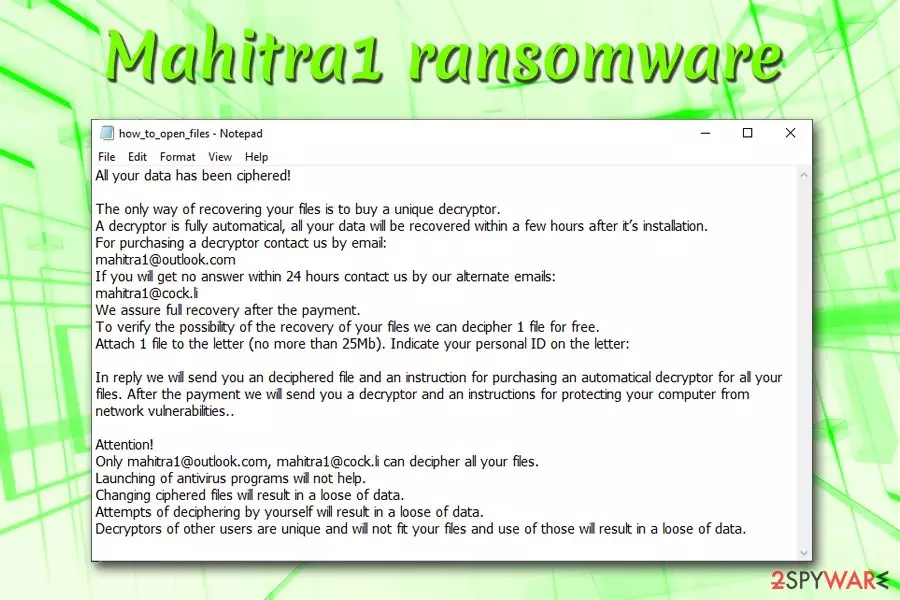
Nevertheless, file locking viruses all operate on the same principle: locking files in order to blackmail victims for money in Bitcoin or another cryptocurrency. To upload the ransom note and obtain the ID, Mahitra1 contacts a remote server which is in the read of hackers only. The message states as follows:
All your data has been ciphered!
The only way of recovering your files is to buy a unique decryptor.
A decryptor is fully automatical, all your data will be recovered within a few hours after it’s installation.
For purchasing a decryptor contact us by email:
mahitra1@outlook.com
If you will get no answer within 24 hours contact us by our alternate emails:
mahitra1@cock.li
We assure full recovery after the payment.
To verify the possibility of the recovery of your files we can decipher 1 file for free.
Attach 1 file to the letter (no more than 25Mb). Indicate your personal ID on the letter:In reply we will send you an deciphered file and an instruction for purchasing an automatical decryptor for all your files. After the payment we will send you a decryptor and an instructions for protecting your computer from network vulnerabilities..
Attention!
Only mahitra1@outlook.com, mahitra1@cock.li can decipher all your files.
Launching of antivirus programs will not help.
Changing ciphered files will result in a loose of data.
Attempts of deciphering by yourself will result in a loose of data.
Decryptors of other users are unique and will not fit your files and use of those will result in a loose of data.
It is not unusual for bad actors to offer test decryption, as it might make users believe hackers. However, multiple examples from the past confirm that cybercriminals do not always send back the decryption key. In some cases, they might even send executable that will infect the machine even more. Finally, paying Mahitra1 virus authors will only prompt them to create new malware and spread them further.
Therefore, do not contact cybercrooks, and do not pay the ransom. In addition to data loss, you might end up losing a hefty sum of money as well. Therefore, better take care of Mahitra1 ransomware removal first and then try alternative file recovery methods (we provide details below).
Once you get rid of Mahitra1 ransomware, make sure you scan your system with FortectIntego – it will restore its functions, such as scheduled tasks, Windows Registry, and other alternations to the system.

Beware of malicious spam emails and suspicious websites – ransomware infection is just around the corner
Ransomware authors usually are sophisticated individuals, and they are continually looking for new methods to spread their malware around the world. Unfortunately, malware is a very lucrative business for criminals currently, and that's why new variants, as well as new families, of ransomware, show up every day.[2]
Those who do get infected with data locking malware are unaware that they themselves initiated the infection – in one way or another. Thus, the main factor is the victim himself or herself – more caution while using the internet would stop various virus infections.
Experts[3] advise users to practice these simple security measures:
- Employ comprehensive security software and keep it up to date;
- Backup your files on a regular basis;
- Beware of spam emails: attached files (.doc, .html, .pdf, .txt, etc.) or hyperlinks can lead to ransomware infection;
- Protect Remote Desktop with adequate security measures – use strong passwords and employ VPN;
- Stay away from torrent and other file-sharing sites;
- Do not download cracks of keygens;
- Update your system on a regular basis – hackers can use software flaws (vulnerabilities) to inject malware without users' interaction.
Remove Mahitra1 ransomware and only then attempt file recovery
Be aware that you have to remove Mahitra1 virus before you proceed with any other actions, especially the file recovery. If you do not do so, all the files will be encrypted repeatedly (if you manage to recover some). Do not attempt to eliminate crypto malware manually – this practice should only be executed by trained IT specialists.
Instead, you should scan your machine with security software for full Mahitra1 ransomware removal. Because the behavior of the virus is not completely known, it is possible that it might interfere with the operation of the anti-malware program. In such a case, enter Safe Mode with Networking.
As soon as you delete Mahitra1 ransomware from your computer, proceed with file recovery. If you had backups – connect your external device or copy all the data from virtual cloud storage. In case you do not have such backups, recovering data might be quite complicated. You should download third-party software that might be able to help you – find download links and descriptions below.
Finally, in case you do not succeed to retrieve files, keep a copy of all the data because security researchers might create a free decryptor for .mahitra1 file virus.
Did this guide help?
Be the first to comment