

FCrypt – a new ransomware family that encrypts files but does not ask for a ransom payment
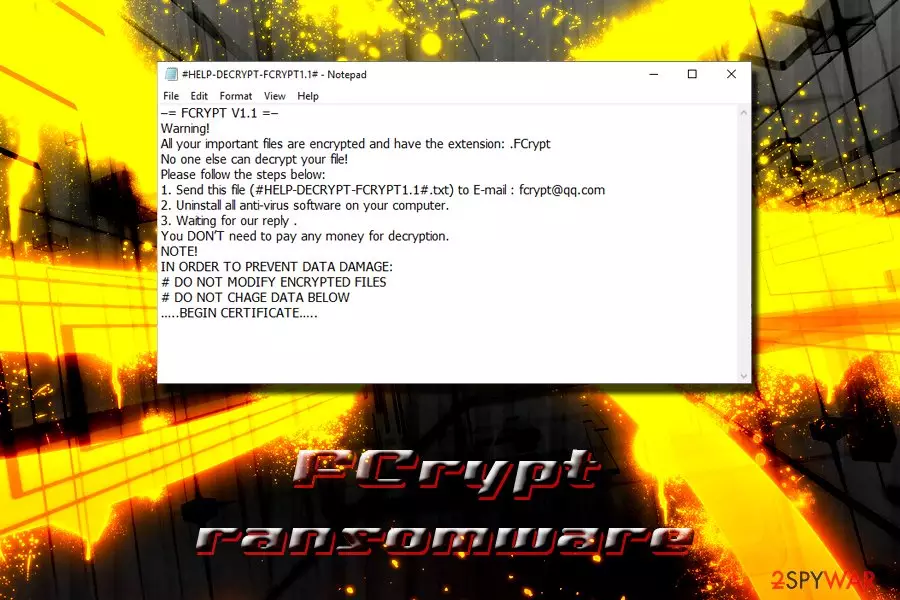
FCrypt ransomware is a type of file-locking malware that is not created for money extortion purposes, or at least cybercriminals behind this malicious piece of software wants everybody to believe so. The threat was discovered in February 2019 by independent security researchers. It turns out that FCrypt uses GNU Privacy Guard software to perform file encryption (AES). Once data is encrypted, a file extension .FCrypt is added, and shortcuts are modified into a lock picture. This type of file modification prevents users from accessing their documents, photos, videos, music, databases, etc. Victims can also view a #HELP-DECRYPT-FCRYPT1.1#.txt ransom note which urges users to contact criminals via the fcrypt@qq.com address and ensure that no payment in Bitcoin or other crypto is not necessary to regain access to personal data.
| Name | FCrypt |
|---|---|
| Type | Ransomware |
| Discovered | February 2019 |
| Cipher | AES |
| File extension | .FCrypt |
| Contact | fcrypt@qq.com |
| Ransom note | #HELP-DECRYPT-FCRYPT1.1#.txt |
| Ransom | Does not ask for ransom payment |
| Elimination | Use anti-malware software that can recognize the threat |
If your files are encrypted, you will have to remove FCrypt ransomware from your computer before you proceed with any other actions that can recover your data. The best way is to use anti-virus software like FortectIntego (recognizes it as BDS/Hupigon.Gen) or SpyHunterCombo Cleaner (Ransom.FCrypt).[1] You should not try manual elimination as you might damage your system even further.
Once the system is infected with the FCrypt virus, the ransom note #HELP-DECRYPT-FCRYPT1.1#.txt pops-up on the screen, elaborating the following:
–= FCRYPT V1.1 =–
Warning!
All your important files are encrypted and have the extension: .FCrypt
No one else can decrypt your file!
Please follow the steps below:
1. Send this file (#HELP-DECRYPT-FCRYPT1.1#.txt) to E-mail : fcrypt@qq.com
2. Uninstall all anti-virus software on your computer.
3. Waiting for our reply .
You DON’T need to pay any money for decryption.
NOTE!
IN ORDER TO PREVENT DATA DAMAGE:
# DO NOT MODIFY ENCRYPTED FILES
# DO NOT CHAGE DATA BELOW
…..BEGIN CERTIFICATE…..
Typically, ransomware authors create malicious scripts to lock up files to gain monetary benefit from ransom payments. However, it seems like this time hackers do not seek any money – or at least they want everyone to think so. FCrypt V1.1 ransomware might have been created for testing purposes, and the new variant that will demand ransom will be launched in the future.
Additionally, hackers might send you malicious executable to infect your device with keylogger, RAT or a similar spying tool. Thus, while intentions of these people might be true, there is never a guarantee, because it does not make sense to go through the trouble of writing a script for no apparent reason (coding takes a lot of time, and it is usually done for a reason).
Therefore, while FCrypt ransomware developers might send you a genuine decryptor, experts warn that it might be malicious, or you might be tricked in other ways. Thus, contact criminals at your own risk.
According to security researchers, FCrypt ransomware is decryptable, so is another good reason to stay away from hackers. Please contact Michael Gillespie on Twitter if you want to try this recovery method.[2] Alternatively, you can always rely on third-party software (you can find all the links and descriptions in the last sections of this blog).
Remember, you must complete FCrypt ransomware removal before you attempt file recovery, or your data will be locked once again!

Ransomware distribution techniques
There are several ways of getting infected with malware. In fact, as long as your computer is connected to the world wide web, there is a chance the virus will slip in. However, several things could be done in order to reduce the possibility to almost zero – it all comes down to safety practices. Please note these tips from cybersecurity analysts:
- Install anti-virus software and keep it up to date;
- Use Firewall;
- Beware of spam emails – suspicious attachments or hyperlinks might instantly infect your device with ransomware or other threats;
- Scan unknown files and links with tools like Virus Total;
- Update your system and software regularly to avoid exploitation of vulnerabilities;
- When using high-risk sites (porn, torrent, file-sharing), use some extra precaution measures – employ real-time protection feature on your anti-virus, use ad-blocker, VPN, and be generally more careful;
- Do not leave an open RDP connection,[3] as brute force attacks are becoming more prevalent among crooks.[4]
Terminate FCrypt ransomware to protect your incoming files from encryption
Until you remove FCrypt ransomware, your computer is not safe to use. Malware can be combined and drop off the payload at the same time (for example, GandCrab and Vidar).[5] For that reason, keeping a dangerous infection on your device is unsafe and not wise.
FCrypt ransomware removal should only be performed with the help of professional security software, as modifying system files, services, registry, and other settings can corrupt the operation of the operating system, and then only the reinstallation would help.
Once you get rid of the FCrypt virus, connect your backup device, contact security researchers, or rely on third-party software for file recovery. If you decide to pursue a decryption tool from cooks, you might get scammed. As already mentioned, no guarantees can be given in such a situation, as hackers are an ungoverned entity.
Did this guide help?
Be the first to comment