

Radman ransomware is file locking malware that offers to contact hackers via @datarestore Telegram account
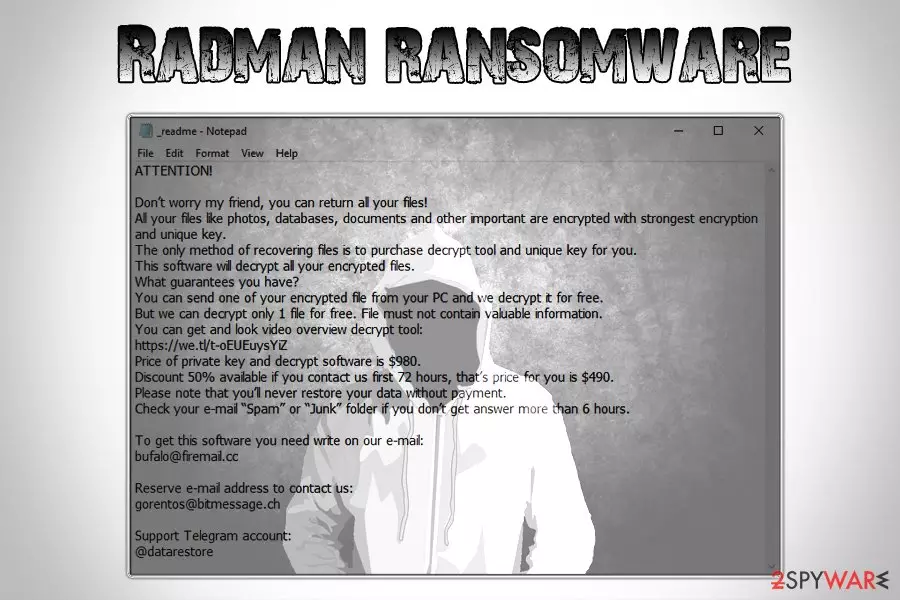
Radman ransomware is a type of computer infection that tries to make victims pay $980 ransom in Bitcoin by locking all personal files on their device. While it is not currently decryptable (unless the encryption process was performed offline), experts do not recommend contacting criminals as the possibility of getting scammed is quite high.
This variant of ransomware uses .radman file extension for file encryption, which later prevents their owners from further usage of documents, pictures, databases, videos, and other data on their device. The malware also drops a ransom note _readme.txt, which is essentially a message from the attackers.
In it, hackers claim that victims have to contact them via bufalo@firemail.cc or gorentos@bitmessage.ch emails or the Telegram account @datarestore. Crooks ask for $980 (or $490 if contact is established within 72 hours of the infection) in Bitcoin for the decryption tool.
If you got infected with this file virus, do not pay the ransom, and rather focus on Radman ransomware removal, as well as alternative file recovery methods in case STOPDecrypter does not work.
| Name | Radman |
| Type | Ransomware |
| Infiltration methods | Spam emails, software cracks, exploits, poorly protected RDP connections, etc. |
| File extension | .radman |
| Ransom note | _readme.txt |
| Contact | bufalo@firemail.cc, gorentos@bitmessage.ch or Telegram@datarestore |
| Ransom size | $980 or $490 in Bitcoin |
| Decryptable? | Decryption might be possible with STOPDecrypter [download link]. Otherwise, use third-party software |
| Removal | Install reputable security software and scan your device in Safe Mode as explained below |
| Recovery | Use FortectIntego to restore infected system files back to normal |
Radman ransomware belongs to one of the most prolific malware families – STOP/Djvu which, since its release in 2017 already deployed dozens of versions that affected thousands of users worldwide. For example, KeyPass ransomware used aggressive techniques in August last year to infect victims in more than 20 countries within just 36 hours after its release.[1]
Developers of Radman virus might employ a variety of distribution methods, including:
- Spam emails
- Fake updates
- Exploits
- Unprotected RDP connections
- Hacking tools or software cracks (Windows activator)
- Web injects
- Torrent files
- Repacked installers, etc.
To make sure threats like Radman ransomware fail to reach your computer in the future, use tips provided in the next section of this article.
Once inside, Radman ransomware performs a variety of changes to Windows OS, including modification of the registry, establishing a connection with the Command & Control server, Shadow Volume Copies termination, etc. After that, the malware scans the device for personal files like .pdf, .avi, .doc, .xlsx, .html, .zip, and others, and locks them with a sophisticated encryption algorithm, generating a unique key in the process and sending it off to the remote server controlled by hackers.
One of Radman virus sample dropped the following ransom note on victim's machine:
To get this software you need write on our e-mail:
bufalo@firemail.ccReserve e-mail address to contact us:
gorentos@bitmessage.chOur Telegram account:
@datarestore
As we already mentioned, do not pay the ransom and remove Radman ransomware from your device instead. You can accomplish that with the help of security software such as SpyHunterCombo Cleaner, although be aware that not all anti-malware applications will be able to detect this STOP variant, so a scan with multiple tools might be necessary. Once you terminate the infection, you can use STOPDecrypter or third-party software for file recovery if you do not have backups ready. Also, for a quick recovery from the virus, use FortectIntego.

Protect yourself from ransomware infections with the help of these tips
There have been countless warnings from security researchers about dangers of ransomware and other serious computer infections, as they can result in money or data loss, sensitive details disclosure to malicious parties, additional malware infections, etc.
However, users still fail to do basic procedures to protect their systems. For example, WannaCry was spread with the help of EternalBlue exploit that has been patched shortly after its discovery, and users are still affected by this file locking threat up to this day.[2]. While no method would prevent malware completely, there are several ways you could reduce the infection rates to a minimum:
- Install reputable anti-malware software with real-time protection feature;
- Enable Firewall;
- Do not download pirated software or its cracks;
- Make sure all the installed applications, as well as the operating system, are up to date;
- Do not open suspicious attachments (especially those that require you to enable macro function) or click on hyperlinks inside a spam email;
- Install ad-blocker and use it for high-risk sites;
- Use a password manager for your accounts and enable two-factor authentication when possible;
- Do not use simple passwords for your RDP connections (such as “1111,” “password,” “1234,” “qwerty,” etc.).
Delete Radman ransomware and only then attempt to recover your files
Not all anti-virus engines can remove Radman ransomware, as they are all using different databases and new virus variants are released daily. Therefore, you might have to scan your computer with different tools. However, experts[3] recommend performing the procedure in Safe Mode with Networking mode, as it can temporarily disable malware's functionality.
Once Radman ransomware removal is complete, you can attempt to recover your files. Of course, the most obvious solution is a backup. Unfortunately, not many users have it prepared, which significantly complicates the recovery process. Thus, you can also make use of third-party recovery software or STOPDecrypter that might be able to work for you.
Did this guide help?
Be the first to comment