

LooCipher ransomware is the virus that encrypts all the data on the infected computer and appends the .lcphr extension to those files
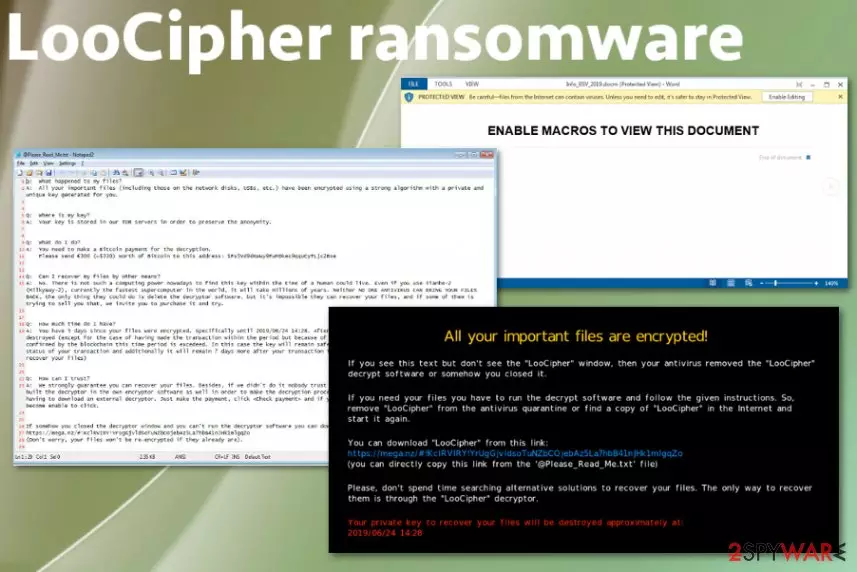
LooCipher ransomware is the cryptovirus that demands 300 euro in Bitcoins that is equivalent to $330. The demand shows up on the ransom note that gets delivered once all the chosen files get encrypted and marked with the .lcphr appendix. According to the initial ransomware discovery, this threat spreads using spam campaigns, during which the malicious Word document called Info_BSV_2019.docm gets downloaded on the system and once the embedded macros get enabled machine gets infected with crypto malware.[1]
Macros get triggered when the victim wants to see the contents of this file, and Tor server connection starts to download the executable file with LooCipher ransomware virus payload. Additional data get installed by the virus to ensure that decryption and removal processes are complicated as they can get, so researchers have a hard time to fight this crypto-extortion based malware.
| Name | LooCipher ransomware |
|---|---|
| Type | Cryptovirus |
| File extension | .lcphr |
| Ransom amount | $330 |
| Preferred cryptocurrency | Bitcoin |
| Ransom note | @Please_Read_Me.txt, pop-up window message |
| Distribution | Spam campaign distributing maliciously infected files, other malware |
| Added files on the infected system | Info_Project_BSV_2019.docm; c2056.ini, LooCipher_wallpaper.bmp, LooCipher.exe, output.135379688.txt, output.135371487.txt |
| Possible damage | Encrypted files may get damaged permanently, additional info-stealing malware installed on the machine, system settings altered and files deleted |
| Elimination | Get FortectIntego for LooCipher ransomware removal and general system cleaning |
The first thing that is known about LooCipher ransomware virus is the initial process that makes users' files locked and unopenable – encryption.[2] This particular virus uses the AES algorithm for the process and makes data useless by changing the original code of documents, photos, videos, archives, or even databases.
It does not delete the original files it only leaves them as zero-bytes copies on the system and marks the other files with .lcphr extension. Then LooCipher ransomware can also add other data on the machine to ensure that the machine is not working correctly and disable security functions or install programs to make the device slow.

Also, LooCipher ransomware can add particular registry keys, delete Shadow Volume Copies and so on, so there is no easy way to terminate this threat and to recover files encrypted by the malware. Cybercriminals developed this program so there might be additional functions that ransomware runs on the affected machine to ensure the persistence.
Due to the files and programs that LooCipher ransomware additionally installs and runs on the computer, people affected by the threat cannot use the machine normally after the infiltration. In most cases, antivirus tools or security programs get disabled by the cryptovirus itself. Due to this fact, we offer to reboot the machine in Safe Mode before eliminating this virus.
However, you cannot notice the particular program that can be deleted since LooCipher ransomware is not a program visible on the system. You can only experience difficulties while working with the device or the slowness of the processes. The first symptom is @Please_Read_Me.txt – ransom note delivery. You can see the illustration with the contents of the ransom note.

LooCipher ransomware creators state all the needed information in this file that contains answers to most important questions and the particular amount of the ransom that the victim is encouraged to pay for the decryption key. Unfortunately, there is no guarantee that your files can be recovered, even when the payment of $330 in Bitcoin is made.
Besides the ransom note, LooCipher ransomware changes the Desktop wallpaper and adds its own picture on the background. In this message, developers also have listed the facts about encryption, payment, and alleged file recovery.
Experts[3] note how important it is to stay away from LooCipher ransomware developers and to keep contact with them. You need to avoid clicking on anything they display in the screen or any links and files. You can lose money or files permanently if you do so without thinking.
Unfortunately, LooCipher ransomware creators start the countdown once the ransom message gets delivered and waits for the payment from the victim in five days or less. Allegedly your already useless files may get deleted permanently as well as the decryption key after that.

Don't believe these criminals and remove LooCipher ransomware as soon as you get the ransom note delivered on the screen. Stay away from any contact and paying the demanded amount and rely on automatic anti-malware tools that can scan the machine of yours and terminate possible threats.
You can see the countdown on the program window named LooCipher that also includes all the information about payment address and so on. However, this is not the best way to recover encoded data. You should get one of the tools that can detect LooCipher ransomware virus and terminate the malware.[4]
For the LooCipher ransomware removal, we recommend a reliable anti-malware program and full system scan. Then you can try file recovery methods. The best one is to use the data backed up on an external drive or database. Also, we have a few software offers down below.

Phishing campaign distributes malicious documents
Malicious spam campaign is used for spreading this malicious malware, and it involves a particular Word file filled with macros that need to be triggered. This is achieved by adding the message to the file that states about enabling macros for the content viewing. Unfortunately, people do so and trigger the drop of infectious file.
This is common for such spam email campaigns and ransomware distributions.[5] When macros get enabled the connection to a Tor server gets made, and the download of the executable starts. Then the file will be renamed to LooCipher.exe and launched. Various other data get added on the system during these processes, so the virus keeps on running.
The email itself that contains such infected files can appear legitimate and harmless, but the data itself hides all the danger. In most cases, such campaigns involve well-known names of companies, services. When you receive DHL, FedEx, eBay notification with possibly financial information and file attachments, keep away from the file if you don't use the service at the time.
Eliminate LooCipher ransomware virus with all the added files and programs
You should note that LooCipher cryptovirus disables various functions and applications to ensure that the victim cannot delete this threat from the machine quickly. All the files and programs cannot be found manually since there is a lot of places virus may hide its parts.
Get the automatic anti-malware tool and run the system scan to remove LooCipher ransomware completely. This program can check the machine for corrupted files, malicious data, malware, and other intruders. All issues with the computer can get fixed during one process.
Tools like FortectIntego, SpyHunterCombo Cleaner, or MalwarebytesMalwarebytes can ensure the best LooCipher ransomware removal results because such programs can also fix errors and issues with the operating system, recover the settings and all the virus damage.
Did this guide help?
Be the first to comment