

The PT Sans Font wasn't found – a scam that aims to install TrickBot trojan
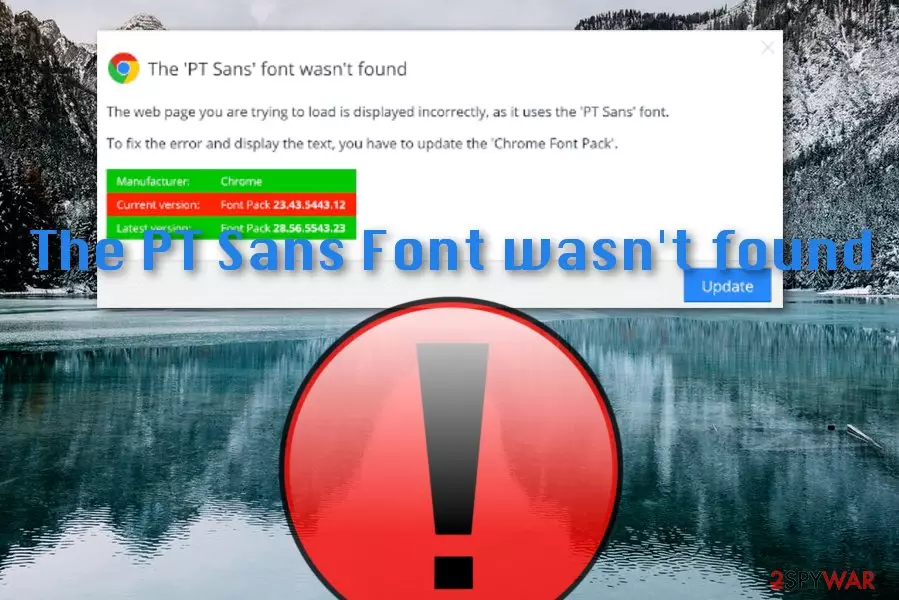
The PT Sans Font wasn't found is known to be a scamming message[1] that hides the notorious TrickBot Trojan horse in its content. The text might slightly differ sometimes depending on the type of web browser being used. However, The PT Sans Font wasn't found virus always claims the same thing: that you are missing the “PT Sans” word font and it needs to be installed, otherwise, entered pages will not show up. Additionally, the scam provides the downloading of this font which is fake and truly is replaced with the dangerous Trojan virus known as TrickBot.
| Name | The PT Sans Font wasn't found |
|---|---|
| Type | Scam |
| Aim | To install malware |
| Malware | TrickBot |
| Distributed | Suspicious networks |
| Cause | Can be delivered by adware and other PUPs |
| Elimination | Use FortectIntego for completing full malware scans |
The PT Sans Font wasn't found is a suspicious message that can approach any user and you are not an exception. You have a big possibility of meeting the scam in third-party networks. If it ever appears to you on such website, just close the window and never return. Besides, perform a malware scan with FortectIntego to find out if your system is still secure.
If you ever meet The PT Sans Font wasn't found scam on the Internet sphere, do not follow any commands it gives, otherwise, you will supposedly end up with TrickBot on your computer and need to face big problems. However, the appearance of this scam can also be a sign that there is a potentially unwanted program in your machine.
Sometimes, adware programs or browser hijackers provoke scams such as The PT Sans Font wasn't found to reach the surface on your computer system. If you think that this might be true, you can perform a full system check-up with the same software that we have offered earlier or choose another tool of your likings.

However, if TrickBot reaches your machine via The PT Sans Font wasn't found, you might end up with various damage and losses. First of all, this Trojan virus is known for its ability to steal personal information and banking details. If this information gets held by the crooks, you might have to face identity theft or big monetary losses from your bank account.
Nevertheless, TrickBot can steal browser cookies together with login details and account passwords. Afterward, the malware saves this data on remote servers. This way the crooks might be able to access your online accounts or even emails. We advise to remove The PT Sans Font wasn't found from your sight before a similar thing happens.
You should also scroll till the end of the article and you will find two methods for system boot options that would help you to disable the malware if some have got into your computer system thanks to the scam. Completing these steps should lengthen the entire The PT Sans Font wasn't found removal process for you.

Scams can show up from various sources. Know the most popular ones
According to technology experts from NoVirus.uk,[2] scams are frequently delivered via theses sources:
- Email spam.[3]
- Adware.
- Suspicious networks.
If you want to avoid scamming apps, you should keep a regular distance from secondary software downloading sources so that no adware reaches your system. Better use installation modes such as “Custom” and “Advanced” for proceeding with your downloads and managing all incoming objects.
Additionally, do not open any suspicious email messages or their attachments, make sure that you perform regular anti-malware scans to clipped documents/files first. Furthermore, you should have antivirus protection running on your computer all the time so you will be protected 24/7 while completing browsing/computing activities.
The removal process of The PT Sans Font wasn't found scam
If you have been looking for ways to get rid of The PT Sans Font wasn't found virus from your Windows computer, you have come to the right place. Here you can download software such as FortectIntego, SpyHunterCombo Cleaner, MalwarebytesMalwarebytes to lengthen the automatical elimination process and you can also find system boot options below.
Our advice would be to take serious concerns about The PT Sans Font wasn't found removal when this scam keeps bothering you often. If you have encountered this message more than once or twice, there might be a potentially unwanted program lurking in your computer system and forcing the notification to appear.
If this is the case, you should remove The PT Sans Font wasn't found together with the adware or whatever is in the way of successful PC optimization. NOTE: remember to be very careful while dealing with this scam, do not click on any downloading buttons as you will supposedly be infected with a trojan infection!
Did this guide help?
Be the first to comment