

DecryptIomega ransomware is a type of malware that targets Network Storage devices and removes files from them
DecryptIomega ransomware is a cryptovirus that was recently spotted in the wild. Unlike most of the file-encrypting viruses, this malware targets Network Storage devices exclusively, namely Lenovo Iomega models (hence the name) and it proliferates with the help of SambaCry vulnerability.
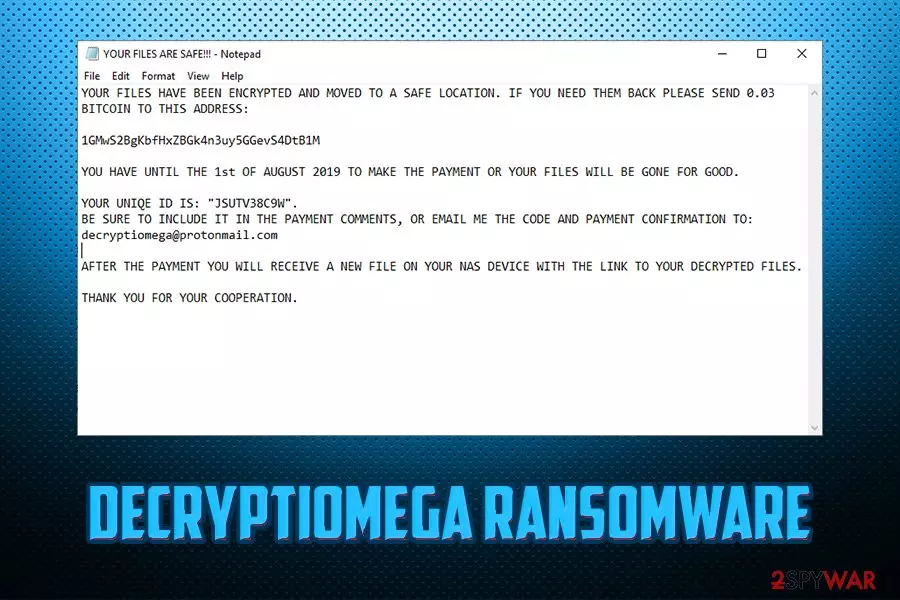
As soon as DecryptIomega virus infiltrates the device, it locks all the data inside and transfers it to a different server, and users will find it empty. Instead, they can view the ransom note YOUR FILES ARE SAFE!!!.txt. which essentially explains that the files are safe, but, in order to retrieve them, users need to pay 0.03 Bitcoin into a 1GMwS2BgKbfHxZBGk4n3uy5GGevS4DtB1M or another wallet. Additionally, threat actors also leave contact details – decryptiomega@protonmail.com or iomega@firemail.cc. Allegedly, the email is meant to be used for the negotiation.
However, contacting crooks is highly discouraged, as it might be that all the data gets deleted instead of transferred somewhere else. Therefore, rather remove DecryptIomega ransomware from your device so you can use it without problems once again.
| Name | DecryptIomega |
| Type | Ransomware, wiper |
| Targets | NAS (Network Attached Storage) devices |
| Ransom note | YOUR FILES ARE SAFE!!!.txt |
| Contact | decryptiomega@protonmail.com, iomega@firemail.cc |
| Ransom demand | 0.03 BTC |
| File extension | Does not append any, as all the data is deleted from the device |
| Termination | Terminate DecryptIomega with anti-malware software like SpyHunterCombo Cleaner |
| Recovery | Use FortectIntego |
| File decryption | Only possible via backups or by employing third-party software |
There are several ways that typical ransomware is distributed, including web injects, spam emails, infected installers, fake updates, and others, DecryptIomega uses CVE-2017-7494 vulnerability to infect the device. Nevertheless, some security experts speculate that the virus might also resort to braking in via the unprotected RDP configuration, or other methods.
SambaCry flaw, which is otherwise known as EternalRed, stems from the notorious Eternal Blue vulnerability, which helped WannaCry ransomware to infection millions of machines and stopped the operation of high-profile organizations and governmental institutions back in 2017.
While other crypto viruses append some type of extension to prevent users from accessing files on their machines, DecryptIomega simply deletes them. Or, as hackers claim, they are moved somewhere else, although there is no evidence for that. For that reason, this malware can be called a wiper – malicious software that permanently deletes data on the infected machines.
While no files are left, however, DecryptIomega-infected users can see the ransom note which states:
YOUR FILES HAVE BEEN ENCRYPTED AND MOVED TO A SAFE LOCATION. IF YOU NEED THEM BACK PLEASE SEND 0.03 BITCOIN TO THIS ADDRESS:
1GMwS2BgKbfHxZBGk4n3uy5GGevS4DtB1M
YOU HAVE UNTIL THE 1st OF AUGUST 2019 TO MAKE THE PAYMENT OR YOUR FILES WILL BE GONE FOR GOOD.
YOUR UNIQE ID IS: “JSUTV38C9W”.
BE SURE TO INCLUDE IT IN THE PAYMENT COMMENTS, OR EMAIL ME THE CODE AND PAYMENT CONFIRMATION TO: decryptiomega@protonmail.comAFTER THE PAYMENT YOU WILL RECEIVE A NEW FILE ON YOUR NAS DEVICE WITH THE LINK TO YOUR DECRYPTED FILES.
THANK YOU FOR YOUR COOPERATION.
In the later cases of DecryptIomega ransomware infections, hackers also provide a date before the files would be allegedly deleted permanetely. Nevertheless, experts believe that it is a simple way of cybercriminals to make users pay the ransom.

Therefore, rather proceed with DecryptIomega ransomware removal if your NAS device was infected. Be aware that until you terminate the virus, all the data you upload will be deleted automatically. Therefore, you need to use anti-malware software that would be able to detect and remove the infection properly. Addtionally, we recommend scanning the device with FortectIntego for best results.
Make sure you update your NAS devices with latest software and firmware updates
While many users mainly focus on their computers when it comes to the cybersecurity, they often forget that many other devices, such as IoT, NAS, or even their mobile phones are also connected to the internet. That means that it is just another source for cybercriminals to infect, and users often forget that.
Thus, it is vital to protect all your other devices that are connected to the network or internet. Hackers continually improve the methods of delivery, and they will not stop any time soon.
To protect yourself from NAS-based ransomware and other infections, it is vital to secure it with security software that employs real-time protection feature. Additionally, it is just as important updating the installed software on a regular basis, so that vulnerabilities cannot be abused to sneak in the infection.
Remove DecryptIomega ransomware from your Lenovo device
Looking at the most recent infections of DecryptIomega virus, it seems like most likely targeted devices are ones of Lenovo – Chinese manufacturer of various hardware. Nevertheless, security experts speculate that the malware might be able to infect other types as well, so being careful is essential.

Regardless, if your documents and other data was wiped from your NAS, you should immediately remove DecryptIomega ransomware for it, as implementing new files will only result in their termination. For that, you will have to install a reputable anti-malware software and run a full system scan.
Once you complete DecryptIomega ransomware removal, you can then recover your data from backups or try third-party software. If you had no backups, check out the alternative solution guide below.
Did this guide help?
Be the first to comment