

Browser Broker is a process use by the official Microsoft Edge browser which might be abused by cybercriminals
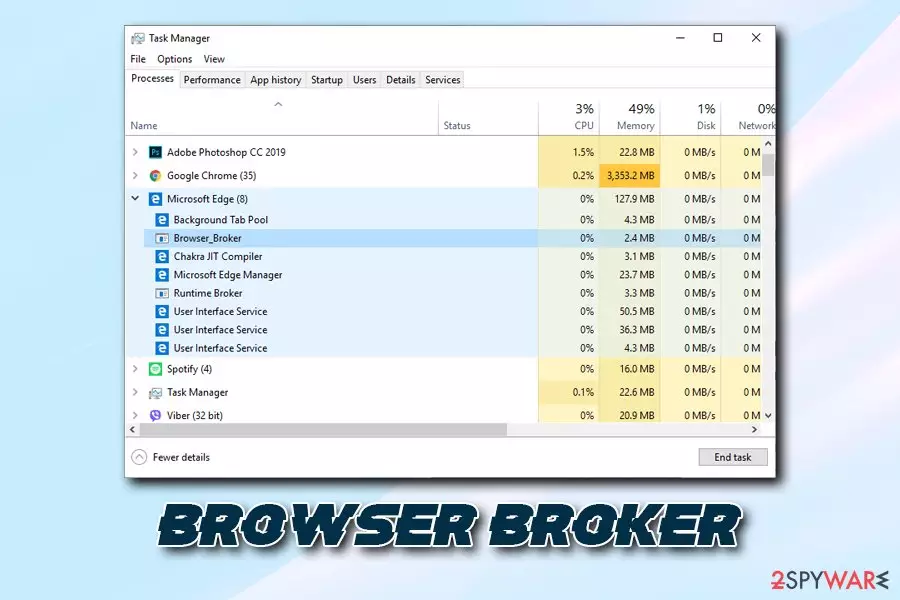
Browser Broker is an essential part of the Microsoft Edge browser and runs in the background under the Browser_Broker.exe process. Initially, it is a mandatory component of the browser located in C:\Windows\System32 folder, so MS Edge would not even run without it. If you have no problems with the file, and it is simply running in your Task Manager, it should not be terminated or touched in any other way.
However, users do need to remove Browser Broker in case the executable is infected or replaced by a virus – especially if Microsoft Edge is not used. Nevertheless, users might also experience other difficulties with the process, such as multiple instances running, or slowly operating browser. If that is the case, please check the bottom section of the article.
| Name | Browser Broker |
| Type | Malware (if does not belong to MS Edge browser) |
| Executable | Browser_Broker.exe |
| Symptoms | Rarely any, although users might notice increased CPU usage, crashing programs, increased amount of ads, etc. |
| Risks | Further malware infections, money loss, identity theft, etc. |
| Termination | Scan your computer with anti-malware software |
| Recovery | To fix virus damage, use FortectIntego |
Because the Browser Broker is an executable, it can be affected by malware and viruses. Quite often, hackers simply name the malicious software by well-known processes that are used by Windows operating systems, including explorer.exe and Conhost.exe.
There are several malware families that could be affecting legitimate executables, for example:
- trojans;
- data stealing malware;
- keyloggers;
- cryptocurrency miners;
- rootkits;[1]
- worms;
- adware.
As evident, infections like trojans and data-steals can ultimately compromise your computer, infect it with other malware, or steal your sensitive information. Keyloggers might be recording all information that you type on your keyboard, including your banking credentials, social media login details, etc. In such a case, Browser Broker malware could result in money loss, identity theft, and further computer compromise.
If you noticed that your computer fans are continually spinning at full capacity, even if you do not perform any resource-demanding tasks, it is highly likely that Browser Broker was hijacked by a cryptocurrency miner. These parasites sneak in unnoticed and abuse computer's CPU and/or GPU in order to illegally mince digital money for cybercriminals. If you let the malicious program to stay on the system too long, it might result in hardware wear and tear and increased electricity bills.
Sadly but rootkits and worms rarely expose any symptoms, so the only way of finding out whether Browser Broker virus is related to that malware is by scanning your computer with reputable anti-malware software, such as FortectIntego or SpyHunterCombo Cleaner. Anti-malware would be able to terminate the malicious software and all its traces automatically.

Finally, you will notice an increased amount of browser redirects and pop-up ads on all websites that you visit if your machine is affected by adware. In such a case, you need to terminate the unwanted app that is installed on your device.
Despite all this, you should not proceed with Browser Broker removal if it a legitimate part of MS Edge, as it will not function properly.
Ways to avoid dangerous malware online
While the internet is a much safer place thanks to ever-evolving security implementations of the malware research community as well as various improvements within browsers like Google Chrome, Opera, Safari, MS Edge, and others. Nevertheless, it does not mean that the internet is completely safe, and, in some cases, getting your PC infected does not even require you to download anything.
There are several other infection methods hackers can use to infect your machine with malware – such as exploit kits,[2] brute force attacks, web injects, etc. All these methods do not require user interaction. Nevertheless, stopping these attacks is also possible – you need to make sure that all your installed software is updated and you are always using strong passwords, along with two-factor authentication method where possible.
Besides that, experts[3] advise:
- Install anti-malware software with real-time protection feature and keep it updated;
- Avoid visiting torrent, and other P2P sharing sites;
- Do not download pirated software or cracks/keygens;
- Enable Firewall;
- Do not open spam email attachments or click on links inside;
- Be aware of social media links – especially if they come from unknown individuals;
- Beware or email and website spoofing – hackers create exact copies of websites you visit every day.
Remove Browser Broker if it is related to malware
Browser Broker removal should only be performed if you are sure that it is a component of malware. While it is certainly possible to eliminate the malicious payload and revert all the damage done by the virus manually, it is not recommended for regular users.
Instead, you should scan your device with anti-virus software and remove Browser Broker virus automatically. This will ensure that all the changes made by malware are reverted, and no traces remain. In case the parasite is interfering with the operation of your security tool, access Safe Mode with Networking as explained below.
However, if Browser Broker is not infected but you are having problems with the process (for example, too many instances running in the background), you should simply reset MS Edge and see if it helps:
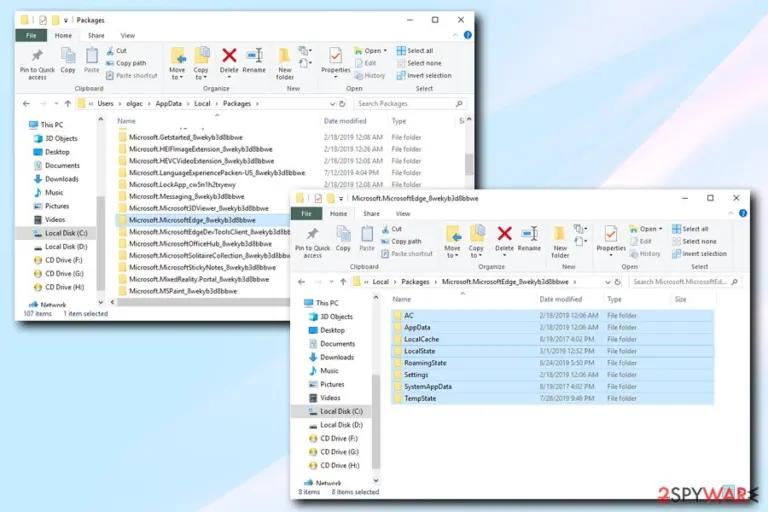
- Go to the following folder:
C:\Users\username\AppData\Local\Packages\Microsoft.MicrosoftEdge_8wekyb3d8bbwe
- Delete everything located there (make sure your browser is closed at the time)
- Now type cmd into Cortana's search box
- Right-click on Command Prompt search result, and select Run as administrator
- In the new window, type in the following command and press Enter:
Get-AppXPackage -AllUsers -Name Microsoft.MicrosoftEdge | Foreach {Add-AppxPackage -DisableDevelopmentMode -Register “$($_.InstallLocation)\AppXManifest.xml” –Verbose}

Did this guide help?
Be the first to comment