

Auto PC Care – a fake cleaning utility that claims to be the world's number one optimization software

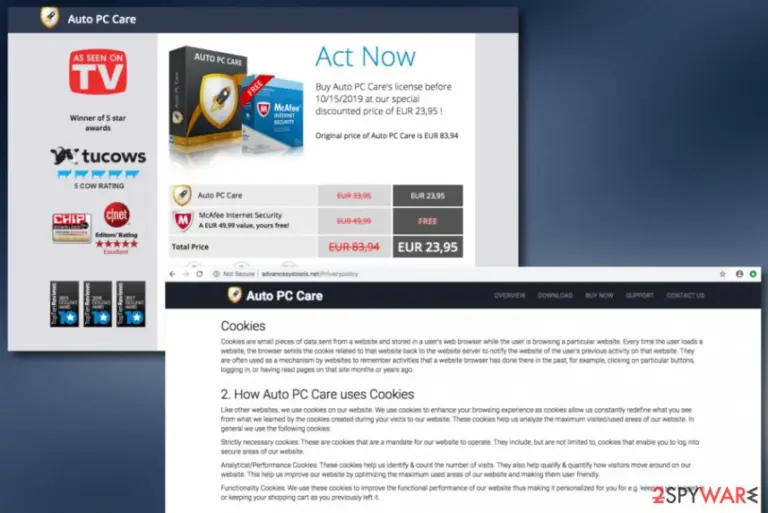
Auto PC Care, developed by PCVARK, is another rogue system product[1] that provides itself as an ultimate optimization program. Visiting its promotion source on advancesystools.net might give you quite an attractive look of the tool whenever it is just a part of marketing. Developers who are responsible for the release of Auto PC Care offer to try the free version of the tool and purchase the license key for $23.95 later after the system scan. Checkup results will supposedly provide you with a big number of non-existing threats as a way to encourage you to purchase the bogus software.
| Name | Auto PC Care |
|---|---|
| Type | System tool |
| Developer | PCVARK |
| Price | Developers offer to buy the license key of this bogus tool for $23.95. However, once you enter the “Buy Now” section, you will be provided with a “special offer” to purchase the product with a 50% discount |
| Goal | To generate income from gullible users. The fake app imitates a system scan, provides misleading system results, and offers to “repair” the system by buying the license key |
| Distribution | Even though Auto PC Care virus has its own promotion source, it is more common to receive the suspicious product after downloading a freeware or shareware package |
| Elimination | Use FortectIntego software to detect the potentially unwanted program. Afterward, eliminate it and all additional objects by automatical or manual technique |
Auto PC Care virus ads the 30-day money-back guarantee thing and even offers to include free McAfee Internet Security if downloading its advanced package for attracting a bigger number of people. Besides, if you enter the official website and click on the “Buy Now” sector, you will be even provided with a special “Just for Today” offer that suggests to purchase the license key with a 50% discount and includes a 60-day money-back guarantee this time.
A piece of advice would be to stay away from any deals that come from Auto PC Care developer as these people just seak to swindle as much of your money as possible. The suspicious product is promoted as multifunction software that allows quick cleaning of the registry, improving system boot processes, removing suspicious objects and files, etc. Besides, developers try to build up trust by faking other users' positive reviews on their product.
Auto PC Care is not the software to trust and you can find that out yourself by scanning your Windows computer system with reliable antivirus software. Once you receive the check-up results, you should not see anything similar to the fake alerts and viruses that were provided during the activity period of the rogue security software. This way you will deny the developers' claims that their software is top 1 in security and there is no such usage as described in here:
Trusted by millions of users. Auto PC Care is the world’s most liked and preferred PC protection utility! The most efficient and simple-to-use tool for the users to quickly optimize and get a clean and faster PC.
Continuously, Auto PC Care brings the aupcsetup.exe file into the system so that the program could be automatically launched. Many AV engines detect this security software and its related files as potentially suspicious or even dangerous:[2]
- PUP.Optional.PCVARK (Malwarebytes).
- PUA:Win32/SpeedChecker (Microsoft).
- Win32:DUOffer-A [Dcp] (AVG/Avast).
- Hoax.Win32.DeceptPCClean.czp (Kaspersky).
Auto PC Care might even come in a bundle with other potentially unwanted programs such as adware applications, browser hijackers. This way you will have to deal with even more unwanted activities at a time. The only way to avoid additional installation of unpleasant software is to get rid of the rogue security software. Scan the system with FortectIntego, find where the bogus system tool is hiding and remove Auto PC Care automatically or manually.

Another reason for Auto PC Care removal is the app's ability to inject cookies in your web browser when you are visiting the advancesystools.net website. Even though third-party developers claim to use tracking objects only to increase the qualities of their services, this is not true. Browser cookies are planted to spy on the user's sessions, habits, experience, and bombard the user with ads. These components are able to enhance the user's browsing experience:
Like other websites, we use cookies on our website. We use cookies to enhance your browsing experience as cookies allow us constantly redefine what you see from what we learned by the cookies created during your visits to our website. These cookies help us analyze the maximum visited/used areas of our website.
All in all, Auto PC Care is not trustable software and this product should not be found on your computer system if your goal is to ensure ultimate security. If the program claims that it is related to Microsoft or supported by this company, do not fall for believing in this as original tools always fulfill their functionality, are provided on official networks, by well-known developers, appear on the system only with the user's consent what you cannot say about Auto PC Care.

Distribution methods of rogue security software
Every developer tries to create his software as much attractive looking as possible. However, for some, promoting their products on official sources is not enough and that is why third-parties start using the software bundling technique when suspicious software ends up on the computer through other downloads indirectly.
If you are a frequent visitor of CNET.com, Softonic, or other secondary downloading websites, you might end up with such a tool at the end. For this not to happen, you should download software only from reliable sources and also use only the Custom/Advanced installation mode which allows taking care of all incoming objects.
Continuously, you should take care of your Windows computer system automatically too. Search the Internet sphere for reliable antimalware software reviews and download antivirus protection if you do not have one yet. In addition, ensure that the software is regularly updated, otherwise, it might not function as supposed to.
Remove Auto PC Care from your Windows computer
You should remove Auto PC Care from your Windows computer system if this tool has appeared under your consent. Taking your disk's space with this type of software is not a good idea so rather than keeping this questionable product, eliminate it from your computer and replace it with a truly reliable program.
Below you will find guidelines on how to perform both manual and automatical Auto PC Care removal. We always recommend choosing the previous option as it is less effort-requiring and does not urge the user to have good skills in virus elimination. You can select a tool from our provided list of any other product regarding your own likings.
According to NoVirus experts,[3] programs such as Auto PC Care might inject additional objects all over the system and they also need to be terminated together with the app, otherwise, the product might still boot itself in the future.
Uninstall from Windows
Uninstall from Windows 10/8:
- Type Control Panel into the Windows search box and open the result.
- Under Programs, select Uninstall a program.


Uninstall from Windows 7/XP:
- Click on Windows Start > Control Panel (Windows XP users should click on Add/Remove Programs).
- In Control Panel, select Programs > Uninstall a program.


Remove the unwanted program:
- In the Programs and Features window, look for any recently installed suspicious entries, select them, and click Uninstall.
- If User Account Control appears, click Yes to confirm, then complete the removal.


Did this guide help?
Be the first to comment