

MedusaLocker ransomware is the malware that encodes valuable personal files and blackmails victims into paying the ransom
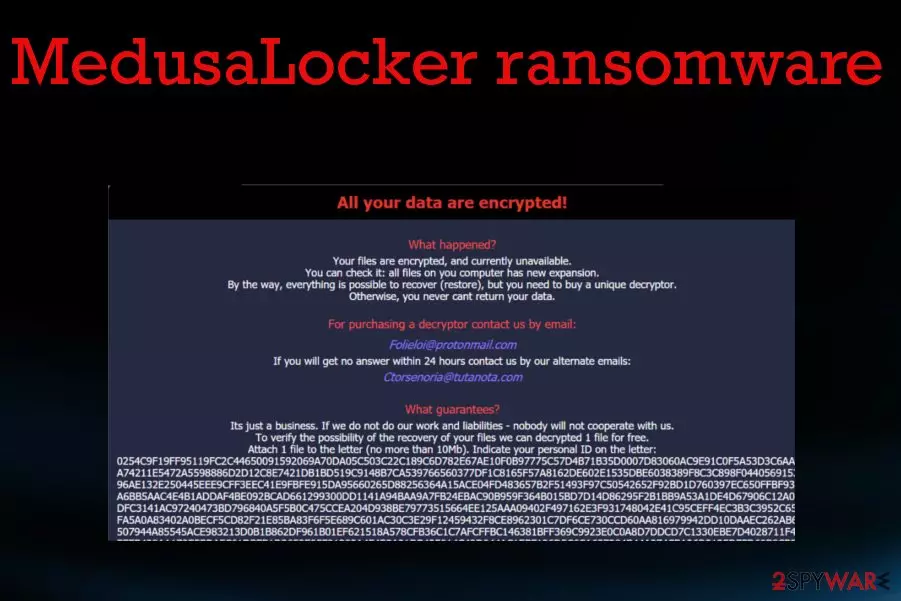
MedusaLocker ransomware is the cryptovirus that emerged at the end of September 2019 and is designed to encrypt data and mark each file with a generic .encrypted file extension. However, this malware form might also user other appendixes such as:
- .bomber,
- .locker16,
- .newlock,
- .boroff,
- .breakingbad,
- .nlocker,
- .skynet.
Once ransomware locks up files by using the combination of RSA 2048 and AES algorithms, the cyber threat waits for 1 minute and then repeats the encryption process in case some data has been left untouched. Once this primary process is done, a money-demanding message appears on the screen via the HOW_TO_RECOVER_DATA.html or Readme.html file.
The browser window shows a brief message about a ransomware attack and informs that people should buy a decryptor to get their files restored. Unfortunately, such offers are not serving in the favor of victims because since criminals are focused on getting money, they don't care about your belongings or lost files and money.
In most cases, the decryption tool is not sent for the person that paid the ransom, so files remain corrupted, and money is lost.[1] Even the decryption test is offered to fake the feeling of trust between criminals and victims.
| Name | MedusaLocker ransomware |
|---|---|
| Type | Cryptovirus |
| release date | Security experts have discovered this malware at the end of September this year |
| Ransom note | Once data is locked, the cybercriminals provide information on the encryption process and talk about ransom demands via HOW_TO_RECOVER_DATA.html |
| Symptoms | After the infiltration, the malware makes files useless by encrypting them. The ransom demand appears immediately after that, and criminals ask for a payment that should help them to get files back. Additional processes and installed files, disabled programs affect the performance of an infected machine |
| Contact emails | folieloi@protonmail.com, ctorsenoria@tutanota.com |
| File marker | .encrypted is the file extension that shows up at the end of every file encrypted by the intruder. Photos, documents, audio or video files become unopenable and useless after such encoding. Some variants can come with .skynet, .bomber, .locker16, .newlock, .boroff, .breakingbad, .nlocker apendixes |
| Distribution | Infected files delivered on the system via spam email attachments or torrent files packaged with software or video game cracks.[2] Also, malicious sites with malware code droppers can lead to such infiltrations and trojans, worms, threats designed to spread crypto-malware around. Nevertheless, hacked RDPs that include vulnerable security do great for malware infiltration |
| related files | svchostt.exe |
| additional capabilities | The malware fills the Windows Registry with entries and drops files on the computer system that allow the ransomware to boot up automatically, avoid antimalware detection, etc. The virus also deletes the backups that were created with Windows Backup services, eliminates Shadow Volume Copies, etc. |
| Elimination | Anti-malware tools can help to eliminate the ransomware. FortectIntego should also give the advantage in such a process and virus damage elimination |
We should also note that contacting MedusaLocker ransomware virus developers is a bad idea. The window with information, test decryption offer, and alleged guarantees criminals also include contact emails Folieloi@protonmail.com,
Ctorsenoria@tutanota.com. Sometimes the email addresses might also be sambolero@tutanoa.com and rightcheck@cock.li. Contacting criminals can lead to permanent data and money loss, so you should restrain from that option and get rid of the virus instead.
Various antivirus engines have scanned the svchostt.exe file that is brought by ransomware into the system and 52 out of 70 AV products found this component malicious. These are some of the generated detection names:[3]
- Win32:Malware-gen (Avast and AVG);
- Trojan.FileCoder (A) (Emsisoft);
- Trojan.GenericKD.41882000 (BitDefender);
- Ransom.Medusa (Malwarebytes);
- Trojan.DownLoader30.26418 (DrWeb);
- Ransom.Win32.MEDUSA.THJAFAI (Trend Micro).
This virus operates in the background, and until your files get encrypted and marked using a unique file extension, you cannot notice the attack. Unfortunately, encryption is the first thing ransomware starts with.

In most cases, your files get immediately affected once the threat checks the system for other malware and indications that should note not to encrypt data further. Other file-locking based threats avoid encrypting files in particular devices that are located in countries with particular laws.
You should note that ransomware delivers the ransom note after the locking, but this is not the end of a ransomware attack. Once the message is delivered in the HOW_TO_RECOVER_DATA.html browser window, other processes running the background of the machine. The note looks like this:
All your data are encrypted!
What happened?
Your files are encrypted, and currently unavailable.
You can check it: all files on you computer has new expansion.
By the way, everything is possible to recover (restore), but you need to buy a unique decryptor.
Otherwise, you never cant return your data.For purchasing a decryptor contact us by email:
Folieloi@protonmail.com
If you will get no answer within 24 hours contact us by our alternate emails:
Ctorsenoria@tutanota.comsambolero@tutanoa.com
suppdecrypt@protonmail.com
What guarantees?
Its just a business. If we do not do our work and liabilities – nobody will not cooperate with us.
To verify the possibility of the recovery of your files we can decrypted 1 file for free.
Attach 1 file to the letter (no more than 10Mb). Indicate your personal ID on the letter:
–
Attention!
– Attempts of change files by yourself will result in a loose of data.
– Our e-mail can be blocked over time. Write now, loss of contact with us will result in a loose of data.
– Use any third party software for restoring your data or antivirus solutions will result in a loose of data.
– Decryptors of other users are unique and will not fit your files and use of those will result in a loose of data.
– If you will not cooperate with our service – for us, its does not matter. But you will lose your time and data, cause just we have the private key.
While you decide to pay the ransom and recover your files or remove MedusaLocker ransomware, malware places files in system folders, disables functions, security tools, installs programs, and even additional malware to keep various processes affecting the already-infected device.
Ransomware can interfere with anti-malware tools, the performance of your security services, applications and delete particular files needed for the removal or data recovery. For example, when Shadow Volume Copies get deleted, you have fewer chances to recover encoded files by yourself.
The first thing you can try to do is find a decryption tool for your files. There are many researchers and experts[4] that focus on analysis and decryption tool development. So you should retain the locked data in case a working tool will be developed in the future.

Then you can go further with MedusaLocker ransomware removal and store malware files for the later use when the software is released for the consumers. Official decryption tools are the ones that can help with your files besides all the manual methods and third-party software.
As for the virus elimination, you need an anti-malware tool that could terminate ransomware, associated programs, fix the damage and delete traces completely off of the PC. Antivirus like FortectIntego cannot decrypt files or recover them tough. However, such software might help you to get rid of damage from your Windows machine.
A deeper look into MedusaLocker ransomware operation module
This particular ransomware is a much more complicated malware than it might seem from the first view. According to a deeper investigation, this file-encrypting virus carries a complex module and is capable of launching various commands that make the ransomware even more successful.
Once the virus enters the system, it drops the EnableLinkedConnections component under this registry entry and sets it as the top one:
HKEY_LOCAL_MACHINE\SOFTWARE\Microsoft\Windows\CurrentVersion\Policies\System
This allows hackers to launch mapped devices even in the UAC mode. To ensure that these devices are available and that Windows networking is operating perfectly, the malware reboots the service named LanmanWorkstation. Malware also places its own entry named HKCU\SOFTWARE\Medusa in the Windows Registry.[5]
Afterward, the dangerous threat will be searching for security-related files that are deleted allow the ransomware to prevent antimalware detection and successfully perform data encryption. Furthermore, ransomware eliminates Shadow Volume Copies of the locked data, deletes all file backups that were performed using Windows backup, and deactivates the Windows automatic startup repair to prevent users from recovering data by themselves.

For reinfection purposes, ransomware takes a copy of itself and places it in the %UserProfile%\AppData\Roaming\svchostt.exe directory so that the malicious payload can be booted up within every half an hour without any hacker interaction needed.
What is interesting about the encryption process is that it skips files that include the .dll, .sys, .exe, .ini, .lnk, .rdp, .encrypted extensions or any other appendixes that are used for locking up data. Also, the cyber threat does not touch files and documents in the following locations:
- \Windows;
- \Users\All Users;
- \Application Data;
- \nvidia;
- \intel;
- \AppData;
- ProgamData;
- WINDIR;
- PROGRAMFILES (X86);
- USERPROFILE.
Malicious code gets hid in various types of files and delivered online
Payload droppers that spread trojans, malware, ransomware and other types of threats can come from safe-looking files and services, so you need to pay close attention to everything that happens on the machine. Spam email campaigns with file attachments, torrent files, malware, malicious pages – all can include malicious code that spreads in a matter of minutes on the targeted device.
You should remember that malicious macros get loaded on MS documents attached to emails with fake financial information-related subject lines. Additionally, cybercrooks pretend to be from respectable shipping companies such as FedEx DHL and provide fake shippment information. Also, direct ransomware payload gets loaded on the machine once the cracked software package is installed from pirated sites or torrent networks.
Nevertheless, ransomware infections can be distributed to multiple computer systems by using vulnerable RDPs[6] that are protected with a weak password or hold no password at all. Hackers misuse ports such as the TCP port 3389 and force the password to get into the targeted Windows computer system remotely.
You should keep the anti-malware tool on the system, run it from time to time and keep the machine virus-free. These tools can scan email attachments before you open and download them on the PC. Restraining from malicious services like torrents can also avoid cyber threats in the future.
Remove the malicious MedusaLocker ransomware payload and related files or programs with anti-malware tools
You should remember that the virus alters many places on the system and can significantly interfere with the process of malware removal. For that, we recommend rebooting the machine in a Safe Mode that allows running AV tools smoothly.
By doing so, you can remove ransomware with a program like SpyHunterCombo Cleaner, or MalwarebytesMalwarebytes automatically. These programs are designed to access multiple places of the computer where malware hides its script and other programs. Anti-malware tools can also eliminate virus damage.
Although this automatic MedusaLocker ransomware removal is not the same as the data recovery, you can restore your files safely after this. Proper security tools clean the machine and your data can be recovered by using the third-party software, backups or one of the methods below.
Did this guide help?
Be the first to comment