

Nyton ransomware – a dangerous computer parasite that relies on AES encryption for locking data
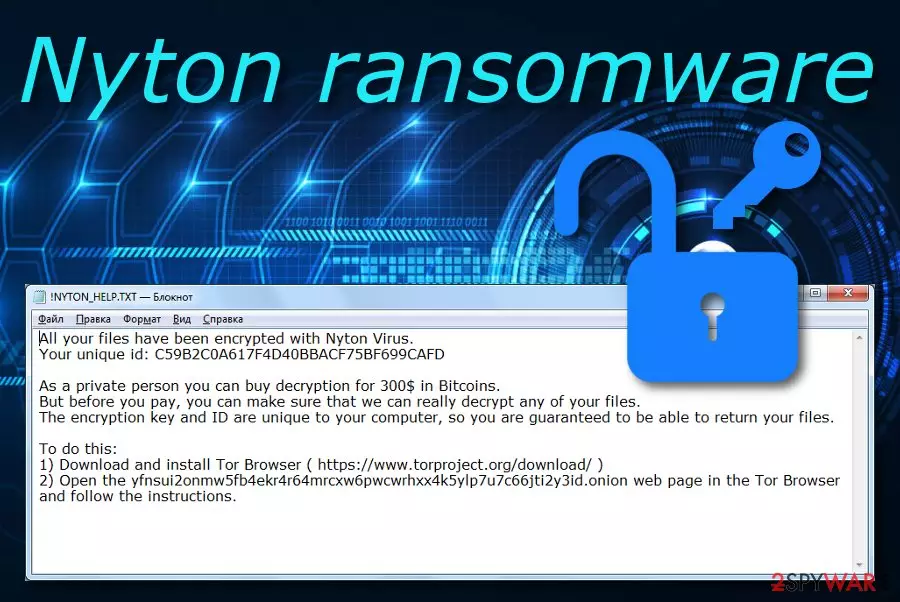
Nyton ransomware is a notorious infection that requires downloading a Tor browser for accessing the decryption tool. This malware uses AES encryption[1] and targets all types of files on the infected Windows computer system. After that, all the data files end up with the .nyton appendix added to their filenames and Nyton virus displays the :! NYTON_HELP.TXT ransom message that holds a ransom demand of $300 in BTC currency and is written in the English language so we can make a speculation that this parasite is targeting English and English-speaking people. It is up to you to fulfill the ransom demands or not but we recommend being careful as there is a big risk of getting scammed by these malicious actors.
| Name | Nyton |
|---|---|
| Type | Ransomware virus/file-locking threat |
| Cipher | This malicious infection uses AES encryption for locking data found on the computer |
| Appendix | Once files are locked, the . nyton extension is added to each filename |
| Target | Regarding the language in which the ransom note has been written, this malware targets English speakers |
| Note | :! NYTON_HELP.TXT is the message that brings information about ransom demands to the surface |
| Price | Crooks demand $300 to be paid in BTC in exchange for the decryption tool |
| Removal | Use automatical software only. We do not recommend risking to make mistakes while completing the manual elimination process |
| Repair | Use system software such as FortectIntego to repair affected components as it might help |
Nyton ransomware is a destructible infection that can appear on any type of Windows computer. When this happens, you will supposedly discover some alterings in the Windows Registry[2] and Task Manager sections. The malware might aim to run different modules allowing it to boot up automatically every time you turn on your machine.
Also, Nyton ransomware might execute specific PowerShell commands to eliminate Shadow Volume Copies of your encrypted data, try avoiding antivirus detection by injecting specific entries or damage the Windows hosts file to prevent you from visiting security-related websites and receiving valuable information on Nyton ransomware removal.
Once Nyton ransomware performs these activities and succeeds in data encryption, the malware loads the :!NYTON_HELP.TXT ransom message where the crooks place the ransom demand that is 300$ in BTC:
All your files have been encrypted with Nyton Virus.
Your unique id: C59B2C0A617F4D40BBACF75BF699CAFD
As a private person you can buy decryption for 300$ in Bitcoins.
But before you pay, you can make sure that we can really decrypt any of your files.
The encryption key and ID are unique to your computer, so you are guaranteed to be able to return your files.
To do this:
1) Download and install Tor Browser ( https://www.torproject.org/download/ )
2) Open the yfnsui2onmw5fb4ekr4r64mrcxw6pwcwrhxx4k5ylp7u7c66jti2y3id.onion web page in the Tor Browser and follow the instructions.
Be careful while dealing with Nyton ransomware and do not take ransom demands seriously as you might get scammed easily. Rather than risking to empty your bank account for nothing, eliminate the infections and go to the end of this article where you will find data recovery possibilities.

You should remove Nyton ransomware with the help of antimalware software as manual elimination will supposedly not bring you fully-satisfying results. Additionally, if the ransomware virus has left some damaged components, you can try repairing them with a system repair tool such as FortectIntego.
Keep in mind that Nyton ransomware might bring other malicious products to the system and inject other malware such as Trojan horses or cryptocurrency miners and double the trouble. Mostly, malware does not come alone so there is a big chance that this type of damage might show up shortly after the installation process of the ransomware.
Things to know about ransomware distribution and avoiding
Ransomware infections can get delivered to vulnerable computer systems easily. Hackers are most likely to search for machines who have weak automatical protection and drop the malicious payload to users who are expected to be naive while browsing online or opening email messages.
The most popular ransomware distribution sources are email spam messages, infectious attachments, cracked software, malicious updates, and vulnerable Remote Desktop Protocol protection. While opening emails, you should ensure that the letter comes from a noticeable sender and does not include grammar mistakes.
Also, if the email message comes with a clipped attachment that you were not expecting to receive, you should always run a malware scam over the attached content. The same you should do with any other suspicious file that tends to land on your computer system somehow.
Continuously, be aware of p2p websites such as The Pirate Bay and eMule as these sources hold a lot of software cracks that might be true malware. Download all of your preferred products and services only from original developers. Last but not least, make sure that your RDP is secured with a strong password so that no bad actor decides to misuse it remotely.

Talking about proper file protection
When it comes to protection from ransomware, we should think not only about the computer system but also about valuable data that we hold and might get encrypted during the malware attack. We do not recommend keeping all valuable information only on one type of device or computer as there is an increased risk of losing the data from there. Some suggestions would be:
- Purchasing portable drives. This might include CDs, DVDs, and USBs. USB flash drives are more comfortable to plug-in and contain much more space than other types of devices. You can have as many of these devices as you want and copy your important data there. However, make sure to keep the drives unplugged when you are not using them in order to avoid possible encryption if any malicious infection tends to sneak in.
- Storing valuable data on remote servers. One of the most popular servers used worldwide are iCloud and Dropbox. iCloud is suited for macOS and other Apple device users and Dropbox is a remote server for Windows OS users.
- Keeping data on multiple computers. This is the least secure option but still better than storing all important documents and files only in one location. However, this type of method might not be that secured as if a malware attack occurs throughout your Internet connection, all the machines that are running the same Internet might get infected equally.
Nyton ransomware elimination guidelines
Nyton ransomware removal can be completed with the help of a reliable antivirus program and should not be tried to eliminate manually. However, you should dimish all malicious processes and return your computer system back to its previous state first. Find how to do that by following the instructing steps that are provided below.
Then, you should remove Nyton ransomware and all malicious content that it might have brought to your Windows computer system. If you are looking for software that can help you to detect all malware-laden objects, you can try employing SpyHunterCombo Cleaner or MalwarebytesMalwarebytes software. Afterward, use FortectIntego for system repair as it might be helpful in some cases.
Experts from LesVirus.fr[3] state that it is better to try any other available options for file recovery than paying the demanded price for receiving the decryption software. Criminals are often likely to scam their victims and just leave them with nothing.
Did this guide help?
Be the first to comment