

Quimera ransomware – a notorious malware form that does not mark the encrypted files
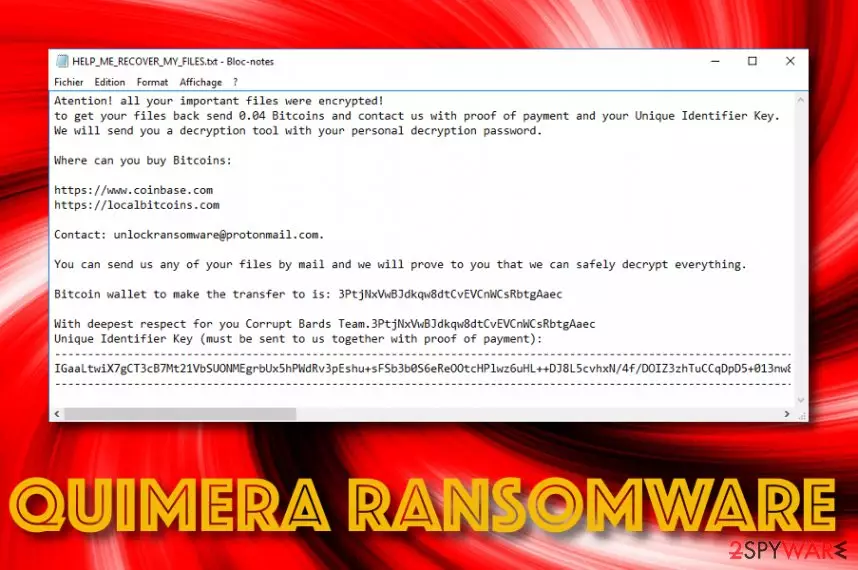
Quimera ransomware is recently discovered malware[1] that locks files with a unique cipher but does not append an extension to the filenames. First spotted by S!Ri, this ransomware initiates the encryption process by running specific tasks via the Task Manager and targets all types of files and documents that are located on the infected Windows machine. Afterward, Quimera ransomware displays a ransom note named HELP_ME_RECOVER_MY_FILES.txt that urges for a 0.04 Bitcoin payment (around $300) in exchange for the decryption software. The crooks provide hyperlinks where the victims can buy Bitcoin cryptocurrency and also include their unlockransomware@protonmail.com email address. These people offer users to deliver them any type of file for free decryption and they will prove that the decryption tool works.
| Name | Quimera ransomware |
|---|---|
| Type | Ransomware virus/malware |
| Founder | This malicious infection has been first discovered by a cybersecurity researcher named S!Ri |
| Encryption | The ransomware virus locks up various files and documents that are found on the infected Windows computer by using a unique encryption cipher. However, the malware, unlikely from others, does not add any type of appendix to the names of encrypted files |
| Ransom note | All of the ransom demands and contact information is provided in the HELP_ME_RECOVER_MY_FILES.txt ransom message |
| Price | The criminals demand a payment of 0.04 Bitcoin that is approximately $300 |
| Email address | The malicious actors provide the unlockransomware@protonmail.com email address as a way to contact them. The victims are offered to send one file for free decryption and also deliver the evidence of the payment later on |
| Spreading | Phishing email messages and their malicious attachments are the most popular ransomware distribution source. However, this malware can also get delivered through software cracks, unsecured RDP configuration, etc. |
| Removal | Get rid of the ransomware as soon as you spot the first symptoms. For this purpose, use reliable antimalware software only |
| Fixing tool | If you have discovered any type of system compromisation on your Windows machine, you can try using a repair tool such as FortectIntego |
Quimera ransomware includes malicious modules into the Windows Task Manager and injects entries into the Windows Registry. This way the malware can enable some features such as automatic boot up every time the computer is turned on. Regarding this task, the cybercriminals will be sure that their ransomware is active all the time when the PC is alive.
Continuously, Quimera virus might try to evade antimalware detection. As a result, some software might not be able to detect this ransomware, unless the victim reboots his/her Windows computer in Safe Mode with Networking or System Restore. If you are also struggling with this, travel to the end of this article and you will find some instructing steps.

However, according to VirusTotal information,[2] 44 AV engines out of the total 69 detect Quimera ransomware as a malicious threat. Some of the detection names include Win32:MalwareX-gen [Trj], Malware@#1ndvs5ku238ur, Gen:Variant.Ulise.94720 (B), Ransom.Quimera, Gen:NN.ZexaF.33564.EuW@aO93MKgi, Artemis!757FE364CEF1.
Quimera ransomware might also run specific PowerShell commands that allow deleting the Shadow Volume Copies of all encrypted files. By performing this type of process, the cybercriminals seek to harden the decryption process for the victims who might try recovering some of their documents by using alternative software.
Quimera ransomware developers store both encryption and decryption keys on remote servers so that the codes would be reachable for the cybercriminals only. However, this is not a reason to purchase the decryption tool from the crooks. Even though it might be hard to recover data on your own, paying the crooks might end up in getting scammed.
Additionally, Quimera ransomware might not be the only malware that lands on your computer system. This cyber threat might be packed with other dangerous viruses such as trojans that aim to steal personal information, swindle money from the user's bank account, destroy particular programs, eat up the CPU power, and slow down the entire computer system.

Regarding all the damage that might be brought by the ransomware and its activities, you should remove Quimera ransomware from your Windows computer system with the help of automatical software. Also, if some damage already has occurred on your machine, you can try repairing things with the help of a tool such as FortectIntego.
After Quimera ransomware removal, you can try restoring some of your files by using third-party data recovery software that has been added to the end of this article. Again, do not get convinced by the ransom note to pay the ransom price as you might easily get scammed by the cybercriminals. Here is how the entire text message looks like:
Atention! all your important files were encrypted!
to get your files back send 0.04 Bitcoins and contact us with proof of payment and your Unique Identifier Key.
We will send you a decryption tool with your personal decryption password.Where can you buy Bitcoins:
hxxps://www.coinbase.com
hxxps://localbitcoins.comContact: unlockransomware@protonmail.com.
You can send us any of your files by mail and we will prove to you that we can safely decrypt everything.
Bitcoin wallet to make the transfer to is: 3PtjNxVwBJdkqw8dtCvEVCnWCsRbtgAaec
With deepest respect for you Corrupt Bards Team.3PtjNxVwBJdkqw8dtCvEVCnWCsRbtgAaec
Unique Identifier Key (must be sent to us together with proof of payment): –
Phishing techniques are used for ransomware distribution
Technology specialists from NoVirus.uk[3] claim that ransomware infections are commonly spread via phishing emails and their malicious attachments such as pdf documents, executables, word files, etc. The crooks often pretend to be from reputable shipping, banking, or healthcare companies and deliver the infection inserted in a hyperlink in the message or in the attachment that comes clipped to the email.
If you are thinking about how to avoid infectious through these types of sources, we recommend managing your email carefully. You should always check the sender and the message's content for grammar mistakes. Also, if you were not expecting to receive the email message, you can surely delete it as any official firm would also contact you via mobile phone. Besides, do not open any attachments without scanning them automatically.
Continuously, ransomware viruses can spread through cracked software[4] that is placed on secondary downloading networks such as The Pirate Bay. These sources come unprotected and can easily carry malware. Also, the virus can be distributed through an unsecured RDP configuration. The hackers find it very easy to connect to the targeted system remotely if the RDP includes weak passwords or is not protected with a password at all.
Quimera ransomware removal methods
Quimera ransomware should be eliminated as soon as you spot this malware on your Windows computer system. The malware might bring other malicious objects that you can avoid by proceeding with the elimination process. Also, you need to get rid of the virus first before trying any data recovery techniques.
Quimera ransomware removal requires purchasing reliable software that is strong and capable enough to terminate the notorious parasite. Keep in mind that manual elimination is not an option in this case as you might skip some crucial steps or miss some malware-laden components that are necessary to delete.
When you remove Quimera ransomware from your Windows computer system, go to the end of this article and try some data recovery techniques. Also, you can search for possible damage with software such as SpyHunterCombo Cleaner and MalwarebytesMalwarebytes. If these tools find anything, try fixing the corrupted areas with another program such as FortectIntego.
Did this guide help?
Be the first to comment