

Zeronine ransomware is a malicious virus that encrypts files on a host machine and demands its victims to contact criminals via Discord app for payment instructions
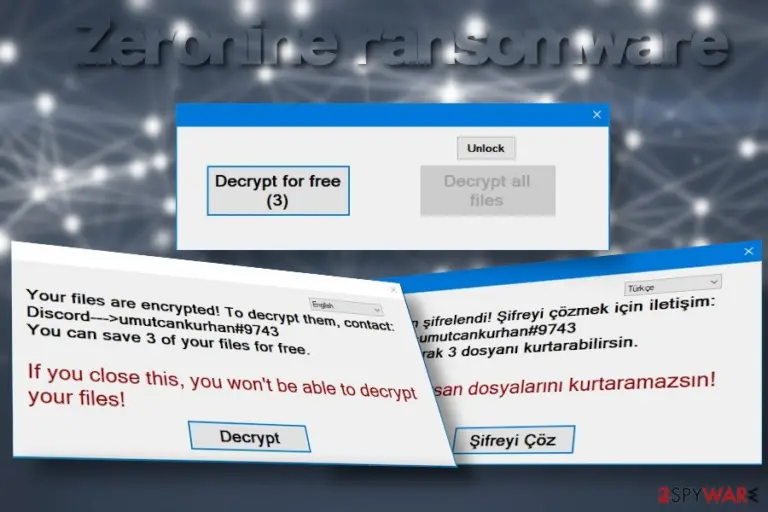
Zeronine ransomware – a file-encoding virus that renders a sophisticated cipher to lock user's data. It resurfaced in May 2020 and, despite the fact that most AV engines are capable of detecting it[1], the ransomware is tricky enough to infect Windows PCs successfully via obfuscated spam email attachments. Upon infiltration, it monitors specific registries, compromises boot processes, enables the zeranine.exe file, and loads the encryption algorithm. Consequently, pictures, videos, documents, and other personal files are encrypted with the .zeronine file extension.
In contrast to other ransomware-type viruses, the .zeronine file extension virus does not create a ransom note. Instead, it drops a pop-up window on the desktop saying “Your files are encrypted” and urge the victim to establish contact with ransomware managers via the Discord platform's umutcankurhan#9743 channel. The size of the redemption differs in each case, depending on the amount of data that the Zeronine ransomware virus managers to corrupt.
| Summary of the ransomware | |
| Name | Zeronine |
| Classification | Ransomware |
| Family | Not specified. This virus seems not to be bound to any ransomware family |
| File marker | The ransomware marks each of the encrypted file with .zeronine file extension |
| Ransom note | This intruder does not generate a regular .txt ransom note. Instead, it enables a pop-up window on the desktop, which indicates the fact that the files have been encrypted and provides a “Decrypt” button, which redirects to a specified decryption website |
| Malicious file | zeranine.exe |
| AV detection | FileRepMalware, Gen:NN.ZemsilF.34110.dm0@aKAgtmf, A Variant Of MSIL/Filecoder.YV, MSIL/Filecoder.YV!tr, Ransom:MSIL/Genasom.MK!MSR, Mal/Generic-S, Trojan.GenericKD.33839438 (B), etc. |
| Distribution techniques | The main dissemination strategy of the ransomware is malicious spam attachments that supposedly come from well-known courier companies, various organizations, or authorities. In addition, people may experience a ransomware attack due to unprotected RDPs, installation of pirated software, or visits on hacked websites |
| Removal options | Manual Zeronine removal is not possible as the virus scatters a package of malicious entities in different locations and use self-protection commands that does not allow the victim to disable malicious processes. to get rid of this virus, restart Windows in Safe Mode and run a scan with a professional AV engine |
| Fixing virus damage | File-encrypting viruses are infamous for distorting registries, files, and processes on the host machine that are crucial for a smooth Windows performance. Therefore, it's very important to optimize the system upon virus removal. For that, you can use FortectIntego program |
When Zeronine ransomware appears on the targeted Windows PC, it starts initiating malicious activities in the background:
- It queries kernel debugger data
- Reads technical name of the system and other tech-related data
- Reads GUID
- Reads configuration files
- Monitors specific registry keys with an intention to initiate changes
- Connects to the LPC port
- Corrupts files in the Windows directory,
- Insert malicious executables (notepad.exe, svchost.exe, setup.exe, update.exe, etc.), etc.
In general, the ransomware initiates a multitude of tasks to take over the system's control and enable the encryption algorithm, which is considered as a success of an attack. It manages to bypass AV detection by initiating a “sleep” command for more than two minutes, thus slithering via AV scan unnoticed.
The second phase of the Zeronine ransomware launch is the encryption of files. In the case of the successful command run in the first phase, the virus launches its encryption software, which targets over two hundred file extensions on a host machine, meaning that it is capable of locking documents, pictures, photos, videos, archived files, and other valuable data.
When the encryption software does what it is supposed to do, all locked files are marked with .zeronine file extension. Clicking on any of the entries that have the mentioned suffix lead to nothing, i.e. the file cannot be opened, renamed, or moved.
The victim will not find a text note or another document that typically stands for a ransom note. Instead, the Zeronine ransomware generates a pop-up window on the desktop, which can be translated into English and Turkish languages. The pop-up contains the following information:
Your files are encrypted! To decrypt them contact:
Discord —> umutcankurhan#9743
You can save 3 of your files for freeIf you close this, you won't be able to decrypt your files!
Decrypt
The size of the redemption is not known. The pop-up that stands for a ransom note contains a Decrypt button, which allows uploading three files encrypted by .zeronine file extension virus and decrypting them for free. Besides, it contains a decrypt all files button, which required a unique decryption key. The only way to get the key is to contact umutcankurhan#9743 on Discord.

However, contacting criminals is not advisable due to a high risk of identity theft or money loss. If your files are encrypted, we highly recommend you remove Zeronine virus from the system and try alternative data recovery methods. There are several third-party data recovery programs that you can use. You can find the decryption methods that we recommend at the end of this post.
If you cannot remove Zeronine virus using your anti-virus program, most probably the command to block security software is enabled. Therefore, you should restart the system into Safe Mode with Networking[2] and initiate a scan there. Besides, upon ransomware removal, a proper care of the system should also be taken to the account. One of the ways to fix virus damage is to scan the system with FortectIntego tool.
Methods used for ransomware dissemination
According to LesVirus.fr experts[3], Zeronine virus developers are exploiting traditional malware distribution techniques. In most of the cases, the file-encrypting virus is disseminated via malicious email attachments. Crooks manage to craft those emails in a sophisticated manner. They tend to look like order confirmations, receipts, shipment tracking emails, or similar.
In addition, this type of threats are injected into vulnerable systems as secondary payloads of malicious trojans and botnets. Ransomware can be automatically downloaded as a “regular” file, which asks a potential victim to enable macros. However, enabling macros works as permission to launch ransomware payload.
The third widely used malware distribution medium is related to Remote Desktop Protocols (RDPs). Hackers can easily exploit poorly protected RDPs, steal passwords, or find unlocked configurations. As a consequence, they can connect to a remote desktop and download ransomware to the host machine.

Thus, there's no single advice on how to prevent ransomware attacks. However, there's a couple of tips that could work as precautionary measures:
- Regularly back up your files[4]. For this purpose, use an external hard drive, USB flash drive, or cloud storage.
- Investigate each email message and scan its attachments before opening. Look for grammar or type mistakes. Mark it as spam if its sender is marked as malicious on various cybersecurity-related websites.
- Avoid visiting peer-to-peer networks. It's advisable to download programs and subscribe to services from official sources.
- Use strong passwords and make sure to protect configurations if you are using remote desktop services.
- Use a professional antivirus program with real-time protection. Ensure regular updates.
Steps to take after Zeronine ransomware attack
The first step that you have to take is to remove Zeronine ransomware completely. The longer the virus stays on the system, the more damage it causes. It runs multiple malicious processes in the background and may download other malware to the system, thus leading not only to data encryption, but also leakage of personally identifiable information.
Make sure to use a professional AV engine for Zeronine removal. Outdated antivirus or security software that has a low virus detection rate may fail to recognize all malicious entries. To ensure a proper file-encrypting virus removal process, we recommend using programs MalwarebytesMalwarebytes or SpyHunterCombo Cleaner. Besides, initiate a scan when the system is rebooted into Safe Mode with networking. Upon ransomware removal, don't forget to optimize Windows or Mac OS with the help of FortectIntego.
As for the decryption of files encrypted by .zeronine extension, we do not have good news. At the moment, there is no official Zeronine decryption software created. Nevertheless, there are several methods that can be applied to unlock at least some of your files.
Did this guide help?
Be the first to comment