

Dll-Files Fixer is an alleged computer-fixing application with plenty of negative traits
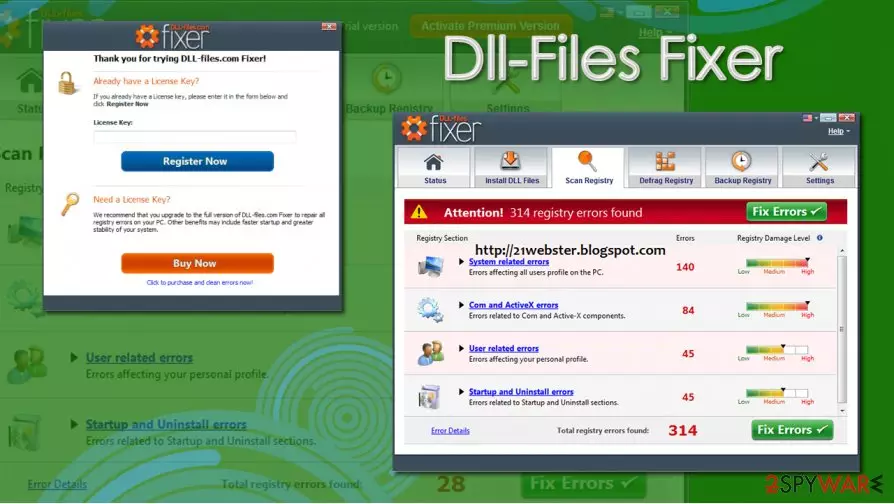
Dll-Files Fixer is yet another potentially unwanted application[1] that claims to be capable of fixing various Windows issues, including system/ActiveX/startup/uninstall errors and broken DLL files. However, applications of such type are typically distributed via various deceptive ways (software bundle packages, ads, fake update prompts) and also show exaggerated scan results in order to mislead users and make them buy a full version of Dll-Files Fixer.
| Name | Dll-Files Fixer |
| Type | Potentially unwanted program |
| Distribution | While the app can be downloaded from the official website, users find it on their system seemingly out of nowhere. This happens due to software bundling – several apps are inserted into one installer, which results in the unintentional installation |
| Dangers | Incorrect “fixes” that could damage Windows system; monetary loss due to a licence purchase |
| Purpose | Developers say that the app can fix various system, DLL, and other errors |
| Removal | Follow our manual guide below or perform a full system scan with anti-malware software |
| System fix | Potentially unwanted programs rarely deliver the results one has expected. Instead of choosing an app that shows computer health status in a misleading matter, we recommend using a PC repair tool FortectIntego |
DLL file errors are relatively common, as they result in various inconveniences to the users. For example, “MSVCP140.dll is missing” error prevents users from starting a variety of applications, hence they are trying to look for solutions. Therefore, the demand for automatic repair solutions for Windows is huge – and many developers with questionable intents attempt to monetize on users' misfortune. Dll-Files Fixer is one of such programs.
Dll-Files Fixer claims that it can help users to fix DLL errors by replacing corrupted files with new ones. However, there is no guarantee that it will insert a correct version of the file – this might make the computer problem even worse.
As previously mentioned, Dll-Files Fixer is most commonly distributed via software bundle packages, which most commonly results in unintentional installation. PUP developers and freeware distributors often fail to provide adequate information about all the components to be installed. If you found this program on your machine seemingly out of nowhere, remove Dll-Files Fixer from your machine as soon as possible.
As soon as the app is installed on the system, it will perform a full system scan. While this behavior is very common and is widely practiced by many app developers, what comes after the scan is complete is considered to be dubious. Instead of showing adequate information about users' computer health, misleading numbers are shown.

For example, Dll-Files Fixer uses red color to display several issues found within the registry, as well as the “Status” section, which is designed to show a warning next to each of the issues found. Since the program is picking up even the most harmless Windows components (for example, Google Chrome cookies) and marks each of the entries as an issue, it creates a distorted perception to users.
However, as soon as they are willing to fix the found problems, they are shown a popup window, which suggests fixing only part of the found issues, and the rest can be fixed only after a full license is purchased. Keep in mind that that is done right after misleading scan results are shown.
Another reason for Dll-Files Fixer removal is that several reputable security vendors detect it under the following names:[2]
- Program.Unwanted.1502
- PUP/Win32.PCClean.C3052925
- Riskware.Hoax!
- PUA:Win32/Systweak
- PUP.Optional.DllFilesFixer, etc.
Fake system optimizers such as Dll-Files Fixer are often advertised as all-in-one tools that are capable of fixing all your computer problems. However, we suggest you stay away from apps that are distributed in questionable ways and show fake scan results. If you need a solution for your Windows errors, crashes, BSODs, and other problems, we recommend using FortectIntego instead.
Common mistakes users make when installing freeware
As mentioned above, potentially unwanted applications are usually distributed in various deceptive ways. Nonetheless, some users might install applications that fail to provide what they promised, show intrusive ads on the web browser, or establish persistence to prevent elimination. As evident, it is better to stay away from adware, browser hijackers, fake system optimizers, and similar unwanted software – novirus.uk[3] experts have several prevention tips.
If you found an unwanted app on your computer out of nowhere, you should look at what freeware programs you recently installed. The main cause of the infiltration of potentially unwanted programs is the careless installation of software downloaded from third-party websites. Thus, experts advise choosing official sources and developers' websites when downloading new apps (note: if you know nothing about a program you are about to install, first read up on it online – check blogs, forums, community reviews, etc.).

If you insist on downloading programs from third-party sources, you should be extremely careful. You should never rush the installation process, always pick Advanced/Custom settings, and remove all the ticks from the pre-ticked boxes.
Get rid of Dll-Files Fixer in an easy way
Some apps might be tricky to uninstall – shady tactics are applied for some developers to keep PUPs on users' machines as long as possible. If you happen to struggle with Dll-Files Fixer removal, you should check our step-by-step guide we provided below. Nonetheless, if the entry is missing or the program keeps re-appearing (users begin calling it Dll-Files Fixer virus for this reason), you should rely on automatic solutions.
Anti-malware software is a perfect solution is you are unable to remove Dll-Files Fixer in a regular way. Security applications are designed to search through your system and eliminate everything suspicious. Before you perform a full system scan, we highly advise you to enable the PUP detection feature first, however.
If you found Dll-Files Fixer on your computer unexpectedly, keep in mind that there might be other unwanted programs or even malware installed as well. In this case, your anti-malware should be able to delete all the malicious files from your device. On the other hand, if you choose to uninstall Dll-Files Fixer manually, you might never notice malicious programs that run in the background.
Uninstall from Windows
Uninstall from Windows 10/8:
- Type Control Panel into the Windows search box and open the result.
- Under Programs, select Uninstall a program.


Uninstall from Windows 7/XP:
- Click on Windows Start > Control Panel (Windows XP users should click on Add/Remove Programs).
- In Control Panel, select Programs > Uninstall a program.


Remove the unwanted program:
- In the Programs and Features window, look for any recently installed suspicious entries, select them, and click Uninstall.
- If User Account Control appears, click Yes to confirm, then complete the removal.


Did this guide help?
Be the first to comment