

Restoreserver ransomware – cryptovirus that demands a ransom within 48 hours or encrypted data will be deleted
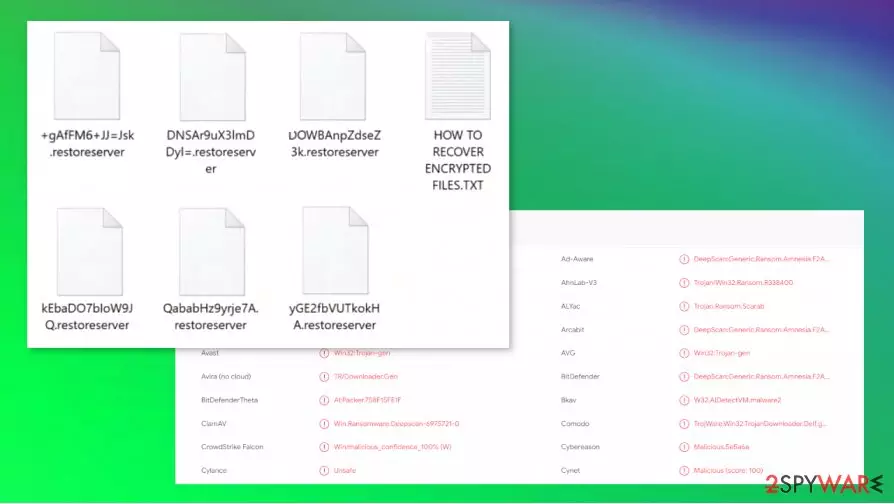
Restoreserver ransomware is a virus that, after gaining access to a targeted computer, encrypts all users' non-system files with a powerful AES + RSA[1] algorithm mixture. The restoreserver file-locking parasite is from the renowned Scarab ransomware family. Malware from this family was first apprehended in June 2017. After the encryption of all victims' personal data is completed, a ransom note, named “HOW TO RECOVER ENCRYPTED FILES.TXT”, is created in all affected folders. All files are appended with double extensions – first a sequence of random characters, second – .restorserver.
| Name | Restoreserver ransomware |
|---|---|
| Family | Scarab ransomware family |
| appended extensions | Two-part extensions added to all non-system files: 1. sequence of random characters; 2. .restoreserver |
| Ransom Note | HOW TO RECOVER ENCRYPTED FILES.TXT is created in all affected folders |
| Criminal contact details | Victims are given only one way to contact the cybercriminals – restoreserver@mail.ru |
| Distribution | Spam email hyperlinks/attachments, file-sharing platforms |
| Virus removal | Steadfast anti-malware software should be used to remove Restoreserver virus |
| system fix | Respectable system tune-up app like FortectIntego should be used to fix any issues the ransomware had done to system files and settings |
Within the Restorederver virus ransom-demanding note, victims can find an explanation of what has happened and what to do to get their files back. Cybercriminals are urging people not to try and decode their locked data with third-party software because that could lead to permanent data loss.
They're providing an email address to establish a contact (restoreserver@mail.ru) and pushing the victims to do that within 48 hours, or their personal decryption key will be deleted, and thus the encrypted data will be lost forever. A personal Restoreserver ransomware virus identifier is prescribed and should be given to the cyber thieves upon communication.
We always advise against contacting the criminals, or even worse – meeting their demands. According to experts[2], victims should use a trustworthy anti-virus (AV) program to remove Restoreserver ransomware from infected devices. Apps like SpyHunterCombo Cleaner and MalwarebytesMalwarebytes automatically find viruses, isolate, and delete them automatically. Furthermore, dependable AVs like these will protect devices from ransomware and other malware attacks in the future.
Developers of the Restoreserver ransomware enclosed this message in the ransom demanding note:
=======================================
!!! ALL FILES HAS BEN ENCRYPTED !!!
=======================================We have encrypted your important data on your system.
We would like you to know that you cannot restore your data with familiar data recovery methods.
These methods will only waste your time.
However, if you want to use data recovery companies or programs, please do not use your original files,
process and / or have copies of them.
Corruption of master files can cause irreversible damage to your data.
The originals of your encrypted files have been deleted using random data write technique.
Your backups are deleted by writing data to all backups on your NAS Storage and Disks.If no return is made within 48 hours, the password used in the system will be deleted and your data will never be restored.
Your disks are encrypted with Full disk encryption and unauthorized interference will result in permanent data loss!
Don't believe the people around you
I have enough references to give you confidenceI don't know you, so it doesn't make sense that I have bad feelings for you,
My goal is just to make this desirable income. After your payment
I will connect to your server to restore your data as soon as possible.To decrypt your data, you can contact us via the following communication channel.
If you want to reach, do not forget to add the code that is specially produced below.Free decryption as guarantee!
Before paying you can send us up to 3 files for free decryption.
The total size of files must be less than 10Mb (non archived), and files should not contain
valuable information (databases, backups, large excel sheets, etc.).How to obtain Bitcoins?
* The easiest way to buy bitcoins is LocalBitcoins site. You have to register, click
'Buy bitcoins', and select the seller by payment method and price:
hxxps://localbitcoins.com/buy_bitcoins
* Also you can find other places to buy Bitcoins and beginners guide here:
hxxp://www.coindesk.com/information/how-can-i-buy-bitcoins
Attention!
* Do not rename encrypted files.
* Do not try to decrypt your data using third party software, it may cause permanent data loss.
* Decryption of your files with the help of third parties may cause increased price
(they add their fee to our) or you can become a victim of a scam.e-mail: restoreserver@mail.ru
with email pls send your ip adres :
Your personal identifier:
–

Sadly, Restoreserver ransomware removal won't unlock encrypted data. Only the creators of the ransomware can do that, well, at least for now. Transfer all locked files to an offline storage device, like a USB drive, and wait for a decryption tool to be made available to the public.
If you were wise enough to have backups of all your important data – everything's much easier for you. After the Restoreserver ransomware virus is successfully eliminated from infected devices, run a full system scan with FortectIntego to automatically find and fix any harm the virus has done to your system files and its settings. Afterward, retrieve your desired data from the backups and stay safe.
Distribution of malware on the internet
Cybercriminals have numerous ways at their disposal to infect unaware peoples' devices. Although the most popular methods are: infectious email hyperlinks/attachments and file-sharing platforms.
Developers of malware tend to hide their creations in both mischievous email hyperlinks and email attachments. The letters might seem that they're coming from a trusted source, like your bank or the company you work for, but actually, they might be coming from the perpetrators. Never open fishy looking emails, and always scan all email attachments with a proper AV app prior to downloading it.

Another sure way to infect your device is when downloading something from a file-sharing platform like The Pirate Bay, BitTorrent, etc. Anyone can upload whatever they want to these sites and choose whichever name they want for the files. Instead of downloading, e.g., PhotoShop crack, soon to be victims could be downloading ransomware or any other kind of malware. Try and avoid these sites and support your beloved app developers by buying their creations from their official websites.
Restoreserver ransomware virus removal and a quick system fix
As reported by VirusTotal.com[3], 58 out of 71 AV engines caught this ransomware infection. This emphasizes the importance of reliable anti-malware software. We strongly advise using SpyHunterCombo Cleaner or MalwarebytesMalwarebytes to remove Restoreserver ransomware from the infected system and protect the devices from future threats.
After Restoreserver ransomware removal is completed, users should consider using a system tune-up tool like FortectIntego to automatically scan, find, and fix any damage the malware has done to the system files and settings. If not attended to, these changes might lead to computers exhibiting anomalous behavior, such as crashing, severe lag, etc.
Did this guide help?
Be the first to comment