

RXD ransomware – a new file-locking parasite from the Dharma family
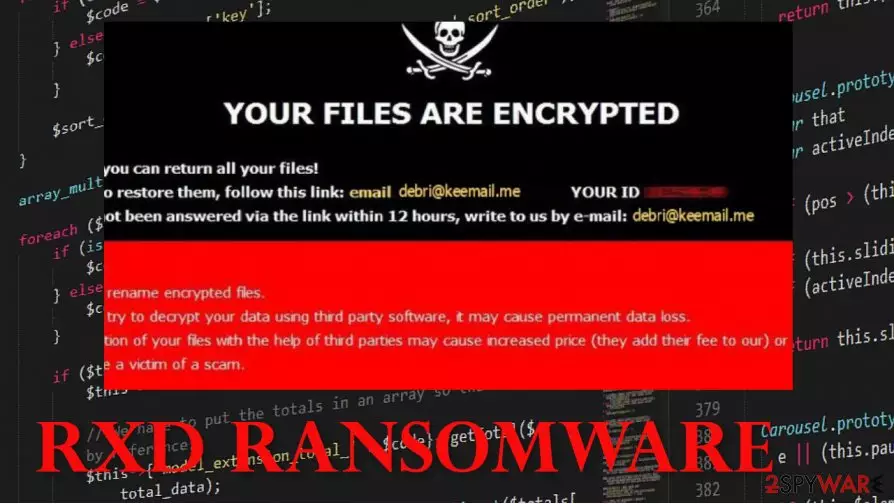
When RXD ransomware does the first part of its mission and encrypts all personal data (photos, video/audio files, documents, archives, etc.), it appends all files with a three-part extension – unique victim ID, cybercriminals contact email (debri@keemail.me) and .RXD. Users of infected computers won't be able to open/use any of the contaminated files. A ransom note presents itself in two ways – a pop-up window and in text files, named FILES ENCRYPTED.txt.
In the pop-up, creators of RXD cryptovirus reassure that all files can be returned and provide two emails to establish contact – debri@keemail.me, tzk7@protonmail.ch. Also, the perpetrators are warning the victims against using any third-party decoding tools and against file renaming, as both of these actions could lead to permanent data loss.
| name | RXD ransomware, RXD cryptovirus |
|---|---|
| Type | Ransomware, file-locker |
| Family | Dharma |
| Ransom note | Pop-up window and text files – FILES ENCRYPTED.txt |
| Appended extension | Three-part extensions are appended to all personal data: 1 – victims' ID. 2 – criminal contact email. 3 – .RXD appendix |
| Issues | All non-system files are inaccessible, ransom note pop-up window appears |
| Criminal contact details | debri@keemail.me, tzk7@protonmail.ch |
| ransomware removal | Trustworthy anti-virus software is required to remove RXD ransomware |
| System fix | The FortectIntego tool should be considered to do a full system overhaul |
After a victim would contact the cybercriminals, they would probably receive a cryptocurrency (Bitcoin) wallet address and the ransom amount required to decode files encrypted by the RXD ransomware. We strongly advise against making contact with the criminals. Security experts say that the cost of paying the ransom could be twice as high as the price for recovery[1].
Victims should remove RXD fle virus with a dependable anti-malware software like MalwarebytesMalwarebytes or SpyHunterCombo Cleaner and focus on system repair. The sooner one does that, the better because, the longer the malware stays on a machine, the more damage it could do.
Dharma family cryptoviruses are known to alter infected machines' system files and settings. That might lead to various visible performance issues, e.g., crashing, extreme lag, etc. To avoid such mishaps and to fix all modifications done to the computer system, after successful RXD ransomware removal, use the FortectIntego tool. It will automatically scan and find whatever the virus has changed and revert it.

Message from the RXD ransomware ransom pop-up window:
YOUR FILES ARE ENCRYPTED
Don't worry,you can return all your files!
If you want to restore them, follow this link:email debri@keemail.me YOUR ID –
If you have not been answered via the link within 12 hours, write to us by e-mail:tzk7@protonmail.ch
Attention!
Do not rename encrypted files.
Do not try to decrypt your data using third party software, it may cause permanent data loss.
Decryption of your files with the help of third parties may cause increased price (they add their fee to our) or you can become a victim of a scam.
Text from the FILES ENCRYPTED.txt file:
all your data has been locked us
You want to return?
write email debri@keemail.me or tzk7@protonmail.ch
Examples of methods cybercriminals use to stay busy
Ransomware[2] has been first created and used around 2012. It is mainly targeted at various corporations, but simple, everyday computer users are at risk too. Cybercriminals don't care where the money comes from. Malware is usually hidden in spam emails and file-sharing platforms like torrent sites and social media.
We all have received spam emails. There's even a folder for that in most inboxes. Users shouldn't ever open an email from a sender that they don't recognize, and even those that look legitimate should be inspected thoroughly. Make sure to always scan email attachments with a reliable anti-malware app prior to downloading it. This might save you a really big headache.

Instead of downloading some pirated software, illegal activation tools, etc., support the developers of the required software by buying it directly from them. Try and avoid torrent sites, because who knows who uploaded what in there.
Instructions on RXD ransomware virus removal from contaminated computer systems
Malware should be immediately dealt with before it has done even more harm to the computer system. We recommend using MalwarebytesMalwarebytes and SpyHunterCombo Cleaner to remove RXD ransomware from infected systems automatically. Keep these apps updated, and they could be a perfect security tool in your arsenal.
Unfortunately, RXD ransomware removal won't decrypt your files. You should restore the files from backups. But prior to doing that, a system tune-up is in order to repair any damage done to system core files and settings. Experts[3] suggest using the FortectIntego app for that before your system starts to show any abnormal behavior. Remember to keep backups, update your anti-malware equipment, and stay safe!
Did this guide help?
Be the first to comment