

SilentDeath ransomware – a file-locking parasite that demands to purchase tools for its decryption in Bitcoins
SilentDeath ransomware is a malicious computer virus that locks files on a targeted Windows machine and demands to pay its developers in cryptocurrency for the necessary decryption key. Criminals claim to have the only solution for data recovery. Although this cryptovirus was first detected in July 2019, it's still actively spreading and causing trouble for people worldwide.
When a computer gets infected with SilentDeath ransomware virus, the encryption starts instantly, and all files can be locked within a couple of minutes. During which, all personal files, such as pics, docs, databases, etc., get renamed by appending a .SilentDeath extension to their original filenames.
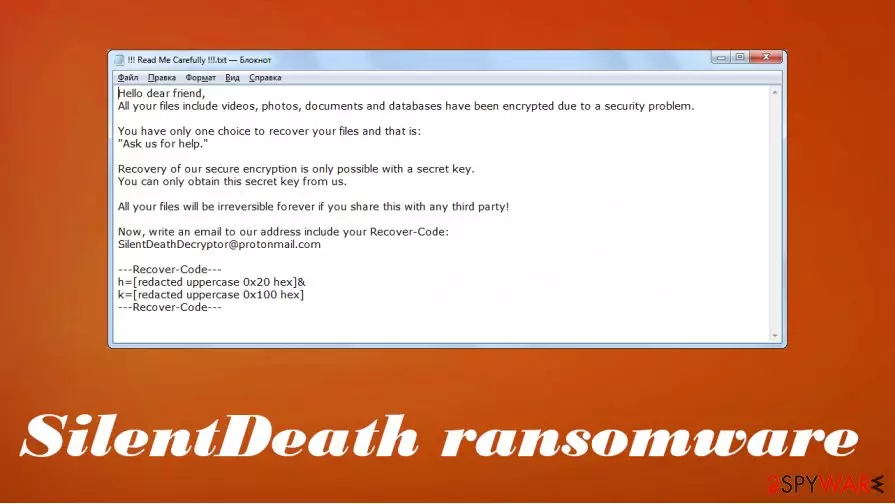
Also, a ransom note, titled !!! Read Me Carefully !!!.txt is generated and placed on the desktop so victims could find it with ease. If you've encountered this file-locking parasite and thus can't access your files, then we're happy you came to us to solve this issue. Please don't contact the assailants by their given email (SilentDeathDecryptor@protonmail.com). Please read this article to find out how this malware spreads, its removal options, and other subtleties.
| name | SilentDeath ransomware |
|---|---|
| Type | File-locker, cryptovirus, ransomware |
| Distribution | Spam emails, file-sharing platforms, deceptive ads |
| Appended file extension | All encoded data gets marked with a .SilentDeath extension after the original filename |
| Ranson note | !!! Read Me Carefully !!!.txt can be found on the desktop |
| Criminal contact details | SilentDeathDecryptor@protonmail.com |
| Malware Elimination | Victims should remove SilentDeath ransomware with professional anti-malware tools that would do the job properly and leave no pieces behind |
| System health check | To restore your system to a pre-contamination phase, a system repair tool such as the FortectIntego app must be used |
Usually, ransom notes of file-locking parasites are long and informative. The one from SilentDeath ransomware isn't anything like that. The threat actors behind the attack just state that files are encrypted, and the only way to retrieve them is by contacting them via a provided email and purchasing their decryption key.
The whole message from !!! Read Me Carefully !!!.txt file states:
Hello dear friend,
All your files include videos, photos, documents and databases have been encrypted due to a security problem.You have only one choice to recover your files and that is:
“Ask us for help.”Recovery of our secure encryption is only possible with a secret key.
You can only obtain this secret key from us.All your files will be irreversible forever if you share this with any third party!
Now, write an email to our address include your Recover-Code:
SilentDeathDecryptor@protonmail.com
Contacting the criminals and paying the ransom is highly unrecommended. The payoffs only encourage them to intensify their attacks, develop more sophisticated malware, and research more effective distribution methods. Also, after payment is made, any of these scenarios could come to life:
- No decryption tool is sent.
- More money is asked.
- Additional malware is sent instead of the decryption key.
- The decryption key doesn't work.
- Cybercriminals disappear altogether.
Victims should have only one thought in their heads “how do I remove SilentDeath ransomware and forget about this nightmare”. And here we come to the rescue. First of all, you'll need a professional anti-malware tool for this task. If you don't have one, we recommend getting either SpyHunterCombo Cleaner or MalwarebytesMalwarebytes.

Launch your security software and pick the entire system scan. Once it's finished, eliminate all suspicious files. For the second part of SilentDeath ransomware removal, you'll need a system repair tool. Once again, if you don't own one, we advise getting the powerful FortectIntego tool. Open it, scan the whole system, and restore any corrupted or damaged system files.
Avoid file-sharing platforms to evade malware infections
There are tens of thousands of various computer viruses waiting to infect the devices of regular people. Not only Windows machines can get infected, but also Macs and Androids. When it comes to malware delivery, cybercriminals have many techniques at their disposal, including spam emails, drive-by downloads,[1] and so on.
One of the most pervasive methods used to spread all kinds of malware[2] is file-sharing platforms. Hackers prefer this method because they don't have to bend over backward to reach their goals. Due to the lack of end-to-end security, they just have to think of a catchy name and upload their creations.
Malware can be camouflaged as the latest game crack, expensive unlocked software, or similar illegal downloads. It can be hidden as any filetype. If you value your privacy, security, and finances, don't use file-sharing platforms. Support software developers by purchasing their products directly from them.
SilentDeath ransomware virus removal options from infected devices
If you've noticed any of the symptoms that your Windows computer is infected with the SilentDeath file virus, then this article is for you. Follow our instructions, and you'll get rid of it in a couple of minutes, once and for all. Start by copying all essential encrypted data to an offline storage device. There's no decryptor available at the moment, but there's always hope.
Open your security tool. If it's the same one that let the malware through, we recommend upgrading your cybersecurity level by acquiring a trustworthy anti-malware program like SpyHunterCombo Cleaner or MalwarebytesMalwarebytes. Scan the whole device, and remove SilentDeath ransomware along with any other questionable files.
Since malware infections tend to make alterations to the system registry and other key system settings, a system repair is in order. To restore all system values and files back to normal, following SilentDeath ransomware removal, experts from UdenVirus.dk[3] advise using the FortectIntego system repair tool.
Did this guide help?
Be the first to comment