

RABBIT ransomware – a file-locking virus targeted at Thai-speaking users
RABBIT ransomware is a malicious computer virus that encrypts files with a military-grade AES-256[1] coding algorithm and demands a ransom to be paid in cryptocurrency Bitcoins through a generated ransom note – อ่านวิธีแก้ไฟล์โดนล๊อค.txt. The notes title and the text within suggests that this virus is aimed at Thai-speaking computer users.
During the encryption, all non-system files are appended with a .RABBIT extension and are rendered inaccessible. Victims are urged to contact their assailants by writing an email to unlock_rabbit@pm.me and to forward 0,0400 BTC (an equivalent of 8000 baht – approx. $260) into their crypto wallet 1A3gVjAwot4PHXXEy22LpfsEhTYMSW5hQ1.
If you were unlucky enough to deal with this malware, you came to the right place to find out more about it. This article covers all aspects of the .RABBIT virus, its spreading techniques, and removal options. If you want to get rid of it ASAP, check our detailed instructions below.
| name | RABBIT ransomware |
|---|---|
| Type | File-locker, cryptovirus |
| Encryption algorithm | AES-256 |
| Appended file extension | .RABBIT |
| Ransom note | อ่านวิธีแก้ไฟล์โดนล๊อค.txt |
| Detailed ransom note address | hxxps://pastebin.com/raw/K9DwMHWa |
| Ransom amount | 0.0400 Bitcoins, which equals 8000 baht or $260 |
| Assailants crypto wallet | 1A3gVjAwot4PHXXEy22LpfsEhTYMSW5hQ1 |
| criminals contact details | unlock_rabbit@pm.me |
| Malware removal | Every type of malware should be eliminated by professional anti-malware software |
| System health check | Users are advised to use the FortectIntego app following a successful RABBIT ransomware removal |
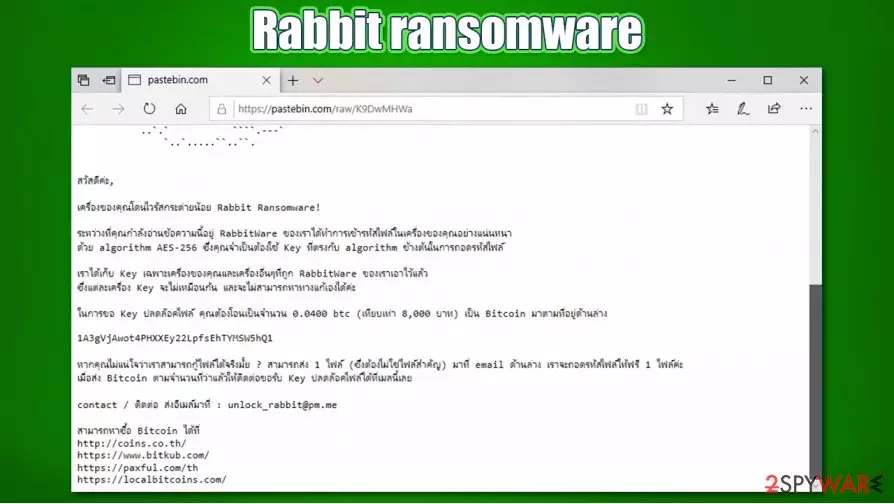
As we've mentioned before RABBIT ransomware ransom note is written in Thai, which suggests that this file-locking parasite is aimed at users from Thailand, Malaysia, Cambodia, and other Thai-speaking countries. Message in the อ่านวิธีแก้ไฟล์โดนล๊อค.txt note has a childish depiction of a rabbits head and a link (hxxps://pastebin.com/raw/K9DwMHWa) where the full note is posted:
How to fix .RABBIT lock read >> hxxps://pastebin.com/raw/K9DwMHWa
The ransom note from the PasteBin is much more informative. It specifies the amount of Bitcoins, the assailants' crypto wallet address, what encryption RabbitWare ransomware uses, criminals' email, links to Bitcoin markets, and free decryption of one locked file guarantee. The whole message states:
สวัสดีค่ะ,
เครื่องของคุณโดนไวรัสกระต่ายน้อย Rabbit Ransomware!
ระหว่างที่คุณกำลังอ่านข้อความนี้อยู่ RabbitWare ของเราได้ทำการเข้ารหัสไฟล์ในเครื่องของคุณอย่างแน่นหนา
ด้วย algorithm AES-256 ซึ่งคุณจำเป็นต้องใช้ Key ที่ตรงกับ algorithm ข้างต้นในการถอดรหัสไฟล์เราได้เก็บ Key เฉพาะเครื่องของคุณและเครื่องอื่นๆที่ถูก RabbitWare ของเราเอาไว้แล้ว
ซึ่งแต่ละเครื่อง Key จะไม่เหมือนกัน และจะไม่สามารถหาทางแก้เองได้ค่ะในการขอ Key ปลดล๊อคไฟล์ คุณต้องโอนเป็นจำนวน 0.0400 btc (เทียบเท่า 8,000 บาท) เป็น Bitcoin มาตามที่อยู่ด้านล่าง
1A3gVjAwot4PHXXEy22LpfsEhTYMSW5hQ1
หากคุณไม่แน่ใจว่าเราสามารถกู้ไฟล์ได้จริงมั้ย ? สามารถส่ง 1 ไฟล์ (ซึ่งต้องไม่ใช่ไฟล์สำคัญ) มาที่ email ด้านล่าง เราจะถอดรหัสไฟล์ให้ฟรี 1 ไฟล์ค่ะ
เมื่อส่ง Bitcoin ตามจำนวนที่ว่าแล้วให้ติดต่อขอรับ Key ปลดล๊อคไฟล์ได้ที่เมลนี้เลยcontact / ติดต่อ ส่งอีเมล์มาที่ : unlock_rabbit@pm.me
สามารถหาซื้อ Bitcoin ได้ที่
hxxp://coins.co.th/
hxxps://www.bitkub.com/
hxxps://paxful.com/th
hxxps://localbitcoins.com/
No matter how small the ransom might seem or how desperately you need to get your files back, please remember that paying the ransom does not guarantee that cybercriminals will keep their promises, and you will get your data back (in other words, you might get scammed). Also, know that the encrypted RABBIT files aren't corrupted, meaning their contents are untouched. There might be other ways to regain access to them.

There's no decryptor available at the moment, so extract all encrypted files to an offline storage device and then take on .RABBIT ransomware removal. Manual elimination could be possible, but it might be a lengthy and extremely tough task (if you still want to try it, we provide the instructions below). That's why we recommend sticking to automatic removal with reliable anti-malware tools, such as SpyHunterCombo Cleaner or MalwarebytesMalwarebytes.
Launch the security tool of your choice, scan the entire system and remove RABBIT ransomware with all its pieces. Afterward, run a system repair tool to fix any damaged Window files, restore Registry values, and fix any other system inconsistencies. If you don't own such a tool, experts[2] advise using the FortectIntego system repair app.
Popular techniques used for ransomware delivery
Ransomware has been floating around the internet for decades now.[3] It can be spread using various methods, including drive-by downloads, deceptive ads, RDP attacks, etc. However, the most popular methods are spam email and file-sharing platforms.
Spam emails are sent out by tens of thousands during so-called spam campaigns. They might look like legitimate emails from shipping/shopping companies, various institutions. The easiest way to identify spam emails from legitimate ones is by grammatical mistakes, different domain names, addressing users in a general manner, and inconsistencies alike.
File-sharing platforms, like popular torrent sites, host a myriad of different malware. It can be camouflaged as any filetype and named to lure gullible people into downloading them. Usually, ransomware is hidden in the latest game cracks, pirated software, and other illegal downloads. Refrain from using such portals if you value your safety and privacy.
RABBIT ransomware removal instructions from infected computers
Before beginning RABBIT ransomware removal process, you have to copy all required encrypted data to an offline storage device. The necessary decryption software isn't available yet, but there's always hope that the security researchers will develop one sooner or later.

Once the data is extracted, launch your security tool. If it's the same one that let the malware through, we suggest getting a professional anti-malware tool like SpyHunterCombo Cleaner or MalwarebytesMalwarebytes. Scan your device. Remove RABBIT ransomware along with other suspicious entries.
Afterward, a system repair must be done to prevent the computer from exhibiting any abnormal behavior, such as BSoD, crashing, freezing, and so on. The FortectIntego app will take care of Windows Registry and other core system settings and files so you could enjoy your device anew.
Did this guide help?
Be the first to comment