

Tortoise ransomware – a computer infection that fails to encrypt files
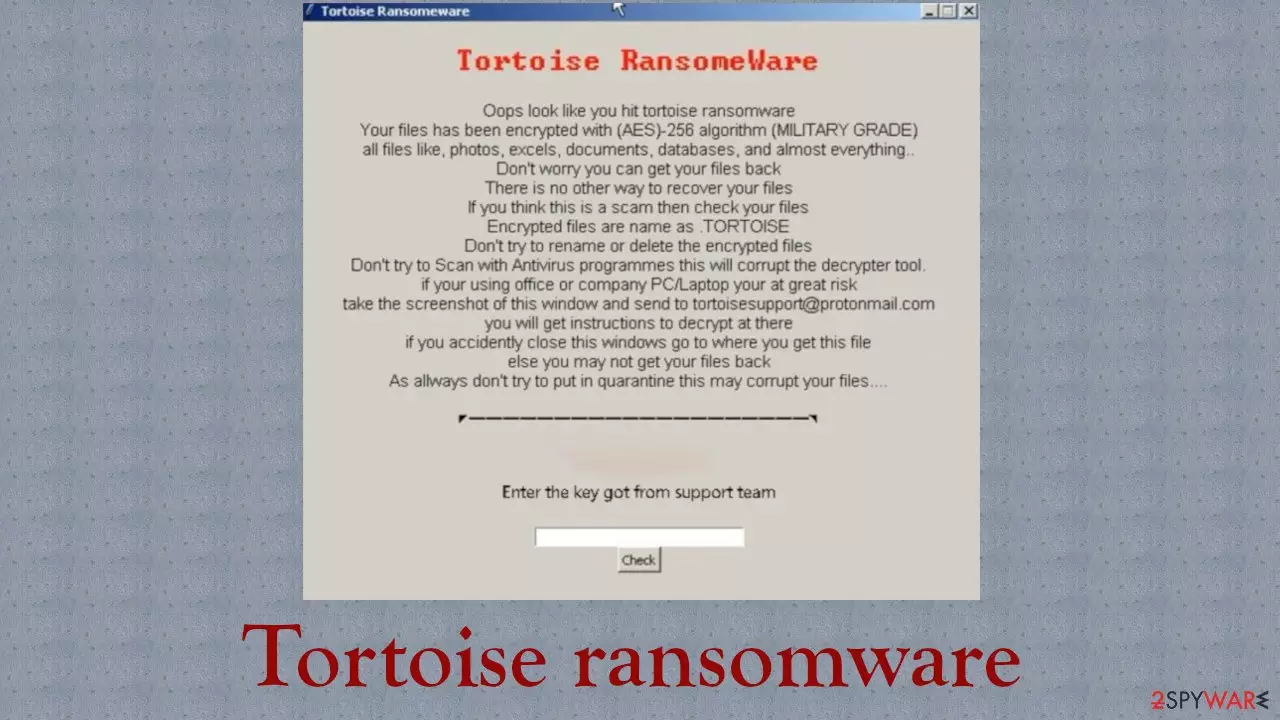
Tortoise ransomware is a cryptovirus that, developers declare, encrypts files with an army-based AES-256 coding algorithm and appends either .TORTOISE or .tortoise extension to their original filenames. These false claims are displayed in a ransom note. Reports suggest[1] that no files were locked following the infection.
That might mean two things, either the Tortoise ransomware virus is still under development, or the developers are trying to scare their victims into paying the ransom without encrypting the files.
Whatever the case might be, you need to make sure that you eliminate this malware as soon as possible, as hackers might fix the bugs and deliver additional payloads that would encrypt your files eventually. Get yourself a professional anti-malware tool to combat these cyberattacks.
That being said, never contact cybercriminals via tortoisesupport@protonmail.com email, as the attackers might try to fool you and extort money from you, all while your files are still accessible. In this article, we'll discuss the subtleties of the infection, its plausible spreading techniques, and explain how to eliminate it.
| name | Tortoise ransomware |
|---|---|
| Type | Cryptovirus, file-locker |
| Ransom note | Pop-up window |
| Appended file extension | Data might be encrypted, and a .TORTOISE or .tortoise extension appended to it |
| Programming language | Python |
| Possible coding algorithm | AES-256 |
| Criminal contact details | tortoisesupport@protonmail.com |
| Possible virus executable filenames |
|
| Distribution | Spam emails, RDP attacks, deceptive ads, file-sharing platforms |
| Threat elimination | Remove any suspicious files with trustworthy anti-malware applications |
| System health check | Ransomware can damage system files and alter system settings, resulting in poor performance, crashing, etc. Restore all the system back to normal with the powerful FortectIntego system repair tool |
Ransomware-type infections are capable of much more than just encrypting files. There were reports of file-locker developers programming their creations to:
- steal data before encrypting it and threatening to publish it if the ransom isn't paid,
- download all files and wipe them from the storage drives,
- further infect victims by uploading trojans on the system, etc.
Tortoise virus might be written with some flaws, but they can be corrected, and this file-locker might be a very hazardous infection. Its ransom note is written in English, which suggests that this cryptovirus is aimed at English-speaking users.
The pop-up window note contains mainly false claims (for now) and threats, not to scan the infected device with security tools, not to rename or delete the files, and so on. This is the whole message that the assailants display to their victims:
Oops look like you hit tortoise ransomwareYour files has been encrypted with (AES) -256 algorithm (MILITARY GRADE)all files like, photos, excels, documents, databases, and almost everything ..Don't worry you can get your files backThere is no other way to recover your filesIf you think this is a scam then check your filesEncrypted files are name as .TORTOISEDon't try to rename or delete the encrypted filesDon't try to Scan with Antivirus programs this will corrupt the decrypter tool.if your using office or company PC / Laptop your at great risktake the screenshot of this window and send to tortoisesupport@protonmail.comyou will get instructions to decrypt at thereif you accidently close this windows go to where you get this fileelse you may not get your files backAs allways don't try to put in quarantine this may corrupt your files ….Enter the key got from support team

If your files weren't encrypted, then it's enough to remove Tortoise ransomware with dependable anti-malware solutions like SpyHunterCombo Cleaner or MalwarebytesMalwarebytes. If you weren't so lucky and an upgraded version infected your device and locked your files, then refer to our instructions at the bottom of the page, where we display possible data recovery options.
Cryptoviruses can cause numerous system issues. So once security tools are finished with Tortoise ransomware removal, you should take care of the system's overall health. We recommend using the FortectIntego system tune-up tool to repair corrupted files, restore default registry values, and fix any other system irregularities.
Stay away from torrent sites to evade PUP and malware infections
New versions of potentially unwanted programs[2] and malware are created every day. And there are many distribution methods that threat actors behind their creations might use to infect the devices of unaware people. Techniques including deceptive ads, RDP attacks, drive-by downloads, and others can be used.
However, our team reports suggest that one of the most popular methods used for ransomware delivery is by using file-sharing platforms, most notably torrent portals. These websites offer tons of illegal copyrighted content, and cybercriminals love to exploit people's weaknesses for free things.
Most of the ransomware was uploaded camouflaged as popular game cracks, game cheat codes, unlocked commercial software, and similar illegal downloads. Ransomware can be hidden as any file type, including .zip, .rar, .exe, .jpg, .xls, etc. If you value your devices and your own security and privacy, refrain from using such websites.
Reliable anti-malware tool can remove Tortoise ransomware and protect devices from future incidents
As we've stated before, Tortoise virus doesn't encrypt files (at least until it's not upgraded). But its ransom note could scare some gullible people to succumb to the demands of the criminals. Be advised that your data can be used. However, you will still have to upgrade your security tools that let the cyber infection through to the pc.
Professional anti-malware tools are must be used to remove Tortoise ransomware once and for all. We recommend acquiring SpyHunterCombo Cleaner or MalwarebytesMalwarebytes. Reports from VirusTotal.com[3] show that 36 out of 71 most used AV tools caught the infection. Here are a few examples of its detection names:
- FileRepMalware
- Python.Encoder.22
- Ransom.FileCryptor
- Trojan:Win32/Ymacco.AA6E
- ML.Attribute.HighConfidence
Any malware should be obliterated immediately after detection because the longer it stays in the system, the more damage it could do to the system files. File-lockers make changes to them and system settings to establish persistence. Experts[4] highly recommend using the FortectIntego tool to fix any system-related issues that occur after Tortoise ransomware removal.
Did this guide help?
Be the first to comment