

XP Internet Security – a fake antivirus program that tries to imitate Windows anti-malware suite
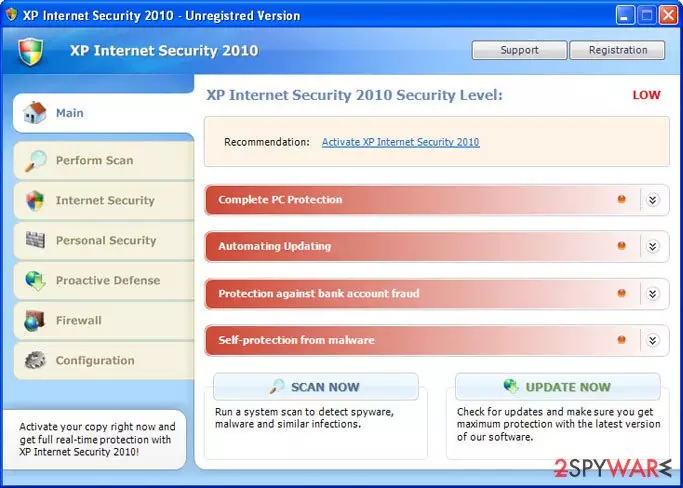
XP Internet Security is bogus security software that, at first glance, might look like a legitimate anti-spyware program. In reality, this program is nothing but a scam that is designed to compromise your Windows machine and trick you into believing that its infection level is dangerously high.
If you have found that this program has shown up on your system seemingly out of nowhere, do not pay attention to anything it displays as it is all fake. Also, do not purchase its “full version” as it will not protect you from real threats – you will only waste your money.
| Name | XP Internet Security |
| Type | Rogue antivirus, scam |
| Related | XP Internet Security 2010 |
| Distribution | Fake online scanners or software vulnerabilities/drive-by downloads |
| Dangers | Financial losses, installation of other malware, personal data disclosure to cybercriminals |
| Elimination | Perform a full system scan with a legitimate antivirus program such as SpyHunterCombo Cleaner. If you are unable to launch, access Safe Mode as explained below |
| System fix | Malware modifies Windows OS in order to perform its malicious tasks. In order to fix damage done to the system files, you can either start a Windows reinstall or employ FortectIntego to do it for you automatically |
It is important to note that this malware will change its name based on the operating system it is running on. Thus, an alternative name you could see would be Vista Internet Security if you are running Windows Vista. Dynamic names are yet another social engineering trick to make users believe that the program is used for their OS and that the protection is sufficient.
Once installed and active, it will be automatically configured to scan your computer for malware every time Windows starts. Of course, this fake program only imitates a system scan and, after all, reports false computer threats that cannot be removed with a trial version of the program, so you will be prompted to pay for a full version of the bogus software.
While XP Internet Security is running, you will notice that your computer will begin to run slower. This is because the program is always running in the background while using your computer's resources.
The virus will also display many fake security alerts and impersonate Windows Security Center to make the whole scam look more realistic and to finally convince you into believing that your computer is badly infected. Here is an example of a bogus message:
Threat Detected!
Security Alert! Your computer was found to be infected with privacy-threatening software. Private data may get stolen and system damage may be severe. Recover your PC from the infection right now, perform a security scan.
Furthermore, the rogue program will block anti-virus and anti-spyware software and hijack Internet Explorer. This hijacking consists of a randomly displayed message in a pop-up stating that the page you are visiting has been blocked due to malware activity or other security threats.
If you want to delete this parasite properly, access Safe Mode as explained below and perform a full system scan with SpyHunterCombo Cleaner or another reliable antivirus. Also, you should clean your web browsers or reset them altogether. If your system is acting slow or is unstable, use FortectIntego to fix virus damage automatically.
Distribution techniques
As evident, users rarely install this rogue on their Windows systems intentionally. Of course, since it can be found on some shady third-party websites, some people might initially believe that it is legitimate computer security software. In all other cases, users can get infected in one of the following ways:
- downloaded and installed after being tricked by a fake online scanner which claims numerous virus infections;
- automatically downloaded with the help of software vulnerabilities present on the computer after being redirected to a compromised website.
Thus, in order to protect yourself, make sure that your operating system, along with all the installed programs, is patched with the latest security updates. Also, use an anti-malware program with a web shield protection feature – it could warn you about phishing and scam sites.
Do not wait to remove rogue programs from your computer
Rogue security software is especially twisted considering that it pretends to be a program that should defend you from online threats but instead is the parasite itself. Developers of such software are nothing more, but cybercriminals and these creations should be treated for what they are – malware. Furthermore, not only do crooks infect your PC by using malicious distribution techniques, but they also ask for money for it.
XP Internet Security is a total scam, don't buy it and instead remove this infection from your computer upon detection. And by the way, if you have already purchased it, contact your credit card company immediately and dispute the charges if it's not too late.
Did this guide help?
Be the first to comment