

BitCrypt virus is a very serious ransomware, which acts just like Cryptorbit virus, PoshCoder virus and many other threats. That means that similarly to these viruses it has ability to encrypt all files that are kept on the system. After doing that, it asks to pay a ransom in Bitcoins and recover connection to these files. Be sure that this virus can easily block your office suite documents, pictures and other important files that are kept on computer. By the way, according to the latest news, it can also try to steal your Bitcoins from your Bitcoin wallet. If you noticed that your files have an extra extension and look like [file].jpg.bitcrypt, [file].xls.bitcrypt, etc., you should be worried. You must ignore an alert that offers you to purchase BitCrypt Software for decrypting your files (take into account that this ransomware uses the multilingual ransom note). In order to remove BitCrypt virus from the system, you should run a full system scan with without wasting your time.

How can BitCrypt virus infect my computer?
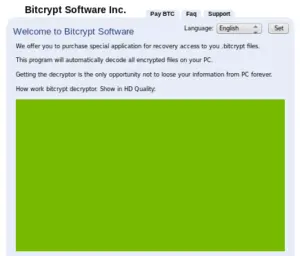
Just like many other advanced threats, this cyber threat is spread all around the world. It seems that it has been especially popular in United States of America and Japan, but there are hundreds of Europe users who have also reported about this serious ransomware. When trying to avoid BitCrypt virus, you have to remember that one of the most popular way, which is used for spreading this threat, is related to spam. You should be very careful with all the mails that warn you about missing payments and similar things. Also, do NOT click on suspicious alert messages and similar notifications because they can easily infect your machine with this cyber threat. As soon as it enters the system, it starts showing such alert:
Attention!!!
Your BitCrypt ID: {transaction ID}
All necessary files on your PC ( photos, documents, data bases and other) were encoded with a unique RSA-1024 key.
Decoding of your files is only possible by a special programm that is unique for each BitCrypt ID.
Specialists from computer repair services and anti-virus labs won’t be able to help you.
In order to receive the program decryptor you need to follow this link {malicious site #1} and read the instructions.If current link doesn’t work but you need to restore files please follow the directions:
1. Try to open link {malicious site #2}. If you failed proceed to step 2.2. Download and install tor browser {Tor Project website}
3. After installation, start tor browser and put in the following address {malicious site #3}
Remember, the faster you act the more chances to recover your files undamaged.
How to remove BitCrypt virus?
We highly recommend you to think about prevention of this virus. You can keep your file safe by making their copies and transmitting them to the USB external hard drive, CD, DVD, etc. You can also think about online backups, such as Google Drive, Dropbox, Flickr and other solutions. If BitCrypt virus has infiltrated your computer, we highly recommend using a guide below.
Did this guide help?
Be the first to comment