

CryptFIle2 virus – a bothersome ransomware threat
CryptFIle2 virus belongs to ransomware-type viruses which are programmed to encrypt highly valuable personal data and then terrorize a victim by demanding a ransom in exchange for the data. If this menacing virus has appeared in front of your operating system doorstep and managed to lock personal files, what you need to do is not pay the money. Instead remove CryptFIle2 virus from computer. You can do it using FortectIntego.
Unlike a recent stream of less aggressive ransomware viruses which became famous for their simplicity, this particular CryptFIle2 uses RSA-2048 algorithm to encrypt the data. While the public key is used for locking the data, private key provides the decrypting function only for certain users. In other words, usually, the decryption is generated solely for single use. Thus the hackers alarm you to pay the ransom quickly in order for you to obtain the key. Certainly, we do not recommend wasting money, as you may end up with lost money and no data at all.
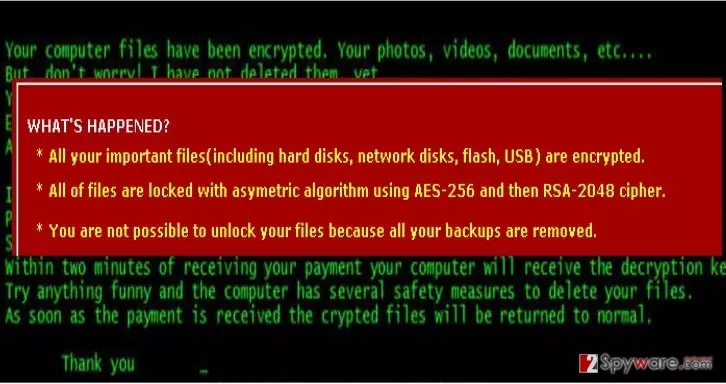
Additionally, once in the system, CryptFIle2 malware ads .id_[VICTIM_ID]_[EMAIL].scl extension to each encrypted files, so it is not difficult to distinguish which files have been corrupted. Moreover, the virus plants the following files: help_your_files.html and help_your_files.txt on the infected system. They provide extensive instructions how to proceed with the payment in order to retrieve the files. It has become a trend recently for hackers to use emails for communicating with the victims instead of employing anonymous domains. We provide the addresses of these emails in order for you to get acquainted with them: pchelp_@_post.com, erx_@_usa.com. If you spot them in some forum or advertising website, they should become an obvious hint to stay away from those domains.
When did the virus infect my computer?
Your computer might have got entangled by CryptFIle2 ransomware as a result of surfing peer-to-peer sharing websites, and downloading torrents. Additionally, a popular distribution channel has been spam emails. Usually, they contain a zip folder or doc file which contains the ransomware within it. Be aware that that those emails might be every persuasive. However, retain cautiousness.
Additionally, CryptFIle2 might have been travelling disguised in trojans or computer worms. Though, usually, the former wreck registry files and steal personal data, trojans are also capable of carrying ransomware within them. Since they provide necessary disguise, some security programs might fail to detect the approaching menaces. If you want to protect your computer from these highly bothersome threats, you should install an anti-spyware program. So, finally, we have reached CryptFIle2 removal section.
Is there a way to remove CryptFIle2?
Since ransomware got into your computer, you should not expect that you will get rid of it quickly if you opt for manual instructions. First of all, you need to find clear and proper CryptFIle2 removal guidelines developed by cyber security professionals. That is why we suggest you to save time and get rid of the virus automatically. The security software will eliminate CryptFIle2 virus within a moment. What is more, it is also capable of detecting malicious files more easily and thoroughly unlike an ordinary user. If you do not specialize in programming, this option might be the right choice for you.
Did this guide help?
Be the first to comment