

Personal Defender 2009 – malware disguised as a security tool
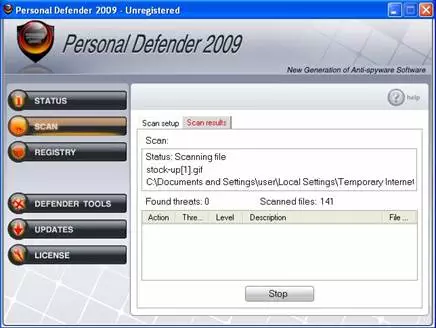
Personal Defender 2009 is falsely advertised as a useful addition to your computer. Its developers claim that it can prevent severe malware from infecting your device and repair Windows Registry problems. In fact, all this fake security tool does is show falsified virus scan results and non-existing system errors.
Once Personal Defender 2009 gets on a computer, it starts offering the paid version of the software. It might appear to be legitimate anti-spyware, but it is nonfunctional. Do not pay for the full version unless you want to support malware creators. This potentially unwanted program imitates system scans and reports large numbers of infections found on board. You can ignore every message generated by this infection because they are all fake.
| name | Personal Defender 2009 |
|---|---|
| Type | PUP, rogue antispyware tool |
| Purpose | Scare users into buying its licensed version by showing fictional virus scan reports and notifications |
| Risks | Monetary losses, malware infection, privacy issues |
| Elimination | Scan your device in question with legitimate AV software to remove this PUP along with any other unwelcomed guests |
| System repair | To fix all damage caused by this fake antispyware tool, use the powerful FortectIntego system optimizer |
PersonalDefender2009 is not able to infect computers on its own. Instead, it tricks people into downloading the program voluntarily. It is delivered by the trojan mupd1_2_1711951.exe, which mimics Windows Firewall notifications and asks if user wants to enable protection. By clicking “Enable Protection”, people actually allow the trojan to install the article's culprit.
Not only Personal Defender 2009 is useless as antispyware software, but it is also malicious. It slows down the system performance and limits internet connection. It displays many pop-ups that make using a computer an impossible task. This cyber threat can also hijack a web browser and redirect it to personaldefender2009.com, defender-review.com, or other affiliated sites.
It doesn't matter whether you willingly installed this fake anti-malware software or it got on your device unknowingly. The important thing is to remove it immediately. You can do that by scanning your device with a legitimate security tool such as MalwarebytesMalwarebytes or MalwarebytesMalwarebytes.
Once the removal is finished, you should take care of the overall health of your device because fake programs like Personal Defender 2009 can cause havoc on core system files and settings. To fix all system issues automatically, use a system repair tool.
Uninstall from Windows
Uninstall from Windows 10/8:
- Type Control Panel into the Windows search box and open the result.
- Under Programs, select Uninstall a program.


Uninstall from Windows 7/XP:
- Click on Windows Start > Control Panel (Windows XP users should click on Add/Remove Programs).
- In Control Panel, select Programs > Uninstall a program.


Remove the unwanted program:
- In the Programs and Features window, look for any recently installed suspicious entries, select them, and click Uninstall.
- If User Account Control appears, click Yes to confirm, then complete the removal.


Did this guide help?
Be the first to comment