

Windows Advanced Security Center – rogue security software that imitates legit Windows products
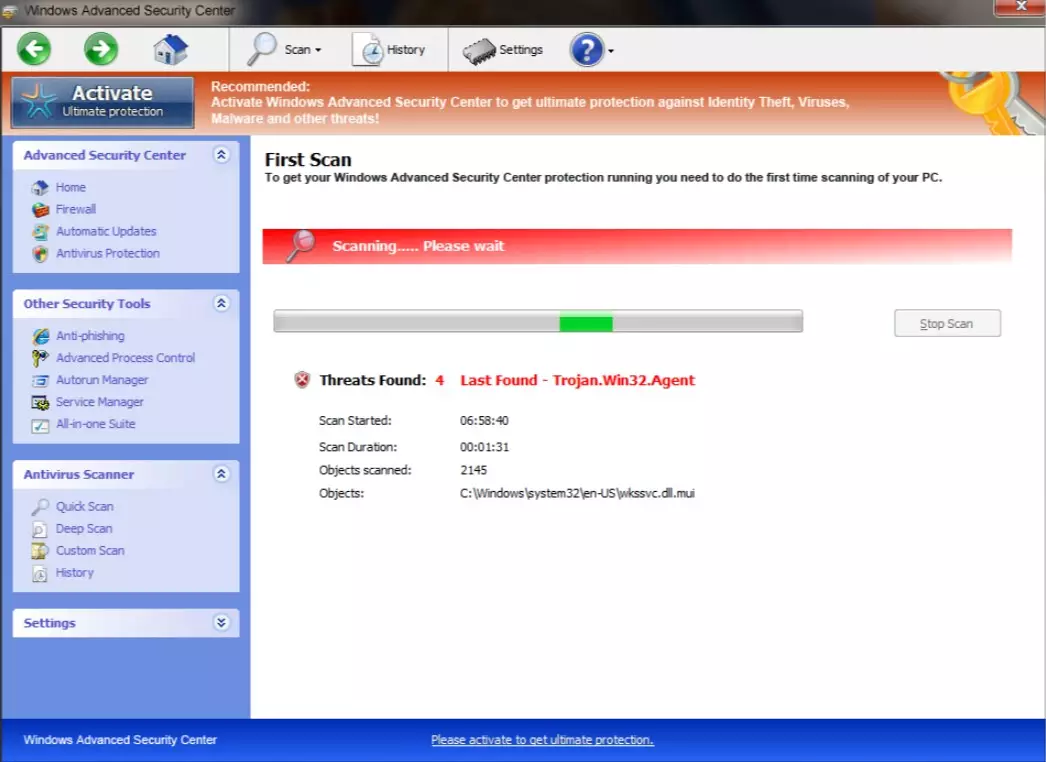
Windows Advanced Security Center is a fake system security program associated with Home Security Essentials. You can get infected with this virus through freeware or shareware downloads, peer-to-peer software, malicious or hacked websites, deceptive ads, etc. This infection pretends to be a legitimate Windows product and imitates all the features that a real Microsoft product provides.
Windows Advanced Security Center imitates Firewall, Automatic Updates, Antivirus Protection, Anti-phishing, Advanced Process Control, Autorun Manager, Service Manager, All-in-one Suite, Quick Scan, Deep Scan, Custom Scan, etc. All these features from the bogus product are fake too.
As with all rogue anti-spyware products, this virus will show you numerous fake popups, alerts, and notifications, which will state that your computer is infected with lots of parasites. It may start a fake scan of the system and find imaginary threats. When you click on the alerts, the rogue antispyware software asks you to purchase its paid version to remove all of them. Please don't fall for this scam and remove the infection with our help.
| name | Windows Advanced Security Center |
|---|---|
| Type | Rogue antispyware, fake security tool |
| Main goal | Scare its users into purchasing its worthless paid version |
| Risks | Because this AV engine is fake, your device could be infected with real and hazardous malware while it's operational |
| Elimination | You have to perform a full system scan with reliable anti-malware software in Safe Mode with Networking to remove this dangerous threat |
| System Health fix | To revert any changes this rogue tool has made to the Registry and other core system files and settings, please use the FortectIntego system repair tool |
Windows Advanced Security Center imitates the real Security Center, and it's tough to see the difference. When infected, it can replace the legal Windows product with the fake one. Graphic user interfaces are the same. Fake Virus will state that your Firewall is off and your Virus protection is Off.
Trojan installer is so sophisticated that before installing, it detects your current system and installs the fake one according to your system. Systems Affected: Windows 9x, 2000, XP, Vista, Windows 7. This fake security software can cause many problems, as when it's installed, your system is left vulnerable to real malware. Thus be cautious when installing any new products.
Here are a few tips on how to separate a phony security tool from a legitimate one:
- You should know that a legal product does not open by itself without any user interaction.
- Legit software never asks you to purchase, upgrade, subscribe or renew from its own interface. Fake one asks you to purchase a Paid license for the specific rogue security software that installed it in the first place.
- Recent versions are almost perfect replica, but they still have some grammar errors and some bugs in graphics.
The removal process of Windows Advanced Security Center is a hard task. Even with automated tools. It disables all anti-spyware and anti-virus software, including the default one. Thus to remove it, you have to reboot your PC in Safe mode with Networking. If you're unsure how that's done, use our guide below.
Then download a reliable security tool such as MalwarebytesMalwarebytes or SpyHunterCombo Cleaner, install and update it, and perform a full threat scan. Either of these free apps will identify the phony antispyware tool and remove it. Then run system diagnostics with the FortectIntego PC tune-up software to ensure that your device runs smoothly and doesn't exhibit any strange behavior.
Did this guide help?
Be the first to comment