

Agafurretor.com ads can be the result of an adware infection that displays advertising pages to users, often popping up in a new tab or window

Agafurretor.com ads are bothering you? Well, that all started with an adware infection. You know, the pesky piece of software that installs without your consent and causes you to be bombarded by annoying ads? Well, it did just that. This particular type of malware is a little more clever than most – after installation, it will monitor your browsing habits and deliver targeted advertisements based on the sites you frequently visit.
In addition to being completely obnoxious, this website can link you to malicious downloads in some cases. Thankfully there are tools available for free online that can protect us from these types of infections: it might be your own fault or anyone else that's using your device in question. Commercial content from this website is shown when a computer or smartphone is infected with a potentially unwanted program (PUP)[1] known as adware. Windows, Mac, and Android devices can be affected by it.
It can be annoying and risky to have this one running on your device. You could end up with malware if you click any of the ads or get redirected to bad sites by them too! We're going at giving you some quick tips for removing this adware from your computer. It's important for us to mention here that its delivered content may harm both yourself and also your devices if you click on them – please keep away from clicking anything at this stage.
| name | Agafurretor.com |
|---|---|
| Type | Adware, redirect virus |
| Symptoms | Redirects to various untrustworthy domains with questionable contents; intrusive ads; diminished device performance |
| Risks | Privacy issues, malware, or PUP infections |
| Elimination | Remove adware by scanning your device with reliable anti-malware software. To clear your browsers from questionable addons, please use our guides |
| System fix | PUPs edit system files and cause abnormal device behavior, such as crashing, overheating, severe lag, etc. Resolve all these issues by running system diagnostics with the time-tested FortectIntego software |
Software bundles are a great way for developers to include more apps in their software. However, if you don't know the name of an app and want it installed on your device without any additional programs be bundled with it then choose Advanced or Custom installation mode instead of Standard or Recommended when installing new applications (or else other suspicious-looking apps will also get downloaded).
If you tend to rush through installations and can't be bothered otherwise, there's another way to evade PUPs – installing the MalwarebytesMalwarebytes anti-malware software. It will prevent you from visiting high-risk websites, block installations of adware and similar shady products, and protect your device from hazardous malware.[2]
You can also use this security software to remove Agafurretor.com ads and adware causing them. All you have to do is download the security app, install it, update its virus definition database, and perform a full system scan. It will automatically find and isolate all threats lurking on your device and suggest removing them. Please do so.
If you want to get rid of the intruder manually, feel free to do so. Still, please be warned that any overlooked entries or other potentially unwanted programs could renew the infection. If we didn't overpersuade you, then at least let us help you by providing detailed instructions for that. If your infected device is running on Windows 10/8, please do the following:
- Enter Control Panel into Windows search box and hit Enter or click on the search result.
- Under Programs, select Uninstall a program.
- From the list, find the entry of the suspicious program.
- Right-click on the application and select Uninstall.
- If User Account Control shows up, click Yes.
- Wait till the uninstallation process is complete and click OK.


There was a time when Apple devices were impenetrable to viruses, but those days are long gone. If you see Agafurretor.com ads on your Mac, it's infected with adware. You can remove it by scanning your device with the SpyHunterCombo Cleaner security application or by using these instructions:
- From the menu bar, select Go > Applications.
- In the Applications folder, look for all related entries.
- Click on the app and drag it to Trash (or right-click and pick Move to Trash)


Once again, we highly suggest that you pick the automatic removal by using trustworthy anti-malware software. Only then can you rest assured that all associated files and entries are eliminated and that no other PUPs or more severe infections are left behind.
How to deal with browser-based infections and restore your device's overall health?
When the adware is installed on your device, it might cause all sorts of problems. For example, it could gather your browsing-related data and use it for marketing purposes, i.e., customizing ads that will be irresistible to you. It could also redirect you to various shady websites with ill intentions.
Agafurretor.com redirect could cause you to visit websites that may trick you into accepting their notification by showing various misleading page backgrounds and prompts. If you enable alerts from such domain, you will immediately start receiving tons of commercial content right on your computer desktop or phone screen.
Therefore, please don't press the allow button on any portal that you don't visit frequently and don't trust. If you did that or added any questionable extensions, our detailed instructions below will help you remove them from your browser Google Chrome browser:
- Open Google Chrome, click on the Menu (three vertical dots at the top-right corner) and select More tools > Extensions.
- In the newly opened window, you will see all the installed extensions. Uninstall all the suspicious plugins that might be related to the unwanted program by clicking Remove.
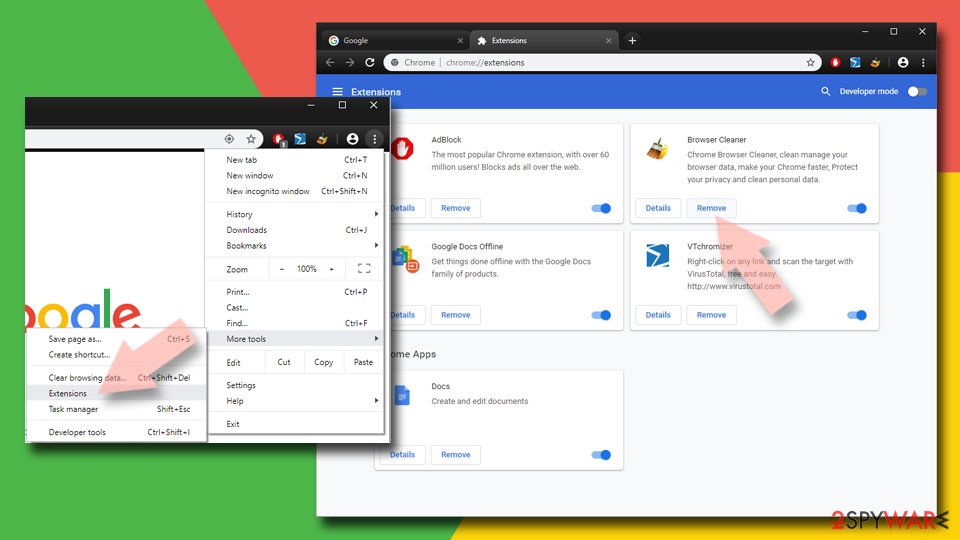

If Agafurretor.com ads still persist even after you've removed adware and suspicious extension, please try clearing your browser's cache. If you're not sure how that's done, please follow these steps:
- Click on Menu and pick Settings.
- Under Privacy and security, select Clear browsing data.
- Select Browsing history, Cookies, and other site data, as well as Cached images and files.
- Click Clear data.


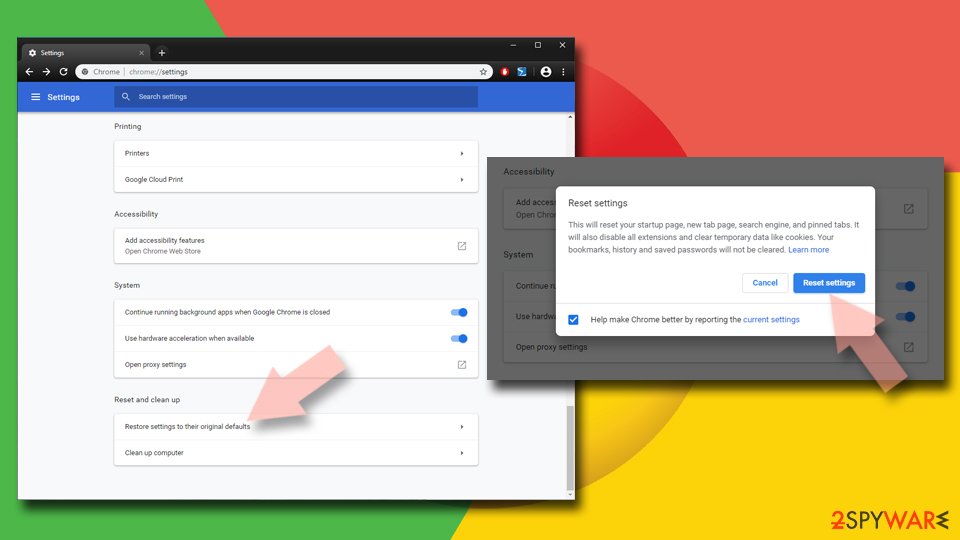
If all fails, you can completely reset Google Chrome which will delete all unwanted, suspicious, or malicious components:
- Click on Menu and select Settings.
- In the Settings, scroll down and click Advanced.
- Scroll down and locate Reset and clean up section.
- Now click Restore settings to their original defaults.
- Confirm with Reset settings.

If you can't be bothered with cleaning the browsing history and other related components manually, there's software that could help you do that automatically. Both other cybersecurity experts[3] and we highly recommend using the time-proven FortectIntego system diagnostics tool that will not only delete all tracking cookies stored by hazardous portals but will also repair outdated or corrupted system files, broken DLLs, registry values, and so much more.
If these changes made by adware are left unattended, your device might exhibit various abnormal behavior, including freezing, BSoDs, severe lag, and other system failures. Thus we highly recommend downloading this handy tool and giving it a go:
- Download the application by clicking on the link above
- Click on the ReimageRepair.exe
- If User Account Control (UAC) shows up, select Yes
- Press Install and wait till the program finishes the installation process
- The analysis of your machine will begin immediately
- Once complete, check the results – they will be listed in the Summary
- You can now click on each of the issues and fix them manually
- If you see many problems that you find difficult to fix, we recommend you purchase the license and fix them automatically.


You might be using multiple browsers, so cleaning each of them might take a lot of time. However, all browser-related issues will be resolved within a couple of minutes by using this PC repair software. And it's free to test it out, thus don't hesitate and use it, so your device runs as good as new.
Did this guide help?
Be the first to comment