

Sspq ransomware – a dangerous infection developed to racketeer Bitcoins
Sspq file virus is a Windows computer infection that is usually downloaded through file-sharing platforms. When it's executed, the ransomware immediately starts what it's developed for – encrypting all personal files (databases, documents, pics, archives, etc.) on the machine. Only system files are not locked but heavily altered to establish persistence.
During the encryption, original filenames are appended with the .sspq extension, and thereby they're rendered useless, i.e., inaccessible. However, victims of this cyber attack shouldn't worry as the contents of the data are not altered. Thus after using a necessary decryption tool, it can be unlocked and used again.
Developers of this nasty file-locking parasite want to persuade you that the only way to regain access to the encrypted files is by purchasing their decryption software. And they're trying really hard to convince you that there's no other way and that they will send the required software after payment through cryptocurrency Bitcoin is received.
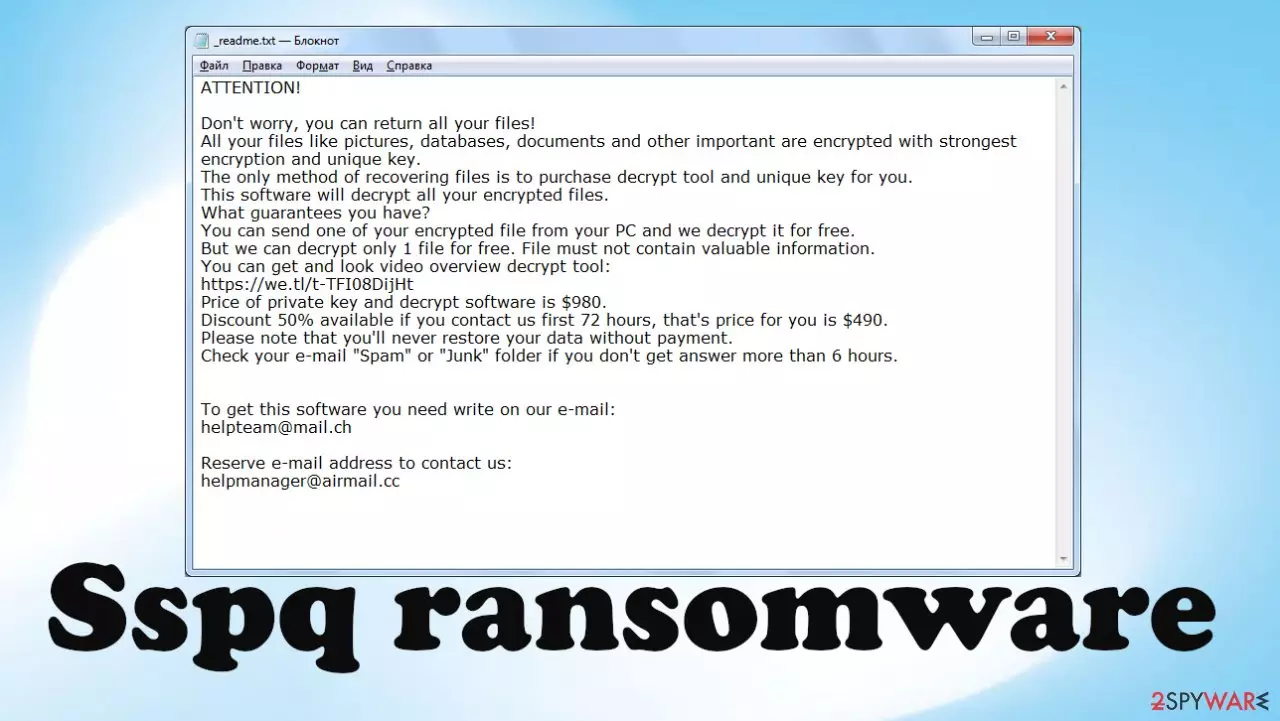
All cybercriminal instructions and demands can be seen in a ransom note, titled _readme.txt, that appears after the ransomware has successfully locked stored data:
ATTENTION!
Don't worry, you can return all your files!
All your files like pictures, databases, documents and other important are encrypted with strongest encryption and unique key.
The only method of recovering files is to purchase decrypt tool and unique key for you.
This software will decrypt all your encrypted files.
What guarantees you have?
You can send one of your encrypted file from your PC and we decrypt it for free.
But we can decrypt only 1 file for free. File must not contain valuable information.
You can get and look video overview decrypt tool:
hxxps://we.tl/t-9CYW99VhUR
Price of private key and decrypt software is $980.
Discount 50% available if you contact us first 72 hours, that's price for you is $490.
Please note that you'll never restore your data without payment.
Check your e-mail “Spam” or “Junk” folder if you don't get answer more than 6 hours.To get this software you need write on our e-mail:
helpteam@mail.chReserve e-mail address to contact us:
helpmanager@airmail.ccYour personal ID:
As you can see, the threat actors behind the Sspq file virus are trying to scare their victims and push them into making rash decisions. The ransom amount, whether with the 50% discount ($490) or without it ($980), might seem like a reasonable amount of money to pay for your precious data.
But please don't contact the criminals by the two emails (helpmanager@airmail.cc or helpteam@mail.ch), or forward them the money. If you do that, you would be motivating them to infect more computers of innocent people and providing funding for research of more effective distribution techniques and the development of more devastating malware.

As a matter of fact, you can recover .sspq files without losing a dime. Since this cryptovirus belongs to the Djvu ransomware family, companies such as Emsisoft have committed their time to help people get from this uncomfortable predicament scotch-free.
We'll tell you all about their free decryptor and teach you how to use it, but first, you have to remove the ransomware. We've been in this business for two decades, so we know a thing or two about this malware. Please stick to our detailed guidelines, and the infection will be gone in a couple of blinks. However, if you skip any steps, the virus might renew itself, and you'll have to start over.
| name | Sspq virus |
|---|---|
| Type | Ransomware, file-locking parasite |
| Family | Djvu/STOP |
| Infection symptoms | Personal files are renamed with a strange extension and can't be opened; the appearance of a ransom note on the desktop; can't launch security software or visit security-related pages |
| Ransom note | _readme.txt |
| Ransom amount | $490 if the victims establish contact within three days of the attack. Otherwise, the price is $980 |
| Appended file extension | .sspq |
| Data recovery | There are other ways to restore your files, and criminal intervention is not necessary. All plausible techniques are either within the article or below it, in the instructions section |
| Elimination | You should entrust the removal of such devastating computer infection to dependable anti-malware software to ensure its complete eradication |
| System health | While the system files don't get encrypted, they're heavily edited. Use the FortectIntego system diagnostics software to run a check and resolve all irregularities |
Remove Sspq virus so you could proceed to data recovery
The first thing you need to do after spotting a ransomware infection is disconnecting all attached storage devices, such as USB drives, NAS, and similar. Then take a seat, relax, and know that it all be over soon enough. Panicking or making irrational decisions won't get you anywhere.
If you've kept backups of all your crucial data, then this removal will be swift, and you can skip the last part about file decryption as you can restore files from backups after the virus is eliminated and the device's system files are back to normal.
When the ransomware is done encrypting files, you'll see the ransom note (_readme.txt.) on the desktop and in some affected folders. Then connect a USB drive and extract all crucial files. You will need them after you terminate the infection.

To remove Sspq ransomware and prevent its renewal, you must use a trustworthy anti-malware tool. According to many user reviews, one of the best tools on the market today is the MalwarebytesMalwarebytes security software. Thus we recommend downloading and installing it.
Afterward, update the virus definition database with the latest signatures. Only then perform a full system scan. It will identify all ransomware virus files, isolate them, and suggest you remove them. But, again, please stick to what the anti-malware software recommends doing.
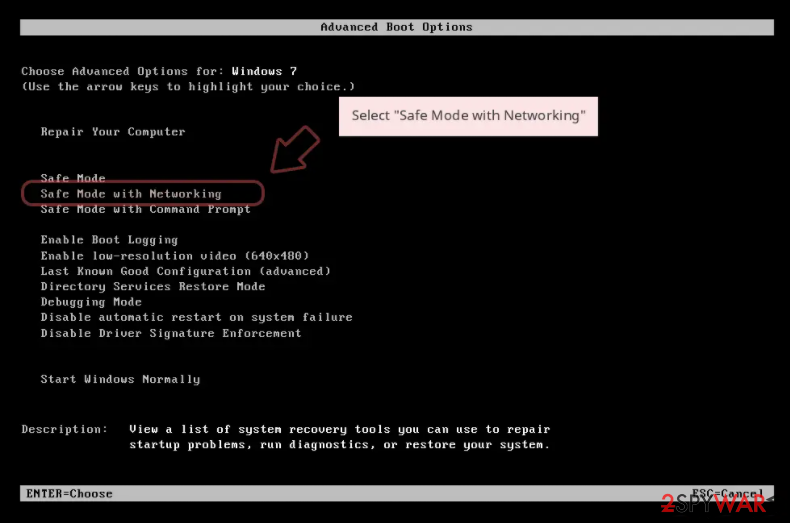
Some victims of Djvu ransomware have reported that it prevents them from opening security-related websites, and thus they can't download the recommended software. If that happens to you, download the software and remove the virus after accessing Safe Mode with Networking. For Windows 7/Vista/XP, please do this:
- Click Start > Shutdown > Restart > OK.
- When your computer becomes active, start pressing the F8 button (if that does not work, try F2, F12, Del, etc. – it all depends on your motherboard model) multiple times until you see the Advanced Boot Options window.
- Select Safe Mode with Networking from the list.

If the operating system on your infected device is Windows 10 or 8, please take these steps to access the Safe Mode with Networking:
- Right-click on the Start button and select Settings.
- Scroll down to pick Update & Security.
- On the left side of the window, pick Recovery.
- Now scroll down to find the Advanced Startup section.
- Click Restart now.
- Select Troubleshoot.
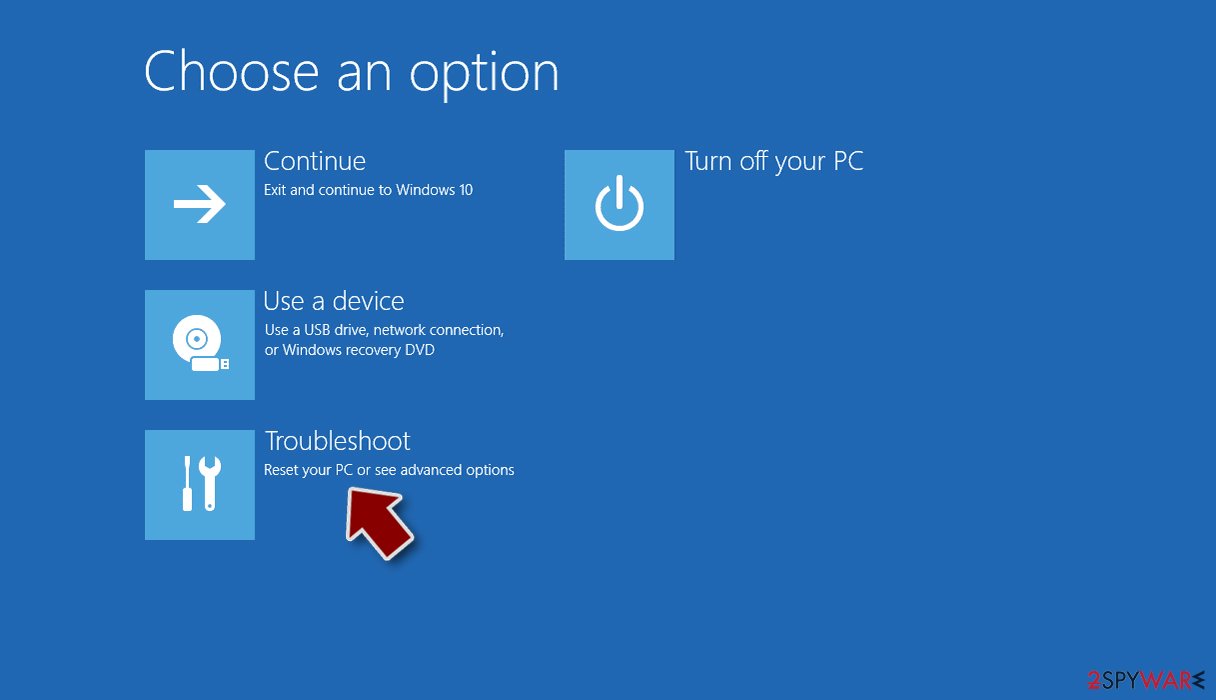
- Go to Advanced options.
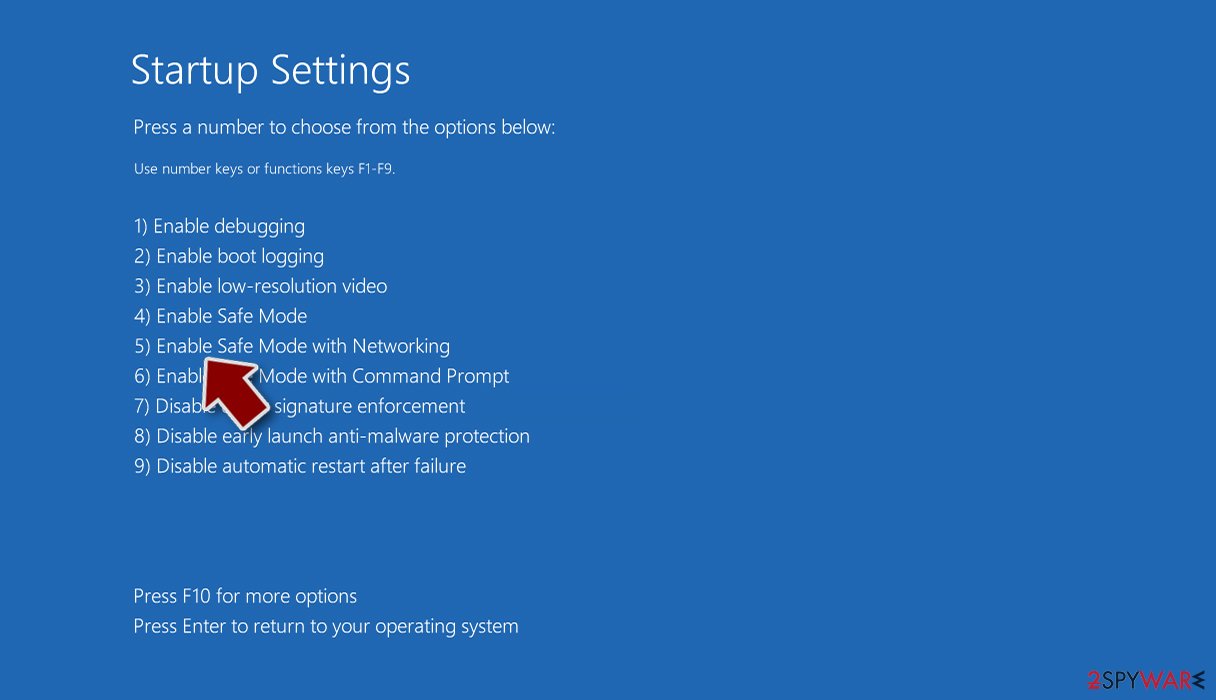
- Select Startup Settings.
- Click Restart.
- Press 5 or click 5) Enable Safe Mode with Networking.


Once you successfully reboot your PC in Safe Mode with Networking, launch SpyHunterCombo Cleaner or another reputable antivirus, update it with the latest definitions, and perform a full system scan to remove Sspq file virus and all its malicious components. Nowadays, such software is a must for all devices regularly used on the internet.
A proper anti-malware tool will protect your devices from various types of malware,[1] prevent you from visiting shady websites and installing potentially unwanted programs (PUPs).[2] Please remember to regularly update the virus database of your chosen AV software and scan your device with it at least a couple of times per week.
Furthermore, as we've stated in the opening sentence, Djvu family ransomware spreads through file-sharing platforms. So, of course, we advise our readers not to use high-risk sites like torrent portals. Still, if you can help yourself, anti-malware software would identify ransomware payload camouflaged as any file and isolate it before it could do any harm.
Repair corrupted system sections and unlock encrypted files
If you've read this article, you might already know that Djvu family ransomware does extensive damage to system files to establish persistence. The Sspq ransomware is not an exception. It makes alterations to various system files and settings. These changes might result in various system failures, including:
- Blue Screens of Death (BSoDs);
- crashing,
- freezing,
- severe lag,
- complete system failure.
Therefore they need to be mitigated as soon as possible. But only after you completely remove the infection with security software of your choice. We, along with cybersecurity experts from DieViren,[3] highly recommend using the FortectIntego system tune-up software to repair the damage caused by the ransomware infection.
By using this tool to scan your device at least a couple of times per week, you can rest assured that all system settings and files are at bay and that no tracking cookies are collecting your browsing-related data. Here's what you need to do to get your computer back on its feet:
- Download the application by clicking on the link above
- Click on the ReimageRepair.exe
- If User Account Control (UAC) shows up, select Yes
- Press Install and wait till the program finishes the installation process
- The analysis of your machine will begin immediately
- Once complete, check the results – they will be listed in the Summary
- You can now click on each of the issues and fix them manually
- If you see many problems that you find difficult to fix, we recommend you purchase the license and fix them automatically.


It would be best if you made a habit of performing system tune-up at least twice a week. If you're not fond of this software, use a time-tested app. But make sure to fix Registry errors, broken DLLs, and other core system settings, so your device runs as new.
After removing the ransomware infection and fixing all system irregularities that it caused, you can proceed to data recovery. If you've kept backups, now it's safe to retrieve your data from them. If you didn't, you would have to use Sspq file recovery software.
As we've mentioned before, there are alternative ways to recover your data, so there's no need to pay the assailants. But, in fact, there's no guarantee that their deliver decryption software would work or that they would honor their word and stick to their end of the bargain.
The main tool that helps people recover their encrypted data by Djvu family ransomware is the free decryptor from Emsisoft. Since the Sspq file virus is brand new, there's no guarantee that the free software will decrypt your files, but it's your best option. Please download it and try it as instructed:
- Download the app from the official Emsisoft website.
- After pressing the Download button, a small pop-up at the bottom, titled decrypt_STOPDjvu.exe, should show up – click it.
- If User Account Control (UAC) message shows up, press Yes.
- Agree to License Terms by pressing Yes.
- After Disclaimer shows up, press OK.
- The tool should automatically populate the affected folders, although you can also do it by pressing Add folder at the bottom.

- Press Decrypt.



Using the free Emsisoft decryption software could have three outcomes. First, if a “Decrypted” sign shows up, congrats, the tool successfully unlocked your files, and you can access them without any limitations. If “Error: Unable to decrypt file with ID:” appears, that means that no one has provided a sample of Sspq ransomware to the company.
As soon as that's done, Emsisoft will break the algorithm, and you'll be able to unlock your data. Thus, be patient and try once more in a couple of days or so. And lastly, if you see the “This ID appears to be an online ID, decryption is impossible” message – this particular decryptor won't be able to help you.
That shouldn't get you down because you can try other software and Windows features to recover Sspq files. All possible means that we know of are presented in detail at the bottom of the page in our instructions section. We hope that this article helped you to deal with the ransomware infection. If you have any questions, please feel free to contact our staff.
Did this guide help?
Be the first to comment