

Higher Captcha-Settle pop-ups – the outcome of an adware infection

Many users have complained[1] that after clicking a link in Google search (and possibly other search providers), they were redirected to Highercaptcha-settle.com website. This happens because users have a potentially unwanted program[2] installed on their devices.
Adware can cause various shenanigans, from redirects to questionable or even dangerous domains to showing bombarding desktops or browsers with tons of deceptive ads. This article will explain in detail how to deal with such cyber threats and enlighten you more about them.
Higher Captcha Settle is a push notification virus that tries to trick its visitors into pressing the Allow button, which would enable its alerts. Push notifications are a great service that brings the latest sports updates, breaking news, special deals, and other useful information straight to your desktop or phone screen.
Unfortunately, that not the case with the article's culprit's pop-ups. They display misleading ads that appear in the top-right or bottom-right corners of your desktop or directly on your screen. The ads have nothing in common with the portals you'll be redirected to if they're clicked.
And it's hard not to do that, as they could have various alluring messages. They're impossible to close in some cases, as the “X” button doesn't work properly. It either does nothing or opens an affiliate site. If you encounter Higher Captcha Settle pop-ups, please don't interact with them in any way.
| name | Higher Captcha-Settle pop-ups |
|---|---|
| Type | Push notification virus, PUP, adware |
| Symptoms | Redirects to questionable websites; diminished devices performance and the browsing speed; ads in the form of notifications |
| Risks | Redirects might lead to dangerous sites riddled with malware. Data-tracking might result in privacy loss |
| Distribution | Software bundles, fake Flash Player updates |
| Elimination | Use reliable anti-malware software to remove adware and every other unwelcomed guest |
| System health | By using the FortectIntego repair tool, you can rest assured that all system files and settings are properly maintained |
Instructions for adware removal
The first step to remove Higher Captcha-Settle pop-ups is to get rid of the potentially unwanted program that's causing redirects to this website. Manual removal might be impossible as adware could be camouflaged as a legitimate app installed on your device.
PUPs aren't as dangerous as malware as they're not malicious themselves. Still, their caused redirects might lead to malicious sites where users could be exposed to various tech support scams, push notification viruses, and serious infections.
That's why we recommend using a reliable anti-malware tool to identify and terminate it. The MalwarebytesMalwarebytes security software has a ton of great reviews and is capable of locating and eliminating not only PUPs but also severe malware, such as ransomware, trojans, and alike.
Thus to remove Higher Captcha Settle adware, you should download the AV tool, install it, update its virus definitions database, and perform a full threat scan. It will be finished within a couple of minutes (depending on your device's storage capacity, speed, etc.), and the program will suggest removing all suspicious apps/entries. Please comply with the recommendations.

Guidelines to remove Higher Captcha-Settle notifications
If you, your children, or anyone else that might have used your device has pressed the allow button when redirected to Highercaptcha-settle.com push notification virus site, you have to remove them from your browser. Unfortunately, there's no software that could help you do that.
Therefore, you'll have to do it yourself. But we'll help you. Since this PUP can infect any browser (Chrome, Safari, Firefox, etc.), this section of the article contains illustrated instructions on how to remove its notifications. For peace of mind, if you have all the below-mentioned browsers, check all of them.
Remove Highercaptcha-settle.com pop-ups from Google Chrome as follows:
- Open Google Chrome browser and go to Menu > Settings.
- Scroll down and click on Advanced.
- Locate the Privacy and security section and pick Site Settings > Notifications.
- Look at the Allow section and look for a suspicious URL.
- Click the three vertical dots next to it and pick Block. This should remove unwanted notifications from Google Chrome.


Push notification viruses can also infect smartphones. The difference is that the deceptive ads would appear straight on your screen in the form of notifications. They would also contain catchy headlines but redirect to the same affiliate sites that may endanger your safety and privacy. Therefore you have to remove them from your Android device like this:
- Open Google Chrome and tap on Settings (three vertical dots).
- Select Notifications.
- Scroll down to the Sites section.
- Locate the unwanted URL and toggle the button to the left (as shown below).
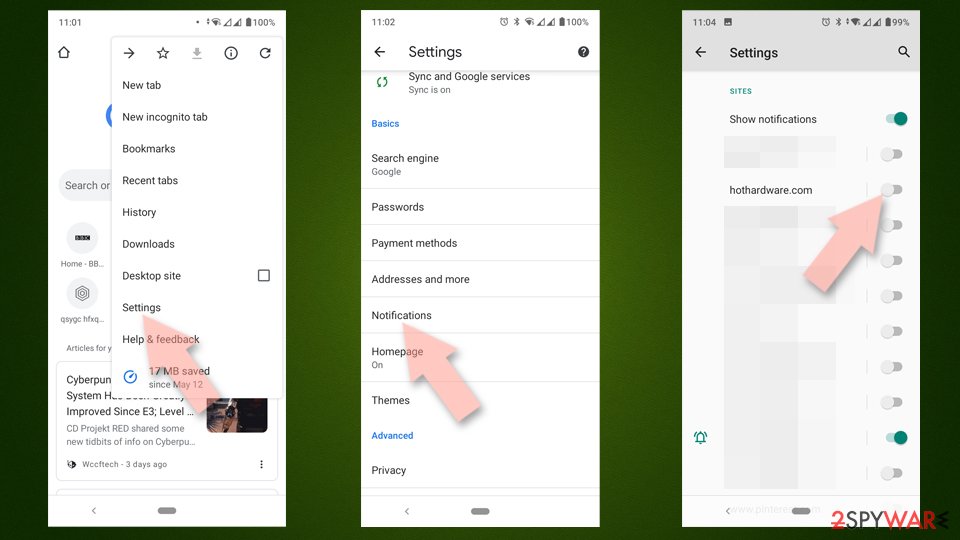

If you were redirected to Highercaptcha-settle.com and accepted its notification while using the Mozilla Firefox browser, you will need to take these actions to remove the annoying notifications:
- Open Mozilla Firefox and go to Menu > Options.
- Click on Privacy & Security section.
- Under Permissions, you should be able to see Notifications. Click the Settings button next to it.
- In the Settings – Notification Permissions window, click on the drop-down menu by the URL in question.
- Select Block and then click on Save Changes. This should remove unwanted notifications from Mozilla Firefox.


And last but not least – the Safari browser. For a long time, Apple devices were impenetrable for various computer viruses. But those days are long gone. Macs, iPhones, and other popular products are susceptible to infections, as is the Safari browser.
Therefore, after you remove adware with reliable security software such as the SpyHunterCombo Cleaner, please follow these instructions to remove notifications of the treacherous site from your browser so that the annoying ads would finally stop interrupting you:
- Click on Safari > Preferences…
- Go to the Websites tab and, under General, select Notifications.
- Select the web address in question, click the drop-down menu and select Deny.


Repair damages caused by various infections
Once all of the prior steps are completed, the adware caused redirects to untrustworthy sites, and the Higher Captcha-Settle pop-ups are gone, you should take care of your device's overall health. That must be done as each dangerous site leaves its imprint on the device (tracking cookies), and potentially unwanted programs could leave tons of traces in the various core system settings.
Finding and removing all those traces manually could take lots of time and require extensive IT knowledge. That's why cybersecurity experts[3] highly recommend repairing all system-related irregularities and removing tracking cookies automatically.
For this mission, they recommend using the patented FortectIntego system diagnostics tool. It will restore corrupted system files, fix broken DLLs, take out the trash, and make other essential actions needed to ensure a stable working environment. Here's what you need to do:
- Download the application by clicking on the link above
- Click on the ReimageRepair.exe
- If User Account Control (UAC) shows up, select Yes
- Press Install and wait till the program finishes the installation process
- The analysis of your machine will begin immediately


By following all these steps, your device will be as good as new. In the future, please be very attentive when installing new applications as software bundling is getting more and more popular. This technique doesn't disclose all apps that are preselected for installation, and as soon as you hit the Recommended or Quick installation button, all of them end up on your device.
Few good options to avoid potentially unwanted programs traveling along with legitimate apps are choosing the Advanced or Custom installation and going step-by-step through the process by deselecting all untrustworthy or suspicious apps. Another great way is to get yourself a trustworthy AV tool such as the MalwarebytesMalwarebytes to protect you and your device from PUPs and more severe infections.
Did this guide help?
Be the first to comment