

Doydo ransomware encrypts user data and demands Bitcoin
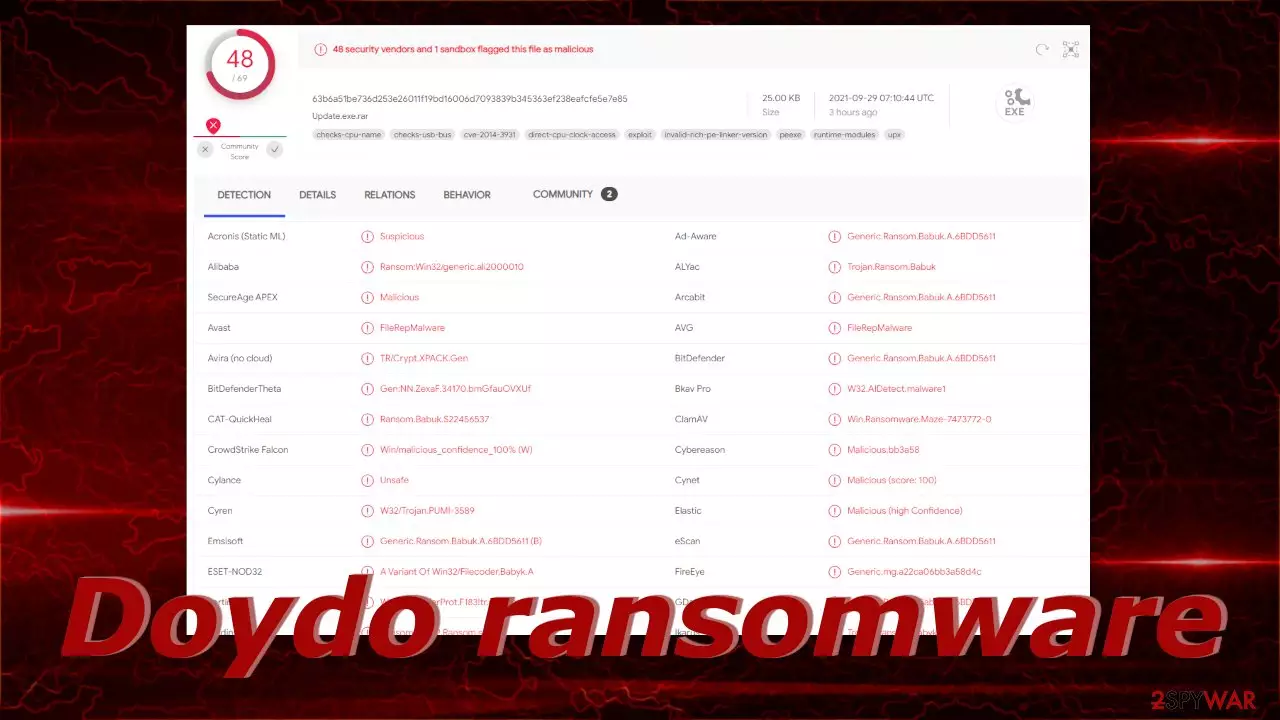
In recent years, ransomware attacks have become increasingly popular among threat actors for their rewards. Cybercriminals encrypt users' personal data like photos, videos, documents, and others, making it impossible to open or view. Seems that this type of malware is especially damaging to people who do not have their data backed up and big companies as criminals blackmail them and threaten to release the information if they do not pay huge sums of money.
Doydo ransomware is a new strain detected by security vendors and it belongs to the Babuk Ransomware family, which is notorious for huge attacks in a variety of industries. When the virus infiltrates the victims' devices it almost immediately starts the encryption process using complicated algorithms. The affected files get appended with the .doydo extension, so for example, if a file was previously named picture.jpg after the encryption is complete, it would look like this – picture.jpg.doydo. The icons also change to blank pages so you cannot see the content even in preview mode. If you try to open the damaged files, a prompt appears saying that Windows is unable to open the file.
Shortly after, a ransom note Help Restore Your Files.txt is generated on the user's PC to inform them of what has happened and what they should do if they want to recover the files. This particular ransomware's developers ask for $300 in Bitcoin[1] for a decryption key[2] or software. We always suggest against contacting the threat actors as they cannot be trusted. Past ransomware victims report that they never heard back after sending the money to criminals, so you risk not only losing your files but your money too.
| NAME | Doydo |
| TYPE | Ransomware, cryptovirus, data locking malware |
| MALWARE FAMILY | Babuk Ransomware |
| FILE EXTENSION | .doydo |
| RANSOM NOTE | Help Restore Your Files.txt |
| RANSOM AMOUNT | $300 in Bitcoin |
| DISTRIBUTION | Infected email attachments, peer-to-peer file sharing platforms, torrents, malicious ads |
| FILE RECOVERY | It is next to impossible to recover the files if you do not have backups or the decryption keys were not leaked; in some cases, recovery is successful with third-party software |
| ELIMINATION | Scan your machine with anti-malware software to eliminate the virus safely; this will not recover the locked files |
| SYSTEM FIX | You can avoid windows reinstallation with FortectIntego maintenance tool, which can fix damaged files and system errors |
The Russian cybercrime group behind the Babuk ransomware family
The hacker group became known in 2021 but it is believed that attacks started at the end of 2020. The cybercriminals from Russia targeted big companies and demanded ransoms as large as $85,000 in Bitcoin. The attackers also targeted Washington DC's Metropolitan Police Department and later planned to attack corporations in the transportation, healthcare, electronics, and agricultural sectors.
When a group infiltrated MPD's networks, they threatened to make confidential information public, including names of suspected gang member informants and intelligence from crime briefings. But later the Babuk's ransomware source code has been uploaded to VirusTotal,[3] making it available to all competitors. It is unclear why that happened, some say that the group is changing direction and will no longer encrypt information on networks.
After a while, the ransomware developers state that the Babuk project will be closed, its source code will be available publicly and everyone will have the ability to make their own product based on the original code. Doydo virus belongs to the Babuk malware family because it shares similarities in its code and methods.
The ransom note

The full Help Restore Your Files.txt ransom note read as follows:
All of your files have been encrypted!
The harddisks of your computer have been encrypted with an military grade encryption algorithm.
There is no way to restore your data without a special
software Doydo.To purchase your key and restore your data, please follow these three easy:
1. The price for the software is $300 dollars USD. Payment can be made in Bitcoin only.
2. Bitcoin Address: 3JG36KY6abZTnHBdQCon1hheC3Wa2bdyqs
3. Once paid, send proof of payment:
Email: recover300dollars@gmail.com
You receive your key in 20 minutes:To make sure we have the decryptor and it works,
you can send an email: recover300dollars@gmail.com
and decrypt a file for free.
But this file shouldn't be of any value!Warning: do not turn off your pc!
If you abort this process, you could destroy all of your data!
Please ensure that your power cable is plugged in!
As you can see there are plenty of grammar mistakes, so it might be that English is not the developers' native language. The creators try to use scare tactics to prevent users from exploring other options and try to get them to act immediately without thinking.
They ask to be paid in Bitcoin because it is anonymous. Although, these days cryptocurrency transactions can be easily traced, and criminals still need to expose their identity if they want to transfer the money into their bank account. The only option to stay anonymous is to exchange cryptocurrency for online gift cards, but we cannot see how that can be convenient for big sums of money.
Do not worry about the ransom note and try to follow our guide as closely as possible, to successfully remove the malicious program from your system.
The start of the elimination process
The important thing to do is disconnect the affected machine from the local network. For home users, disconnecting the ethernet cable should do the job. If this happened at your workplace, doing that might be complicated, so we have instructions for corporate environments at the bottom of this post.
If you try to recover your data first, it can result in permanent loss. It can also encrypt your files the second time. It will not stop until you remove the malicious files causing it first. You should not attempt removing the malicious program yourself unless you have experience.
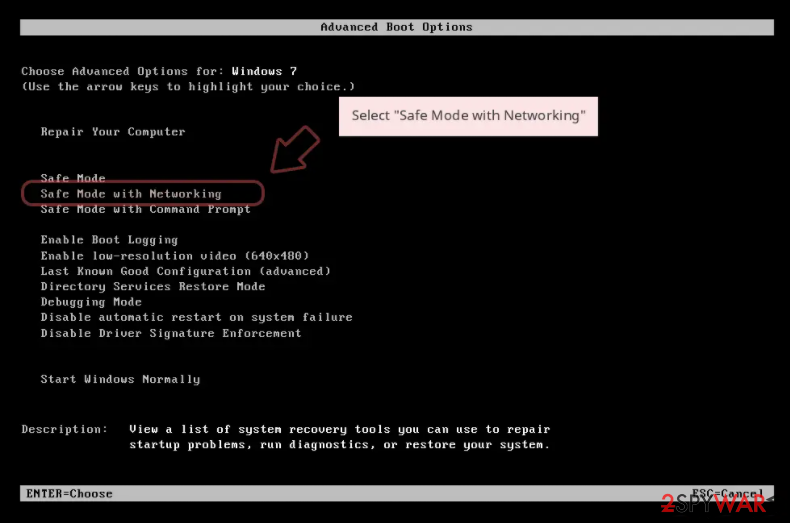
Use anti-malware tools like SpyHunterCombo Cleaner or MalwarebytesMalwarebytes to scan your system. This security software should find all the related files and entries and remove them automatically for you. In some cases, malware is not letting you use antivirus in normal mode, so you need to access Safe Mode and perform a full system scan from there:
Windows 7 / Vista / XP
- Click Start > Shutdown > Restart > OK.
- When your computer becomes active, start pressing F8 button (if that does not work, try F2, F12, Del, etc. – it all depends on your motherboard model) multiple times until you see the Advanced Boot Options window.
- Select Safe Mode with Networking from the list.

Windows 10 / Windows 8
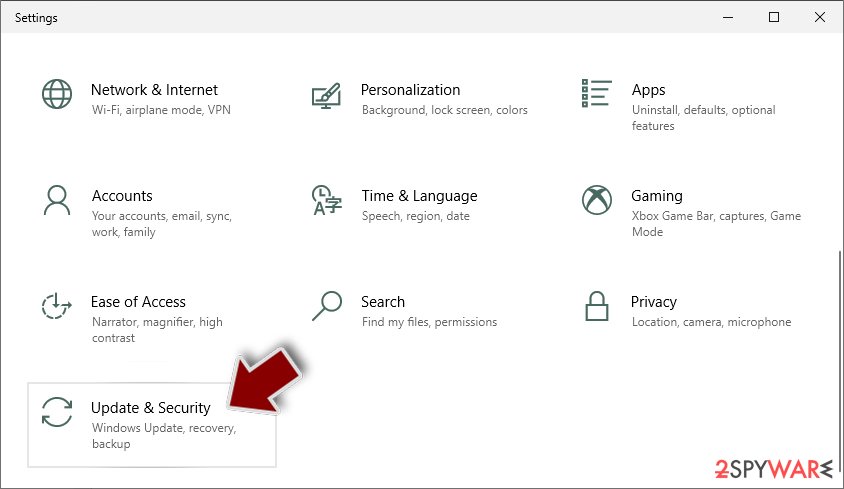
- Right-click on Start button and select Settings.
- Scroll down to pick Update & Security.
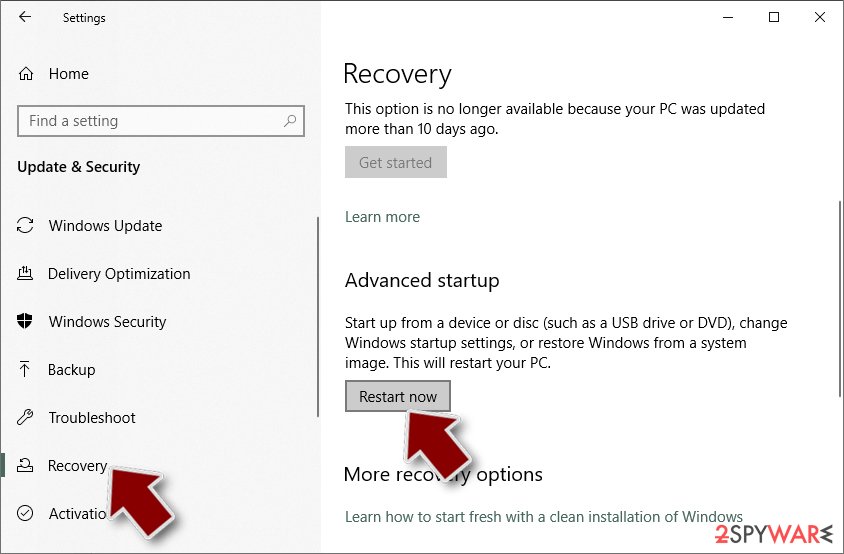
- On the left side of the window, pick Recovery.
- Now scroll down to find Advanced Startup section.
- Click Restart now.
- Select Troubleshoot.
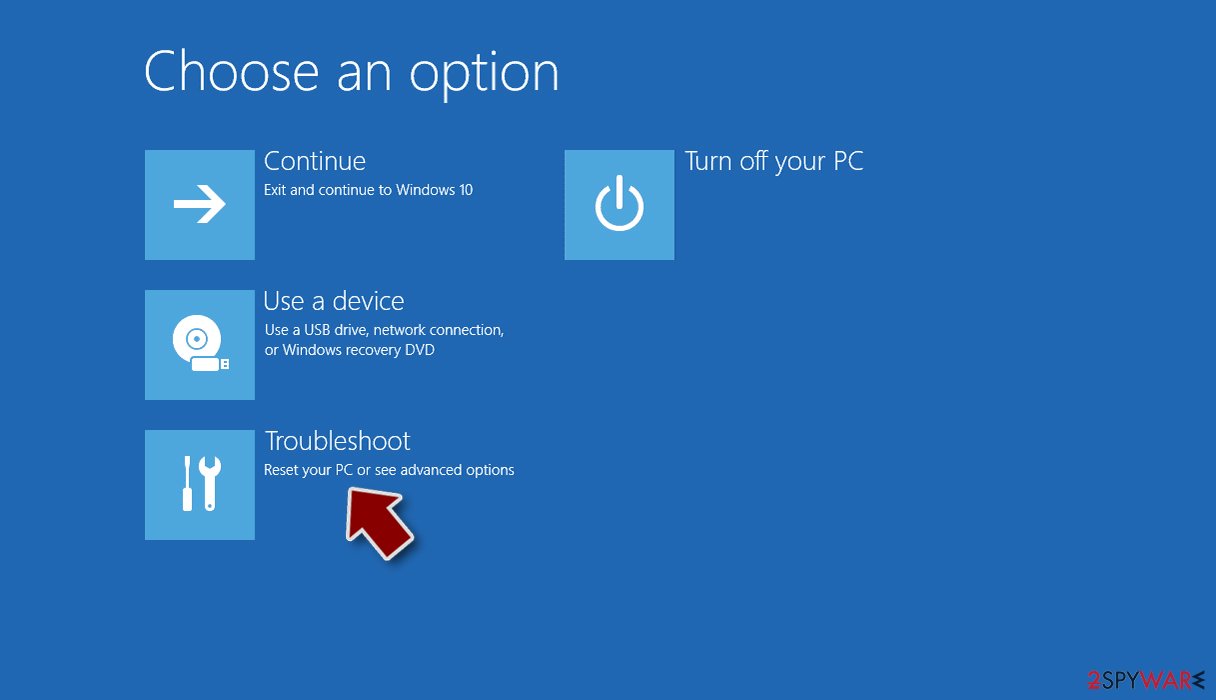
- Go to Advanced options.
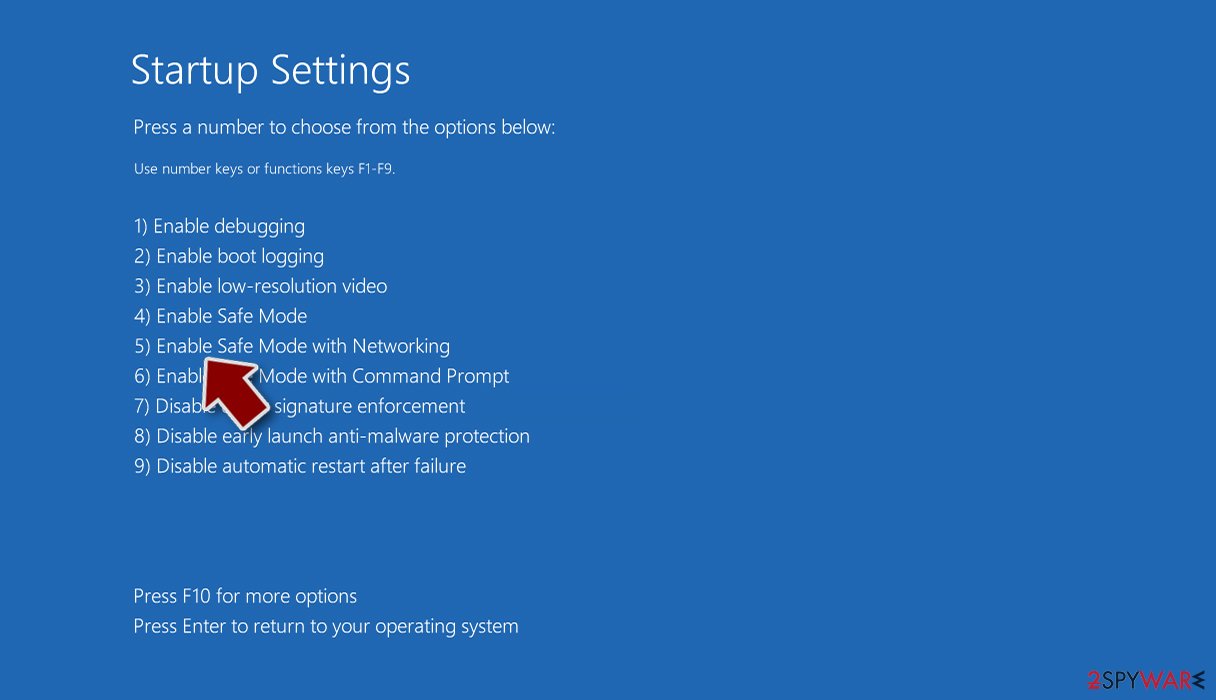
- Select Startup Settings.
- Click Restart.
- Press 5 or click 5) Enable Safe Mode with Networking.


What to do with the damaged operating system?
Performance, stability, and usability issues, to the point where a full Windows reinstall is required, are expected after malware infection. These types of infections can alter the Windows registry database, damage vital bootup, and other sections, delete or corrupt DLL files, etc. Once a system file is damaged by malware, antivirus software is not able to repair it.
This is why FortectIntego was developed. It can fix a lot of the damage caused by an infection like this. Blue Screen errors, freezes, registry errors, damaged DLLs, etc., can make your computer completely unusable. By using this maintenance tool, you could avoid Windows reinstallation.
- Download the application by clicking on the link above
- Click on the ReimageRepair.exe
- If User Account Control (UAC) shows up, select Yes
- Press Install and wait till the program finishes the installation process
- The analysis of your machine will begin immediately
- Once complete, check the results – they will be listed in the Summary
- You can now click on each of the issues and fix them manually
- If you see many problems that you find difficult to fix, we recommend you purchase the license and fix them automatically.


Try recovering your files with third-party software
Only hackers hold the decryption key, which can unlock your files, so if you did not back them up previously, you possibly lost your files forever. You can try using data recovery software, but third-party programs cannot always decrypt the files. We suggest at least trying this method. Before proceeding, you have to copy the corrupted files and place them in a USB flash drive or another storage. And remember – only do this if you have already removed the Doydo ransomware.
Before you begin, several pointers are important while dealing with this situation:
- Since the encrypted data on your computer might permanently be damaged by security or data recovery software, you should first make backups of it – use a USB flash drive or another storage.
- Only attempt to recover your files using this method after you perform a scan with anti-malware software.
Install data recovery software
- Download Data Recovery Pro.
- Double-click the installer to launch it.
- Follow on-screen instructions to install the software.

- As soon as you press Finish, you can use the app.
- Select Everything or pick individual folders where you want the files to be recovered from.

- Press Next.
- At the bottom, enable Deep scan and pick which Disks you want to be scanned.

- Press Scan and wait till it is complete.
- You can now pick which folders/files to recover – don't forget you also have the option to search by the file name!
- Press Recover to retrieve your files.



Infiltration methods
Typically, the malicious code gets introduced by an executable file (.exe) that may have been in a zip folder, embedded within Microsoft Office document’s macros, or disguised as fax or other viable attachment. This usually happens because of user error and ignorance of security risks:
- Installations of “Cracked” software. Websites that distribute free versions of programs should not be trusted because their activity is illegal. Most often the downloads are filled with potentially unwanted programs and malware.
- Drive-by downloads. Hackers embed the malicious code[4] on a website or redirect the victim to another site that they control, which hosts exploit kits. They give hackers the ability to silently scan the visiting device for its specific weaknesses, and, if found, execute code in the background without the user clicking anything.
- Software vulnerabilities. Hackers look for weak spots to exploit so those who do not patch their programs frequently are at higher risk.
- Phishing attacks. This involves an attacker attaching an infected document or URL to an email while disguising it as being legitimate to trick users into opening it, which will install the malware on their device.
- Trojan horse style. This involves disguising ransomware as legitimate software online, and then infecting devices after users install it.
Recommended security measures
- Secure web gateways can scan users’ web surfing traffic to identify malicious web ads that might lead them to the installation of ransomware.
- Secure Email Gateways with targeted attack protection are crucial for detecting and blocking malicious emails that deliver ransomware. These solutions protect against malicious attachments, malicious documents, and URLs in emails delivered to user computers.
- Monitoring tools can detect unusual file access activities, viruses, network C&C traffic, and CPU loads just in time preventing ransomware activation.
- Mobile attack protection products, when used in conjunction with mobile device management (MDM) tools, can analyze applications on users’ devices and immediately alert about any applications that might compromise the environment.
Did this guide help?
Be the first to comment