

Payransom500 ransomware is the threat that locks data using an encryption algorithm
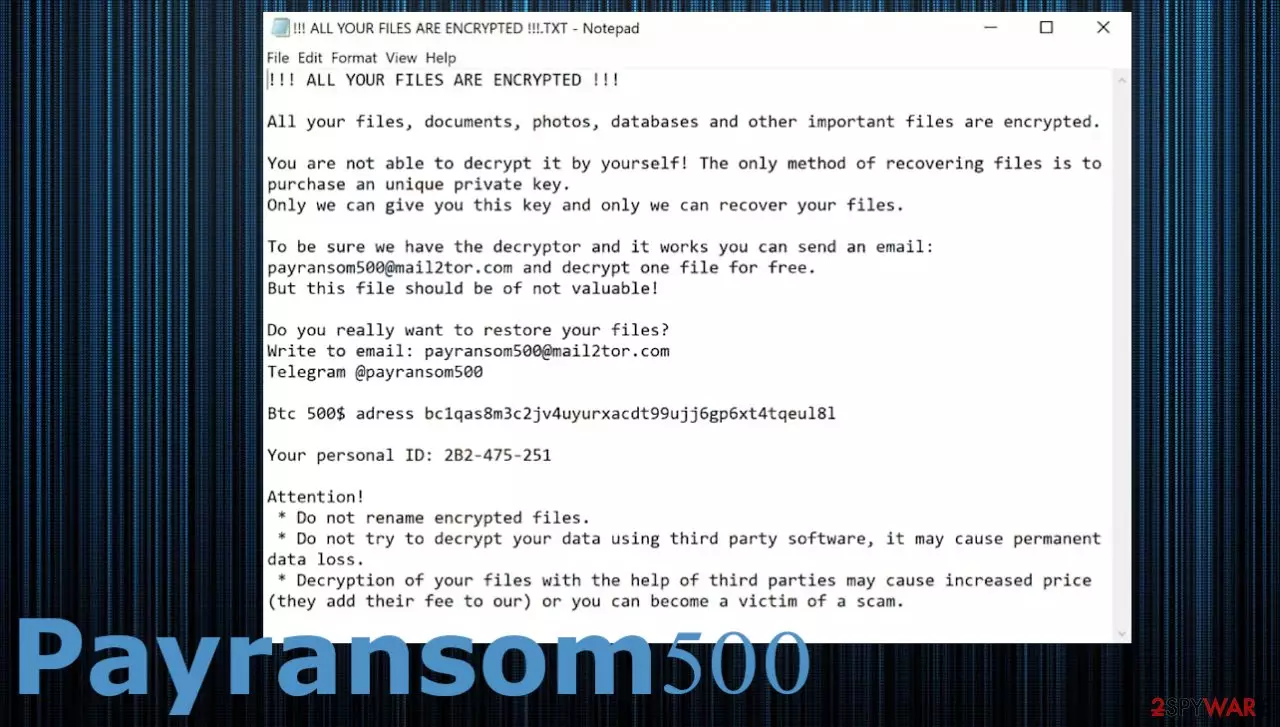
Payransom500 virus is a file-locker infection that is not decryptable at the time. In means that people who get files locked by the threat need to choose between paying the ransom and removing the threat properly, then recovering the data using alternate methods. The virus marks affected files using the pattern .@payransom500.[victim's_ID]. This is the indication of encryption-based malware, and the further details on what to do once you find your files locked get listed in the !!! ALL YOUR FILES ARE ENCRYPTED !!!.TXT ransom note. $500 in Bitcoin should get victims out of the situation, but these criminals behind a virus shouldn't be trusted.
It is truly devastating when the commonly used files get locked and become unopenable. However, if you have good data backup habits, you might be lucky enough and recover all of the needed files without much hassle.[1] Paying is never a good option! We never recommend not offer people to pay up when files get encrypted. It is more likely that your machine receives additional malware but not the decryption tool.
The message that ransomware creators deliver with the goal to get people scared into paying:
!!! ALL YOUR FILES ARE ENCRYPTED !!!
All your files, documents, photos, databases and other important files are encrypted.
You are not able to decrypt it by yourself! The only method of recovering files is to purchase an unique private key.
Only we can give you this key and only we can recover your files.To be sure we have the decryptor and it works you can send an email: payransom500@mail2tor.com and decrypt one file for free.
But this file should be of not valuable!Do you really want to restore your files?
Write to email: payransom500@mail2tor.com
Telegram @payransom500Btc 500$ adress bc1qas8m3c2jv4uyurxacdt99ujj6gp6xt4tqeul8l
Your personal ID: 2B2-475-251
Attention!
* Do not rename encrypted files.
* Do not try to decrypt your data using third party software, it may cause permanent data loss.
* Decryption of your files with the help of third parties may cause increased price (they add their fee to our) or you can become a victim of a scam.
Payransom500 ransomware virus demands $500 for the decryption tool that most likely does not exist. This encouragement to pay up should convince victims to transfer Bitcoins to the walled listed in the ransom note. However, it is more likely that criminals will get you the decryption option after the money transfer. These threat actors are money motivated, and even the test decryption that creators can offer is not trustworthy.
| Name | Payransom500 ransomware |
|---|---|
| Type | Cryptovirus, file-locker |
| File marker | .@payransom500.[ID] |
| Contact | Telegram @payransom500, payransom500@mail2tor.com |
| Ransom amount | $500 in Bitcoin |
| Ransom note | !!! ALL YOUR FILES ARE ENCRYPTED !!!.TXT |
| Distribution | Spam email attachments, including malicious files as attachments |
| Removal | The best elimination of such infections should include anti-malware tools due to detection rate[2] and powerful techniques of malware termination |
| Repair | The system gets damaged when the ransomware aims for persistence. You can benefit from FortectIntego because this application repairs various system data |
The ransom note that the Payransom500 ransomware virus delivers to every folder with encrypted files indicates that victims have no options once the encryption is complete. Even though decryption tools take time to get developed, you can get that help from researchers and repair files at the later date. This is why experts[3] often suggest storing some ransomware files, encrypted files on the external device and wait. Otherwise, you need to clear the threat fully from the machine.
That can be done right away without thinking about possible decryption or after this storing of malware pieces. Be careful because malware can detect those files on the external device and encrypt them. make sure to plugin an empty USB key. The best solution for these cryptocurrency threats – anti-malware tools. You should rely on the powerful SpyHunterCombo Cleaner or MalwarebytesMalwarebytes apps and take care of the infection.

Virus removal is not the same as the Payransom500 ransomware file recovery. You need more to repair those functions that can help with data recovery sometimes. Shadow volume copies get deleted and anti-malware tools disabled, so you cannot access or control wanted processes. Malware also can add or alter files to ensure persistence, launch other programs.
System recovery after the ransomware encryption
Payransom500 virus like any other malware alters system files and alters performance. The system is changed to operate differently in favor of the threat actor. For example, an infection can alter the Windows registry database, damage vital bootup, and other sections, delete or corrupt DLL files, etc. Consequently, users might experience performance, stability, and usability issues, to the point where a full Windows reinstallation is required.
Therefore, we highly recommend using a one-of-a-kind, patented technology of FortectIntego repair. Not only can it fix virus damage after the infection, but it is also capable of removing malware that has already broken into the system thanks to several engines used by the program. Besides, the application is also capable of fixing various Windows-related issues that are not caused by malware infections, for example, Blue Screen errors, freezes, registry errors, damaged DLLs, etc.
- Download the application by clicking on the link above
- Click on the ReimageRepair.exe

- If User Account Control (UAC) shows up, select Yes
- Press Install and wait till the program finishes the installation process

- The analysis of your machine will begin immediately

- Once complete, check the results – they will be listed in the Summary
- You can now click on each of the issues and fix them manually
- If you see many problems that you find difficult to fix, we recommend you purchase the license and fix them automatically.


What can be done to get those .payransom500 files back?
The main issue with such infections like the Payransom500 ransomware virus is the state of files. Even though there are helpful tools like anti-malware and PC repair apps, the encrypted data remains altered, and without the proper decryption tool from researchers, options are limited.
Infiltration of the ransomware can happen behind your back, and the drop of this payload file is not noticeable until the ransom note gets delivered. When you see the full pattern on the file, you can be sure that ransomware is done dealing with the system. However, any files added newly to the system can be encoded and damaged. Sometimes the second round of encryption results in permanent data loss. If you pay up – financial losses.

Payransom500 file encryption is a process that is similar to applying a password to a particular file or folder. However, from a technical point of view, encryption is fundamentally different due to its complexity. By using encryption, threat actors use a unique set of alphanumeric characters as a password that can not easily be deciphered if the process is performed correctly.
There are several algorithms that can be used to lock data (whether for good or bad reasons); for example, AES uses the symmetric method of encryption, meaning that the key used to lock and unlock files is the same. Unfortunately, it is only accessible to the attackers who hold it on a remote server – they ask for a payment in exchange for it. This simple principle is what allows ransomware authors to prosper in this illegal business.
Regardless of which crypto-malware affects your files, you should try to find the relevant decryptor if such exists. Security researchers are in a constant battle against cybercriminals. In some cases, they manage to create a working decryption tool that would allow victims to recover files for free.
Once you have identified which ransomware you are affected by, you should check the following links for a decryptor:
- No More Ransom Project
- Free Ransomware Decryptors by Kaspersky
- Free Ransomware Decryption Tools from Emsisoft
- Avast decryptors

If you can't find a decryptor that works for you, you should try the alternative methods we list below. Additionally, it is worth mentioning that it sometimes takes years for a working decryption tool to be developed, so there are always hopes for the future.
Avoiding the damaging virus infection
The internet is a place for various malware creators. Threats can be released in campaigns of advertisements and added to spam emails as attachments. Word files, Excel, PDF documents can carry the payload of this Payransom500 ransomware or another cryptocurrency extortion virus. Unfortunately, these files have malicious macro functionality that is triggered easily, so malware finds its way on the PC quicker than you realize what happens.
The most common tactic is to trick people into opening the email attachment with a particular trigger for the drop of this virus or another infection. Trojans and other malware can act as a direct vector that spreads the payload of the file locker. However, it is more common to deliver ransomware via such emails with deceptive subject lines and false claims, usage of known companies.
Ransomware email subjects can include such companies as shipping services, common shopping sites, stores. These popular brands attract the receiver. Malware creators also use scamming methods. If you have received an email with the below subject, requesting payment in bitcoin this is known as a ransomware scam, please delete the email. Possible subject lines to such emails:
- Be sure to read this message! Your personal data is threatened!
- Caution! Attack hackers to your account!
- Fraudsters known your old passwords. Access data must be changed.
- Hackers know password from your account. Password must be changed now.
- High level of danger. Your account was under attack.
- Security Alert. Your account was compromised. Password must be changed.
- Security Notice. Someone have access to your system.
- The decision to suspend your account. Waiting for payment.
- Your account is being used by another person!
You can block-list such subject lines automatically or pay attention to any email that is sent to you with a suspicious subject line or the attached file. Sometimes links can also be included on the message itself, so you need to pay attention to any unsuspected emails because many of them can carry the payload of the Payransom500 ransomware virus.
Keep the program like SpyHunterCombo Cleaner or MalwarebytesMalwarebytes and you can solve any issues with security before those appear. Antivirus tools offer the function of scanning the email that is suspicious before downloading the file or a different attachment. Also, apps like FortectIntego can help avoid security flaws and issues with the machine that can be used as vulnerabilities exploited by malware.
Did this guide help?
Be the first to comment