

Gvh65 ransomware is an infection that targets commonly used files but can lead to more issues with the machine
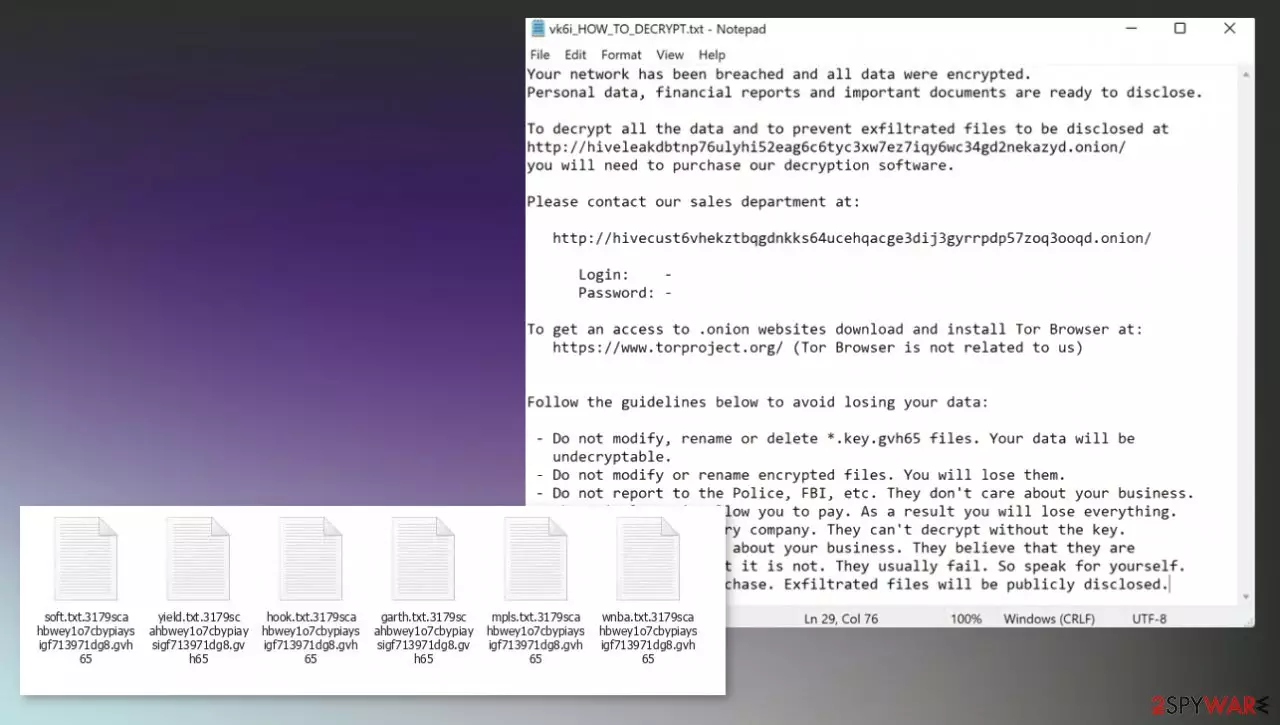
Gvh65 ransomware – the cryptovirus that makes files inaccessible to have the reason for blackmail. This piece of malware is considered one of the most dangerous because cryptocurrency[1] is digital money, and paying these criminals never helps to get files back. If the victim falls for false claims and pays the ransom, they can permanently lose their files and money. The particular demand for money appears on the screen once all encoded files receive the marker – gvh65 that also includes random character string. The message comes in the form of a text file named vk6i_HOW_TO_DECRYPT.txt, which is providing instructions on further steps.
The virus developer claims to have affected the system and that the only way to get those pieces back to normal is to purchase the decryption software. Gvh65 ransomware virus creators provide the guide on connecting via Tor Browser and instruct people not to alter encrypted files.
This is not a particular threat that can be linked to an already existing family of ransomware yet. It is possible that the threat is still in development and maybe not advanced enough, but criminals these days release more and more damaging viruses, so you should be cautious and remove the malware as soon as possible.
Affected files can be documents, pictures, video, audio files, sometimes even backups.[2] You shouldn't panic and focus on system clearing, so the machine can be used without any additional damage caused to the system or files. The threat can be removed, and experts[3] always suggest using anti-malware tools capable of detecting this type of malware to eliminate the infection.
Your network has been breached and all data were encrypted.
Personal data, financial reports and important documents are ready to disclose.To decrypt all the data and to prevent exfiltrated files to be disclosed at
hxxp://hiveleakdbtnp76ulyhi52eag6c6tyc3xw7ez7iqy6wc34gd2nekazyd.onion/
you will need to purchase our decryption software.Please contact our sales department at:
hxxp://hivecust6vhekztbqgdnkks64ucehqacge3dij3gyrrpdp57zoq3ooqd.onion/
Login: –
Password: –To get an access to .onion websites download and install Tor Browser at:
hxxps://www.torproject.org/ (Tor Browser is not related to us)Follow the guidelines below to avoid losing your data:
– Do not modify, rename or delete *.key.gvh65 files. Your data will be
undecryptable.
– Do not modify or rename encrypted files. You will lose them.
– Do not report to the Police, FBI, etc. They don't care about your business.
They simply won't allow you to pay. As a result you will lose everything.
– Do not hire a recovery company. They can't decrypt without the key.
They also don't care about your business. They believe that they are
good negotiators, but it is not. They usually fail. So speak for yourself.
– Do not reject to purchase. Exfiltrated files will be publicly disclosed.
Removing the Gvh65 ransomware virus might seem impossible for many, but this is why particular av tools are designed. The infiltration of this virus happens behind your back and silently, so additional processes can control the performance and behavior of the computer, as well as the virus activities.
Since you cannot see nor control the infiltration, you need powerful tools to fight the malware fully. Anti-malware apps like SpyHunterCombo Cleaner or MalwarebytesMalwarebytes can find the malicious files and properly terminate the intruder for you. Then you move on to file recovery.
| Name | Gvh65 ransomware |
|---|---|
| Type | File-locker, cryptovirus, ransomware |
| Marker | .gvh65 and random characters |
| Ransom note | vk6i_HOW_TO_DECRYPT.txt |
| Distribution | Files attached to malicious emails, pirated files, and software |
| Contact | The preferred method is the Tor network |
| Damage | The virus is demanding money, can damage files permanently, and spread additional malware on the system |
| Elimination | Anti-malware tools can help with the proper termination of this piece, so rely on security tools and remove the virus |
| Repair | A particular application like FortectIntego can help with system damage and virus leftovers |
Removing the threat and recovering data is not the same
Unfortunately, clearing the infection pieces and all the malicious files cannot act as the data recovery in this case. Gvh65 ransomware virus is a dangerous file locker, and decryption procedures are complicated. There are no universal tools that could help to fix those encrypted pieces.
The proper decryption software takes time to develop because researchers need to obtain particular keys and code of the infection procedures to make the technology that fully unlocks Gvh65 virus encrypted data. There are no such tools right now. You only can repair the system and fix encrypted files with backups or copies stored in the remote location, external device.
Removing the virus with an anti-malware tool is also not the same., you can clear the infection, restore system processes. Only then the data can be attempted to recover. It is possible that you will lose your files if data backups are not up to date, but some alternate options are listed below.
Repair the functions before adding new files to the machine
Once a computer is infected with the Gvh65 file virus, its system is changed to operate differently. For example, an infection can alter the Windows registry database, damage vital bootup, and other sections, delete or corrupt DLL files, etc. Antivirus software is not capable of doing anything about it, leaving it just the way it is. Consequently, users might experience performance, stability, and usability issues, to the point where a full Windows reinstallation is required.

Therefore, we highly recommend using a one-of-a-kind, patented technology of FortectIntego repair. Not only can it fix virus damage after the infection, but it is also capable of removing malware that has already broken into the system thanks to several engines used by the program. Besides, the application is also capable of fixing various Windows-related issues that are not caused by malware infections, for example, Blue Screen errors, freezes, registry errors, damaged DLLs, etc.
- Download the application by clicking on the link above
- Click on the ReimageRepair.exe
- If User Account Control (UAC) shows up, select Yes
- Press Install and wait till the program finishes the installation process
- The analysis of your machine will begin immediately

- Once complete, check the results – they will be listed in the Summary
- You can now click on each of the issues and fix them manually
- If you see many problems that you find difficult to fix, we recommend you purchase the license and fix them automatically.



By employing the proper system tool, you would not have to worry about future computer issues, as most of them could be fixed quickly by performing a full system scan at any time. Most importantly, you could avoid the tedious process of Windows reinstallation in case things go very wrong due to one reason or another.
What can be done to solve system issues?
Gvh65 ransomware and other cryptoviruses can often disable some tools, functions, programs like AV apps, so the persistence of the infection is higher. These alterations and additional processes trigger problems with the machine too. Besides those registry edits, startup files, and background processes, malware can turn off some data recovery functions.
Ransomware is capable of blocking the anti-malware tools that you have, so Safe Mode is helpful for such instances. Since the decrytpion tool is not available, you need to fully repair the system and clear the virus, to be sure that the file copies from backups and other sources will not get encrypted.
Do not risk because the Gvh65 virus, when still active, can encrypt newly added files or run a second round of file-locking. The infection mainly is spread via malicious emails, other insecure platforms, pirating services. You might not know when it happened. So it is more crucial to terminate the virus right away,
Step 1. Access Safe Mode with Networking
Manual malware removal should be best performed in the Safe Mode environment.
Windows 7 / Vista / XP
- Click Start > Shutdown > Restart > OK.
- When your computer becomes active, start pressing F8 button (if that does not work, try F2, F12, Del, etc. – it all depends on your motherboard model) multiple times until you see the Advanced Boot Options window.
- Select Safe Mode with Networking from the list.
Windows 10 / Windows 8
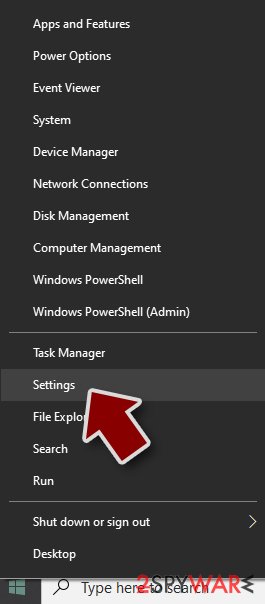
- Right-click on Start button and select Settings.
- Scroll down to pick Update & Security.
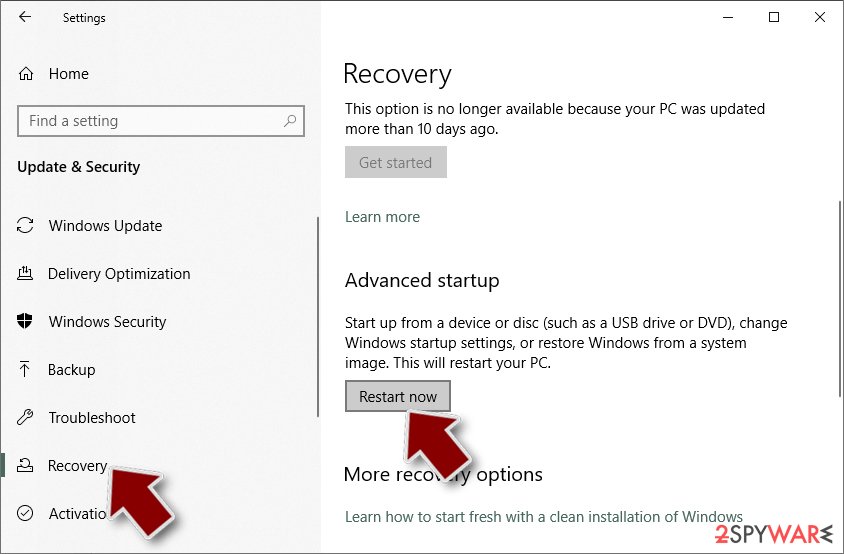
- On the left side of the window, pick Recovery.
- Now scroll down to find Advanced Startup section.
- Click Restart now.
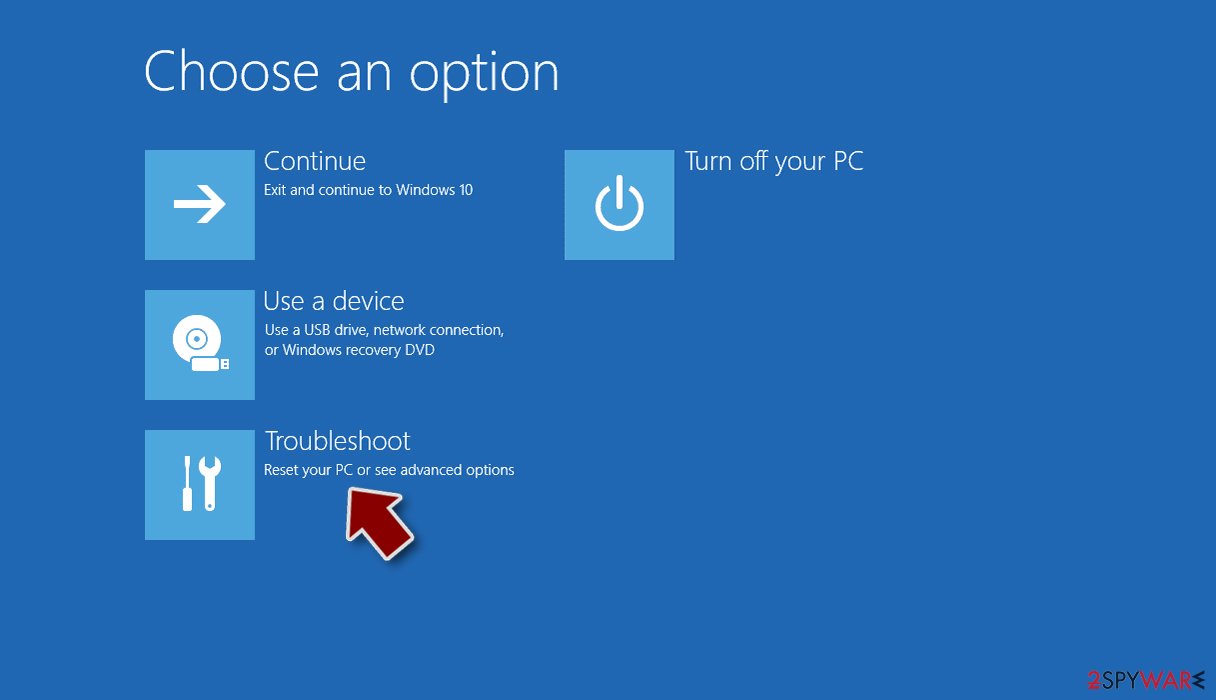
- Select Troubleshoot.
- Go to Advanced options.
- Select Startup Settings.
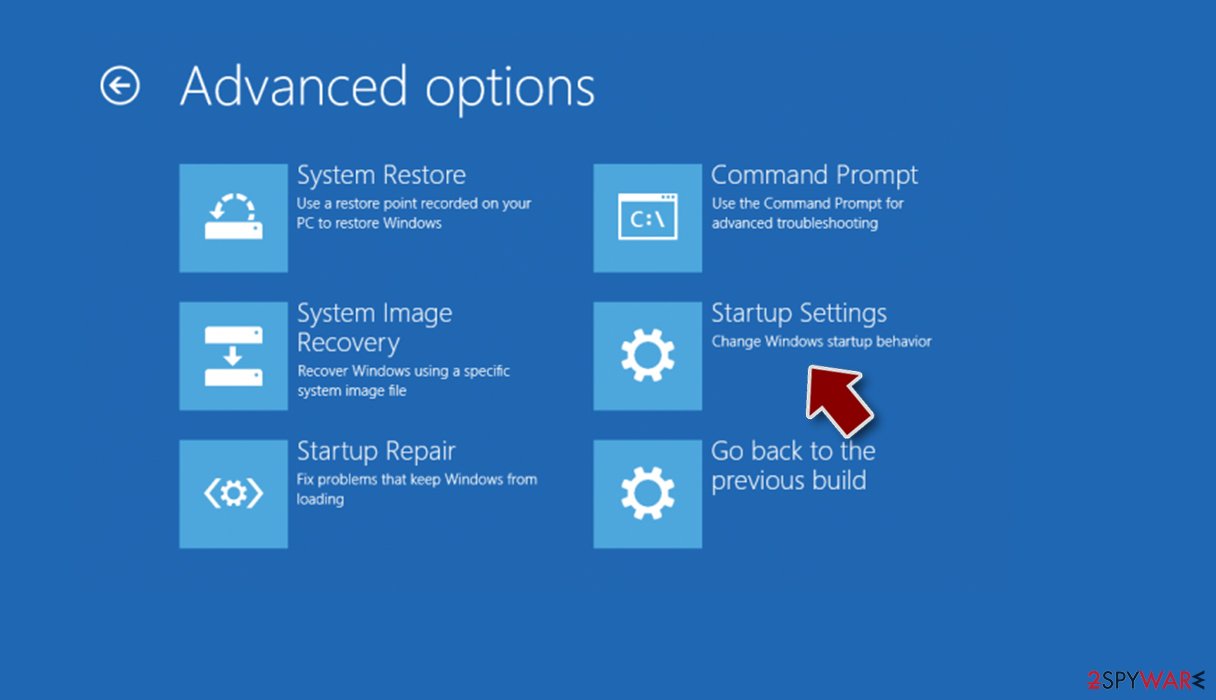
- Press Restart.
- Now press 5 or click 5) Enable Safe Mode with Networking.


Step 2. Shut down suspicious processes
Windows Task Manager is a useful tool that shows all the processes running in the background. If malware is running a process, you need to shut it down:
- Press Ctrl + Shift + Esc on your keyboard to open Windows Task Manager.
- Click on More details.
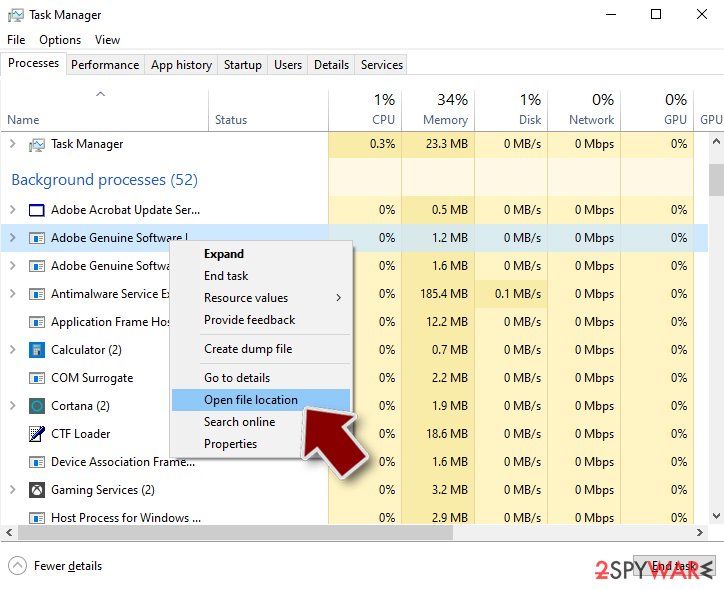
- Scroll down to Background processes section, and look for anything suspicious.
- Right-click and select Open file location.
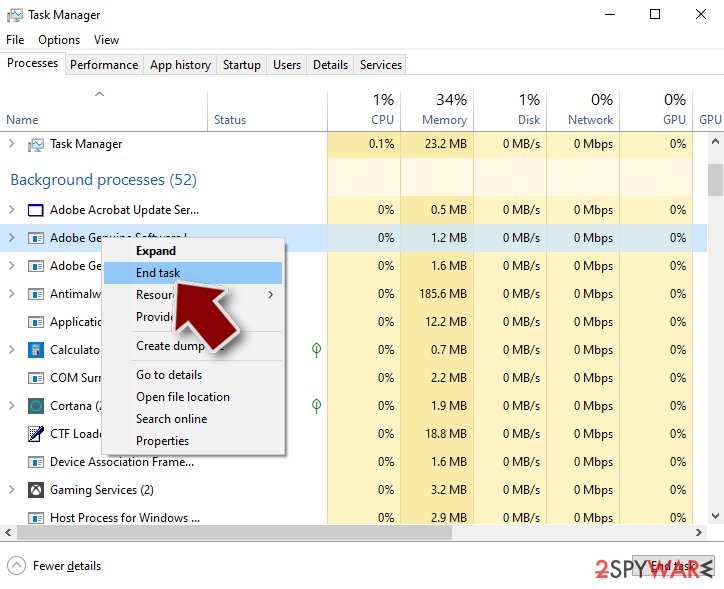
- Go back to the process, right-click and pick End Task.
- Delete the contents of the malicious folder.


Step 3. Check program Startup
- Press Ctrl + Shift + Esc on your keyboard to open Windows Task Manager.
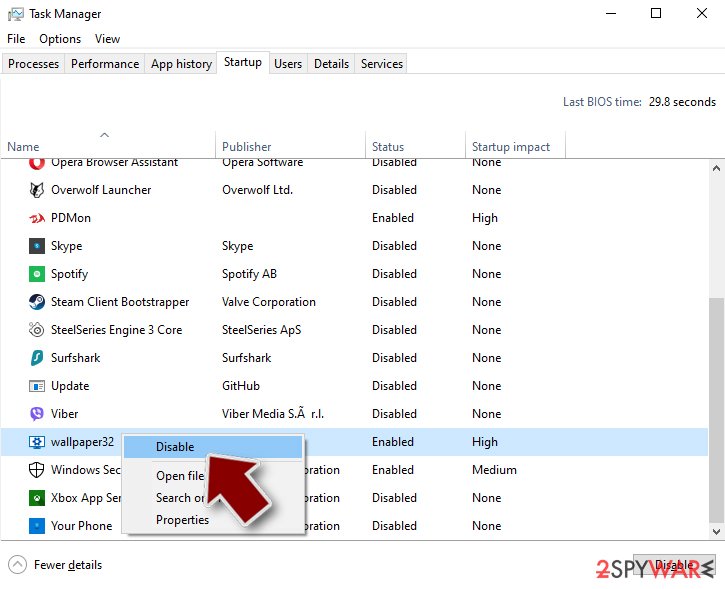
- Go to Startup tab.
- Right-click on the suspicious program and pick Disable.

Step 4. Delete virus files
Malware-related files can be found in various places within your computer. Here are instructions that could help you find them:
- Type in Disk Cleanup in Windows search and press Enter.
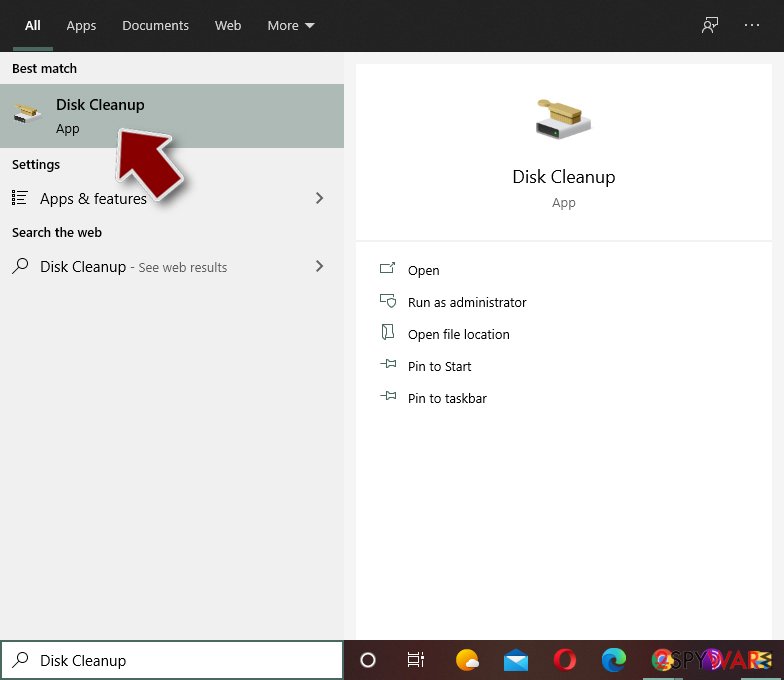
- Select the drive you want to clean (C: is your main drive by default and is likely to be the one that has malicious files in).
- Scroll through the Files to delete list and select the following:
Temporary Internet Files
Downloads
Recycle Bin
Temporary files - Pick Clean up system files.
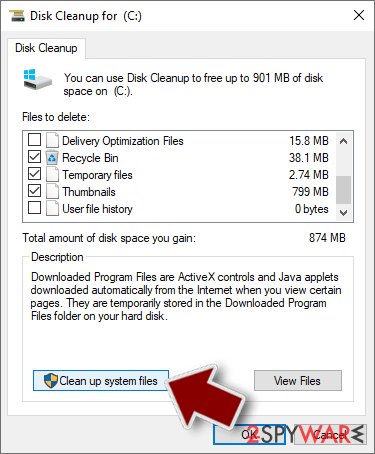
- You can also look for other malicious files hidden in the following folders (type these entries in Windows Search and press Enter):
%AppData%
%LocalAppData%
%ProgramData%
%WinDir%


After you are finished, reboot the PC in normal mode.
Do not fall for those false claims from ransomware creators. You can remove the Gvh65 ransomware using anti-malware tools and then properly recover the system, so the machine is working smoothly. If you pay and those files are left untouched, your system is damaged permanently, so this is not recommended and is too risky. Even large companies do not pay for such criminals.
Keep the program like SpyHunterCombo Cleaner or MalwarebytesMalwarebytes, so the infection can be avoided. Some anti-malware or security software tools can block suspicious emails and links from those messages, so attacks, where the malware is released, cannot happen. Also, you can use the particular software to remove virus damage and treat the Gvh65 ransomware leftovers. FortectIntego and similar applications help with affected system data. Other tips are listed below, so do not skip them.
Did this guide help?
Be the first to comment