

Unix.trojan.coinminer is dedicated to hijacking users' systems for illegal usage

The category of Trojans is very versatile – the function of these malicious programs can vary greatly – from encrypting personal files to mining cryptocurrency illegally. Unix.trojan.coinminer belongs to the latter category.
While the functions of this type of malware can vary, it is defined by its distribution method primarily. In other words, users typically install Trojans when they believe that the installer is something else – a pirated program, software crack, or an update. Regardless of this aspect, users who suffer from the infection would put their security and privacy at risk, hence getting rid of it in a timely manner is absolutely necessary.
Unix.trojan.coinminer's main goal is to mine crypto using CPU/GPU/RAM, it could also affect the machine in many other ways. Once on the system, the coin-mining malware imports its own malicious files and takes over the computer – it could grant access to cybercriminals, insert other modules that would steal data or proliferate other malware, and more.
If your anti-malware software has found this virus on your device, you should immediately take action. In this article, we will explain how to deal with the infection correctly and what to do if malware keeps returning after its termination.
| Name | Unix.trojan.coinminer |
| Type | Trojan |
| Activities | Mines cryptocurrency for criminals in the background, compromises computer security, steals data |
| Dangers | Installation of other malware, personal information disclosure to malicious actors, inability to operate Windows properly |
| Removal | Perform a full system scan with SpyHunterCombo Cleaner, MalwarebytesMalwarebytes and then clean or reset web browsers |
| System fix | Malware or adware infections can diminish the performance of your computer or cause serious stability issues. Use FortectIntego to remediate your device and ensure that the virus damage is fixed |
Coinminers: still popular and profitable
Cryptocurrency mining has become popular since the first spike in its popularity and high value back in 2018. Users were buying expensive hardware to produce as much crypto as possible, which allowed them to acquire money passively directly from their homes. With the increased popularity, programs like XMRig were created – they helped people easily conduct cryptomining without any issues.
However, cybercriminals had a different idea when it came to these activities. They soon figured out that, by installing certain crypto applications or code into users' devices illegally, they could mine Bitcoin without restrictions and losses. Typically, the miming requires a lot of resources, hence crooks would be saving and receiving money for free.
With the rise of the global coronavirus pandemic, Bitcoin reached the highest value ever,[1] prompting even more mining activities to be undertaken. Since global tech companies are struggling with semiconductor production,[2] cryptomining has become more expensive, which prompted cybercriminals to create more crypto-malware.
Unix.trojan.coinminer removal explained
Crypto-mining is a process when computer hardware, such as the CPU, is used to solve very complicated mathematical problems, producing the currency in the process. This process consumes a lot of electricity in the process and takes a very long time, hence regular users rarely go for it without special equipment.
Crypto-mining malware can solve this problem for cybercriminals easily – they don't have to spend money on resources and instead use those of innocent users. While some older versions of similar malware would use most of the available PC resources for this process, Unix.trojan.coinminer might remain stealthy thanks to implemented caps on CPU usage, which does not lag or interfere with normal computer operation. Likewise, malware imports its own startup items that remain hidden, increasing persistence and stealthiness.

It goes without saying that the presence of the virus might cause serious issues to the infected users, thus you should not delay its elimination/ The removal of the Unix.trojan.coinminer virus requires your close attention – follow the instructions below to get rid of it for good.
1. Use anti-malware and repair damaged system files
If you already have anti-malware installed on your device and it has detected the virus, quarantine and delete it at once. In some cases, the infection might return – it results in users being spammed with notifications that something was detected again and again. If that is the case, you should proceed with the next step, as the infection might reside within browsers.
However, we recommend trying an alternative security solution, such as SpyHunterCombo Cleaner or MalwarebytesMalwarebytes, to eliminate all the malicious content from your system. It can automatically find all the virus files and eliminate them at once. Additionally, Unix.trojan.coinminer might be used to insert data-stealing modules or other malicious software installation, so it is important to ensure that all of them are deleted from the system.
The malware drops a multitude of files on the system and changes its settings – these processes can sometimes damage OS files, which might later cause crashes, BSODs, system errors, and much more issues. In order to fix this damage, you don't have to reinstall Windows but instead use FortectIntego repair and maintenance software which can automatically replace damaged files with brand new ones.
2. Clean browsers
Coinmining malware can often affect web browsers and perform operations through it. Therefore, if caches are not cleaned properly, the activities might continue, even after anti-malware deletes all the other malicious files. You can follow the instructions below.
Google Chrome
- Click on Menu and pick Settings.
- Under Privacy and security, select Clear browsing data.
- Select Browsing history, Cookies and other site data, as well as Cached images and files.
- Click Clear data.


Mozilla Firefox
- Click Menu and pick Options.
- Go to Privacy & Security section.
- Scroll down to locate Cookies and Site Data.
- Click on Clear Data…
- Select Cookies and Site Data, as well as Cached Web Content and press Clear.


MS Edge (Chromium)
- Click on Menu and go to Settings.
- Select Privacy and services.
- Under Clear browsing data, pick Choose what to clear.
- Under Time range, pick All time.
- Select Clear now.


Safari
- Click Safari > Clear History…
- From the drop-down menu under Clear, pick all history.
- Confirm with Clear History.


Optional: reset browsers
If you were not successful with malware's elimination thus far, you can reset your browsers altogether. This will for sure delete all the leftover files and caches from the system.[3] Proceed with these instructions to do that:
Google Chrome
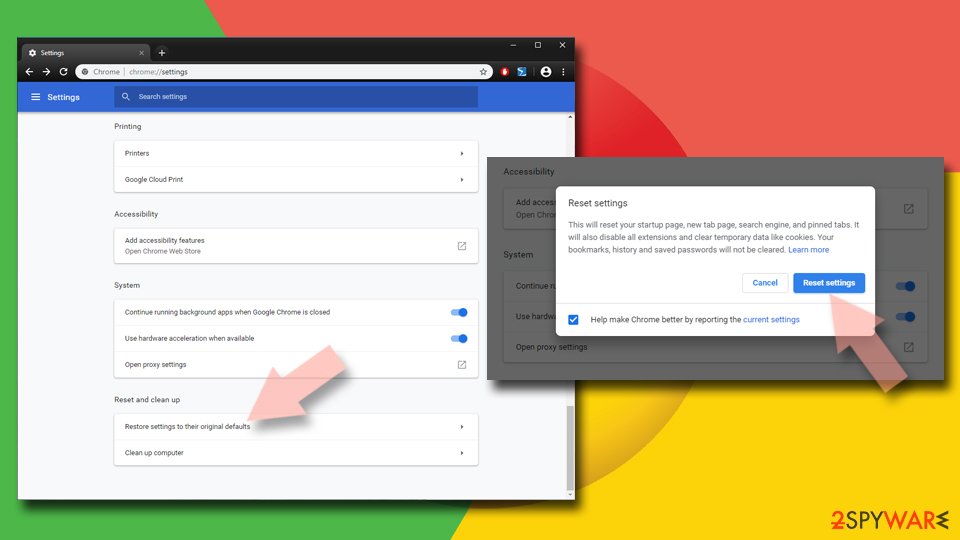
- Click on Menu and select Settings.
- In the Settings, scroll down and click Advanced.
- Scroll down and locate Reset and clean up section.
- Now click Restore settings to their original defaults.
- Confirm with Reset settings.

Mozilla Firefox
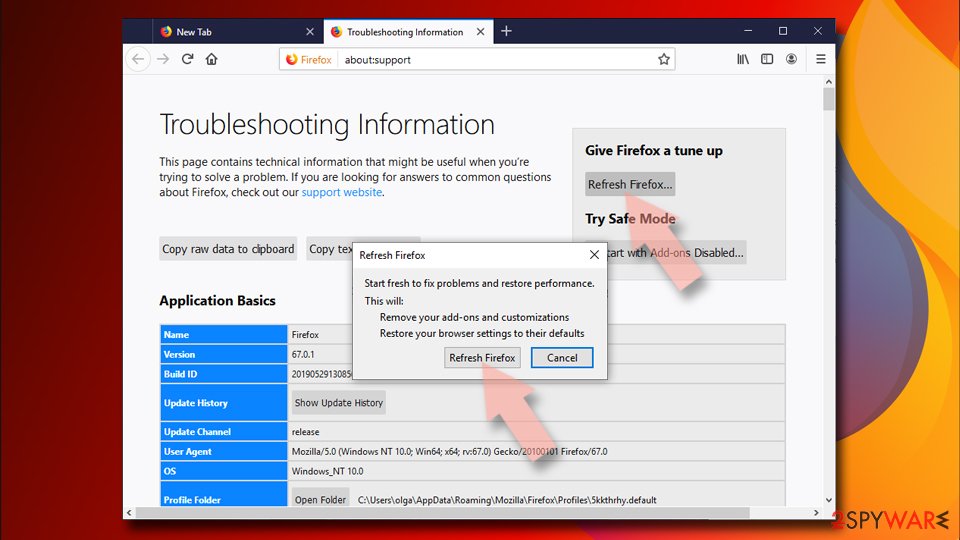
- Open Mozilla Firefox browser and click the Menu.
- Go to Help and then choose Troubleshooting Information.
- Under Give Firefox a tune up section, click on Refresh Firefox…
- Once the pop-up shows up, confirm the action by pressing on Refresh Firefox.

MS Edge
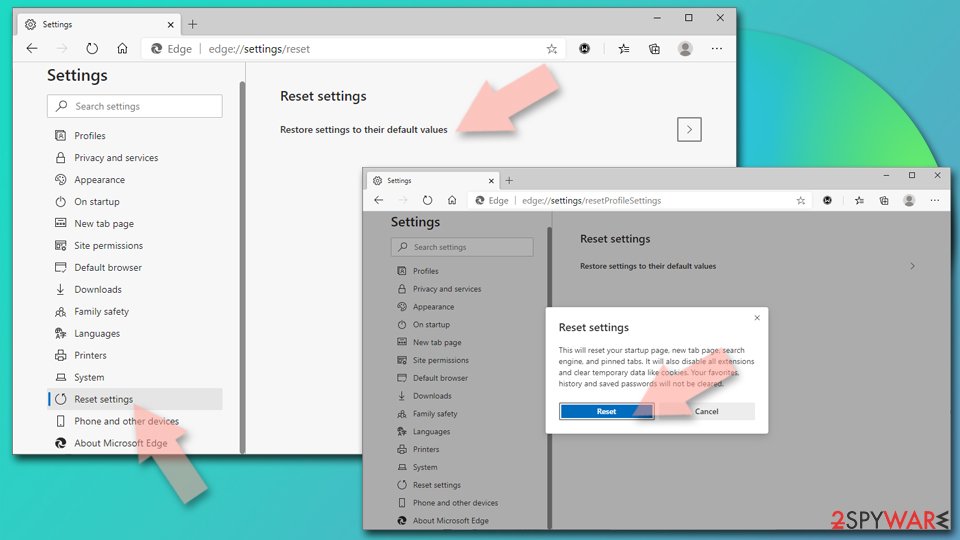
- Click on Menu and select Settings.
- On the left side, pick Reset settings.
- Select Restore settings to their default values.
- Confirm with Reset.

Safari
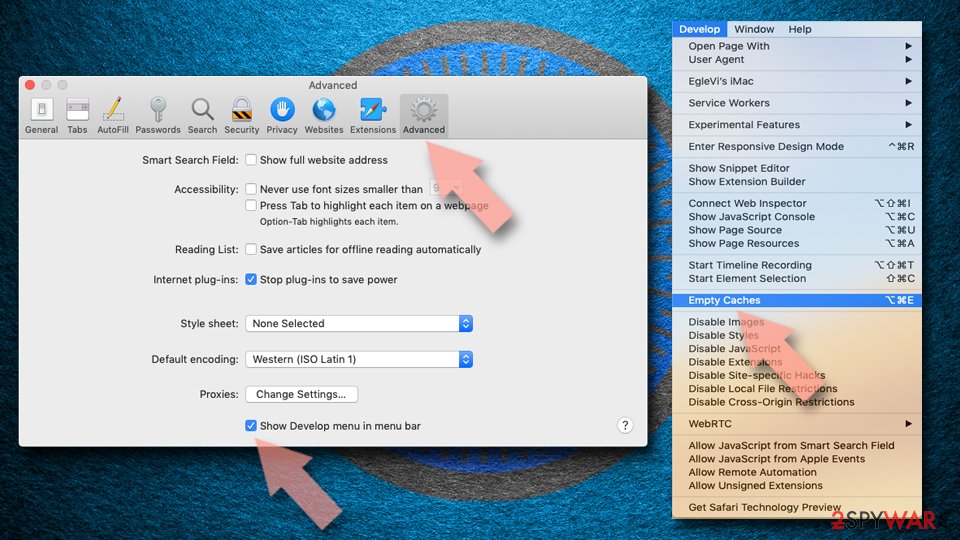
- Click Safari > Preferences…
- Go to Advanced tab.
- Tick the Show Develop menu in menu bar.
- From the menu bar, click Develop, and then select Empty Caches.

Avoid malware infections in the future
As we already mentioned, Unix.trojan.coinminer is a Trojan, which means that its point of entry is typically initiated by users themselves. Its classification does not lie within its operation but rather distribution method. The installation of this malware occurs at some point when a malicious executable or script is launched on the machine, all while users believe that it is legitimate. In other words, a Trojan is usually disguised as a file that victims perceive as safe and legitimate. That being said, there could be many ways how the infection can occur.
- Illegal installers. Users commonly get infected when they misleadingly believe that a software crack or a fake installer is being detected by security software mistakenly, and it is a false positive. However, considering how loose the security measures on these websites are, it makes it a perfect place for cybercriminals to place malware.
- Fake Updates can be encountered on various websites after being redirected from somewhere. These redirects commonly occur on less secure websites, e.g., torrents, illegal video streaming, and similar. Never download and install anything from pages which claim your system is infected or that you need to update some software (especially Flash Player).
- Spam emails. Fake phishing emails have been the most successful in infecting users with malware. Thankfully, the amount of malspam sent to users has significantly decreased over the years thanks to sophisticated scanners employed by most advanced tech companies. You should still be aware that emails with attachments, especially those that ask to enable macros, are dangerous and might contain malicious code.
While it is impossible to guarantee total immunity from malware, plenty of things can be done to reduce that probability significantly. Equip your computer with SpyHunterCombo Cleaner or another anti-malware and always watch out for malicious websites.
Did this guide help?
Be the first to comment