

Vice Society ransomware can damage users' files permanently if the ransom is not paid

Vice Society ransomware is a notorious data-locking malware that has performed numerous large-scale attacks. One of the most recent attacks affected the city of Palermo in Italy, which caused damage to all internet-relying services impacting 1.3 million people.
However, the virus can affect home users too. It infiltrates the machine and starts encrypting[1] people's personal files, such as photos, videos, and documents. Encrypted files are appended with the .v-society.[victim's_ID] extension. So if a file was previously named picture.jpg, after encryption it would look like this – picture.jpg.v-society.[victim's_ID]. Shortly after, a ransom note !!! ALL YOUR FILES ARE ENCRYPTED !!!.TXT is generated on the machine.
| NAME | Vice Society |
| TYPE | Ransomware, cryptovirus, data-locking malware |
| DISTRIBUTION | Email attachments, peer-to-peer file sharing platforms, malicious ads |
| FILE EXTENSION | .v-society.[victim's_ID] |
| RANSOM NOTE | !!! ALL YOUR FILES ARE ENCRYPTED !!!.TXT |
| FILE RECOVERY | If no backups are available, recovering data is almost impossible. We list alternative methods that could help you in some cases below |
| MALWARE REMOVAL | Scan your machine with anti-malware software to eliminate the malicious files |
| SYSTEM FIX | Malware can seriously tamper with Windows systems, causing errors, crashes, lag, and other stability issues. To remediate the OS and avoid its reinstallation, we recommend scanning it with the FortectIntego repair tool |
The ransom note

The full !!! ALL YOUR FILES ARE ENCRYPTED !!!.TXT ransom note from Vice Society ransomware developers reads as follows:
ALL YOUR FILES HAVE BEEN ENCRYPTED BY “VICE SOCIETY”
All your important documents, photos, databases were stolen and encrypted.
If you don't contact us in 7 days we will upload your files to darknet.
The only method of recovering files is to purchase an unique private key.
We are the only who can give you tool to recover your files.To proove that we have the key and it works you can send us 2 files and we decrypt it for free (not more than 2 MB each).
This file should be not valuable!
Write to email:DanKult@onionmail.org
Alternative email: AmbroVirerra@onionmail.orgPublic emai:l v-society.official@onionmail.org
Our tor website: 4hzyuotli6maqa4u.onion
Attention!
* Do not rename encrypted files.
* Do not try to decrypt your data using third party software, it may cause permanent data loss.
* Decryption of your files with the help of third parties may cause increased price (they add their fee to ours) or you can become a victim of a scam.
The ransom note provides information to victims about what happened to their files. Seven days are given to contact the cybercriminals. Otherwise, they threaten to leak the data on the dark net. If users want to recover their files, a decryption key has to be purchased.
However, it is not advisable to pay the threat actors, as many ransomware attack victims never hear back from them after sending the money. Even though the only way to get the files back is to acquire a decryption tool from cybercriminals, it is not worth the risk. It is extremely important to backup your data as the elimination of the ransomware will not recover them.
Distribution methods
Although it is unknown how specifically Vice Society ransomware is spread on the Internet, there are some general tactics that threat actors use to distribute malicious programs. Malicious files can infiltrate the system during “cracked” software[2] installations. Platforms that distribute them are unregulated, the perfect breeding ground for all kinds of malware.
Cybercriminals can even use email to deliver ransomware into your system. This can be done by embedding malicious links[3] or attachments in the email. Always be careful, and do not open emails from unknown senders. Even if you received an attachment from someone on your friend list it is better to double-check with them through another platform.
Another common distribution channel is for hackers to use OS or software vulnerabilities. That is why it is vital to keep everything updated. Software developers regularly release security updates for newly found vulnerabilities, so you can be exposed if you do not install the security patches.[4]
Start the removal process
The important thing to do is to disconnect the affected machine from the local network. For home users, disconnecting the ethernet cable should do the job. If this happened at your workplace, doing that might be complicated, so we have instructions for corporate environments at the bottom of this post.
If you try to recover your data first, it can result in permanent loss. It can also encrypt your files the second time. It will not stop until you remove the malicious files causing it first. You should not attempt removing the malicious program yourself unless you have experience. Manual removal of ransomware is extremely complicated and is suitable for people with advanced IT skills.
Use anti-malware tools like SpyHunterCombo Cleaner or MalwarebytesMalwarebytes to scan your system. This security software should find all the related files and entries and remove them automatically for you. In some cases, malware does not let you use antivirus in normal mode, so you need to access Safe Mode and perform a full system scan from there:
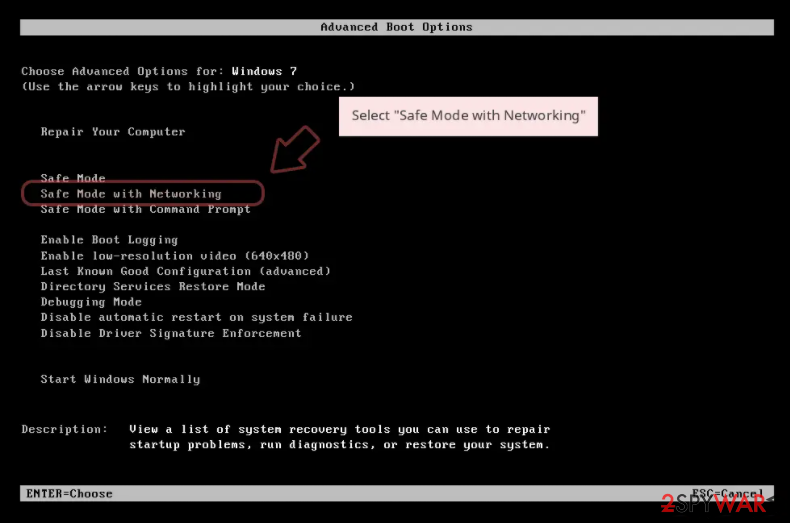
Windows 7 / Vista / XP
- Click Start > Shutdown > Restart > OK.
- When your computer becomes active, start pressing F8 button (if that does not work, try F2, F12, Del, etc. – it all depends on your motherboard model) multiple times until you see the Advanced Boot Options window.
- Select Safe Mode with Networking from the list.

Windows 10 / Windows 8
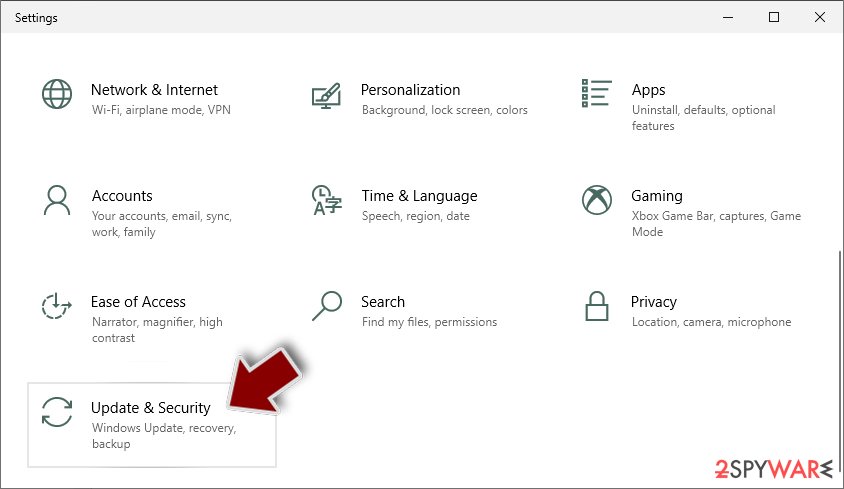
- Right-click on Start button and select Settings.
- Scroll down to pick Update & Security.
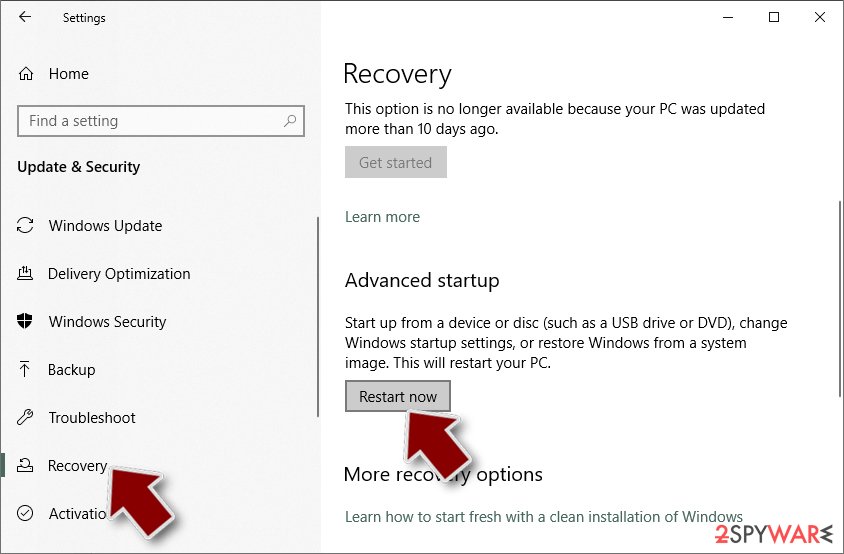
- On the left side of the window, pick Recovery.
- Now scroll down to find Advanced Startup section.
- Click Restart now.
- Select Troubleshoot.
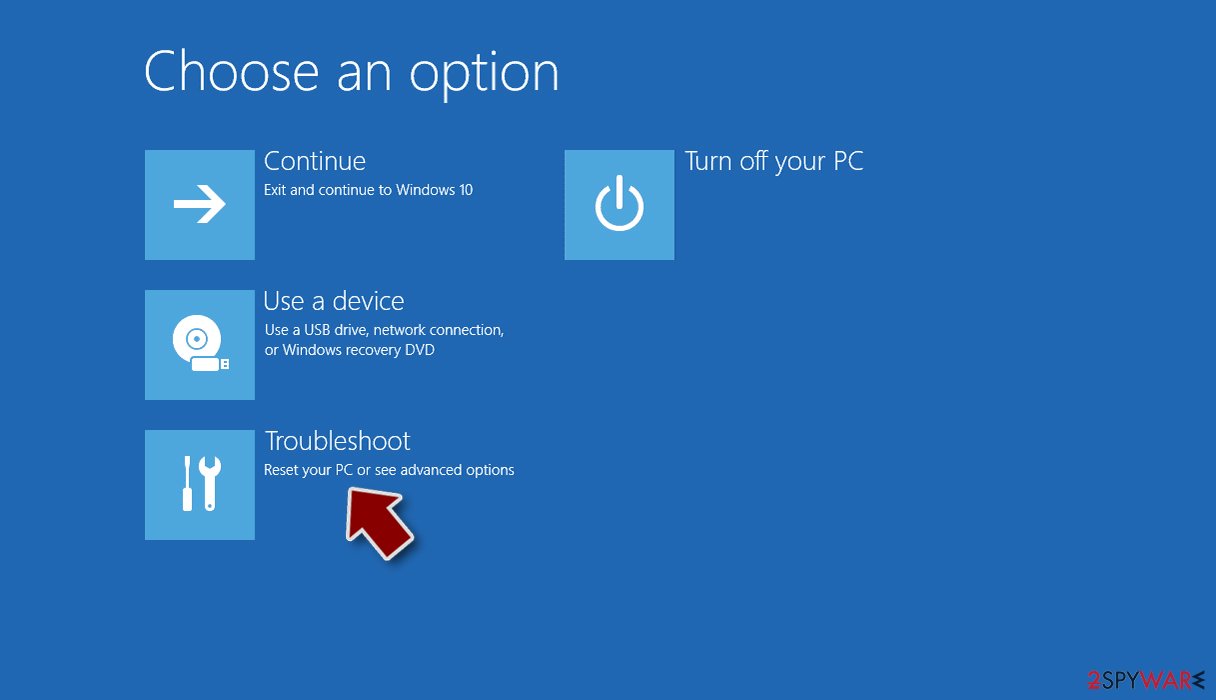
- Go to Advanced options.
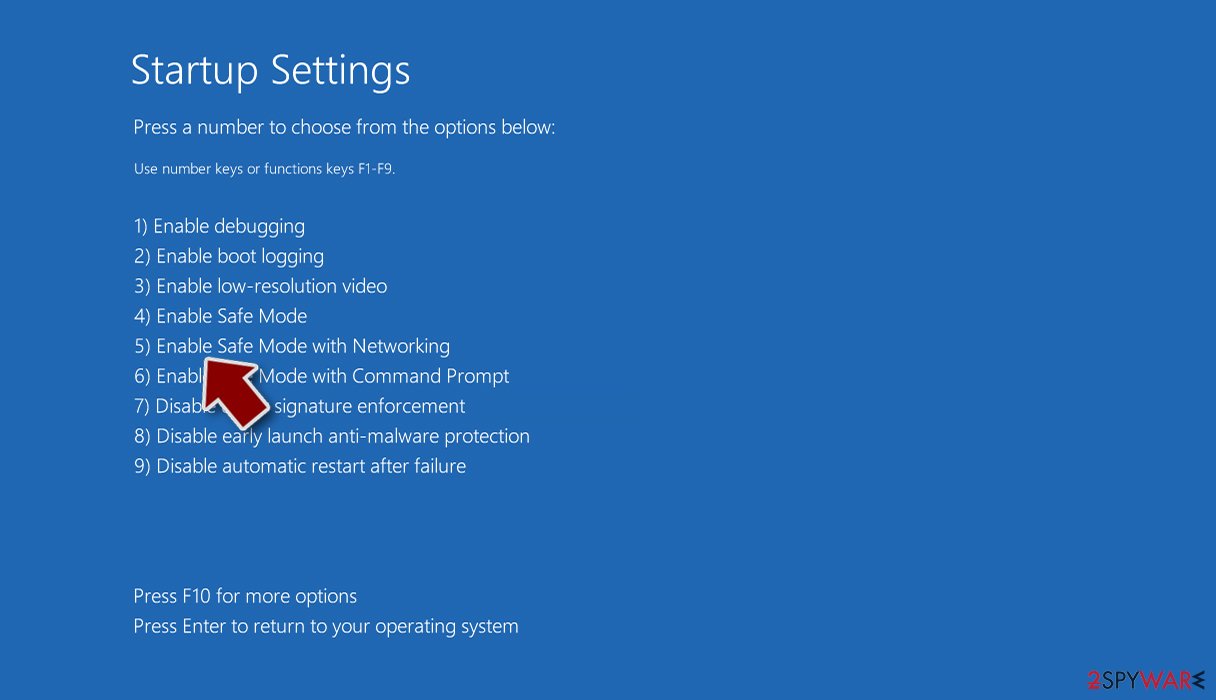
- Select Startup Settings.
- Click Restart.
- Press 5 or click 5) Enable Safe Mode with Networking.


Repair corrupted system files
Performance, stability, and usability issues, to the point where a full Windows reinstall is required, are nothing unusual after malware infection. These types of viruses can alter the Windows registry database, damage vital bootup, and other sections, delete or corrupt DLL files, etc. Once a system file is damaged by malware, antivirus software cannot fix it.
Manual troubleshooting of such damage is also very complicated and can take a long time. This is why FortectIntego was developed. It can fix a lot of the damage caused by an infection like this. Blue Screen errors,[5] freezes, registry errors, damaged DLLs, etc., can make your computer completely unusable. By using this maintenance tool, you could prevent yourself from having to reinstall WIndows completely.
- Download the application by clicking on the link above
- Click on the ReimageRepair.exe
- If User Account Control (UAC) shows up, select Yes
- Press Install and wait till the program finishes the installation process
- The analysis of your machine will begin immediately
- Once complete, check the results – they will be listed in the Summary
- You can now click on each of the issues and fix them manually
- If you see many problems that you find difficult to fix, we recommend you purchase the license and fix them automatically.


Try recovering data with third-party software
Only hackers hold the decryption key, which can unlock your files, so if you did not back them up previously, there is a good chance that you will never get them back. You can try using data recovery software, but keep in mind that third-party programs cannot always decrypt the files. Whatever the situation may be, we suggest at least trying this method. Before you proceed, copy the corrupted files and place them in a USB flash drive or another external storage device. And remember – only do this if you have already removed the Vice Society ransomware.
Before you begin, several pointers are important while dealing with this situation:
- Since the encrypted data on your computer might permanently be damaged by security or data recovery software, you should first make backups of it – use a USB flash drive or another storage.
- Only attempt to recover your files using this method after you perform a scan with anti-malware software.
Install data recovery software
- Download Data Recovery Pro.
- Double-click the installer to launch it.
- Follow on-screen instructions to install the software.

- As soon as you press Finish, you can use the app.
- Select Everything or pick individual folders where you want the files to be recovered from.

- Press Next.
- At the bottom, enable Deep scan and pick which Disks you want to be scanned.

- Press Scan and wait till it is complete.
- You can now pick which folders/files to recover – don't forget you also have the option to search by the file name!
- Press Recover to retrieve your files.



Did this guide help?
Be the first to comment