

Sakura ransomware is the virus that locks files and marks them using .Sakura extension

Sakura ransomware virus is the infection that controls processes that could help with the possible file recovery or virus removal. The threat is focused on encryption procedures because this process allows malware actors to have a reason for the money demands. The infiltration of the threat can happen silently, and users cannot point to the time when these threats inject the machine, so the only symptom is the file marking. However, those extensions appear at the end of the file when it is too late to avoid the ransomware – the locking is done.
Virus developers claim to have the only solution – a decryption tool. But payment should not be considered the solution. These threat actors even claim to offer the test decryption of three files. That can be a tool for legitimacy and trust faking used by criminals behind the Sakura ransomware virus.[1]
The infection is based on the Chaos ransomware, and the malware is encrypting files that can be valuable for the ransom demands. The payment is listed as the only option on the ransom note, but this is not the solution, and the threat should be removed properly to keep the machine running smoothly. The infection can be removed, but the Sakura ransomware virus is not decryptable at the moment.
Overview
The threat locks data and marks files .Sakura marker and demands payments via the read_it.txt file that instructs people to contact criminals and pay the demanded sum in cryptocurrency to recover files using the tools that are supposed to be provided. That is not happening, and you should not trust such claims.
| Name | Sakura ransomware |
|---|---|
| Type | Cryptovirus, file-locker |
| File marker | .Sakura |
| Ransom note | read_it.txt |
| Distribution | File virus payload gets spread to machines via other threats, malicious file attachments on emails, pirating platforms |
| Contact emails | test2@test.com,test@test.com |
| Elimination | These infections need to be removed from the machine, and antivirus applications can surely help with that |
| Repair | Malware like this can cause various issues with the machine, and it happens due to leftovers, so you can run FortectIntego to properly clear the machine |
Sakura file virus is the infection that causes inaccessibility to the files on the machine. However, there are additional issues created by the ransomware because it runs in the machine and triggers alterations to settings that can control various processes needed for file recovery or virus elimination. It is crucial to remove the virus as soon as possible.
Attackers try to convince people to contact them via email, but this communication can cause other malware installations instead of proper Sakura ransomware decryption. Cybercriminals should never be trusted, and these payments rarely lead to file recovery or any other solutions. But the file-locker virus elimination procedure can.

Removing the infection
Sakura ransomware virus is a threat that triggers additional processes on the machine to evade detection[2] of anti-malware tools. That persistence can also be improved by injecting other threats like trojans and malware into the system. These issues are all related to the danger level of ransomware-type threats in general.
These threats are the most dangerous because the ransomware attack involves direct damage to files and money extortion. These are the issues that experts[3] often warn about. There is nothing that could guarantee the file recovery, and paying the demanded sum is not doing that. This is why the removal of this virus is more recommended.
Sakura ransomware virus can spread silently and show various issues with the machine before those files are encoded, but the existence gets masked. Make sure to run the anti-malware tool to properly check the machine for any intruders and remove any indicated infections as soon as possible.
You can run the proper tool like SpyHunterCombo Cleaner or MalwarebytesMalwarebytes and stop the active virus. This way, the operations of those major threats are stopped, and the Sakura ransomware can be terminated. Once that is done, the machine can be recovered and files that got affected addressed. There are no decryption tools that could work for every version, so remove the virus and try alternate methods.
Recovering system performance
An infection like Sakura ransomware can alter the Windows registry database, damage vital bootup and other sections, delete or corrupt DLL files, etc. Once a system file is damaged by malware, antivirus software is not capable of doing anything about it, leaving it just the way it is. Consequently, users might experience performance, stability, and usability issues, to the point where a full Windows reinstall is required.
Therefore, we highly recommend using a one-of-a-kind, patented technology of FortectIntego repair. Not only can it fix virus damage after the infection, but it is also capable of removing malware that has already broken into the system thanks to several engines used by the program. Besides, the application is also capable of fixing various Windows-related issues that are not caused by malware infections, for example, Blue Screen errors, freezes, registry errors, damaged DLLs, etc.
- Download the application by clicking on the link above
- Click on the ReimageRepair.exe

- If User Account Control (UAC) shows up, select Yes
- Press Install and wait till the program finishes the installation process

- The analysis of your machine will begin immediately
- Once complete, check the results – they will be listed in the Summary
- You can now click on each of the issues and fix them manually
- If you see many problems that you find difficult to fix, we recommend you purchase the license and fix them automatically.



File recovery option
Sakura ransomware is not decryptable because it is not a new threat, and it has been related to other threat families and versions on that list. The infection can and should be removed to avoid issues with file encryption and recovery. If you do not remove the virus and allow the copies to be placed on the machine, you can risk getting those files encoded also.
Sakura ransomware virus is one of many threats of this category that can trigger other operations, disable programs, and delete processes from the computer, so those alternate options for file recovery and threat removal can be affected. These are the criminals that run the program on the system, so do not think about paying or contacting them at all.
Since many users do not prepare proper data backups prior to being attacked by ransomware, they might often lose access to their files permanently. Paying criminals is also very risky, as they might not fulfill the promises and never send back the required decryption tool.
While this might sound terrible, not all is lost – data recovery software might be able to help you in some situations (it highly depends on the encryption algorithm used, whether ransomware managed to complete the programmed tasks, etc.). Since there are thousands of different ransomware strains, it is immediately impossible to tell whether third-party software will work for you.
Therefore, we suggest trying regardless of which ransomware attacked your computer. Before you begin, several pointers are important while dealing with this situation:
- Since the encrypted data on your computer might permanently be damaged by security or data recovery software, you should first make backups of it – use a USB flash drive or another storage.
- Only attempt to recover your files using this method after you perform a scan with anti-malware software.
Install data recovery software
- Download Data Recovery Pro.
- Double-click the installer to launch it.

- Follow on-screen instructions to install the software.

- As soon as you press Finish, you can use the app.
- Select Everything or pick individual folders where you want the files to be recovered from.

- Press Next.
- At the bottom, enable Deep scan and pick which Disks you want to be scanned.

- Press Scan and wait till it is complete.
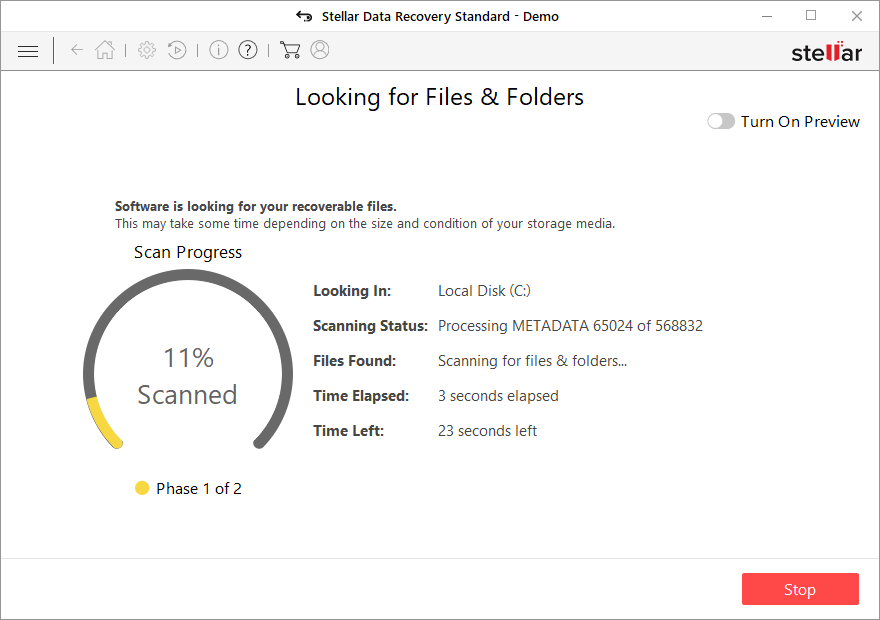
- You can now pick which folders/files to recover – don't forget you also have the option to search by the file name!
- Press Recover to retrieve your files.



Did this guide help?
Be the first to comment