

Adshome.xyz shows misleading messages to make users download potentially unwanted applications

Adshome.xyz is a dubious website one might see accidentally while browsing the internet on Google Chrome, Mozilla Firefox, MS Edge, or another web browser. This typically happens when users click a misleading or malicious link on high-risk websites where they go to download illegal software or stream copyrighted material online. Nonetheless, these redirects might happen due to plenty of other reasons, for example, adware could be causing them.
As soon as users enter the Adshome.xyz site, they are presented with a fake message which encourages them to download and install a browser extension or an application on their devices. Those who agree and install the recommended app would quickly notice that their browsers become hijacked[1] – the homepage and new tab address may get changed or the default search provider altered.
This would bring sponsored links and more ads during web browser sessions, which would diminish the web browsing experience. These traits are almost identical to those of adware infection, so even if you didn't download anything offered by Adshome.xyz, it is a good idea to check your system for infections thoroughly.
| Name | Adshome.xyz |
| Type | Redirect, scam, phishing, adware |
| Distribution | Software bundling, redirects, misleading ads |
| Symptoms | Shows fake ads and promotes potentially unwanted applications |
| Risks | Installation of potentially unwanted programs or malware, personal information disclosure to unknown parties/cybercriminals, monetary losses |
| Removal | Do not interact with scam content; if you did, uninstall the unwanted browser extension and check your system for other infections with SpyHunterCombo Cleaner anti-malware |
| Other tips | After PUP elimination, make sure you clean your browsers to prevent data tracking. FortectIntego can significantly quicken this process |
Potentially unwanted programs and scams
Potentially unwanted browser extensions or programs have been around for many years now, and while definition and functionality changed (a lot of such programs used to be referred to as spyware),[2] their goal remains the same – to make sure that users who have them installed are exposed to as many ads as possible.
Over the years, applications became more regulated, and extensive spying activities and malicious ads had to stop, or otherwise, security solutions would prevent the installation of such software. To this day, adware creators bend the rules and manage to bypass good practices, still relying on dubious methods instead.
Adware is among the most spread potentially unwanted applications out there. Its deceptive distribution practices ensure that more people get infected every day without even realizing it. Nonetheless, adware is almost always installed by users themselves, even though they are usually tricked by clever advertising or misleading messages.
In fact, phishing messages and adware are closely related, as those who are infected by adware are more likely to encounter fake messages, and fake messages promote the installation of potentially unwanted software.

How to avoid fake websites
First of all, it is important to note that you are more likely to enter phishing[3] and other unreliable websites whenever you are already visiting one. For example, peer-to-peer networks or similar sites that distribute pirated software are notorious for their insecure links. Likewise, these websites, along with the hacked ones, might include malicious scripts[3] that would automatically reroute browsers of users who merely click on empty space or don't click anything at all.
All in all, using a powerful ad-blocking application can stop these malicious scripts, as well as intrusive ads on various websites. However, these apps may prevent the monetization of websites you'd like to support and may sometimes break some elements of the page, so it is not the ultimate solution.
Security software with features for browsing protection could be an excellent choice in these situations, although there are plenty of times when people simply ignore the warnings, thinking it's a false positive. Therefore, we recommend avoiding high-risk websites altogether, as not only are they illegal but also dangerous.
Easy way to get rid of Adshome.xyz redirects
There could be plenty of messages one could encounter after being redirected to the Adshome.xyz page. For example, one could be told that some application installed on users' system is outdated and needs to be updated. In other cases, people might simply be shown a page with a download link for a browser hijacker.
In any case, we recommend you avoid downloading anything that the site suggests. Nonetheless, we strongly recommend checking the system for adware – the easiest way of doing that is by scanning your device with SpyHunterCombo Cleaner, MalwarebytesMalwarebytes, or another powerful anti-malware software. This would ensure that no adware or other malware is present on your system.
Likewise, if you have installed the promoted browser extension, proceed with the following instructions to remove it from your system:
Google Chrome
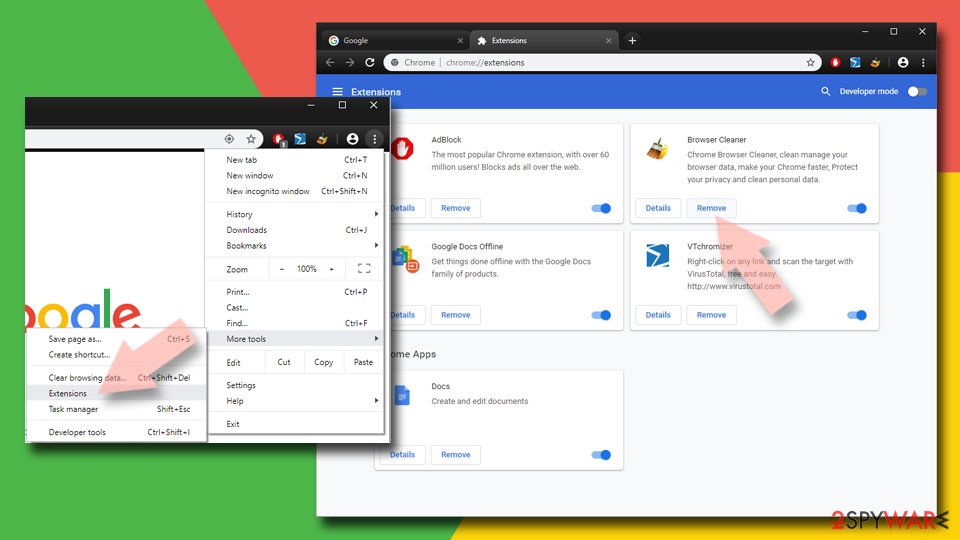
- Open Google Chrome, click on the Menu (three vertical dots at the top-right corner) and select More tools > Extensions.
- In the newly opened window, you will see all the installed extensions. Uninstall all the suspicious plugins that might be related to the unwanted program by clicking Remove.

Mozilla Firefox
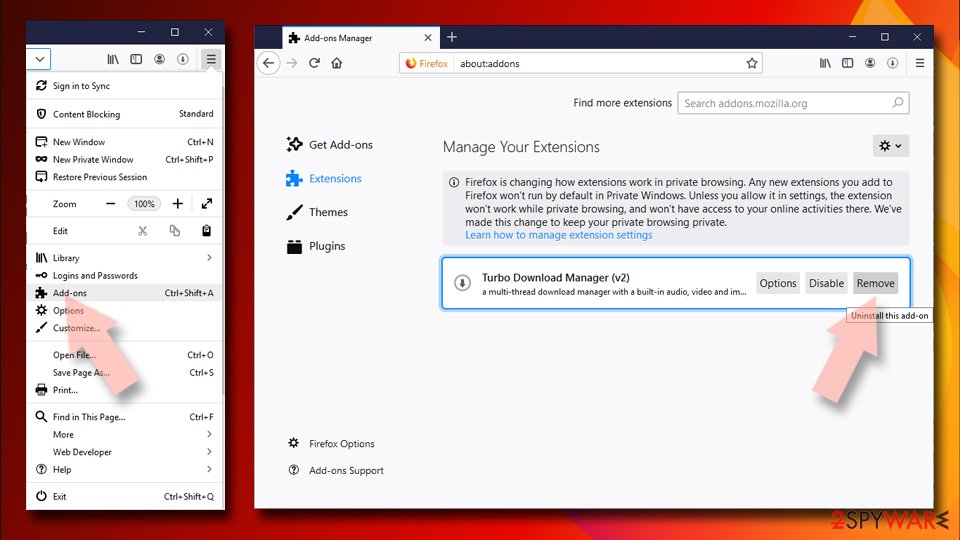
- Open Mozilla Firefox browser and click on the Menu (three horizontal lines at the window's top-right).
- Select Add-ons.
- In here, select the unwanted plugin and click Remove.

MS Edge (Chromium)
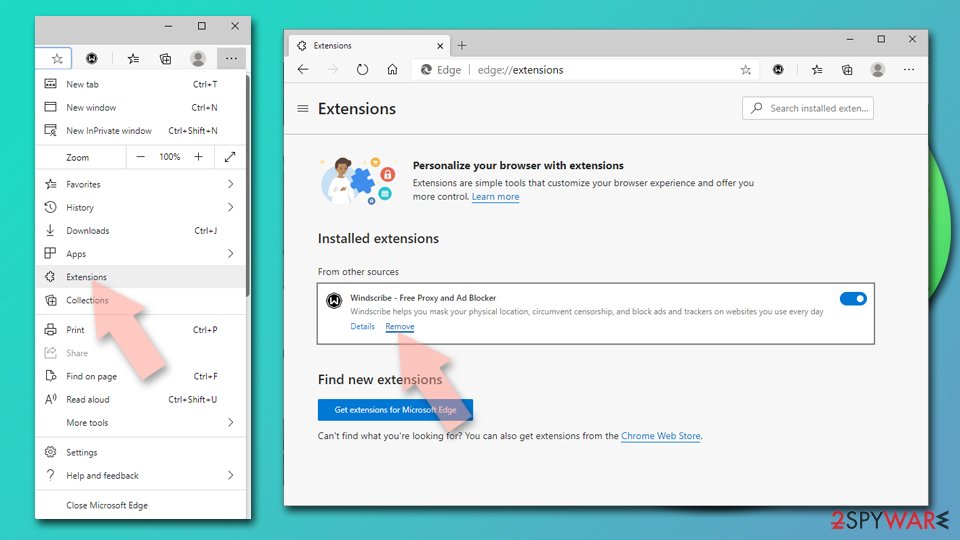
- Open Edge and click select Settings > Extensions.
- Delete unwanted extensions by clicking Remove.

Safari
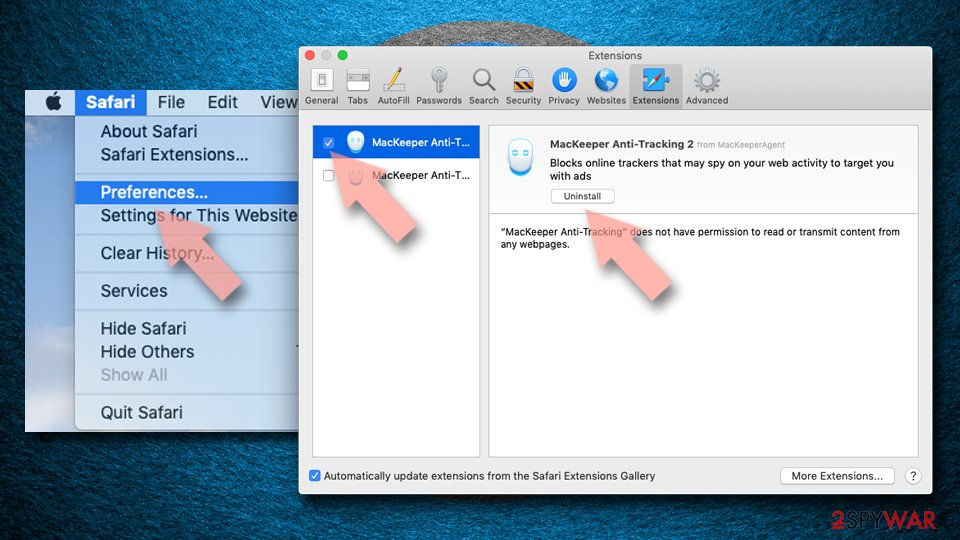
- Click Safari > Preferences…
- In the new window, pick Extensions.
- Select the unwanted extension and select Uninstall.

After you get rid of the unwanted extensions and malicious programs, it is vital you make sure that your browsers are cleaned from various tracker files that could have been left by adware. Cookies, for example, as commonly implemented by various third parties to collect data about users passively in the background.
To stop this, you should clean your browser caches at least sometimes – it is considered a good security practice in general. You can either employ powerful maintenance utility FortectIntego for this job or perform these steps yourself:
Google Chrome
- Click the Menu and pick Settings.
- Under Privacy and security, select Clear browsing data.
- Select Browsing history, Cookies, and other site data, as well as Cached images and files.
- Click Clear data.


Mozilla Firefox
- Click Menu and pick Options.
- Go to Privacy & Security section.
- Scroll down to locate Cookies and Site Data.
- Click on Clear Data…
- Select Cookies and Site Data, as well as Cached Web Content and press Clear.


MS Edge (Chromium)
- Click on Menu and go to Settings.
- Select Privacy and services.
- Under Clear browsing data, pick Choose what to clear.
- Under Time range, pick All time.
- Select Clear now.


Safari
- Click Safari > Clear History…
- From the drop-down menu under Clear, pick all history.
- Confirm with Clear History.


Did this guide help?
Be the first to comment