

News-pubixu.com ads are untrustworthy: they show scams and lead to malicious websites

News-pubixu.com is a fraudulent website created by fraudsters to get people to sign up for push notifications. Users are shown a phony message that encourages them to click the “Allow” button within the prompt on the site, which they are typically directed to after clicking a deceptive link elsewhere. In certain cases, adware[1] infection on users' computers may lead to phishing sites being displayed more frequently, so it needs to be checked out if that's the case.
In most cases, users are not quite aware of how these News-pubixu.com ads managed to infiltrate their devices, as they don't seem to appear in a predictable pattern. Instead, they are shown at completely random times in a separate pop-up message shown at the bottom or top right corners of their screens, depending on the operating system used.
Also, the content within these notifications is often misleading or malicious, which may lead people to dangerous places online if interacted with. For example, people may be exposed to get-rick-quick[2] schemes, fake virus infection alerts which imitate reputable security companies, fake lotteries, and more.
Since most users don't realize they are dealing with push notifications, they also don't know how to get rid of them. Luckily, it is not a big deal, as long as you don't interact with anything presented by News-pubixu.com. We provide detailed instructions on how to get rid of these ads and how to clean the system from potential threats easily.
| Name | News-pubixu.com |
| Type | Push notifications, ads, pop-ups, scam |
| Distribution | The website is granted access to deliver notifications as soon as the “Allow” button is clicked inside the push notification prompt |
| Symptoms | Push notifications show on the desktop at random time intervals – they show fake notices and push scams. Links can also lead to malware-laden sites |
| Risks | If you click on links provided by the site, your system is at risk of malware/PUPs infection, giving away your personal information to hackers or paying for services that aren't truly required |
| Removal | To end intrusive push notifications, go to the Chrome menu and choose Settings. Then, to ensure that your system is not infected with adware or malware, scan it with SpyHunterCombo Cleaner |
| Other tips | Some remnants of apps stay in browsers and can be used for tracking. Delete these with FortectIntego |
Scam messages and how to spot deception
Users seldom go to the News-pubixu.com site on purpose, given its fraudulent nature. An unanticipated redirect from another dubious location, such as a torrent website, may nevertheless lead to it (and plenty of other undesirable places).
The abrupt redirect to this site is clearly a strategy utilized by scammers to achieve their objectives since users are unlikely to consider what they see next. The primary objective is to perplex individuals and persuade them that the push notification prompt they're seeing is something else than what it's intended for. These are a few examples most commonly used:
- Click Allow to confirm that you are not a robot
- Press “Allow” to watch the video
- Click Allow to start downloading
- If you are 18+, click Allow
- Click “Allow” to win the prize and get it in our shop!

Some users might carelessly press the “Allow” button on notification prompts without giving it a second thought. Even if you have allowed notifications from a malicious site, as long as you don't interact with the promoted content, you should be rather safe. You can remove those types of notifications rather easily.
It is worth noting that these exact same messages are used by many other similar sites, such as Takemoneysurvey24.top, Device-variety.xyz, or Maincaptcha.top, so if you happen to come across them, make sure you don't allow notifications, regardless of what the message and the image in the background are implying.
Remove News-pubixu.com ads
Adware might be causing redirects to phishing websites, as we previously said. This is especially true if you see other concerning behavior such as pop-ups, offers, discounts, sponsored links, or redirections via suspicious web addresses when you browse the web. Browser homepage or search provider changes could also occur.
To check your system thoroughly, we recommend you scan your device with SpyHunterCombo Cleaner or MalwarebytesMalwarebytes security software, which can be an excellent help in finding and removing potentially unwanted applications and malware automatically. Likewise, the presence of effective anti-malware can prevent highly dangerous attacks of ransomware, Trojans, rootkits, keyloggers, and similar threats.
If potentially unwanted apps were indeed found, you should also take your time to clean your browsers (although it's also recommended to clean browser caches regularly to avoid errors and some security issues); removing cookies[3] in particular would prevent third-parties from tracking your any longer. You can easily perform this step with a useful tool such as FortectIntego, which can also be used to fix any system damage done by malware.
Finally, you should take care of News-pubixu.com removal as soon as possible, as the intrusive pop-ups and exposure to malicious links/misleading messages won't stop. To do so, you should access browser settings and get to the site settings, where you can block the website's URL from the “Allowed” list. If you need help, follow these steps:
Google Chrome (desktop)
- Open the Google Chrome browser and go to Menu > Settings.
- Scroll down and click on Advanced.
- Locate the Privacy and security section and pick Site Settings > Notifications.
- Look at the Allow section and look for a suspicious URL.
- Click the three vertical dots next to it and pick Block. This should remove unwanted notifications from Google Chrome.


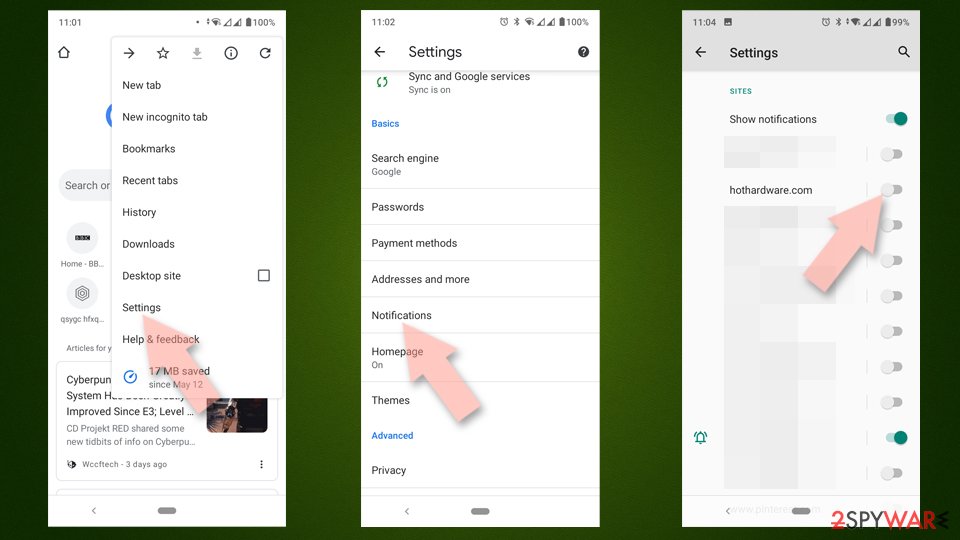
Google Chrome (Android)
- Open Google Chrome and tap on Settings (three vertical dots).
- Select Notifications.
- Scroll down to the Sites section.
- Locate the unwanted URL and toggle the button to the left (Off setting).

Mozilla Firefox
- Open Mozilla Firefox and go to Menu > Options.
- Click on Privacy & Security section.
- Under Permissions, you should be able to see Notifications. Click the Settings button next to it.
- In the Settings – Notification Permissions window, click on the drop-down menu by the URL in question.
- Select Block and then click on Save Changes. This should remove unwanted notifications from Mozilla Firefox.


MS Edge (Chromium)
- Open Microsoft Edge, and go to Settings.
- Select Site permissions.
- Go to Notifications on the right.
- Under Allow, you will find the unwanted entry.
- Click on More actions and select Block.


Safari
- Click on Safari > Preferences…
- Go to the Websites tab and, under General, select Notifications.
- Select the web address in question, click the drop-down menu and select Deny.


Internet Explorer
- Open Internet Explorer, and click on the Gear icon at the window's top-right.
- Select Internet options and go to the Privacy tab.
- In the Pop-up Blocker section, click on Settings.
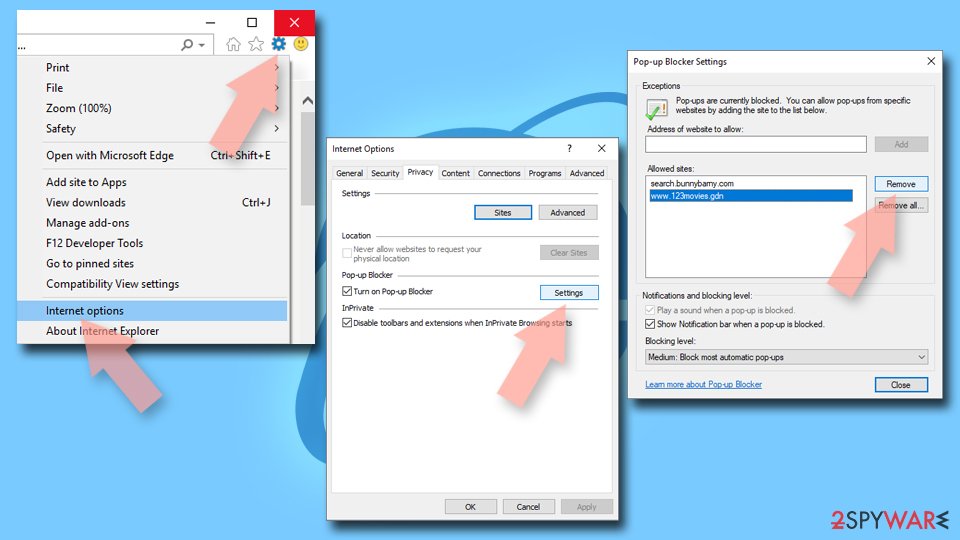
- Locate the web address in question under Allowed sites and pick Remove.

Did this guide help?
Be the first to comment