

Mafiaware666 ransomware can encrypt users' personal files and cause damage to the OS

Mafiaware666 ransomware is a malicious program that can use encryption[1] algorithms to lock users' files. The malware affects personal data, like photos, videos, documents, etc. Ransomware infections can result in permanent data loss if users do not have backups.
When it infiltrates the system, the file-locking virus starts appending files with the .MafiaWare666. If a file was previously named picture.jpg, after encryption, it would look like this – picture.jpg.MafiaWare666. The icons are also changed to white pages so thumbnails are unavailable.
| NAME | Mafiaware666 |
| TYPE | Ransomware, cryptovirus, data locking malware |
| DISTRIBUTION | Email attachments, peer-to-peer file sharing platforms, malicious ads |
| FILE EXTENSION | .MafiaWare666 |
| RANSOM NOTE | Pop-up window |
| RANSOM AMOUNT | $300 in Bitcoin |
| FILE RECOVERY | It is almost impossible to recover the files if you do not have backups. We provide a third-party recovery option in our guide. |
| MALWARE REMOVAL | Scan your machine with anti-malware software to eliminate malicious files. This will not recover them. |
| SYSTEM FIX | Windows reinstallation can be avoided with FortectIntego maintenance tool, which can fix the damaged OS |
The ransom note
After the encryption process is done, Mafiaware666 ransomware generates a pop-up window which is the ransom note. The full message reads as follows:
All Your important files are now encrypted!
You've been infected with MafiaWare666.To decrypt files you need to obtain the private key.
The Single copy of the private key which allow you
to decrypt the files is on a secret server on the internet dark web.
The server will destroy the key after 72 Hours in this window.To obtain the private key for this computer,
Please Send or Pay 300 USD Or 300 EUR
To the bitcoin address below in the Red Box.
~~~~~~~~~~~~~~~~~~~~~~~~~~~~~~~~~~~~~~~~~~~~~
If your wondering why we charge low its because we
believe, a little goes a long way.* Once you've paid follow these steps:
– Take a time stamp of payment
– email this address[MafiaWare666@proton.me]
– Contain the time and date of payment
and we'll email you back with a decryption key
Cybercriminals inform victims that they have 72 hours to pay the ransom. Otherwise, the decryption key will be destroyed. They ask for $300 or 300€ to be paid in Bitcoin. Threat actors choose cryptocurrencies[2] as a payment method because it provides anonymity. However, we strongly advise against paying cybercriminals because they cannot be trusted.
Many previous ransomware victims have come forward and said that they never received the promised decryption tool after paying the ransom. Although it is almost impossible to decrypt files without the threat actors' help, there is a third-party recovery solution that helps in some cases. We have instructions on how to use it below.

Distribution methods
Malicious programs are often included as bundled software in the installers. This usually happens on freeware distribution platforms, Torrent websites, and peer-to-peer file-sharing platforms. People also often look for “cracked” software[3] which is particularly dangerous.
It is best to use official web stores and developer websites. Even though it may get costly, you may save in the long run by keeping your system running smoothly. Apps that get listed on official marketplaces, have to go through an extensive review process. However, you should still always do your research – read the reviews, look at the ratings and the number of users.
Another channel commonly used by cybercriminals is email. They use social engineering[4] methods to create deceptive letters. Often, they make them look like important and urgent messages from well-known companies. They include malicious links or infected attachments. That is why it is best to only open email attachments from senders you know.
Additionally, many people do not realize how important it is to keep your operating system and software updated. Hackers can use software vulnerabilities to deliver their malicious programs. Software developers regularly release security patches that should be installed as soon as they become available.
How to eliminate ransomware?
If you try to recover your data first, it can result in permanent loss. It can also encrypt your files the second time. It will not stop until you remove the malicious files causing it first. You should not attempt removing the malicious program yourself. Use anti-malware tools like SpyHunterCombo Cleaner or MalwarebytesMalwarebytes to scan your system. This security software should find all the related files and entries and remove them automatically for you. Automatic removal is the best option because there is less risk of leaving some of the traces behind.
Malware could prevent you from using antivirus software by turning it off. In that case, you should proceed with accessing Safe Mode first:
Windows 7 / Vista / XP
- Click Start > Shutdown > Restart > OK.
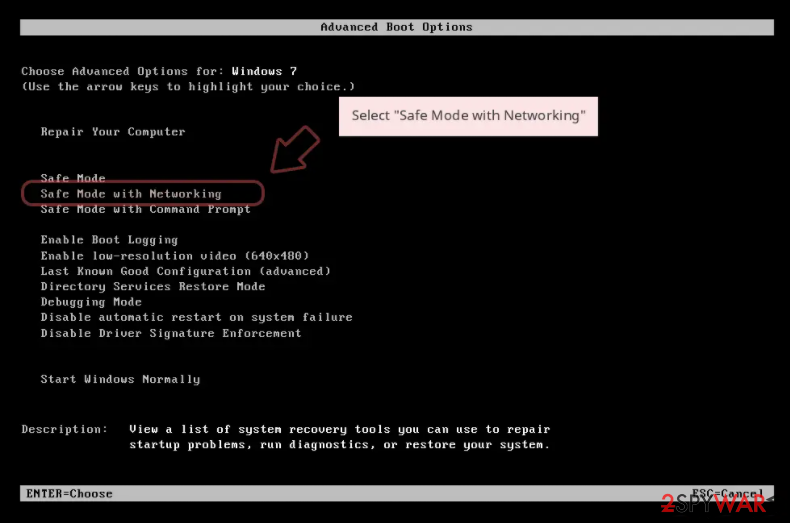
- When your computer becomes active, start pressing F8 button (if that does not work, try F2, F12, Del, etc. – it all depends on your motherboard model) multiple times until you see the Advanced Boot Options window.
- Select Safe Mode with Networking from the list.

Windows 10 / Windows 8
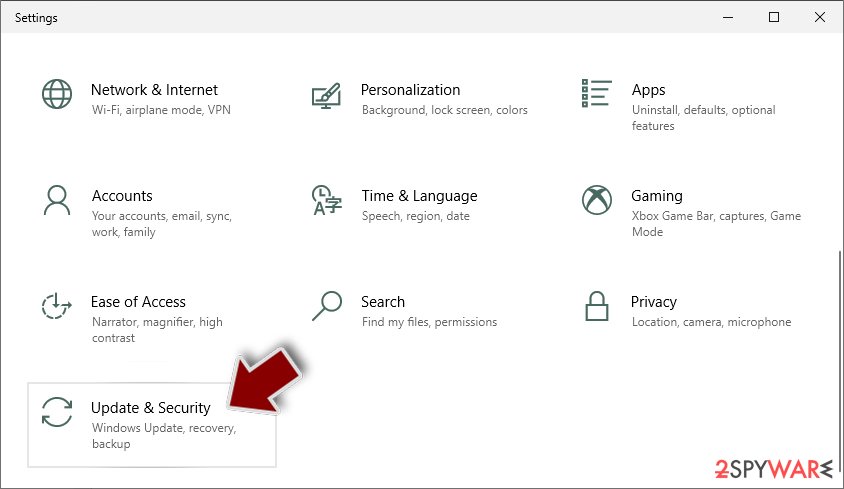
- Right-click on Start button and select Settings.
- Scroll down to pick Update & Security.
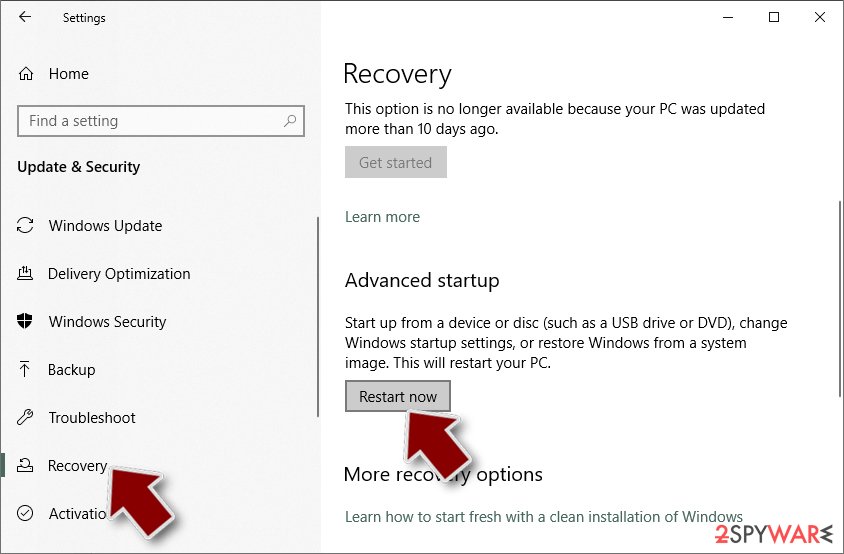
- On the left side of the window, pick Recovery.
- Now scroll down to find Advanced Startup section.
- Click Restart now.
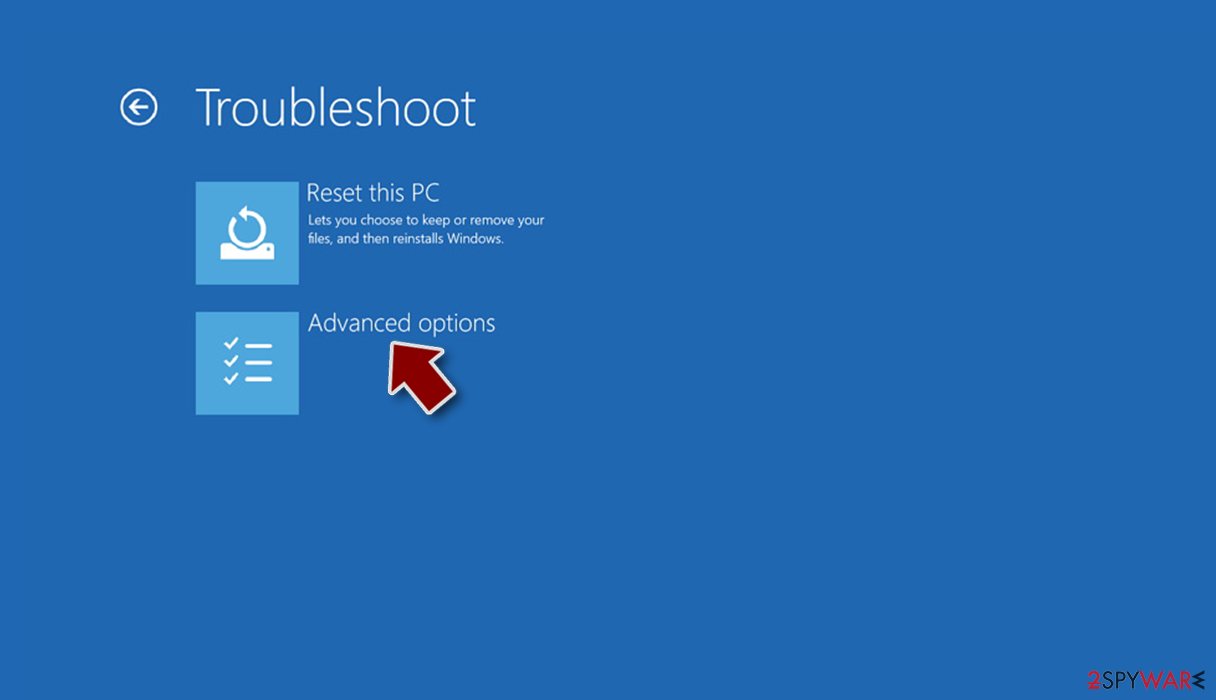
- Select Troubleshoot.
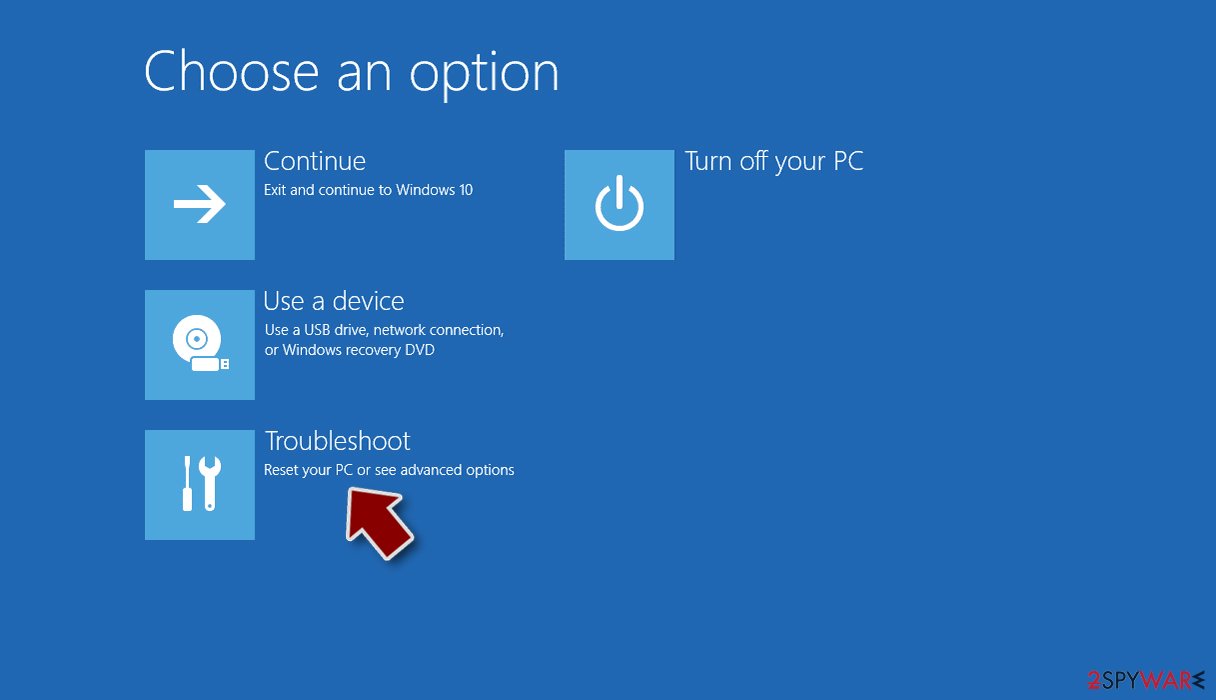
- Go to Advanced options.
- Select Startup Settings.
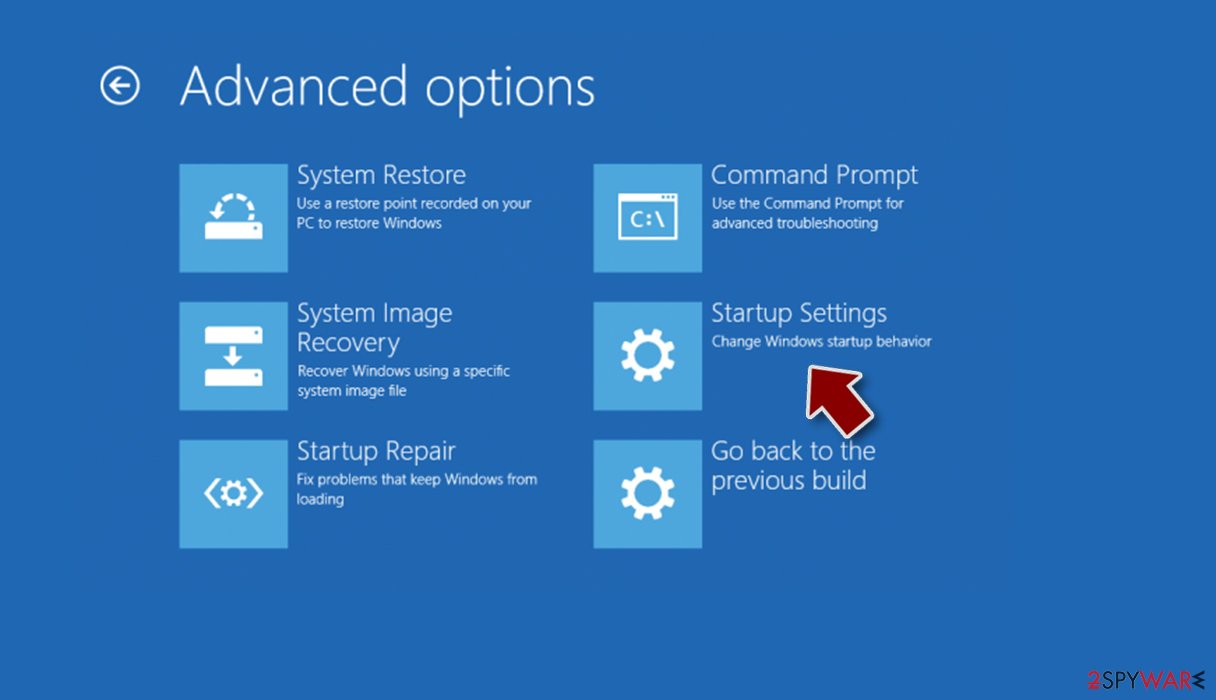
- Click Restart.
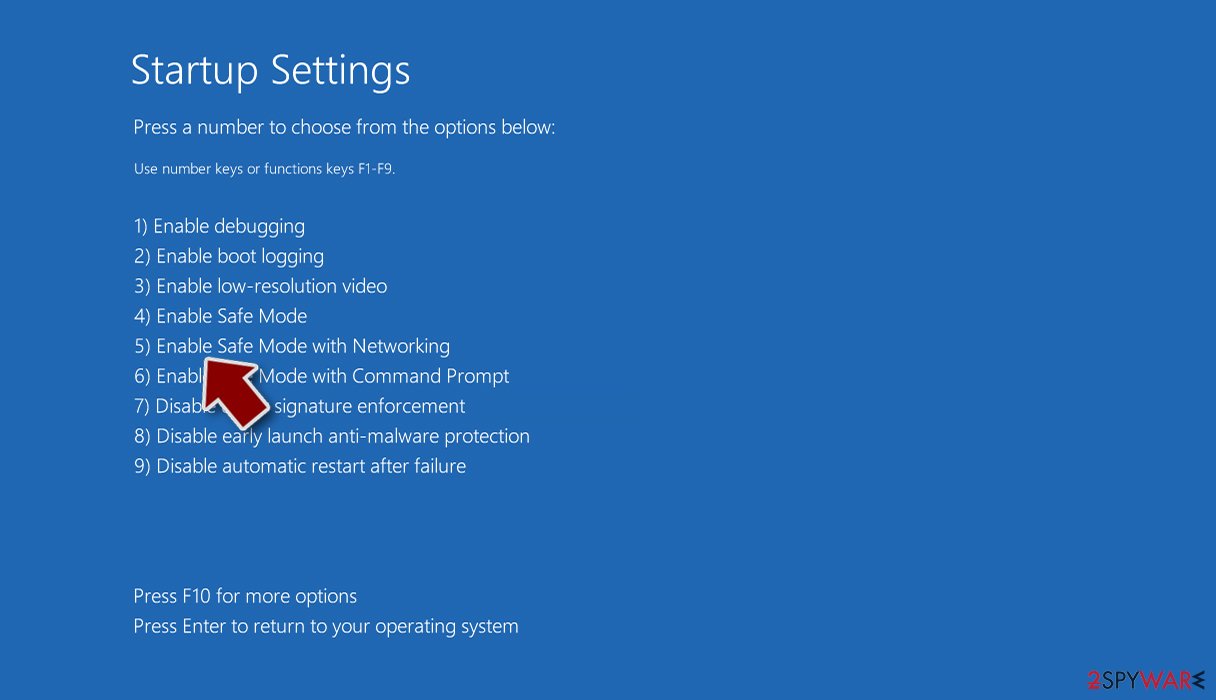
- Press 5 or click 5) Enable Safe Mode with Networking.


File recovery using third-party software
Only hackers hold the decryption key, which can unlock your files, so if you did not back them up previously, you possibly lost your files forever. You can try using data recovery software, but third-party programs cannot always decrypt the files. We suggest at least trying this method. Before proceeding, you have to copy the corrupted files and place them in a USB flash drive or another storage. And remember – only do this if you have already removed Mafiaware666 ransomware.
- Download Data Recovery Pro.
- Double-click the installer to launch it.

- Follow on-screen instructions to install the software.

- As soon as you press Finish, you can use the app.
- Select Everything or pick individual folders where you want the files to be recovered from.

- Press Next.
- At the bottom, enable Deep scan and pick which Disks you want to be scanned.

- Press Scan and wait till it is complete.
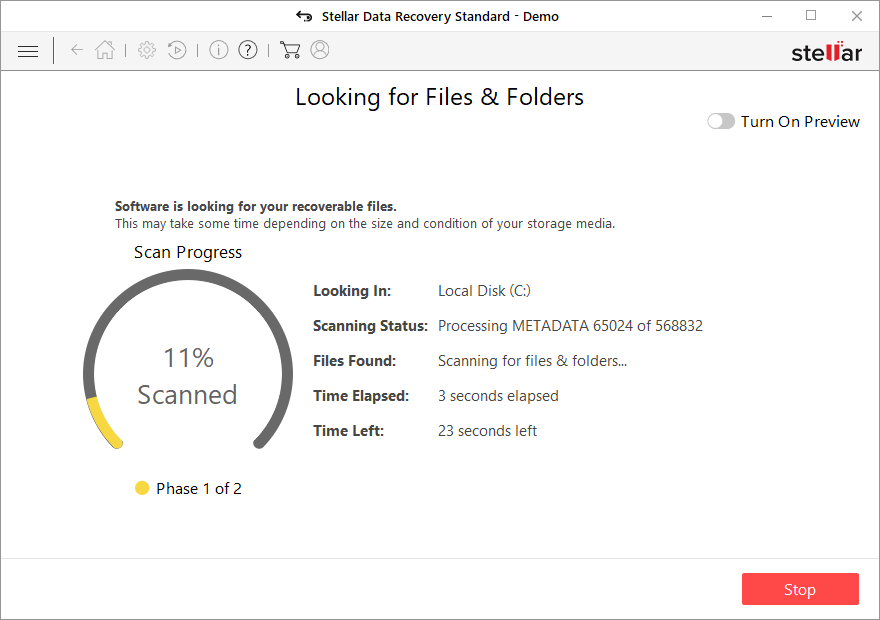
- You can now pick which folders/files to recover – don't forget you also have the option to search by the file name!
- Press Recover to retrieve your files.



The operating system is left damaged after an attack
Performance, stability, and usability issues, to the point where a full Windows reinstall is required, are expected after malware infection. These types of infections can alter the Windows registry database, damage vital bootup, and other sections, delete or corrupt DLL files, etc. Once a system file is damaged by malware, antivirus software is not able to repair it.
This is why FortectIntego was developed. It can fix a lot of the damage caused by an infection like this. Blue Screen errors, freezes, registry errors, damaged DLLs, etc., can make your computer completely unusable. By using this maintenance tool, you could avoid Windows reinstallation.
- Download the application by clicking on the link above
- Click on the ReimageRepair.exe

- If User Account Control (UAC) shows up, select Yes
- Press Install and wait till the program finishes the installation process

- The analysis of your machine will begin immediately

- Once complete, check the results – they will be listed in the Summary
- You can now click on each of the issues and fix them manually
- If you see many problems that you find difficult to fix, we recommend you purchase the license and fix them automatically.



Did this guide help?
Be the first to comment