

Multi-searches.com is a browser hijacker that changes your search preferences to insert more ads

Multi-searches.com is a redirect you may detect taking control of your Google Chrome, Mozilla Firefox, Microsoft Edge, or another web browser. If that's the case, you've got a potentially unwanted program on the system that will most likely show up as an extension. These applications aren't particularly harmful, but they are unlikely to be useful either. Browser hijackers exhibit a lot of suspicious and deceptive characteristics; therefore, they should be removed as soon as possible.
As soon as the PUP is installed, Multi-searches.com will take over the homepage and new tab settings. Besides, the search provider would also be replaced with Bing, although not in its pure form, as it is impacted by the hijacker.
Users would be exposed to all kinds of advertisements and clicks that profit the hijacker creators rather than seeing real links that correspond to the search query. This may prevent people from finding what they're looking for and direct them to websites promoting questionable information or advertising other potentially unwanted applications.
| Name | Multi-searches.com |
| Type | Browser hijacker, potentially unwanted application |
| Distribution | Fake ads, software bundles |
| Symptoms | Homepage and new tab address hijacked by the extension; promotional links are displayed as top search results; intrusive ads on various visited websites |
| Risks | Installation of other potentially unwanted programs/malware, personal data disclosure to unknown parties, monetary loss |
| Removal | Remove the undesirable browser extension by going to your browser's settings. Using SpyHunterCombo Cleaner security software to check the system can also ensure that no malware is running in the background |
| Other tips | Upon elimination of all potentially unwanted apps and malware, we recommend running a scan with FortectIntego that can clean browsers and fix virus damage |
Browser hijackers: how do they spread and how to avoid them
Some people don't install Multi-searches.com on purpose, thinking it just appeared out of nowhere. This is not the case, however, because browser hijackers are frequently installed by users without their knowledge. PUPs do not replicate in the same manner as malware (e.g., ransomware[1] or trojans) and are always downloaded by users through deception.
Multiple apps can be distributed simultaneously by websites thanks to software bundling, sometimes without the user's awareness or consent. Due to the revenue generated by pay-per-install[2] operations, this is a widespread practice among third-party websites. But doing so can lead to people installing unwanted and even dangerous apps on their computers, especially when we're talking about places of dubious origin, such as torrents or warez sites.
We advise great caution while installing new programs from third-party sources to avoid falling victim to this fairly unfair tactic. For instance, you should always ensure that you choose Advanced settings instead of Recommended in the installation window, remove all the ticks from pre-ticked boxes, and be on the alert for misplaced buttons and fine print – these techniques are frequently used to trick people, especially those who are in a rush to get things done.

How to remove Multi-searches.com hijacker
Although they can be annoying, browser hijackers are not considered to be as harmful as malware. However, because they may jeopardize a user's browsing experience and breach their privacy thanks to data monitoring techniques, these applications should not be ignored and should not be allowed to operate in the background. Removing all potentially unwanted applications from the system is something that's beneficial for everybody – even if the hijacker is not malicious, it does not provide any positives for users.
As Multi-searches.com spreads as a browser plugin, you should find and eliminate it first. As a precautionary measure, we recommend that you check your system for more dangerous malware before removing the extension. SpyHunterCombo Cleaner or MalwarebytesMalwarebytes may do so in a matter of minutes. You can then remove the plugin after you've verified that your computer is virus-free:
Google Chrome
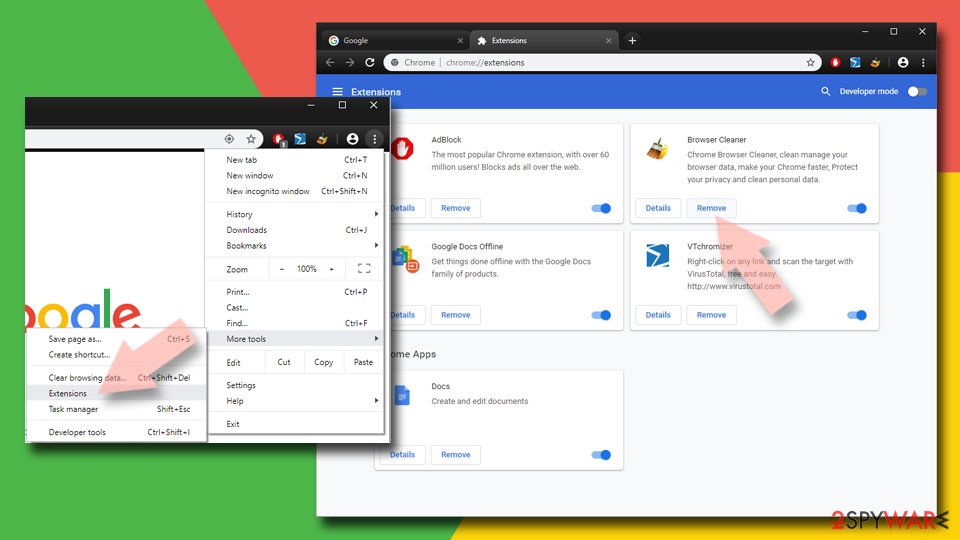
- Open Google Chrome, click on the Menu (three vertical dots at the top-right corner) and select More tools > Extensions.
- In the newly opened window, you will see all the installed extensions. Uninstall all the suspicious plugins that might be related to the unwanted program by clicking Remove.

Mozilla Firefox
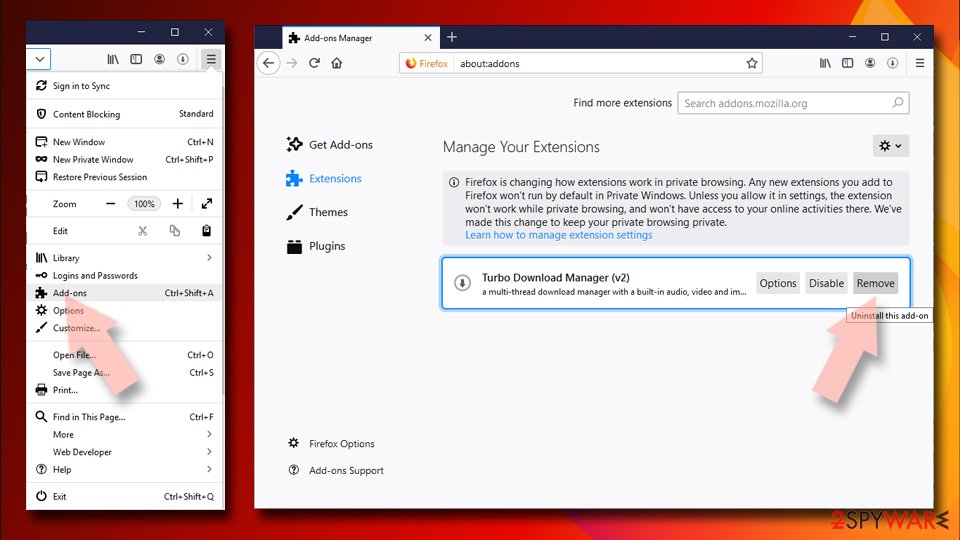
- Open Mozilla Firefox browser and click on the Menu (three horizontal lines at the window's top-right).
- Select Add-ons.
- Here, select the unwanted plugin and click Remove.

MS Edge (Chromium)
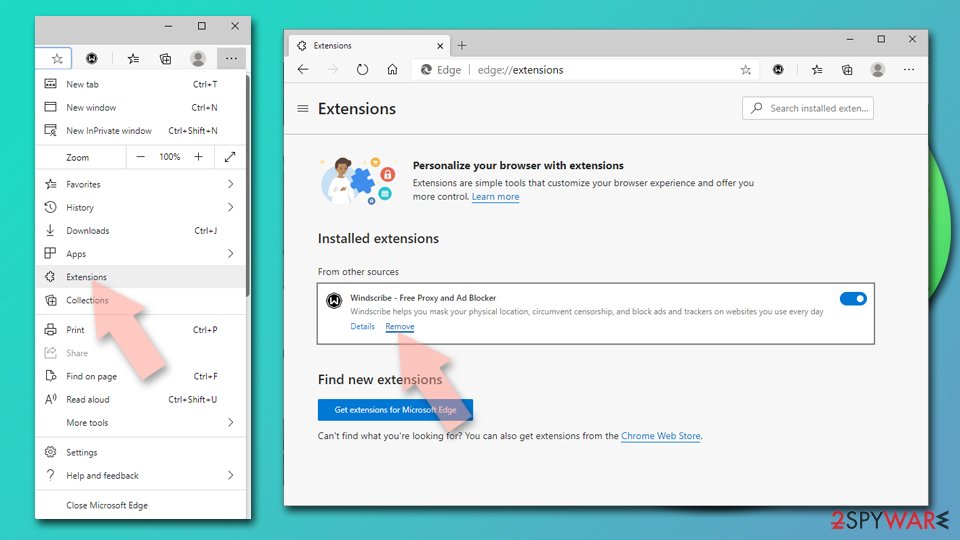
- Open Edge and click select Settings > Extensions.
- Delete unwanted extensions by clicking Remove.

Safari
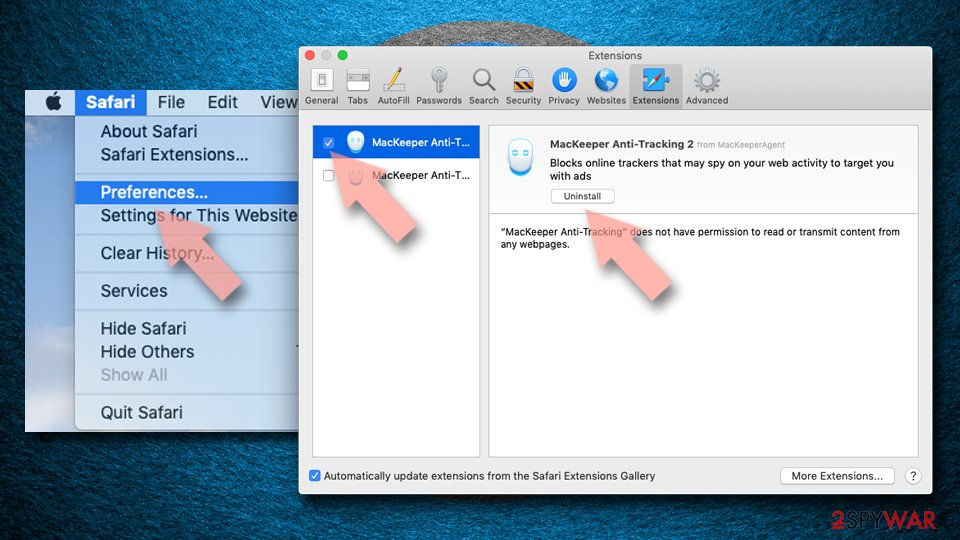
- Click Safari > Preferences…
- In the new window, pick Extensions.
- Select the unwanted extension and select Uninstall.

Internet Explorer
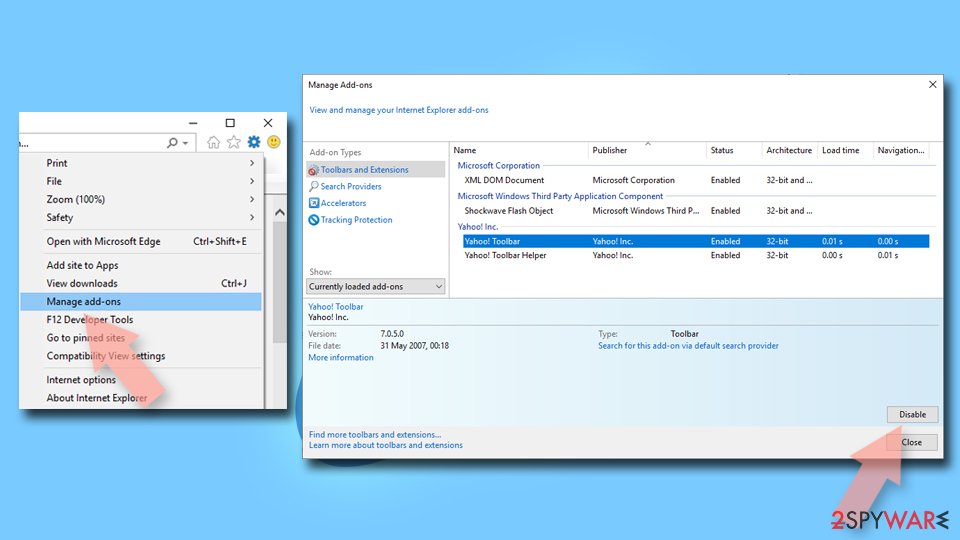
- Open Internet Explorer, click on the Gear icon (IE menu) on the top-right corner of the browser
- Pick Manage Add-ons.
- You will see a Manage Add-ons window. Here, look for suspicious plugins. Click on these entries and select Disable.

Don't forget to take care of your privacy
As mentioned, browser hijackers are well known for their data-tracking capabilities, similar to most potentially unwanted applications. This is because data is valuable to marketing companies, and once collected, it can be sold or shared for profit. To make this happen, third-party applications often employ various tracking activities thanks to items like cookies, web beacons,[3] pixels, and similar tracking technologies.
These tiny items may be placed on your local machine and continue their operation even after Multi-searches.com removal. Therefore, it is important to make sure that web caches where these trackers are stored are cleaned. Besides, clearing caches regularly can improve your overall security and prevent bugs and errors during browsing.
The easiest way to clean your system from PUP leftover files is by employing FortectIntego. This tool can get rid of all trackers and junk from the system and also fix any issues that may arise after a malware infection, resolving system crashes, program errors, and similar issues. If you would instead clean your browsers manually, proceed with the following steps:
Google Chrome
- Click on Menu and pick Settings.
- Under Privacy and security, select Clear browsing data.
- Select Browsing history, Cookies and other site data, as well as Cached images and files.
- Click Clear data.


Mozilla Firefox
- Click Menu and pick Options.
- Go to Privacy & Security section.
- Scroll down to locate Cookies and Site Data.
- Click on Clear Data…
- Select Cookies and Site Data, as well as Cached Web Content, and press Clear.


MS Edge (Chromium)
- Click on Menu and go to Settings.
- Select Privacy and services.
- Under Clear browsing data, pick Choose what to clear.
- Under Time range, pick All time.
- Select Clear now.


Safari
- Click Safari > Clear History…
- From the drop-down menu under Clear, pick all history.
- Confirm with Clear History.


Internet Explorer
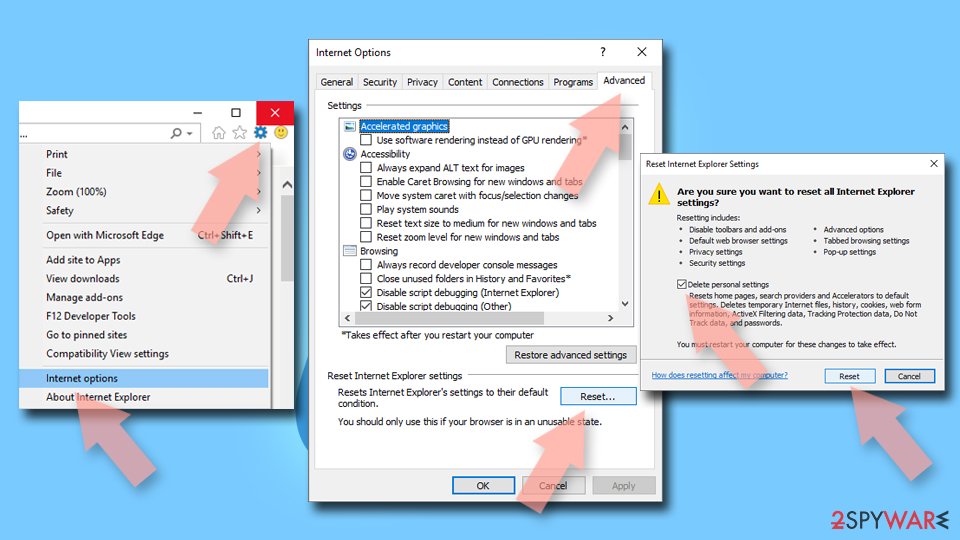
- Click on the Gear icon > Internet options and select the Advanced tab.
- Select Reset.
- In the new window, check Delete personal settings and select Reset.

Did this guide help?
Be the first to comment