
VBScript in 2026: Deprecation Status and What to Do

- VBScript in 2026: the short answer
- VBScript deprecation timeline
- What changed since 2024
- Risks and scams around VBScript (our analysis)
- How to check and prepare for the VBScript removal
- What is still unknown
- Our original 2024 report
- Microsoft says that PowerShell and JavaScript should replace VBScript eventually
- Numerous cybercrime groups used VBScript to infect computers with malware
- Related guides on 2-Spyware
VBScript in 2026: the short answer
VBScript (Visual Basic Scripting Edition) is deprecated, but it has not been removed yet. In Windows 11, version 24H2, the VBScript features on demand come pre-installed and turned on by default, so old .vbs files still run.[1] Microsoft lists VBScript among its deprecated Windows features.[6]
The next step is planned for around 2027. From then on, the VBScript features on demand will no longer be enabled by default, and anyone who still needs them will have to switch them on.[1] In a later phase Microsoft will remove the VBScript .dll files from future Windows versions, and projects that rely on VBScript will stop working.[1] We found no exact removal date from Microsoft as of 2026.
A correction to our original report below: it said users would need to install VBScript on demand in 24H2. Microsoft's updated guidance says the features on demand are pre-installed and on by default in that first phase.[1]
| Question | Answer in 2026 |
|---|---|
| What is VBScript? | A Windows scripting language from 1996, used in .vbs files, old web pages and installers |
| Is it still in Windows 11? | Yes. In 24H2 it ships as features on demand that are on by default[1] |
| When does it turn off? | Around 2027 it will no longer be enabled by default[1] |
| When is it removed? | In a later phase with no public date; the .dll files go away[1] |
| What replaces it? | PowerShell for automation and installers, JavaScript for web pages[1] |
| Does it affect Excel VBA? | Only VBA that calls .vbs files or uses VBScript as a type library, such as regular expressions[1] |
VBScript deprecation timeline
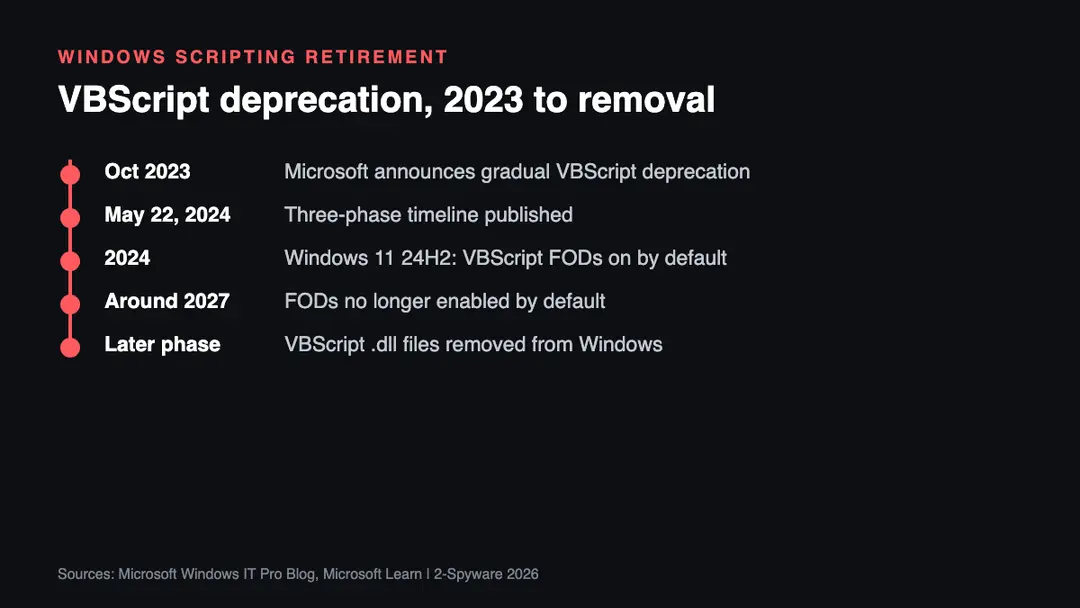
| Date | Event |
|---|---|
| October 2023 | Microsoft announces that it will gradually deprecate VBScript[1][6] |
| May 22, 2024 | Microsoft publishes the three-phase timeline[1] |
| 2024, Windows 11 24H2 | Phase 1: VBScript features on demand pre-installed and on by default[1] |
| Around 2027 | Phase 2: the features on demand are no longer enabled by default[1] |
| Later, no date given | Phase 3: VBScript retired and its .dll files removed[1] |
What changed since 2024
The plan itself has not moved. Microsoft's guidance still describes the same three phases, and we found no newer date for the final removal.[1] What did change is the daily reality for administrators. Some found that VBScript was not available on devices upgraded to 24H2 and saw scripts fail, often because the feature had been turned off by policy.[7]
Microsoft's own advice for that case is short: if a VBA project shows a runtime or compile error, check that the VBScript features on demand are not disabled by an admin setting.[1] The same post says Phase 1 does not affect VBA solutions that call .vbs files or use VBScript regular expressions, but later phases will.[1]
For web pages, the issue is mostly over. Microsoft notes that modern browsers such as Edge, Firefox, Chrome and Safari never supported VBScript, so a page that works in them does not depend on it.[1]
Risks and scams around VBScript (our analysis)
VBScript has a long record in malware delivery, as our original report below explains.[3] Until it is switched off, that risk stays. These are the patterns we see most often:
- Email attachments that hide a .vbs file inside a ZIP archive or behind a double extension such as invoice.pdf.vbs.
- Fake software updates or cracked programs that run a VBScript loader to download information stealers.
- Shortcut (.lnk) files that quietly launch wscript.exe or cscript.exe to run a hidden script.
- Fake "VBScript fix" or "enable VBScript" downloads aimed at people whose old scripts stopped working. Turning the feature on needs only Windows Settings, never a downloaded tool.[1]
How to check and prepare for the VBScript removal
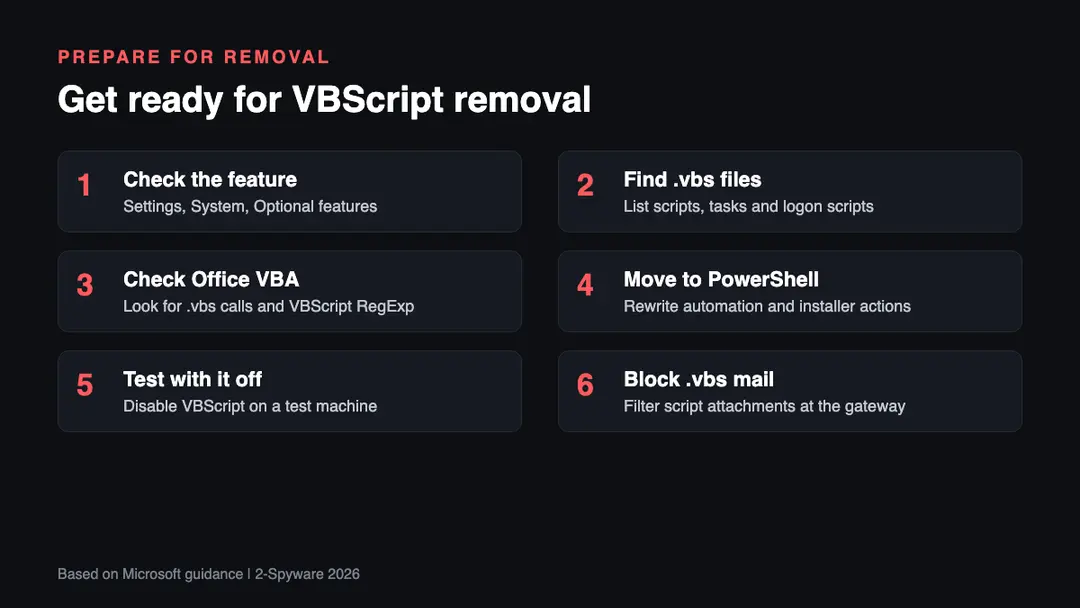
1. Check the feature. Open Start, Settings, System, Optional features, and look for VBSCRIPT. Microsoft says this is where the features on demand appear.[1]
2. Find your .vbs files. Search shared drives, scheduled tasks, group policy logon scripts and installer packages for VBScript. Installer custom actions written in VBScript may stop working after the deprecation.[1]
3. Check Office VBA. Look for macros that call a .vbs script or reference VBScript regular expressions. Those two scenarios will be affected in later phases.[1]
4. Move to PowerShell. Microsoft recommends PowerShell for automation and installer tasks and JavaScript for web pages.[1]
5. Test with VBScript off. Turn the feature off on one test machine now. That shows which tasks break before the default changes around 2027.
6. Block .vbs attachments. Few people need to receive scripts by email. Filtering them cuts one common malware route. If you think a script already ran, see our virus removal guides.
What is still unknown
- The exact Windows release in which VBScript will no longer be enabled by default. Microsoft only says around 2027.[1]
- The date of the final removal of the VBScript .dll files. We found no date as of 2026.
- Whether Office will ship its own regular expression replacement for VBA projects that use VBScript RegExp. We found no Microsoft statement on that in the sources we read.
Our original 2024 report
The text below is our report as first published in 2024. We keep it unchanged for the record; the sections above bring it up to date.
Microsoft announced its plan to phase out VBScript (Visual Basic Script) starting in the second half of 2024. VBScript, introduced in 1996, has been a core component of Windows, used mainly for automation tasks and web development. It allowed users to create interactive web pages and automate tasks through Internet Explorer.
However, over the years, more advanced scripting languages like JavaScript and PowerShell have emerged, offering better capabilities for modern tasks. This transition is part of Microsoft's broader strategy to enhance security and efficiency in its operating systems. In the publication released by Microsoft, it was stated:[1]
Scripting options for web development and task automation are modernizing. To provide you with the most modern and efficient options, we are replacing VBScript with more advanced alternatives such as JavaScript and PowerShell.
Microsoft says that PowerShell and JavaScript should replace VBScript eventually
The deprecation of VBScript will occur in three distinct phases. The first phase begins in the second half of 2024, where VBScript will be available as an on-demand feature in Windows 11 24H2, which was recently released on the Preview Channel.[2] Users will need to install it if needed, as it will no longer be a default component. This change will be part of the new OS release slated for later this year.
The second phase is expected to start around 2027. During this phase, VBScript will still be available but only as an optional feature. It will not be pre-installed on new systems, signaling a move towards its complete removal. By then, users are expected to have transitioned to alternative scripting languages like JavaScript or PowerShell.
In the third and final phase, VBScript will be entirely removed from future versions of Windows. All related dynamic link libraries (.dll files) will be eliminated, and any projects relying on VBScript will cease to function. This complete retirement will ensure a transition to more secure and efficient scripting languages. Microsoft has emphasized that this phase will remove all VBScript components, thereby improving system security and performance.
Numerous cybercrime groups used VBScript to infect computers with malware
Microsoft's decision to discontinue VBScript is driven by several factors. Firstly, modern scripting languages like JavaScript and PowerShell offer broader capabilities and are better suited for today's web development and automation needs. These languages provide more power, versatility, and efficiency compared to the older VBScript, making them ideal for modern computing environments.
Secondly, the move aims to enhance security. VBScript has been used by attackers in various malware campaigns, delivering strains like Lokibot, Emotet, Qbot, and more recently, DarkGate malware.[3] By discontinuing VBScript, Microsoft reduces the attack surface and potential vulnerabilities in its operating systems.
This effort traces back to 2018 when Microsoft extended support for its Antimalware Scan Interface (AMSI) to Office 365 client applications,[4] curbing attacks that utilized Office VBA macros.
Since then, Microsoft has also disabled Excel 4.0 (XLM) macros, mandated default blocking of VBA Office macros, introduced XLM macro protection, and began blocking untrusted XLL add-ins by default across Microsoft 365 tenants worldwide.
Lastly, this decision is part of a broader effort to modernize Windows and Office features. Microsoft has been updating its security measures and removing features that threat actors use as attack vectors to infect users with malware.
Discontinuing VBScript aligns with these ongoing security enhancements, making the operating system more robust against potential threats. This move also follows recent steps like deprecating NT LAN Manager (NTLM)[5] in favor of Kerberos for authentication, further minimizing the attack surface.
Related guides on 2-Spyware
Frequently asked questions
What is VBScript?
VBScript, short for Visual Basic Scripting Edition, is a scripting language Microsoft introduced in 1996. It runs .vbs files through Windows Script Host and was once used in Internet Explorer web pages. Administrators still use it for logon scripts, installers and small automation tasks, which is why its removal needs planning.{1}
Is VBScript deprecated?
Yes. Microsoft announced the deprecation in October 2023 and lists VBScript among deprecated Windows features.{1}{6} Deprecated means it is no longer developed and will be removed later. In Windows 11, version 24H2 it still works, because the VBScript features on demand are on by default in that first phase.{1}
When will VBScript be removed from Windows?
Microsoft has not given a final date. Around 2027 the VBScript features on demand will no longer be enabled by default, and in a later phase the VBScript .dll files will be removed from future Windows versions.{1} After that, projects that rely on VBScript stop working.
What should replace VBScript?
PowerShell for automation and JavaScript for web pages. Microsoft recommends PowerShell for websites or applications that use VBScript to automate tasks and for installer custom actions, and JavaScript for web pages, since modern browsers never supported VBScript anyway.{1}
Will Excel VBA macros stop working without VBScript?
Most will not. Only VBA projects that call a .vbs file directly or use VBScript as a type library, for example VBScript regular expressions, are affected. Microsoft says Phase 1 does not affect them, but later phases will, so those macros need a plan now.{1}
How do I enable VBScript in Windows 11?
Open Start, Settings, System, Optional features and check that VBSCRIPT is installed and turned on.{1} If an organisation disabled it by policy, the IT team has to change that setting. Never download a third-party tool that promises to enable VBScript.
Why is VBScript a security risk?
Because attackers have used it for years to deliver malware. Campaigns spreading Lokibot, Emotet, Qbot and DarkGate used VBScript.{3} A .vbs file can run with a double click, so turning VBScript off where nobody needs it removes one easy way to infect a computer.
Log in to comment
No comments yet. Be the first.