

Bgtx ransomware – a dangerous computer virus which belongs to the Dharma ransomware family
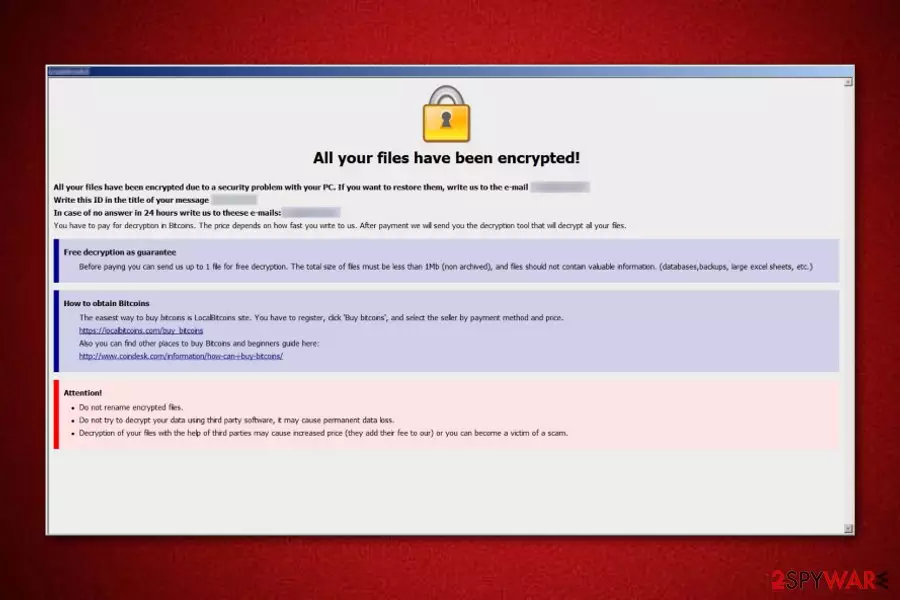
Bgtx ransomware[1] appears to be another ransomware virus that is related to Dharma ransomware. This dangerous cyber threat was discovered by an IT researcher named Jakoub Krustek. Once installed, Bgtx virus starts the file encryption process by using unique ciphers and adds the .id-[victim's_ID].[decrypt@fros.cc].bgtx appendix to each locked file. Afterward, the virus displays a message named FILES ENCRYPTED.txt which appears as a copy in each folder found on the infected computer system. The ransom note announces about the secret encryption and urges for a particular ransom to be paid in order to decrypt important files. It also provides the decrypt@fros.cc email address which should be the way to contact the cybercriminals.
| Name | Bgtx |
|---|---|
| Category | Ransomware |
| Related to | Dharma |
| Extension | .id-[victim's_ID].[decrypt@fros.cc].bgtx |
| Ransom note | FILES ENCRYPTED.txt |
| Ransom | Needs to be paid in Bitcoin cryptocurrency |
| Email address | decrypt@fros.cc |
| Fix | Use FortectIntego to repair the damage |
Here you can see the Bgtx ransomware message:
All your files have been encrypted!
All your files have been encrypted due to a security problem with your PC. If you want to restore them, write us to the e-mail decrypt@fros.cc
Write this ID in the title of your message 1E857D00
In case of no answer in 24 hours write us to theese e-mails:decrypt@fros.cc
You have to pay for decryption in Bitcoins. The price depends on how fast you write to us. After payment we will send you the decryption tool that will decrypt all your files.
Free decryption as guarantee
Before paying you can send us up to 1 file for free decryption. The total size of files must be less than 1Mb (non archived), and files should not contain valuable information. (databases,backups, large excel sheets, etc.)
How to obtain Bitcoins
The easiest way to buy bitcoins is LocalBitcoins site. You have to register, click 'Buy bitcoins', and select the seller by payment method and price.
hxxps://localbitcoins.com/buy_bitcoins
Also you can find other places to buy Bitcoins and beginners guide here:
hxxp://www.coindesk.com/information/how-can-i-buy-bitcoins/
Attention!
Do not rename encrypted files.
Do not try to decrypt your data using third party software, it may cause permanent data loss.
Decryption of your files with the help of third parties may cause increased price (they add their fee to our) or you can become a victim of a scam.
As the ransom type, Bgtx ransomware urges for Bitcoin. Mostly, all ransomware-type viruses demand a type of cryptocurrency such as Bitcoin, Monero, or Ethereum. Such transfers give guarantees that the process will remain safe and untrackable as no sensitive information is required for it.
Moreover, Bgtx ransomware uses unique encryption ciphers such as AES or RSA. The codes differ each time the cyber threat infects a different computer. Both encryption and decryption keys are stored on remote servers which are kept in reach only for the criminals themselves. This makes the decryption code almost impossible to identify even for highly-experienced IT specialists.
However, this doesn’t mean that you have to contact the crooks and pay the demanded ransom. We suggest overthinking everything twice and coming up to a better conclusion. A piece of advice would be to remove Bgtx virus from your computer system permanently. You can also use FortectIntego or any other similar program to take care of the damage that was done by the virus.
You need to perform the Bgtx ransomware removal first before you start thinking about data recovery methods. Otherwise, the virus will not be deleted and will renew the encryption process with the next computer reboot. So, if you have already terminated the dangerous cyber threat, we suggest taking a look at some file restoring methods which you will find below this article.

Ransomware avoiding guide
According to malware experts from Virusai.lt[2], you can successfully avoid ransomware if you have knowledge of its distribution techniques. Ransomware usually is spread by:
- Spam email messages. The hazardous payload comes attached to the dubious-looking email. However, crooks put some effort and make such messages look like they were sent from powerful organizations. Be careful if you ever receive a questionable letter that you were not expecting.
- P2P networks[3]. These websites are promoted by third parties and often lack required protection. You might easily get infected with ransomware if you are likely to visit such sites as they might include harmful links and similar damaging components.
Additionally, we advise downloading and installing an antivirus program. This computer security tool will protect your computer automatically at a higher level. However, you need to make sure that the tool is always kept up-to-date as it is necessary for the program to function properly.
Remove Bgtx ransomware from the system
We suggest performing the Bgtx ransomware removal by using reliable and expert-tested anti-malware tools. The process might take some time but note that there is no other way to get rid of the cyber threat. Manual elimination is not possible for this case as the ransomware might leave numerous hazardous components in the computer system which might be too hard to detect on your own.
After you remove Bgtx virus, make sure you perform some system backups. You can fix all damaged objects by using FortectIntego, SpyHunterCombo Cleaner, or MalwarebytesMalwarebytes. Furthermore, take all precautionary measures to avoid ransomware infections in the future. Another piece of advice would be to purchase a USB drive and store all important data on this external device. If you do so, the information that is kept on the USB will be reachable only for you. Just do not forget to keep the device unplugged from your machine.
Did this guide help?
Be the first to comment