

What dangers lie behind .bin file extension virus?
While recently Alfa ransomware has sprung to life, its so-called “sibling” – .bin file extension virus struck the virtual community as well. Unfortunately, both viruses belong to the category of file-encrypting viruses. Obviously, to retrieve the information, victimized users are expected to pay a ransom. This new alternative of Alfa virus has not evolved into a greedy threat yet – it only demands one Bitcoin, which equals to 642,86 USD. Thus, before it becomes one, do not waste time and find out about .bin file extension removal options.
If you are interested in what’s happening in the cyber world, you may have heard of Cerber virus which currently keeps terrorizing the cyber world with more astounding and treacherous virus updates. When a few days ago, Alfa virus hit the spotlight, some researchers have revealed their suspicions that this current .bin virus might be related with the ransomware bearing the name of the mythical three-headed dog. Their encryption techniques happen to be similar. Speaking about this particular ransomware, the name was given due to this ability to append a .bin extension to all encrypted files. According to victims’ reports, the names of corrupted files are modified into a numeric name ending with the .bin extension.
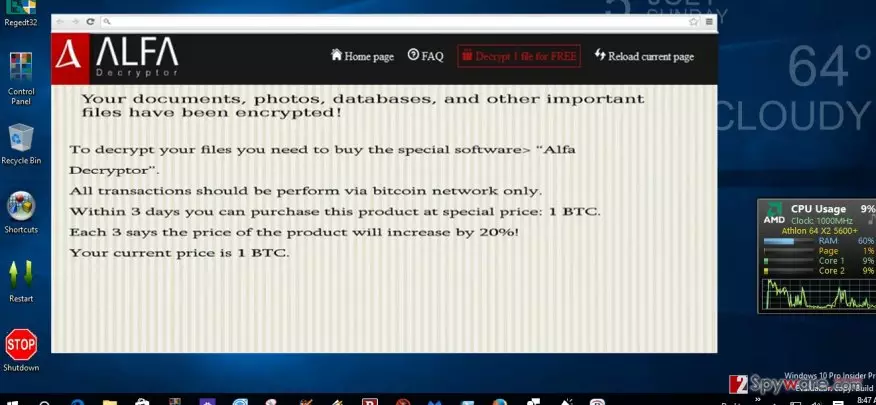
After the threat infiltrates a computer, it will cause some modifications in the registry system, so that the virus can “recover” after the reboot. For you interest, you can find the following registry entries in the OS:
HKEY_LOCAL_MACHINESOFTWAREMicrosoftWindowsCurrentVersionWinlogon=%System%ntos.exe
HKEY_LOCAL_MACHINESOFTWAREMicrosoftWindowsCurrentVersionRunBestSaveForrYeou
HKCUSoftwareMicrosoftInternet ExplorerToolbar,LinksFolderName = C:WINDOWSNetwork Diagnostic
HKEY_CURRENT_USERSoftwareMicrosoftWindowsCurrentVersionRun “SD2014” = “%AppData%\.exe”
HKEY_LOCAL_MACHINE\SOFTWARE\Microsoft\Windows\CurrentVersion\Uninstall\
Thus, the threat leaves readme how to decrypt your files.txt, and readme how to decrypt your files.html. Once these files are disclosed, the new tab opens in a browser leading you to the web page of .bin virus. It indicates that in order to unlock the files, you need to buy Alfa Decryptor. Its current value is one bitcoin. Like Cerber, .bin file virus does not indicate any email address. The developers prefer confidentiality as they use bitcoin server to communicate with the victims. Certainly, we discourage you from both, paying the money and downloading the software. Even if the program decodes the highly important information, you never know whether the decryptor will not spy on you and, when the right time comes, will not launch the ransomware again. Instead, concentrate on .bin file extension removal process.
The distribution of the ransomware
It was observed that the malware is dispersed in similar ways like other infamous threats of the same kind. .bin file extension malware usually attacks users via spam emails. Not only cyber security specialists have warned users to pay extra attention but such official institutions as the FBI as well. Due to increased amount of spam and scam frauds, the FBI warned the virtual community not to open emails, especially the attachments of emails, which are seemingly sent from official tax institutions, customs and transportation agencies. Then, you might ask yourself – “how I am supposed to tell a difference between legitimate and a fake email”? Usually, the frauds contain typing and grammar mistakes. If you carefully take a look at the ransom note of .bin file extension ransomware, you might also notice a few mistakes. Alternatively, there is another method to escape the virus. Install an anti-spyware program, for example, FortectIntego. The program is able not only to detect and eliminate the threat, but it can also decrease the number of received spam emails. It can significantly lower the risk to receive an email which contains the ransomware within.
.bin file extension removal guidelines
Since this virus is ransomware and is suspected to be related to other greatly destructive threats, it would be wise to move on to automatic elimination. As previously mentioned, the program will locate the virus and remove .bin file extension virus entirely. The program also safeguards your OS from the viruses of diverse complexity. However, some variations of this malware may shut down the anti-virus program or stop the operation of important system functions. If that happens and you cannot access the required programs, take a look at the recovery instructions delivered below. Lastly, remember to stay vigilant and avoid opening the emails even if they contain the names of official institutions.
Did this guide help?
5 comments
Nick
Hackers sure do not waste summer days...
Becky
I guess another security app wont do any harm?...
OwenLee
Oh boy, it keeps getting more and more dangerous every day.
Kenneth
Hackers are still one step ahead.
Jean.P
I wonder if that decryptor really helps.