
Cockblocker ransomware virus: what it is and how to remove it
CockBlocker virus may look like a filthy ransomware-type computer program, luckily though, it is merely a scareware application which imitates ransomware working principles in order to extort some money from the victims. Unlike regular ransomware, it does not encrypt the files it finds on the computer with complex algorithms , which means that the files remain structurally unchanged.
Facts checked October 6, 2026. Removal steps tested on Windows 11 (26H2) and checked against Microsoft's and the browser makers' current documentation. Sections marked as our earlier report are the original text: they describe the threat as it was then and have not been reviewed since. The 2026 status, the removal steps and the questions are current.
Automatic
Get a free scan and check if your PC is infected.
Fortect finds malware, unwanted programs and the Windows damage they leave behind, and repairs it in one pass.
Make sure nothing will rename more files to .hannah: an automatic scan checks the PC first.
Do it yourself · free Remove Cockblocker ransomware virus yourself 6 steps, about 18 minutes, no software needed.
Start the steps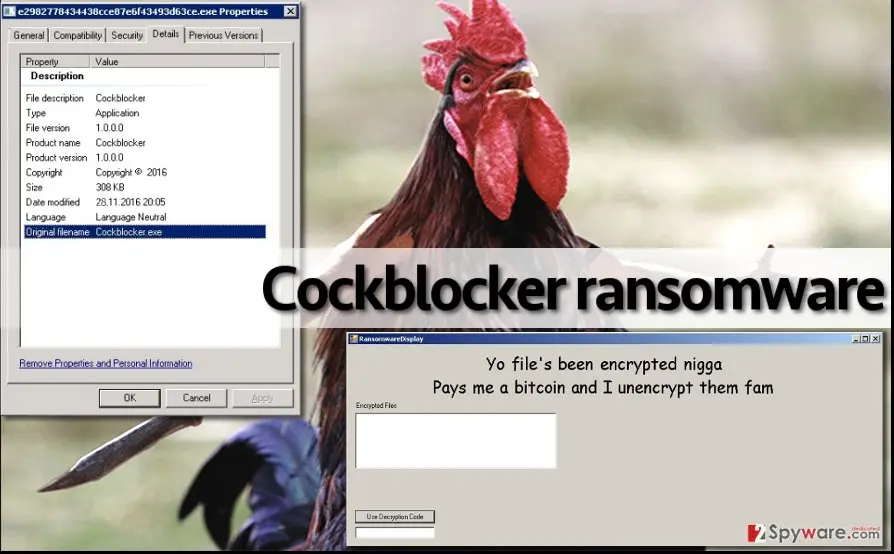
Cockblocker ransomware virus: summary
| Detection names | No Microsoft detection name is known |
|---|---|
| Ransom note | Not recorded in our earlier report |
| Contact | Not recorded in our earlier report |
| Encrypted file extension | .hannah |
| Decryptor | No free decryptor is known for this variant; check No More Ransom (nomoreransom.org) for updates |
| Distribution | Not recorded in the old report |
| Removal | Scan the PC with security software to find and remove the malware and anything installed with it. Fortect scans Windows for malware and repairs the system files and settings it damaged. Remove it nowTo use the full-featured product, you have to purchase a license for Fortect. The scan is free. |
Show 9 more facts
| Damage | Not recorded in the old report |
|---|---|
| Name | Cockblocker ransomware virus |
| Type | File-encrypting ransomware |
| Symptoms | Files renamed with a new extension |
| Evidence | 5 write-ups by security sites; details still limited |
| Encrypted files | .hannah |
| Free decryptor | No free decryptor is known (checked 6 October 2026) |
| First seen | 27 February 2017 |
| Facts checked | 6 October 2026 |
- File extension:
.hannah
From our report of Feb 2017 · not reviewed since
More from our earlier report on Cockblocker ransomware virus
- Yo file's been encrypted n**a Pays me a bitcoin and I unencrypt them fam
How Cockblocker ransomware virus behaves
From our report of Feb 2017 · not reviewed since
CockBlocker ransomware virus acts rowdy. What else is known about this virus?
CockBlocker virus may look like a filthy ransomware-type computer program, luckily though, it is merely a scareware application which imitates ransomware working principles in order to extort some money from the victims. Unlike regular ransomware, it does not encrypt the files it finds on the computer with complex algorithms , which means that the files remain structurally unchanged.
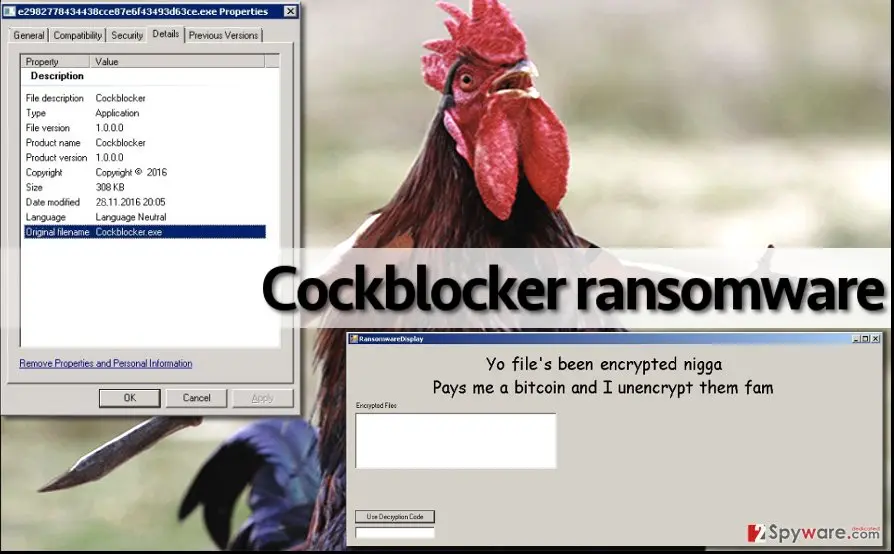
Nevertheless, the virus still marks all files with .hannah file extension to make them look like they have been encrypted. When the "encryption" is done, the virus drops a lock screen with an insulting message in a RansomwareDisplay.exe program window:
This deceptive program displays the list of the supposedly encrypted files and asks to input a decryption code. However, the virus still seems to be in a development process at the moment, since it does not provide information on how to pay the $732 dollar ransom or how to contact perpetrators.
Therefore, we assume that you should make CockBlocker removal a top priority task. To remove CockBlocker virus, run anti-malware software. If you do not have it, consider installing or . It is believed that this ransomware is going to be improved anytime soon, but in case you become a victim of this malware, do not consider paying the ransom.
In quite a lot of cases, victims who pay up never receive the decryption tool. Besides, just recently, ransomware investigators have announced some good news on how to terminate the lock screen and get back the access to the computer. You simply have to enter not_a_backdoor into the blank space provided on the lock screen and hit "Use Decryption Code".
From our report of Feb 2017 · not reviewed since
How can you get infected with this ransomware?
Your computer might become contaminated with CockBlocker malware if you tend to browse the Internet carelessly, without thinking about general Internet hazards.
You must understand that the world wide web offers a lot of interesting content, but it also provides a lot of dangerous content as well. Browsing the Internet notwithstanding the impeding danger is like walking through a minefield. One click on a malicious link or one email attachment can entirely mess up your computer system and take your precious files away from you.
If you do not want that to happen, try to stay away from suspicious or vague content online. Especially pay attention to emails that you receive. Never open files sent to you from unknown people or organizations. In many cases, criminals pretend to be someone they're not, so do not believe that someone is writing to you from Amazon or Paypal before checking sender's email online .
Also, stay away from sites that aggressively ask you to install software updates, browser extensions, add-ons, and similar software. No one should be pushing you to install anything - if someone does, there is a great chance they want to infect your computer with CockBlocker or any other type of malware.
How to remove Cockblocker ransomware virus
Tools you'll need
All of these are free except where noted. Download them on a clean device if the infected PC is offline.
- A USB stick: to keep the ransom note, two or three encrypted files and screenshots off the infected PC.
- Microsoft Defender Offline: built into Windows 11 and Windows 10; scans before Windows starts, so running malware cannot hide.
- Microsoft Safety Scanner: a second, portable scanner with current signatures; each download works for 10 days.
- ID Ransomware: identifies the family from the note and one encrypted file and says whether a decryptor exists.
- No More Ransom: the free decryptors from police and security companies; check it again every few months.
- Fortect (optional): scans Windows for malware and repairs the system files and settings it damaged. The free scan is in the box above.
How to remove Cockblocker ransomware virus and get your files back
Work in this order.
Disconnecting comes first, removal comes before any restore, and nothing here asks you to contact the attackers.
Step 1: Disconnect the PC and unplug backup drives
Unplug the network cable or turn off Wi-Fi, and disconnect USB drives, external disks and network shares, so Cockblocker ransomware virus cannot reach more files. Pause OneDrive, Google Drive or Dropbox sync, because synced folders upload the encrypted copies over the good ones.
Leave the PC on but offline while you read the next steps, since a restart can let the ransomware run again. This applies to Windows 11 and Windows 10 alike.
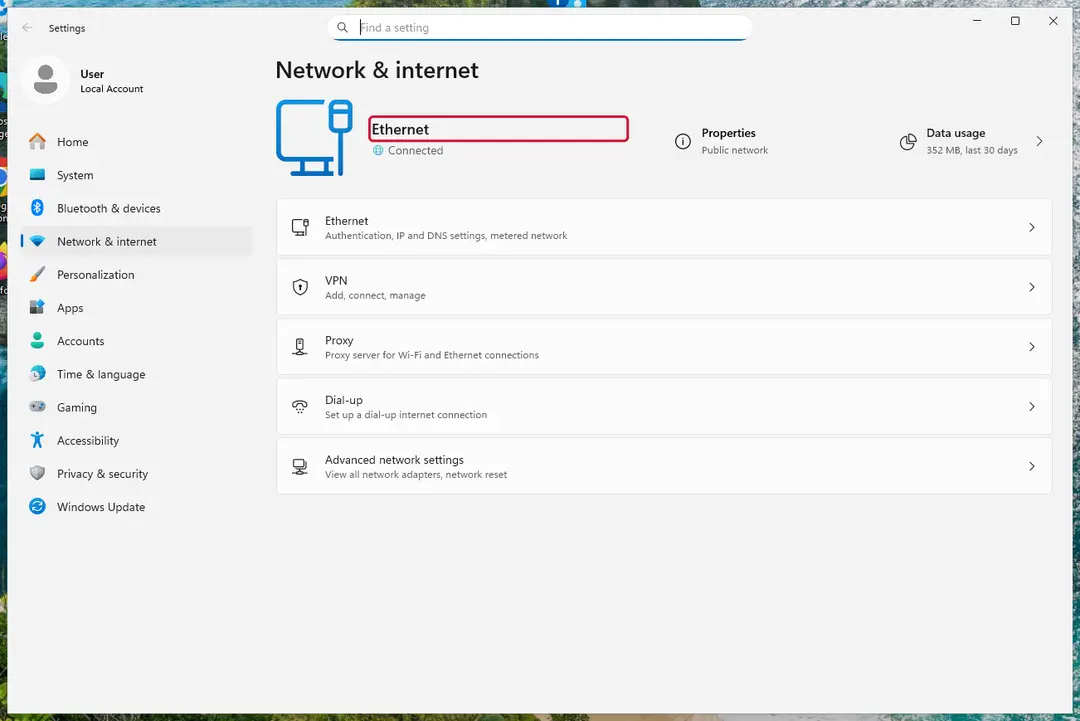
Windows 11: turn off Wi-Fi to take the PC offline. Full procedure with screenshots: Ransomware: first steps, finding a decryptor and recovering files
Step 2: Save the ransom note and identify the family
The name of the family decides whether a free decryptor can help. Copy the ransom note and two small encrypted files to a USB stick, and check them on another device with ID Ransomware or Crypto Sheriff.
Note the extension added to the files, the contact address and the victim ID shown in the note. Keep the originals on the Windows 11 or Windows 10 PC untouched.
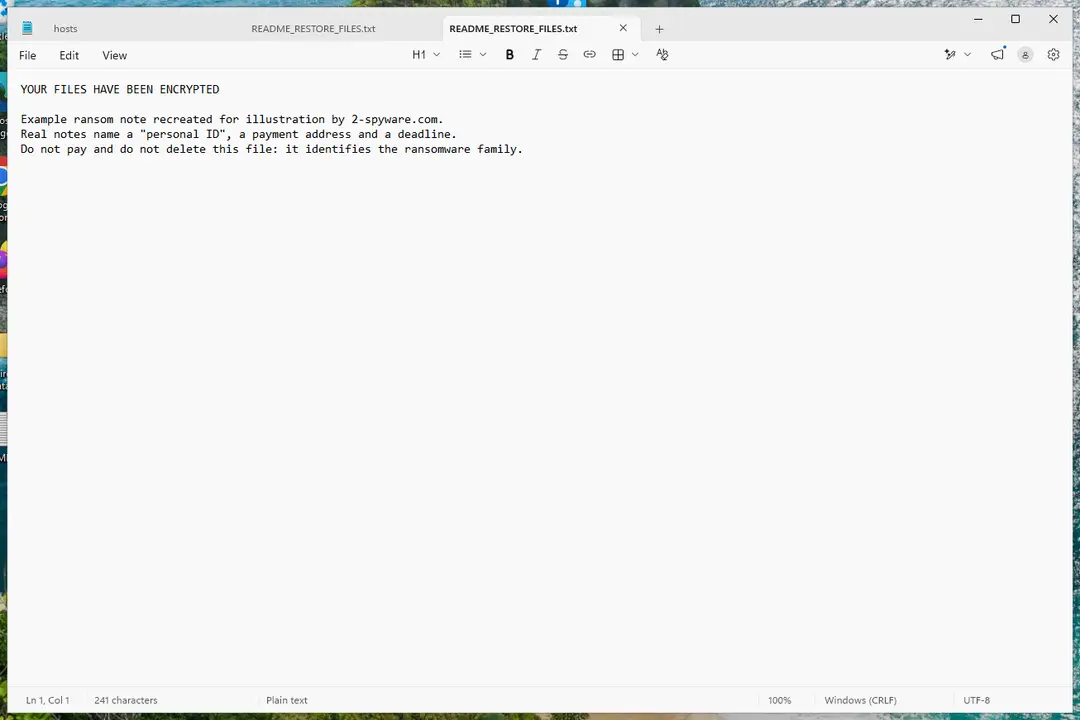
Windows 11: the ransom note and encrypted files to copy for identification. Full procedure with screenshots: Ransomware: first steps, finding a decryptor and recovering files
Step 3: Check for a free decryptor
Our last check found that for Cockblocker ransomware virus, no free decryptor is known (checked 6 October 2026). Look again yourself in the No More Ransom list and the free decryptor pages of Emsisoft, Avast and Kaspersky, which add new families every year.
A decryptor needs the ransomware gone first, or it encrypts the files again. Keep at least one copy of the encrypted files on an external drive, even if no tool works yet.
Full procedure with screenshots: Ransomware: first steps, finding a decryptor and recovering files
Step 4: Remove the ransomware before you restore or decrypt
Removing Cockblocker ransomware virus does not bring the files back, but it has to come first. Start with Defender's Full scan, then the offline scan from the same Scan options page, which checks the disk before Windows loads.
If the scan cannot start, use Safe Mode with Networking. Delete the ransom notes only after you have saved a copy, because removal tools sometimes leave them behind on Windows 11 and Windows 10.

Windows 11: Windows Security > Virus & threat protection > Scan options. Full procedure with screenshots: Run a Microsoft Defender Offline scan
Step 5: Look for shadow copies of the files
Windows keeps shadow copies for restore points and backups, and some ransomware fails to delete them.
vssadmin list shadowsin an administrator Command Prompt tells you at once whether any exist.If they do, right-click the folder that held your files, open Properties > Previous Versions, select a version from before the attack, and click Open to check it before you Restore or copy the files out. Windows 11 and Windows 10 both have the tab.
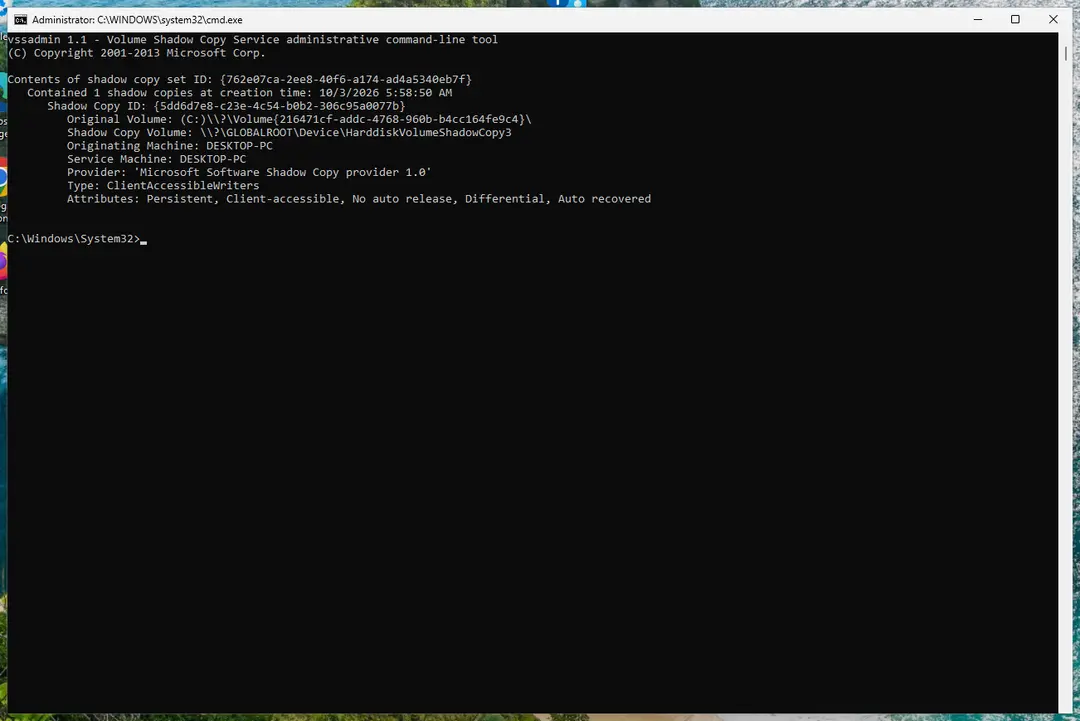
Windows 11: vssadmin list shadows shows whether shadow copies exist. Full procedure with screenshots: Ransomware: first steps, finding a decryptor and recovering files
Step 6: Restore the files from a backup or recover deleted originals
A backup made before the attack is the surest way back. Connect it only once the PC is clean, then restore from File History, Windows Backup, OneDrive's Restore your OneDrive or your own external copies.
Without a backup, try file recovery: the originals that Cockblocker ransomware virus deleted may still be on the disk until something overwrites them. Install nothing new on the drive you want to recover from on the Windows 11 or Windows 10 PC.
Full procedure with screenshots: Recover deleted files (Recycle Bin, backups, OneDrive) On uGetFix
Instructions for each browser and system
The detailed steps for every browser and system this guide covers. Open the one you use.
Manual removal using Safe Mode
Important! →
Manual removal guide might be too complicated for regular computer users. It requires advanced IT knowledge to be performed correctly (if vital system files are removed or damaged, it might result in full Windows compromise), and it also might take hours to complete. Therefore, we highly advise using the automatic method provided above instead.
Step 1. Access Safe Mode with Networking
Manual malware removal should be best performed in the Safe Mode environment.
Windows 7 / Vista / XP
- Click Start > Shutdown > Restart > OK.
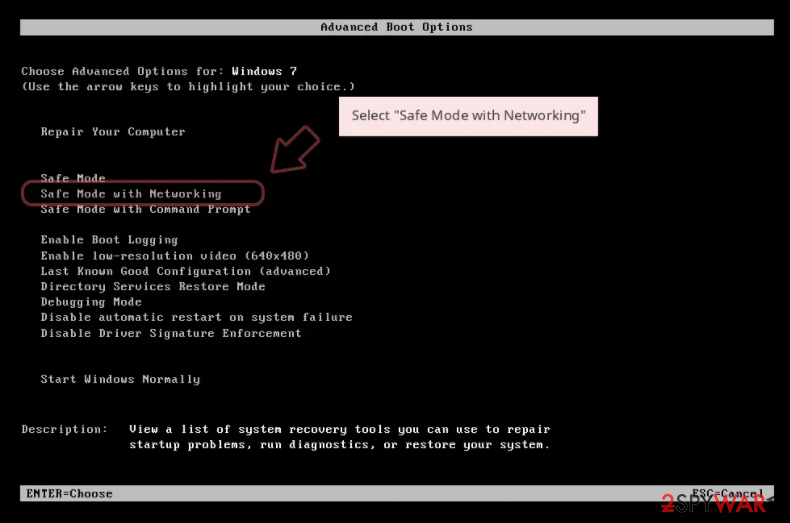
- When your computer becomes active, start pressing F8 button (if that does not work, try F2, F12, Del, etc. - it all depends on your motherboard model) multiple times until you see the Advanced Boot Options window.
- Select Safe Mode with Networking from the list.
Windows 10 / Windows 8
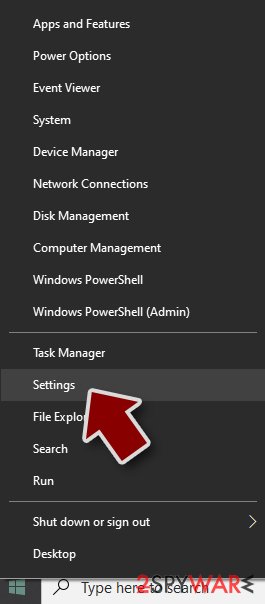
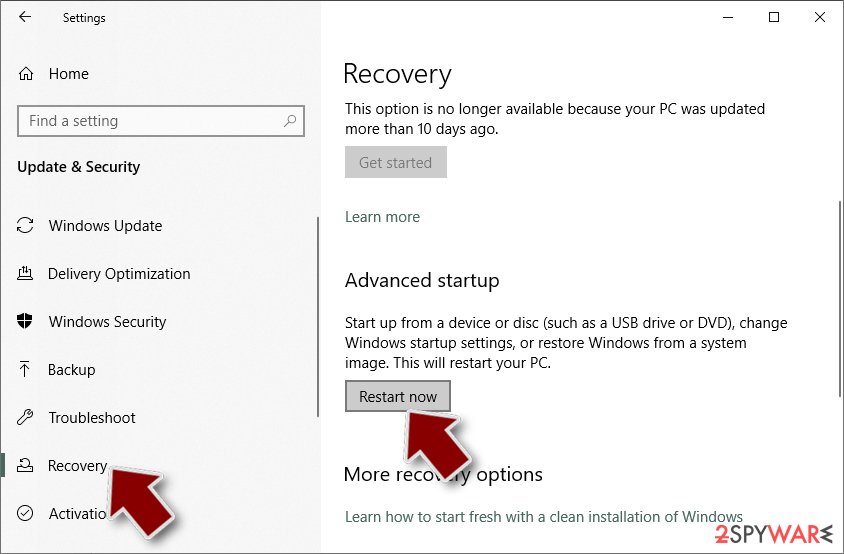
- Right-click on Start button and select Settings.
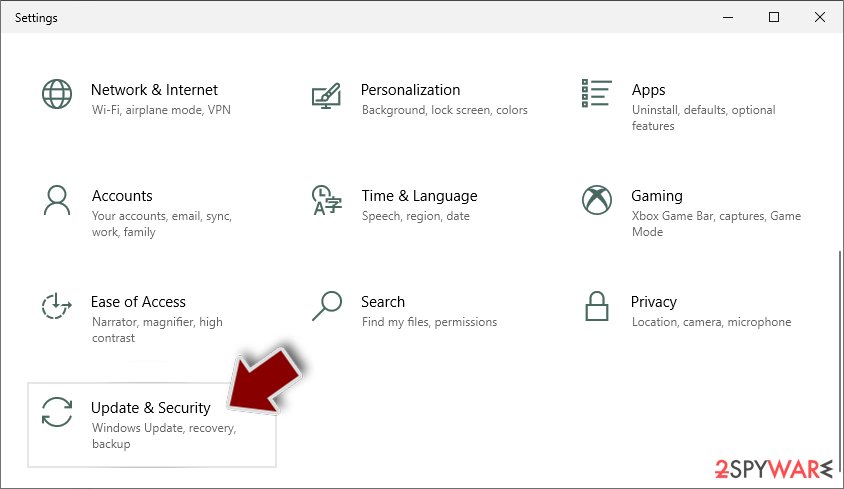
- Scroll down to pick Update & Security.
- On the left side of the window, pick Recovery.
- Now scroll down to find Advanced Startup section.
- Click Restart now.
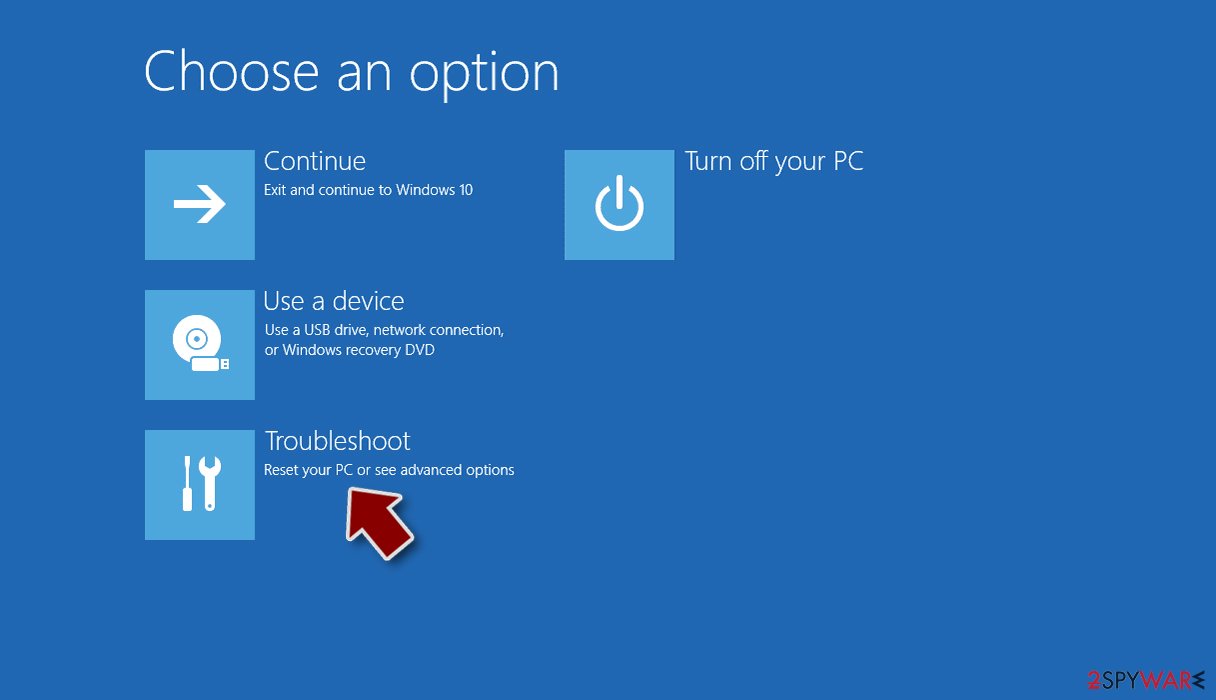
- Select Troubleshoot.
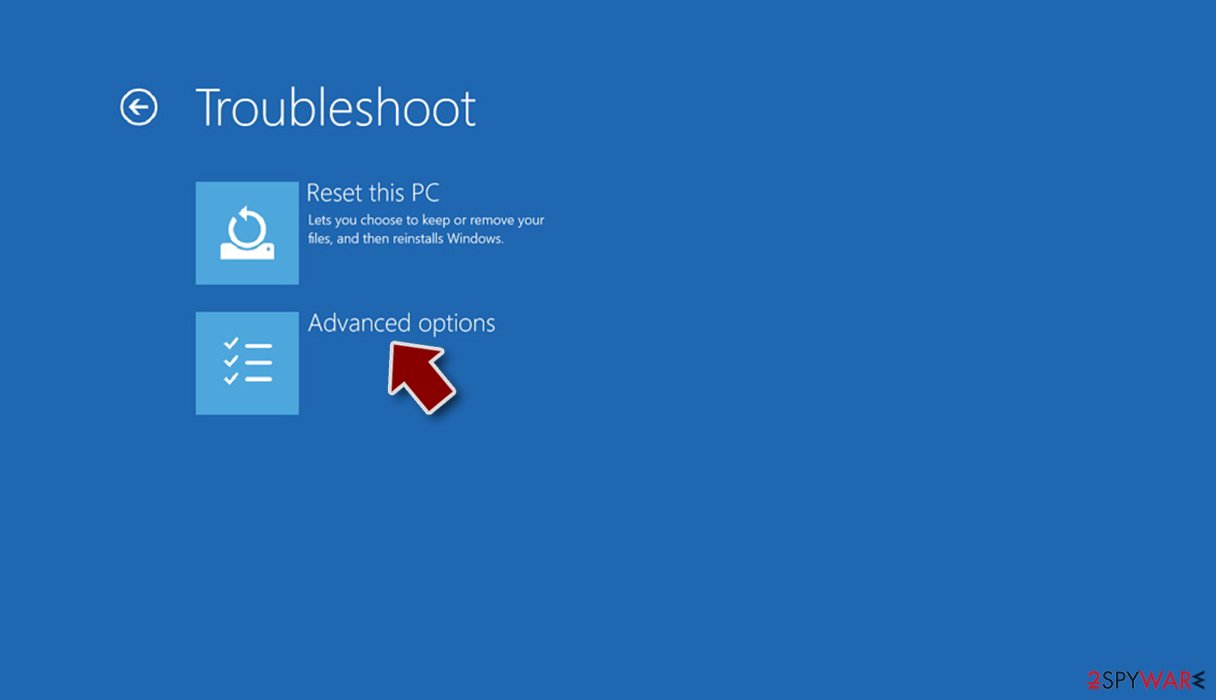
- Go to Advanced options.
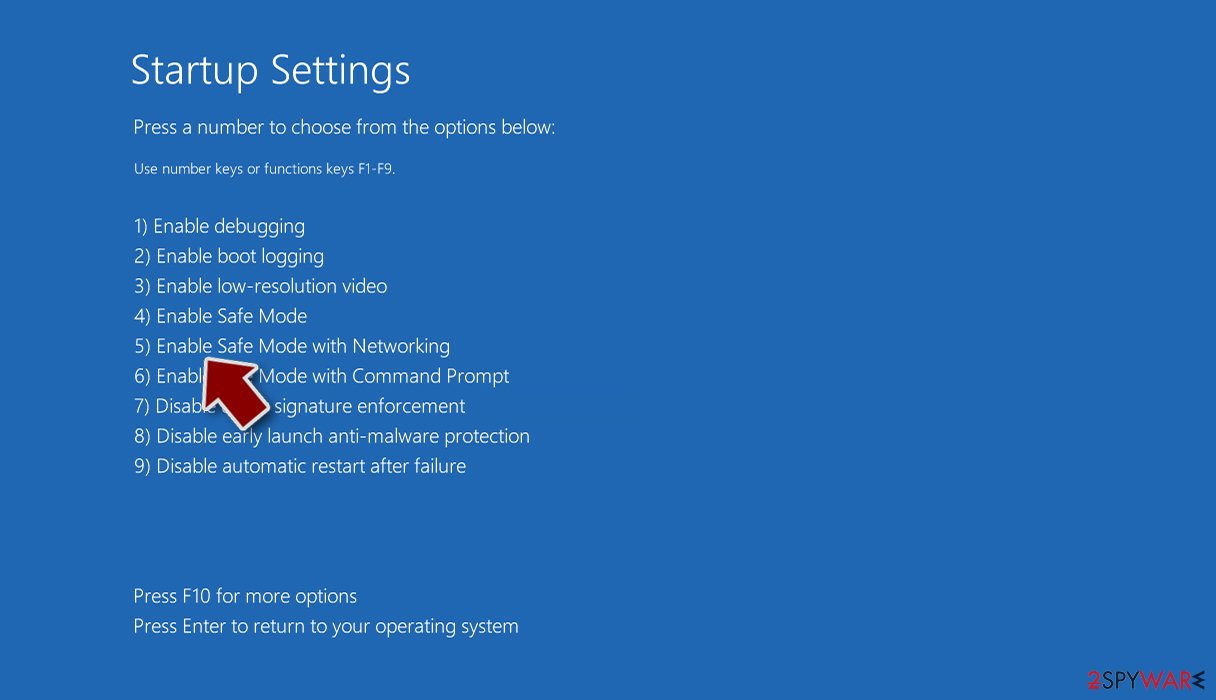
- Select Startup Settings.
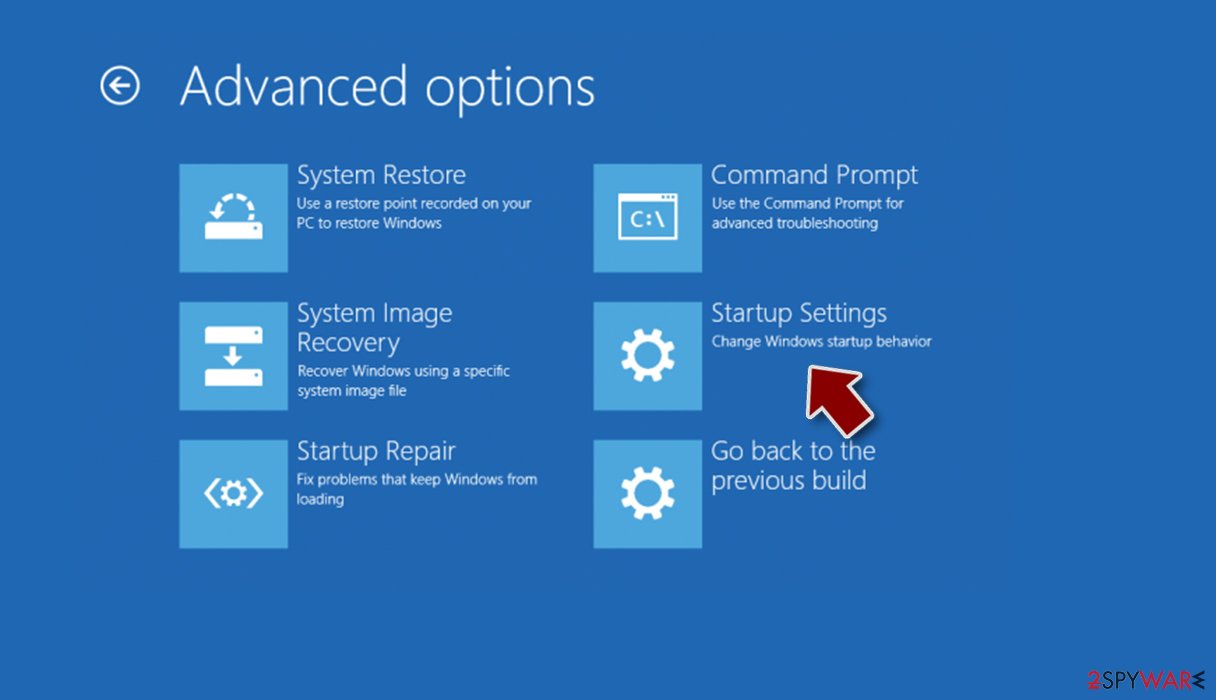
- Press Restart.
- Now press 5 or click 5) Enable Safe Mode with Networking.
Step 2. Shut down suspicious processes
Windows Task Manager is a useful tool that shows all the processes running in the background. If malware is running a process, you need to shut it down:
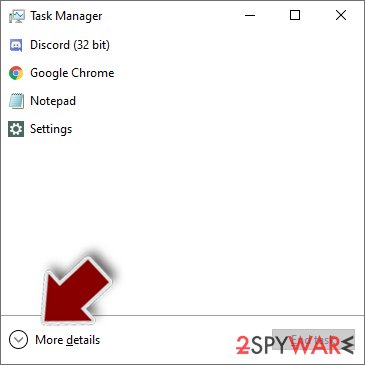
- Press Ctrl + Shift + Esc on your keyboard to open Windows Task Manager.
- Click on More details.
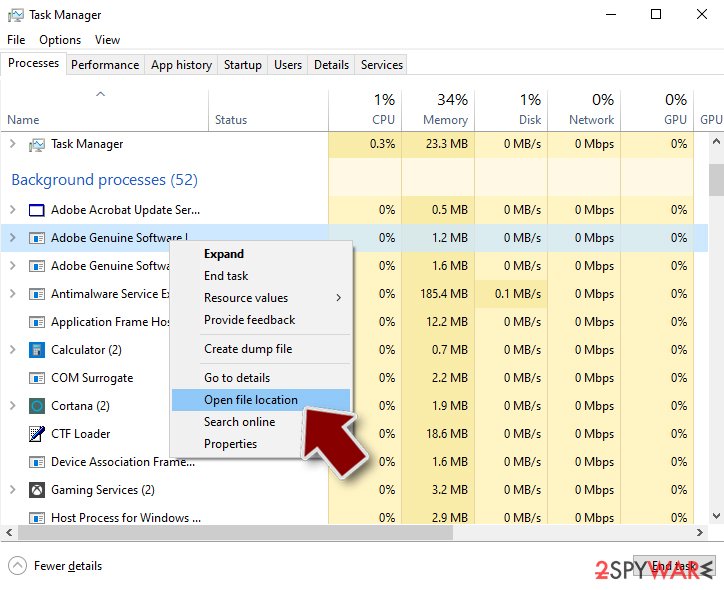
- Scroll down to Background processes section, and look for anything suspicious.
- Right-click and select Open file location.
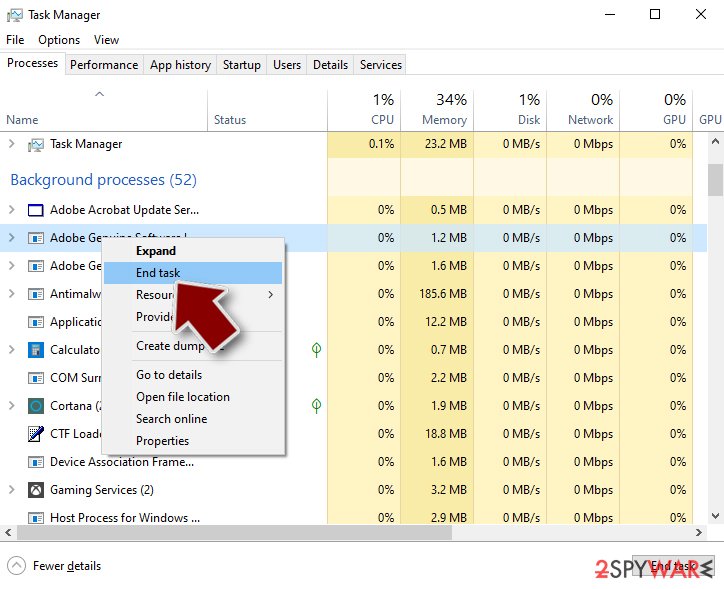
- Go back to the process, right-click and pick End Task.
- Delete the contents of the malicious folder.
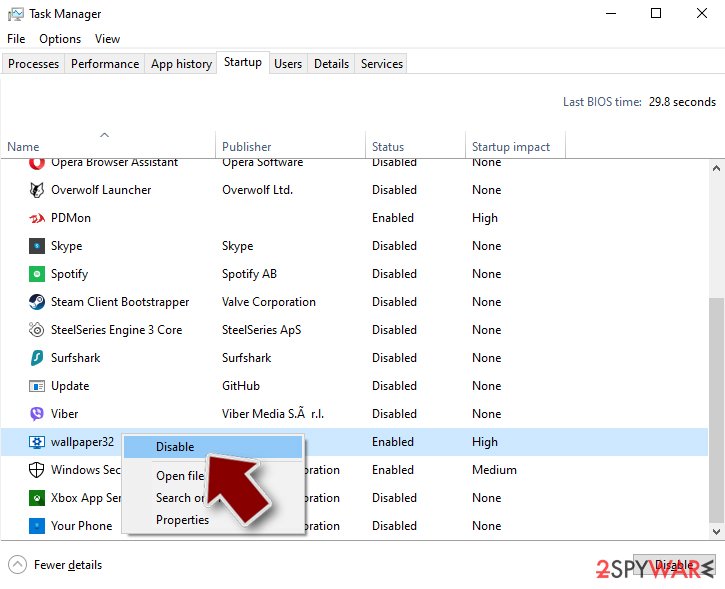
Step 3. Check program Startup
- Press Ctrl + Shift + Esc on your keyboard to open Windows Task Manager.
- Go to Startup tab.
- Right-click on the suspicious program and pick Disable.
Step 4. Delete virus files
Malware-related files can be found in various places within your computer. Here are instructions that could help you find them:
- Type in Disk Cleanup in Windows search and press Enter.
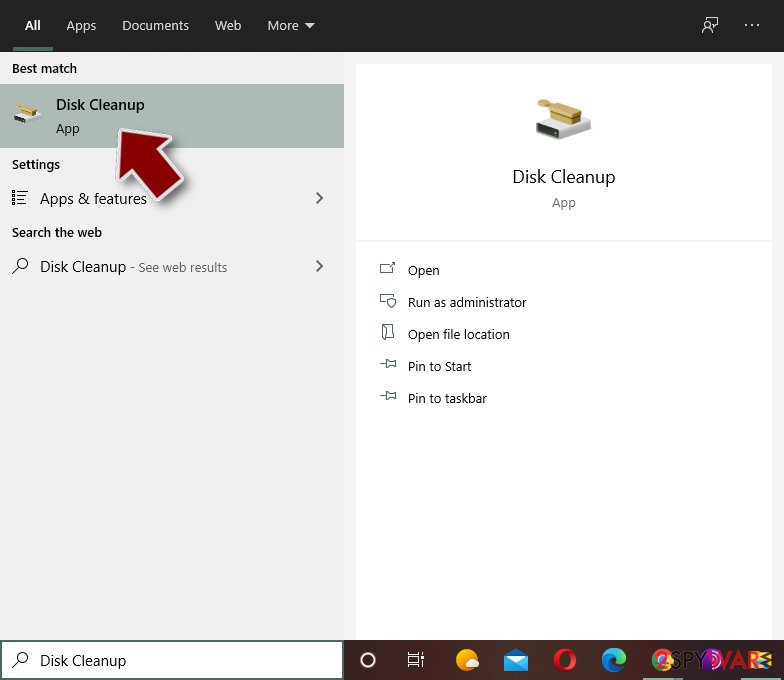
- Select the drive you want to clean (C: is your main drive by default and is likely to be the one that has malicious files in).
- Scroll through the Files to delete list and select the following:
Temporary Internet Files
Downloads
Recycle Bin
Temporary files - Pick Clean up system files.
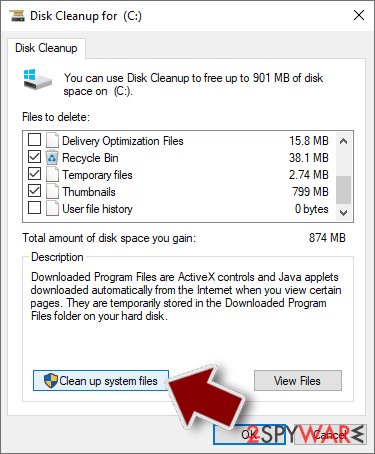
- You can also look for other malicious files hidden in the following folders (type these entries in Windows Search and press Enter):
%AppData%
%LocalAppData%
%ProgramData%
%WinDir%
After you are finished, reboot the PC in normal mode.
From our report of Feb 2017 · not reviewed since
How to remove CockBlocker virus?
CockBlocker removal can be completed using anti-malware tools.
It is not recommended to test your malware removal skills by experimenting with this virus because it is not a regular program and unlike ordinary and legitimate programs, it can hardly be removed via Control Panel. To remove CockBlocker virus, follow instructions provided below. You need to prepare the computer for this procedure. After removing the virus, take a look at data recovery tips provided below the removal tutorial.
[GI=method-1]Though the virus is merely a scareware and does not encrypt files, it does not mean it will not fight to remain on your computer. You can decontaminate the virus by following instructions down here:
Use a data restoration tool
Although this tool sometimes cannot help to restore files that are rendered useless with strong encryption, it is still worth to try it and see what it can do.
Restore using Windows Previous Versions
Some files can be recovered via Windows Previous Versions. This method works if you have enabled System Restore function a while ago.
Cockblocker decryption solution
Enter not_a_backdoor string into the box on the bottom left corner of the lockscreen window and click "Use Decryption Code". The program should close. Then, run the scan of your computer using reputable antivirus software.
Report it and recover your files
Report it
Report the attack even if you do not expect the files back: insurers and banks ask for the report number, and police use the contacts in the note to link cases.
- United States
- FBI IC3 · FTC ReportFraud
- United Kingdom
- Report Fraud (formerly Action Fraud) · NCSC
- Australia
- ReportCyber (ASD)
- EU countries
- Europol: national reporting sites
Give the victim ID, the note and the date the files were encrypted. A business that holds personal data may also have to notify its data protection authority, in the EU within 72 hours.
Backups: the 3-2-1 rule
Keep three copies of files that matter, on two kinds of storage, with one copy offline or off-site.
A disk that stays plugged in is reached by malware like Cockblocker ransomware virus together with the PC; one you connect only for the backup is not.
On Windows 11, File History keeps versions on an external drive, and OneDrive keeps earlier versions of synced files. Before restoring anything, make sure the PC no longer shows files that end in .hannah and no longer open.
Setting it up step by step: 3-2-1 backups on Windows 11 and 10.
Protect your privacy - employ a VPN
There are several ways how to make your online time more private - you can access an incognito tab.
However, there is no secret that even in this mode, you are tracked for advertising purposes. There is a way to add an extra layer of protection and create a completely anonymous web browsing practice with the help of VPN. This software reroutes traffic through different servers, thus leaving your IP address and geolocation in disguise.
Besides, it is based on a strict no-log policy, meaning that no data will be recorded, leaked, and available for both first and third parties. The combination of a secure web browser and VPN will let you browse the Internet without a feeling of being spied or targeted by criminals.
No backups? No problem. Use a data recovery tool
If you wonder how data loss can occur, you should not look any further for answers - human errors, malware attacks, hardware failures, power cuts, natural disasters, or even simple negligence.
In some cases, lost files are extremely important, and many straight out panic when such an unfortunate course of events happen. Due to this, you should always ensure that you prepare proper data backups on a regular basis.
If you were caught by surprise and did not have any backups to restore your files from, not everything is lost. is one of the leading file recovery solutions you can find on the market - it is likely to restore even lost emails or data located on an external device.
Questions about Cockblocker ransomware virus
Is there a decryptor for .hannah files?
That depends on the family behind the .hannah extension, which this guide cannot confirm yet from the reports alone. Check No More Ransom and ID Ransomware with your ransom note and one encrypted file; they list families with free tools.
If none exists today, keep the encrypted files and a copy of the note on a separate drive, because decryptors are sometimes published months later after flaws are found or servers are seized. Never buy a decryptor from a website that is not the security company that made it.
How do I open .hannah files?
You cannot open them by renaming or by choosing another program. The .hannah ending shows that Cockblocker ransomware virus encrypted the content, and only the matching key can reverse it. Renaming a file back to .docx or .jpg changes nothing except the icon, and it can confuse a future decryptor, so leave the names as they are.
To get the content back, use a backup, an unencrypted copy elsewhere, or a decryptor listed on No More Ransom if one exists for Cockblocker ransomware virus. Store the encrypted files on an external disk until then.
How did Cockblocker ransomware virus get on my computer?
The way Cockblocker ransomware virus spreads has not been documented yet, so look at your own recent activity. On home PCs, ransomware most often comes with cracked programs, game cheats, key generators and fake updates, or with an e-mail attachment that was opened. On business networks, attackers usually log in through Remote Desktop with a stolen or guessed password.
Think back to what was downloaded or installed in the days before files that end in .hannah and no longer open, and check the Downloads folder and Installed apps sorted by date. Keep anything suspicious for your report, but do not run it again.
Should I pay the ransom?
We advise against it, and so do the FBI, Europol and national cyber agencies. Payment does not guarantee a working tool: some attackers never reply, some tools damage files, and some variants have no decryptor at all. Paying also funds further attacks and can make you a target again.
Before considering payment, try every recovery option in this guide and report the attack. Companies must involve their legal adviser and insurer, because payments to sanctioned groups can be illegal. If files are truly irreplaceable, store the encrypted copies and wait; decryptors sometimes appear later.
Are ransomware recovery services legitimate?
Some are, but read the offer carefully. Genuine data-recovery firms recover deleted originals from disks or rebuild damaged files, and they say so. Others promise to "decrypt any ransomware" for a fixed price, which is impossible without the key; they quietly pay the attackers and keep a margin, sometimes without telling the victim.
Be especially careful with services that contact you after you post about the attack online. Ask for references, a written method and a no-result-no-fee clause, and check the free tools on No More Ransom first.
Did Cockblocker ransomware virus steal my files or passwords?
We do not know yet. Nothing published so far shows data theft by Cockblocker ransomware virus, but the only confirmed sign is files that end in .hannah and no longer open, which says nothing about what happened before. Many current ransomware attacks copy files or run a password stealer first, so it is wise to act as if they did.
From a clean device, change the passwords that were saved in the browsers on this PC, starting with e-mail and banking, sign out of all sessions and turn on two-step verification. Watch bank statements and account activity for the next few weeks.
Is Cockblocker ransomware virus the same as other ransomware with a similar name?
Not necessarily. Ransomware names come from the file extension, the note or a word in the code, so unrelated families often end up with similar names, and one family can appear under several names. The difference matters: a decryptor or advice for one family does not fit another and can damage files.
Compare the ending added to your files and the exact name of the note with the summary table at the top of this guide, then upload the note and one encrypted file to ID Ransomware from a clean device. If the result names another family, follow the guide for that family instead.
Will .hannah spread to my other drives?
It can. Ransomware encrypts every drive and network share it can reach while it runs, so external disks, USB sticks and shared folders connected during the attack may also have files ending in .hannah. Disconnect everything now, then check each device from a clean computer.
Do not plug a backup drive into the infected PC until the ransomware has been removed with an offline scan. Cloud folders such as OneDrive sync the encrypted versions, but they keep earlier versions you can usually restore.
Will removing Cockblocker ransomware virus unlock my .hannah files?
No. Removing Cockblocker ransomware virus stops it from encrypting more files and from starting again, but it does not decrypt the files that already end in .hannah. The scanner does not have the attackers' key.
Files come back only from a backup, from copies the ransomware did not reach, such as OneDrive version history, Previous Versions, e-mail attachments or a phone, or with a working decryptor if one exists.
Remove the ransomware first anyway: if you restore files while it is still active, it can encrypt them again. Keep the encrypted files; a decryptor may be published later.
Will Fortect remove Cockblocker ransomware virus?
Fortect scans Windows for malware and unwanted programs and repairs the system files and settings they change, and its free scan shows what it finds on your PC before you decide anything.
For Cockblocker ransomware virus, follow the plan above as well: the browser steps take back permissions and settings that no scanner treats as a threat, and uninstalling the program that brought it removes the source.
Run Microsoft Defender's full scan and, if anything was found, its offline scan as a second opinion. If the symptoms are gone after the plan and both scans are clean, there is nothing more to do.
Sources
- Threatpost: Fake PayPal emails distributing malware (read October 6, 2026)
- CISA: StopRansomware (read October 6, 2026)
- No More Ransom (read October 6, 2026)
- FTC: How to recognize, remove and avoid malware (read October 6, 2026)
- Microsoft Learn: Microsoft Defender Offline (read October 6, 2026)