

DataKeeper – ransomware as a service which has been spread around as nguyen police report.pdf.exe
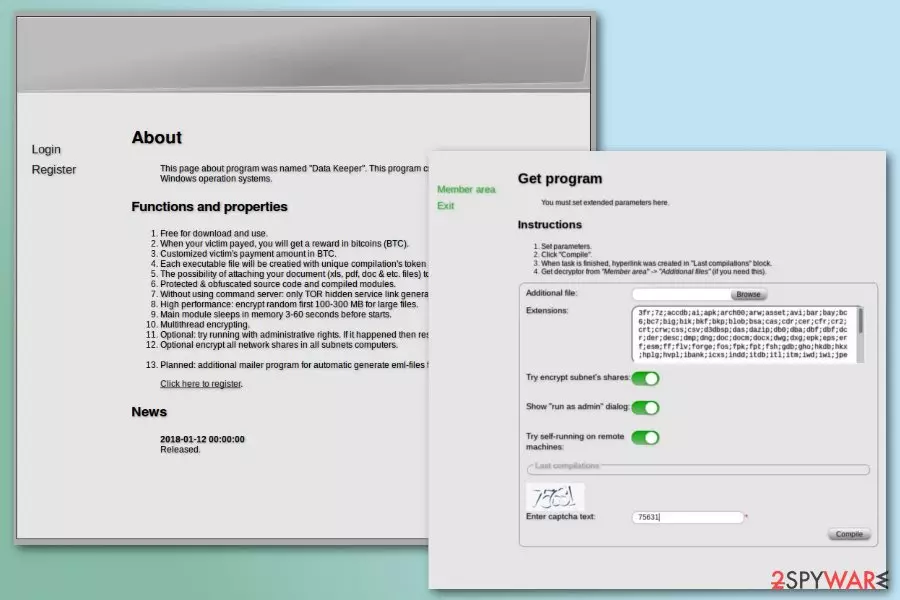
DataKeeper ransomware is a file-encrypting virus that was released in January 2018. Malware is available on the dark web as Ransomware-as-a-Service (RaaS)[1] program. The crypto-virus is designed to target Windows operating system, lock files with RSA-4096 keys and demand to pay the ransom in Bitcoins. Recently, the virus was noticed spreading around with the help of nguyen police report.pdf.exe file that mimics police and has a great potential to infect unaware users.
| Name | DataKeeper |
| Type | Ransomware/RaaS |
| Encryption algorithm | RSA-4096 |
| Propagation | Spam. Uses nguyen police report.pdf.exe file as a notification from Police |
| Encrypts | Images, audio, video files, archives, databases |
| Removal | Use FortectIntego to fix the system |
Evil-minded people who decide to obtain DataKeeper ransomware are given these functions and properties that they can customize:
- the amount of ransom asked for data recovery;
- possibility to attach PDF, dox, xls or other files to output malware executable;
- multithread encryption;
- optional network shares encryption;
- ability to run with administrative rights and remove system restore points;
- self-running feature on remote devices.
Therefore, DataKeeper virus can operate as an ordinary crypto-virus that allows cybercriminals to collect ransoms from computer users who opened obfuscated email attachments or downloaded other malicious content.
DataKeeper can encrypt various types of files, including Microsoft Word documents, various types of image, audio or video files, archives, databases, etc. The appended file extension during data encryption is unknown. It seems that anyone who gets this RaaS can set their preferred suffix.
The size of the ransom can also be set by each of a crook who obtains the malicious program. However, transferring money to the provided Bitcoin wallet address might not lead to data recovery. Thus, you should remove DataKeeper ransomware and try other methods to recover files.
Authors of ransomware might threaten you into paying more money or disappear as soon as they receive your Bitcoins. Thus, we do not recommend having business with them and risking to increase yours loses.
For DataKeeper removal we highly recommend using FortectIntego or another malware removal tool that can quickly wipe out all malicious components from the system. Unfortunately, security software cannot restore encrypted files. However, our team provides data recovery suggestions at the end of the article.

Dissemination methods of the ransomware virus
The ransomware itself can be obtained on the dark web. Anyone who gets the virus can use personalized methods to spread this malicious program. Main methods used by ransomware to spread around are:
- Malicious spam email attachments. Usually, the letter informs about important information and asks to check the information in the attached document.
- Malware-laden ads. Advertisements on legitimate and popular websites might include malicious content or redirect to infected websites. Often they offer software updates, security programs or great shopping offers.
- Fake software downloads and updates. Freeware or shareware websites or P2P networks often include malicious programs that look like legitimate tools. However, cracked software is most of the time harmful.
- Remote Desktop Protocol (RDP). Criminals use network scanners to find unprotected or insecure RDP connections and use brute force tools to attack the system.
- Exploit kits.[2] Authors of ransomware use specific software known as exploit kit to look up for security vulnerabilities to install malware on the computers.
Security specialists from bedynet.ru[3] remind that it’s not enough to install the powerful antivirus to be fully protected from ransomware. Many cyber threats are capable of bypassing security software if you click on a malicious link or download obfuscated malware on the system.
Therefore, it’s recommended to watch your actions online and create backups. In case of cyber attack, they will be extremely important.
Instructions to delete DataKeeper ransomware virus from the computer
To remove DataKeeper from the computer, you have to use reputable malware removal software. Ransomware viruses are one of the most dangerous types of cyber threats. Thus, they can make numerous changes to the system and install harmful components that can be hard to identify and remove manually.
We recommend using FortectIntego or MalwarebytesMalwarebytes for safe DataKeeper removal. Automatic malware elimination software can quickly identify and clean the infected computer. Note that for data recovery you will need backups or other software. Security tools are not capable of decrypting files.
Did this guide help?
Be the first to comment