

Fujacks – a self replicating virus that uses weak passwords to enter machines
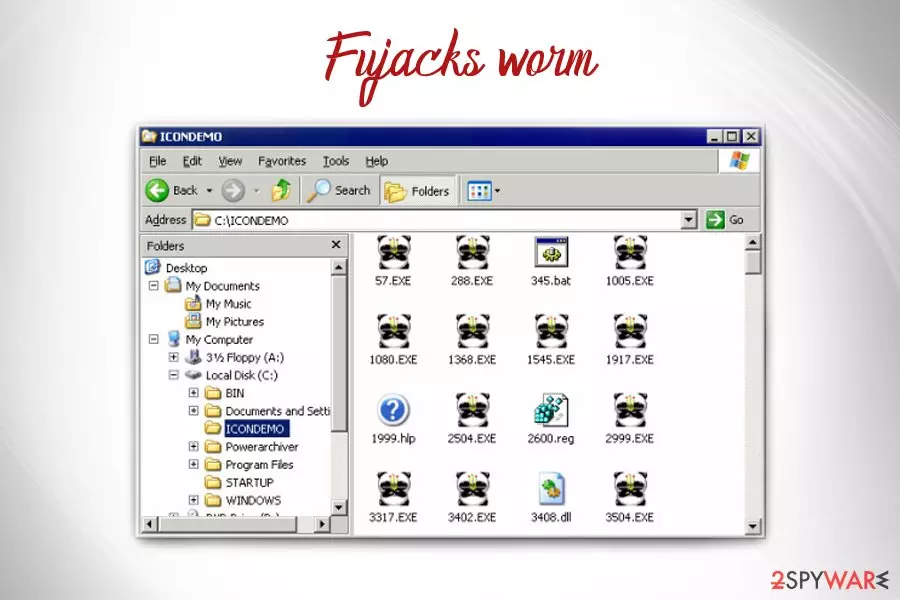
Fujacks is a dangerous computer worm[1] with the backdoor functionality which lets in a password-stealing malware. It enters victims' computers by exploiting weak passwords and copies itself to network shares. It can also spread via infected external devices or shared files. The malicious code infects all .exe files that are located on the computer and drops setup.exe and autorun.inf files to be able to boot with every Windows system startup. Fujacks virus also disables any security software that is installed on the machine. An interesting fact is that infected icons are changed into a panda holding three sticks.
| Name | Fujacks |
| Type | Worm |
| Also known as | Win32/Emerleox.CZ (CA)Worm.Win32.Fujack.g (Kaspersky)W32/Fujacks-AM (Sophos)Win32.HLLP.WHBoy.AD (VirusBuster)GenPack:Win32.Worm.Fujacks.R (BitDefender)Win32/Fujacks.AK (ESET)W32/Fujacks.m (McAfee):W32/Viking.FU (Panda)W32.Fujacks.E (Symantec), Win32/Looked.FU |
| Distribution | The virus enters machines via infected external devices or shared files on the networks |
| Main dangers | Serves as a backdoor for other malware to enter |
| Symptoms | Barely any. The presence of certain files might indicate infection. Additionally, anti-malware software malfunctions are common |
| Elimination | Download and install FortectIntego or MalwarebytesMalwarebytes |
Fujacks malware is also known as Panda virus in the East, as it primarily targets Chinese users. Nevertheless, it does not mean that Fujacks cannot infect people all around the world.
Users who have never had to deal with computer viruses are mostly at risk. Worms are especially dangerous, and Fujacks worm is also capable of stopping anti-malware tools from working. Nevertheless, it is possible to stop the the virus. Users should install FortectIntego or MalwarebytesMalwarebytes or other security software and remove Fujacks from their computers. To start an anti-virus program safely, victims should enter Safe Mode with Networking.
Fujacks can enter machines via infected external devices, such as DVD or the USB stick. The cyber infection copies the malicious payload into the root directory of removable drives as setup.exe and also adds autorun.inf to launch the virus automatically.
Virus:Win32/Fujacks.D also scans all the devices connected to the same network and places a copy of itself into System32\GameSetup.exe. To access shares, the worm uses a list of easily-guessable passwords, such as 111, 123abc, login, password, qwerty and similar.
The main executable spoclsv.exe is dropped into \drivers. Fujacks virus then adds the following registry[2] entry to ensure persistence:
HKCU\Software\Microsoft\Windows\CurrentVersion\Run
Additionally, the virus can delete several registry entries that are related to anti-malware software or other security measures. What is more, Fujacks removes all GHO files that are essentially backup files that can be used to restore data.
Unfortunately, there are minimal infection symptoms. Nevertheless, users can check for the following:
- added registry value svcshare with data \drivers\spoclsv.exe
- added file spoclsv.exe in the following location: system32\drivers
Additionally, victims may observe some problems with their security software. It may fail to start, become nonresponsive, crash, etc. Therefore, if your anti-malware applications are struggling, make sure you check for virus infection and perform full Fujacks removal in Safe Mode.

Worms can enter your machine if you are careless
Computer infections don't just enter your machine while it is not being used, as experts[3] explain. Meaning, for malware infiltration, there is always a trigger, and it is a human's interaction with the device. Therefore, make sure you stay safe online by practicing secure internet browsing and computer usage habits.
First of all, make sure you use unique and secure passwords for each of your accounts. As the worm can brute-force passwords, it is always a good idea to secure every account promptly.
Next, you should always take caution when connecting unknown external devices to your computer. Even if it comes from somebody you trust – they don't even know that their USB stick or the DVD is infected. Therefore, make sure you scan the file using security software before opening.
And finally, stay away from suspicious websites, such as porn, file-sharing, online dating and similar. These sites are prone to hacking and can contain malware inside.
Remove Fujacks virus from your machine
Because the virus affects files of security software, Fujacks removal might be a bit complicated. Nevertheless, it is possible. Users should not try to start anti-malware application in normal mode but enter Safe Mode with Networking.
If security software still does not work, victims should download and install a new version. In Safe Mode, capabilities of the virus will be disabled. As soon as the new anti-malware tool is installed, users should perform a full system scan. Using FortectIntego or MalwarebytesMalwarebytes, remove Fujacks virus safely.
Did this guide help?
Be the first to comment