

What kind of program GMusicPlayer actually is?
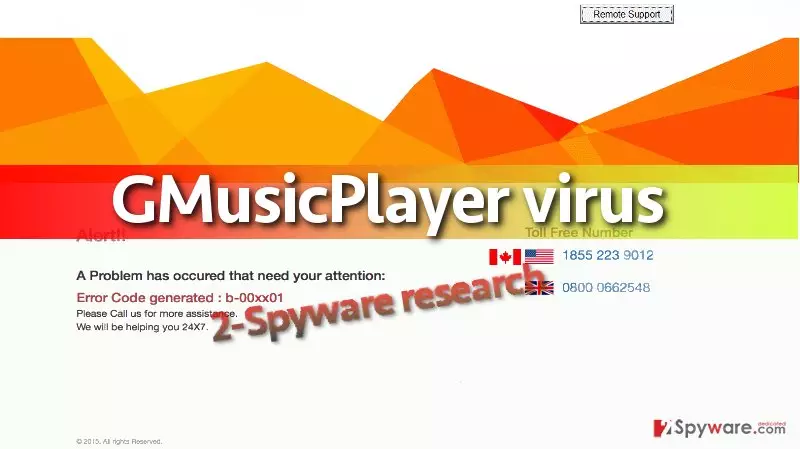
GMusicPlayer virus is a malicious software that belongs to Tech Support Scam[1] category. Although it pretends to be a music player, it is truly a virus that is programmed to carry out completely different tasks on the infected system. Once installed, GMusicPlayer malware[2] assigns itself to startup programs and then the malware screenlocks the computer every time the computer user turns on the infected PC. The screen locker says “Alert!! A Problem has occurred that need your attention: Error Code generated : b-00xx01” and asks to call 24×7 tech support technicians for help. The virus provides two numbers – one for Japan and USA based customers, and one for UK-based customers. The virus also triggers a pop-up that asks to enter computer’s password to continue.
The number that this malicious program urges to dial is 1-855-223-9012, but you should never call it if you do not want to have a not-so-friendly conversation with cyber criminals. Criminals try to deceive callers and convince them that the system is infected with malicious viruses that will shortly damage the computer for good. These tales that criminals trell are meant to intimidate the victim and make him obey to criminal’s commands[3]. Once the victim gets on the hook, scammers start asking for credit card details (to verify victim’s identity), buy certain software to fix computer problems, or visit a phishing website[4] and reveal personal information on it. Be very careful! These scammers are filthy, and they will do everything to deceive you. Therefore, you must remove GMusicPlayer malware as soon as you can. We have prepared a full GMusicPlayer removal tutorial for you – it is provided below the article.
How did I get affected by this virus?
Normally, users do not notice GMusicPlayer hijack because it happens silently. This program conceals itself as a music player and pretends to be a legitimate program, but if you download it from the wrong source, you can get infected with it. Please carefully choose websites to get software from and try to avoid installing bundled software packs. It is advisable to select custom/advanced settings because they let you see all bundled programs and drop them off in case you do not want to install them. However, such dangerous programs can reach you via email or be sent to you by an unknown person via social media websites, so we highly suggest you not to trust content that strangers send to you. Clicking on an infectious URL or opening a compromised email attachment[5] can quickly install malware on your computer.
How can I remove GMusicPlayer malware?
Remove GMusicPlayer virus as soon as you can because it is a hideous program that simply blocks access to your computer. You will need to perform series of tasks to finally get rid of it, and scan the system with anti-malware software to get rid of the virus’ remains. A much easier option is to simply complete the entire GMusicPlayer removal procedure by running a system scan with anti-malware – it will automatically find and kill malicious processes and delete dangerous files and programs from your computer system. In case you still want to delete the virus manually, follow these steps:
Did this guide help?
3 comments
mixtape
This information is 100% true!!! I have been infected with GMusicPlayer virus and I know what it does... Its a nasty program, goddamit!
polygon
I know right.... i am a victim, too
Rolls24
Thanks for the help - I have deactivated the malware and then uninstalled it with my antivirus program.