

Godsomware ransomware — a fake ransomware virus that is trying to troll computer users
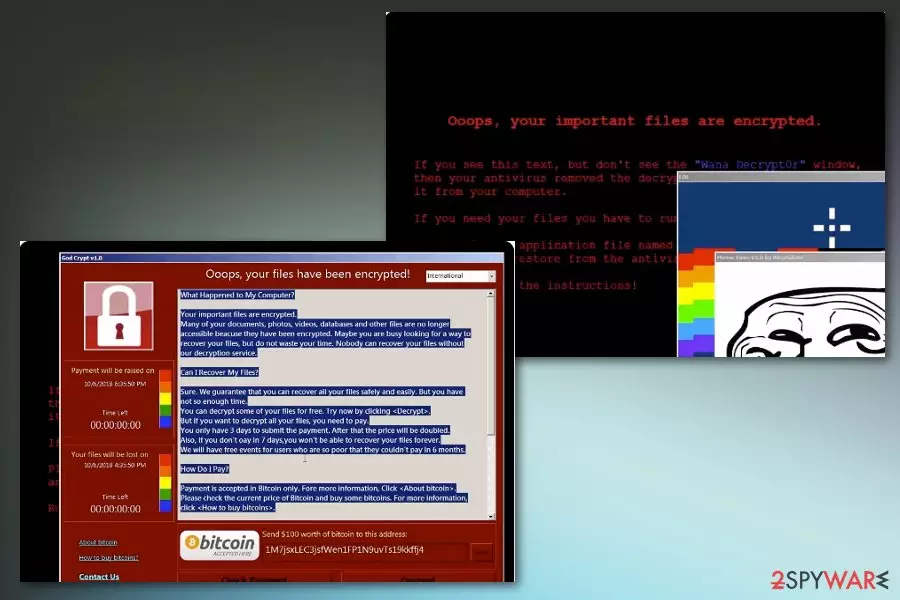
Godsomware is a bogus ransomware virus that demands $100 ransom in Bitcoin. Immediately after infiltration, malware changes desktop background, replacing it with a fake ransom note that claims that all personal files have been locked. Additionally, users are greeted with various internet memes, like Nyan cat or Trollface. It is not surprising that this infection is rather a joke than a real threat, as it does not encrypt any data, despite all the claims. Godsomware ransomware also displays ransom message under the name of God Crypt v1.0, and it visually reminds of WannaCry ransomware note. In there, users can enter 29b579fb811f05c3c334a2bd2646a27a code to disable the malicious program. Nevertheless, according to VirusTotal,[1] 25 AV engines already recognize the file, so its removal should not be delayed, even after the code is entered.
| Name | Godsomware ransomware |
|---|---|
| Type | Cryptovirus |
| Also named | God Crypt/ God Crypt v1.0 |
| Ransom amount | $100 in BTC |
| Distribution | Insecure file attachments from email |
| Elimination | Use FortectIntego for Godsomware ransomware removal and clean your system |
Godsomware ransomware virus is not the threat that locks personal files or marks your data with the added file extension. Displaying memes, demanding ransom and scaring people with the error messages are the only features of this mimicking threat.
Besides intrusive internet memes, pictures, and troll faces Godsomware virus displays a ransom note similar or even identical to other more dangerous cyber threats like WannaCry ransomware. Ransom note reads the following:
Ooops, your important files are encrypted.
If you see this text, but don’t see the “Wanna Decrypt0r” window,
then your antivirus removed the decrypt software or you deleted
it from your computer.
If you need your files you have to run the decrypt software.
Please find an application file named “@WannaDecryptor@.exe” in
any folder or restore from the antivirus quarantine.Run and follow the instructions!
Once Godsomware ransomware gets on the system, it starts changing the performance of the computer by spawning additional background processes. Pop-up windows and added files overload the system and users can encounter errors as:
- System32.dll error;
- taskmgr.dll no found;
- regedit.dll error;
- microsoft.dll not found;
- dll.dll error.
You need to remove Godsomware ransomware no matter how much of joke of a virus it seems like. Various error messages indicate that the virus is not developed completely, so commands are not launching properly. Get rid of malware and do not leave a chance for other malware to get on your device.
If you need to perform a Godsomware ransomware removal, employ anti-malware tools like FortectIntego or other security software. Manual elimination is a very complicated procedure, and should not be practiced by regular users.
While Godsomware ransomware does not encrypt any files, remember, that the infection is very real, and needs to be eliminated. Additionally, do not pay the ransom, as there is no reason to do so. Even if the virus would lock up files, paying ransom is a bad idea, according to researchers.[2]

Malicious files loaded with macros distribute ransomware via spam email attachments
Be aware that even .docx files can be malicious and spread malware. The most common method of ransomware distribution is spam email attachments filled with malicious macros[3]. MS Word or Excel documents often look safe and legitimate based on the sender or subject line.
Unfortunately, malicious actors misuse names of well-known companies and call the email attachment “Invoice” on purpose. All this activity is to make you more trustful and to increase the chance that you would open the file on the device and launch the threat. Clean your email box more frequently and do not download suspicious attachments.
Remove Godsomware ransomware from the system
Performing Godsomware ransomware removal by using anti-malware tools is recommended by our team. The process might be time-consuming, but there is no other way to get rid of the cyber threat completely alongside the additional files.
When you remove Godsomware ransomware prom the device, make sure you double-check before using the computer as normal. Furthermore, take all precautionary measures to avoid ransomware infections in the future. Another piece of advice would be to store all important data on an external device or cloud service.
Did this guide help?
Be the first to comment