

Hastenupdevice.co.in shows fake virus infection prompts to make users buy software
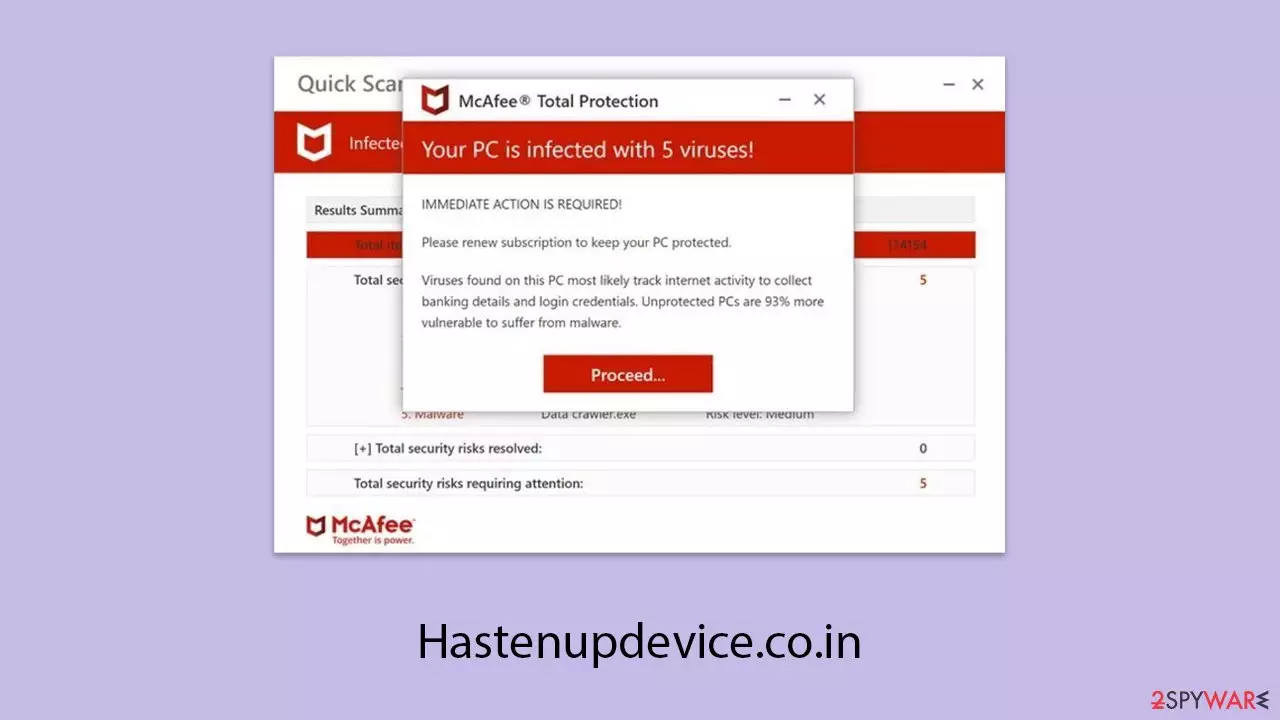
Hastenupdevice.co.in is not the only site attempting to mimic a reputable security provider to deceive users into clicking on deceptive ads and purchasing questionable software. The site primarily aims to create a fake security scan, often using the guise of well-known security brands, although the actual companies have no affiliation with this scam.
While browsing the internet, users may encounter such sites through any browser, including Chrome, Safari, Edge, or Firefox. Often, these redirects occur after clicking on a questionable link found on a website – torrent sites, or illicit streaming platforms, for example, are frequent sources that lead to these harmful destinations.
In some instances, the adware linked to these sites can heighten the risk of phishing attacks. If you notice an increase in pop-up ads or unusual notifications, this could be a sign of such interference. To prevent further redirects from Hastenupdevice.co.in, it's crucial to remove any unwanted programs from your system. We’ll guide you through how to do this effectively, and provide tips on stopping unwanted push notifications if you’ve accidentally allowed them.
| Name | Hastenupdevice.co.in |
| Type | Scam, phishing, redirect, adware |
| Operation | A message claims the subscription for security software has expired and needs to be immediately renewed to remove the allegedly found viruses. Also asks to enable push notifications |
| Distribution | Compromised websites, pop-up ads, and potentially unwanted applications |
| Risks | Installation of PUPs or malware, sensitive information disclosure, and financial losses |
| Removal | You should not interact with any links or ads shown on the scam page, and shut it down immediately. Then, perform a full scan with SpyHunterCombo Cleaner security software as a precautionary measure |
| Other tips | Third parties can use cookies to continue tracking your online activities, so we recommend clearing browser caches and other leftover files with FortectIntego |
How scammers achieve their goals
The tactic used by the creators of Hastenupdevice.co.in is quite straightforward: they leverage social engineering to manipulate users into taking actions that benefit them. Their primary target is often individuals who lack technical expertise, exploiting their concerns over security.
They mimic a security scan, posing as coming from a well-known provider, to scare users about threats to their systems. The results of these imitations are designed with threats in mind to spur users into action. Below is a sample of one of the messages fabricated that can be displayed:
IMMEDIATE ACTION REQUIRED!
Your McAfee subscription has expired!
Renew now to keep your PC protected.
Viruses found on this PC most likely track internet activity to collect banking details and login credentials. Unprotected PCs are 93% more vulnerable to suffer from malware.
Not only do these messages create a false sense of urgency by implying that the system is infected with viruses, but they also claim that the user’s security software has expired and that a renewal is necessary, even if the person isn't using that software.

What do scammers hope to gain?
After these false messages are displayed on Hastenupdevice.co.in, the user must decide whether to believe the alert or not. If they are persuaded, a “Proceed” button will bring them to a sales page of anti-malware software. The scammers earn a commission for every purchase a user makes.
It's also worth remembering that sites like these are never to be trusted. They are often fronts for scamming activities, where users may unknowingly give up their payment details or personal info, making themselves vulnerable to identity theft or further exploitation.
The sensitive information gathered from these spoofed sites may be exchanged on dark web forums or used for other malicious purposes. If you have entered any sensitive information on such a website, be prepared for additional phishing, which will either be in the form of emails or unwanted calls.
In some cases, victims may be tricked into downloading fake security software that does nothing but harm their device. If you’ve downloaded any software from a suspicious website, it’s crucial to uninstall it immediately and run a scan with legitimate security software to ensure your system is clean.
What to do if you have allowed push notifications
Firstly, ensure that you have inadvertently provided permission for push notifications by Hastenupdevice.co.in. Push notifications should pop up as soon as you visit the site. If you have accidentally or unintentionally provided permission by clicking on the “Allow” tab, push notifications could be popping up with annoying stuff like suppose virus infection alerts, annoying lottery scams, money-generating tricks, etc.
Observe that these notifications do not arise from a virus infection but from permission given to the website to send notifications. As long as the website is allowed to send notifications, they will continue.
To stop these intrusions, you will have to alter your browser settings and block notifications from the violating website. This is how:
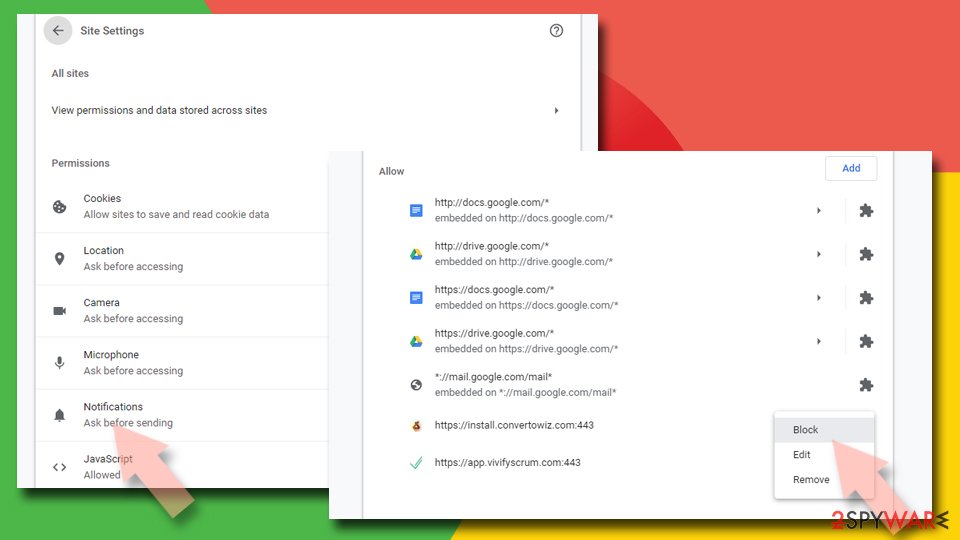
Google Chrome
- Open the Google Chrome browser and go to Menu > Settings.
- Scroll down and click on Advanced.
- Locate the Privacy and security section and pick Site Settings > Notifications.
- Look at the Allow section and look for a suspicious URL.
- Click the three vertical dots next to it and pick Block. This should remove unwanted notifications from Google Chrome.

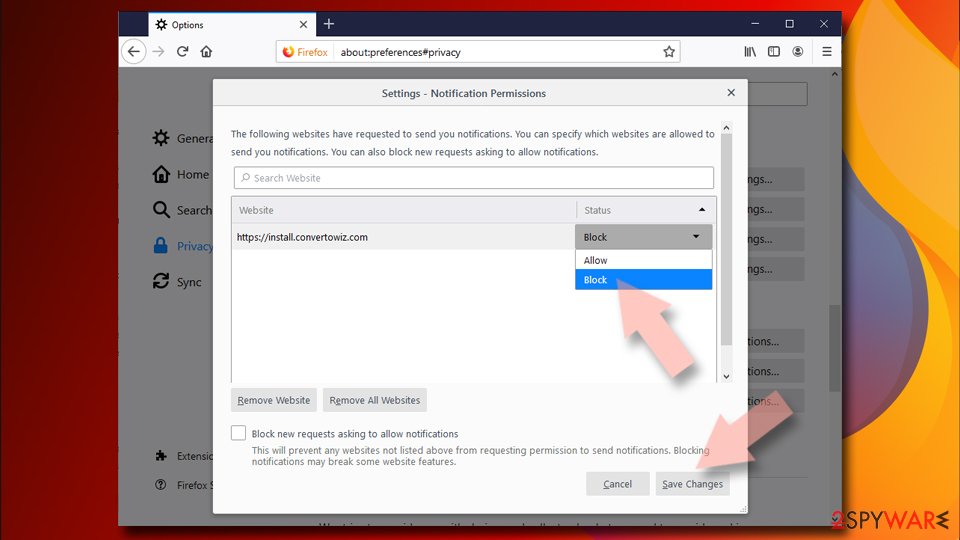
Mozilla Firefox
- Open Mozilla Firefox and go to Menu > Options.
- Click on Privacy & Security section.
- Under Permissions, you should be able to see Notifications. Click the Settings button next to it.
- In the Settings – Notification Permissions window, click on the drop-down menu by the URL in question.
- Select Block and then click on Save Changes. This should remove unwanted notifications from Mozilla Firefox.

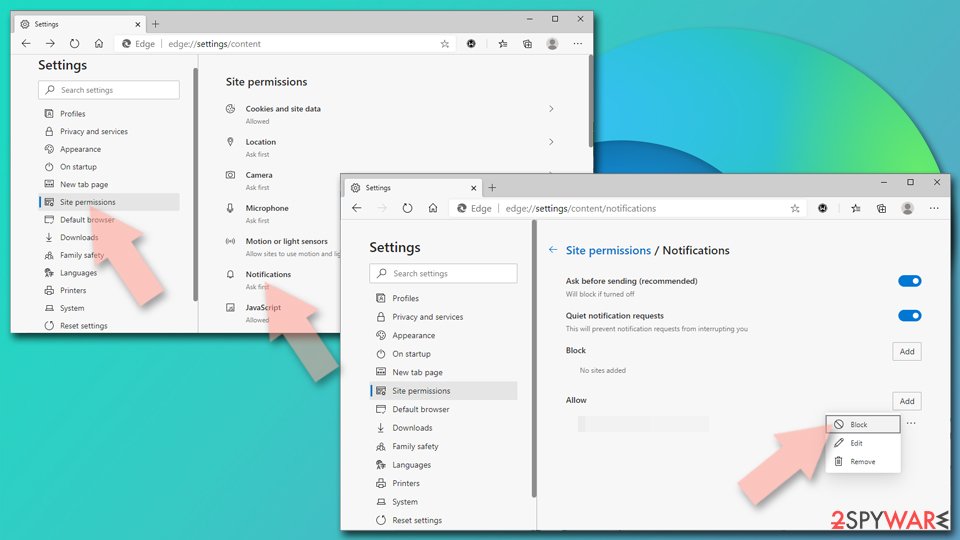
MS Edge (Chromium):
- Open Microsoft Edge, and go to Settings.
- Select Site permissions.
- Go to Notifications on the right.
- Under Allow, you will find the unwanted entry.
- Click on More actions and select Block.

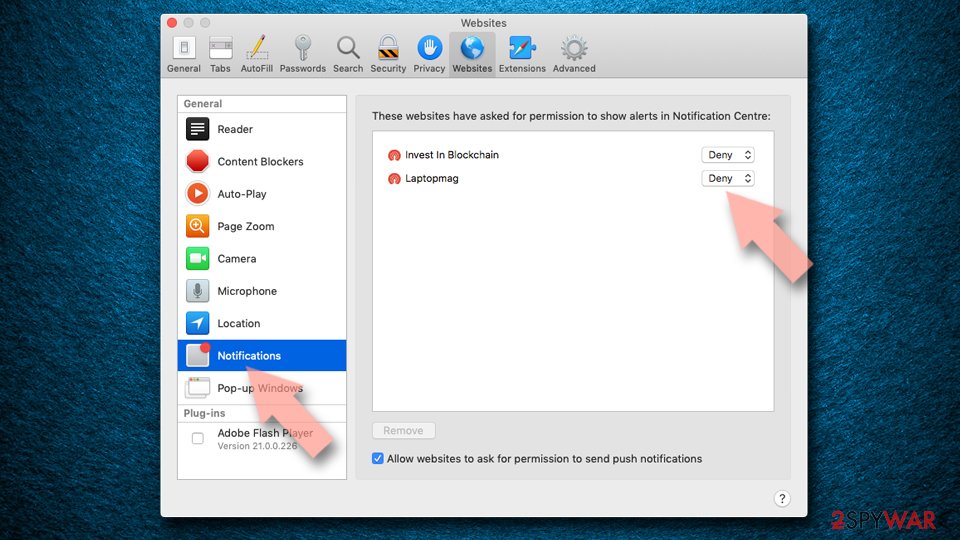
Safari:
- Click on Safari > Preferences…
- Go to the Websites tab and, under General, select Notifications.
- Select the web address in question, click the drop-down menu and select Deny.

Checking the system for actual infections
You might find yourself redirected to a phishing site like Hastenupdevice.co.in after visiting a site that is already suspicious. Websites linked to torrents, peer-to-peer file sharing, or software piracy often contain hidden malicious links. A single accidental click on these types of sites can lead to an unwanted redirect. To minimize this risk, it's best to avoid such sites altogether.
In some cases, your device may have already been compromised by adware or other potentially harmful software. If this happens, you may notice an uptick in unwanted pop-up ads or frequent redirects while browsing. These types of infections increase your chances of encountering deceptive ads or fake software update alerts, heightening your vulnerability to scams.
To safeguard your system, it's essential to use trusted security software, such as SpyHunterCombo Cleaner or MalwarebytesMalwarebytes, to run a comprehensive system scan. These tools can help identify and eliminate harmful files from your device. Additionally, using FortectIntego can assist in clearing residual files like tracking cookies, which will enhance both your security and system performance.
Did this guide help?
Be the first to comment