

Hilipinge.com – a deceptive website that uses fake confirmation prompts in order to deceive users
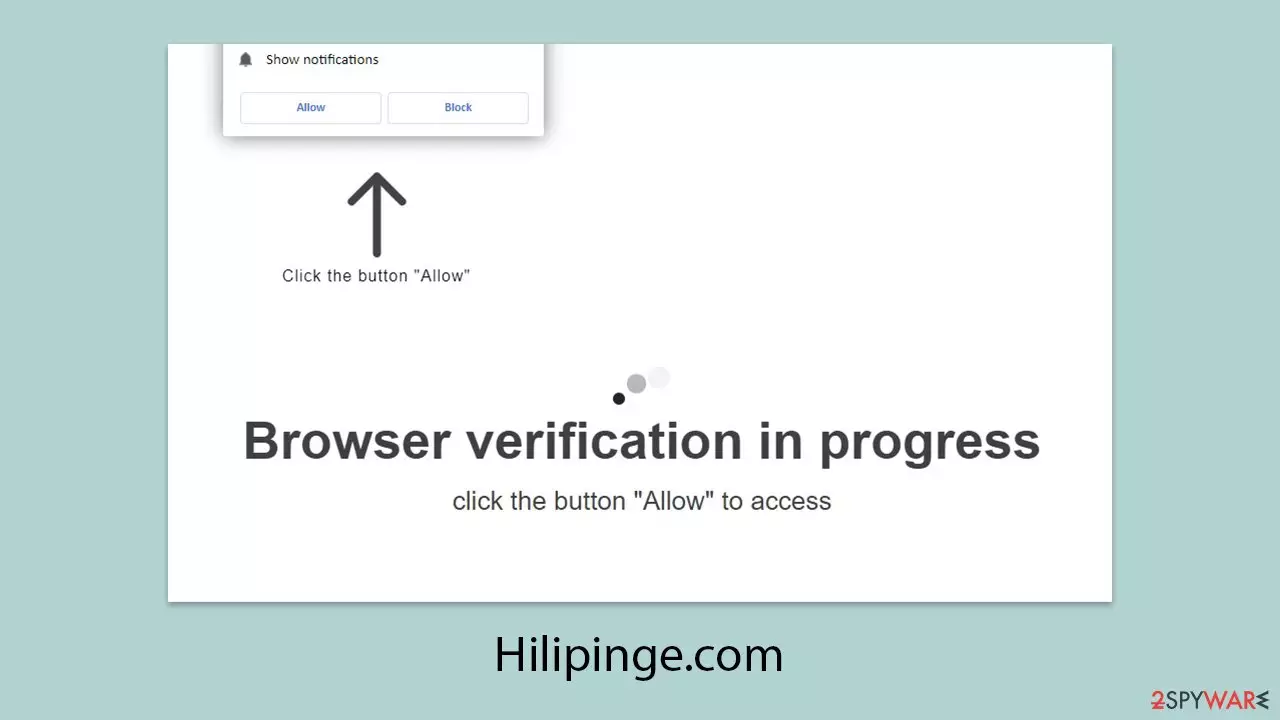
Hilipinge.com is a suspicious website that users often encounter after being redirected from risky corners of the internet, especially pages related to pirated content or unauthorized streaming platforms. Upon landing on the site, visitors are urged to click the “Allow” button on a browser notification prompt under false pretenses.
Complying with this request grants Hilipinge.com permission to send browser notifications, which it abuses to deliver intrusive advertisements. These pop-ups are not only disruptive, frequently interrupting tasks or forcing full-screen apps to minimize, but they also pose security concerns.
The ads themselves are the primary danger. They typically link to misleading or harmful content, including deceptive virus alerts, bogus financial opportunities, or phishing attempts designed to harvest sensitive data. Given the risks, it’s best to avoid interacting with any messages or offers pushed by Hilipinge.com. Instead, refer to a detailed removal guide to block the site and stop the notifications from reappearing.
| Name | Hilipinge.com |
| Type | Push notifications, ads, pop-ups, scam |
| Distribution | Users start seeing intrusive pop-ups at some point after they click the “Allow” button within the site's notification prompt |
| Symptoms | Push notifications that include misleading information links would show up on the desktop at random times |
| Dangers | Push notifications sent by the site might result in you visiting dangerous websites; consequently, you might suffer from malware infections, financial losses, or personal data disclosure to malicious parties |
| Removal | To remove notifications, you should access your web browser settings and block the website in question. You should also scan your system with SpyHunterCombo Cleaner to check for adware and other infections |
| Recovery | If you don't clear your browser's cookies and other web data, unwanted ads may reappear, and your activity could still be tracked. Prevent this with FortectIntego |
How the Hilipinge.com scam operates and warning signs to watch for
Users rarely visit suspicious sites like Hilipinge.com by choice. In most cases, scammers rely on manipulative tactics to drive traffic to such domains. They exploit shady advertising networks or embed malicious scripts into compromised websites, ensuring that users are redirected without fully realizing what’s happening.
One of the more frequent scenarios involves users clicking links on high-risk platforms, such as illegal streaming pages or file-sharing services. In other instances, the redirection may happen automatically, triggered by scripts embedded on a compromised site. Sometimes, adware installed on the user’s system is responsible for rerouting them to Hilipinge.com.
Once on the page, users are hit with deceptive prompts urging them to allow browser notifications. These messages are often designed to look familiar or urgent, which makes them more effective. Some common phrases include:
- Just one more step! “Allow” to continue.
- Click Allow to confirm that you are not a robot
- Click Allow to start downloading
- Click “Allow” to win a prize and get it in our shop!
- If you are 18+, click Allow, etc.
The scam hinges on the user believing these prompts serve a legitimate function. For instance, mimicking CAPTCHA checks or claiming the user needs to verify their age taps into actions people routinely perform on trustworthy sites. In other cases, the lure of a free prize or access to content pressures the user into complying.

However, none of these claims are true. This is classic social engineering in action, manipulating users into enabling permissions that let scammers flood their screens with unwanted and often dangerous advertisements. Hilipinge.com is just one example of this tactic, and users should remain cautious when encountering these kinds of messages.
If you’ve already clicked “Allow” by mistake, don’t panic. As long as you avoid engaging with the content pushed through these notifications, you're still in control. The next step is to follow a proper removal guide to revoke those permissions and block further attempts to hijack your browser.
How to stop unwanted push notifications from Hilipinge.com
Confronted with a wave of unwelcome pop-up advertisements, the vast majority of users automatically assume their phone is infected with malware. This is not a crazy assumption, particularly when the ads are from shady sites like Hilipinge.com and promote false giveaways, suspicious investment deals, or other scam content.
Because of the way aggressive these warnings are, they're often confused for indicators of something deeper system compromise. Traditional antivirus or security suites will not do, though, because the problem isn't malware-caused, but rather the result of accidentally granted browser permissions.
The problem begins when someone clicks “Allow” on the Hilipinge.com browser notification request. That gives the site explicit permission to push notifications directly onto the user's screen, even when the site is not active. The notifications continue to pop up until that permission is revoked manually.
It should be understood that push notifications are a standard functionality of modern browsers, intended for just use. Spammers take advantage of this functionality and send unwanted data by means of it, bypassing security software completely.
To stop notifications from Hilipinge.com, you’ll need to access your browser’s settings and remove the site from the list of those allowed to send notifications. This action is the only reliable way to block further disruptions and regain control over your browsing experience.
Google Chrome
- Open the Google Chrome browser and go to Menu > Settings.
- Scroll down and click on Advanced.
- Locate the Privacy and security section and pick Site Settings > Notifications.
- Look at the Allow section and look for a suspicious URL.
- Click the three vertical dots next to it and pick Block. This should remove unwanted notifications from Google Chrome.


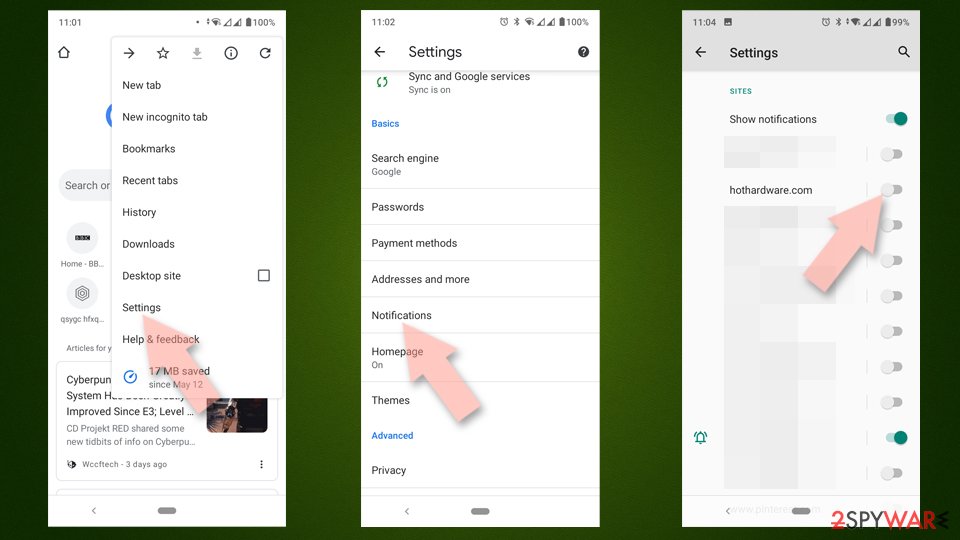
Google Chrome (Android)
- Open Google Chrome and tap on Settings (three vertical dots).
- Select Notifications.
- Scroll down to the Sites section.
- Locate the unwanted URL and toggle the button to the left (Off position).

Mozilla Firefox
- Open Mozilla Firefox and go to Menu > Options.
- Click on Privacy & Security section.
- Under Permissions, you should be able to see Notifications. Click the Settings button next to it.
- In the Settings – Notification Permissions window, click on the drop-down menu by the URL in question.
- Select Block and then click on Save Changes. This should remove unwanted notifications from Mozilla Firefox.


Safari
- Click on Safari > Preferences…
- Go to the Websites tab and, under General, select Notifications.
- Select the web address in question, click the drop-down menu and select Deny.


MS Edge
- Open Microsoft Edge, and go to Settings.
- Select Site permissions.
- Go to Notifications on the right.
- Under Allow, you will find the unwanted entry.
- Click on More actions and select Block.


Internet Explorer
- Open Internet Explorer, and click on the Gear icon at the top-right of the window.
- Select Internet options and go to the Privacy tab.
- In the Pop-up Blocker section, click on Settings.
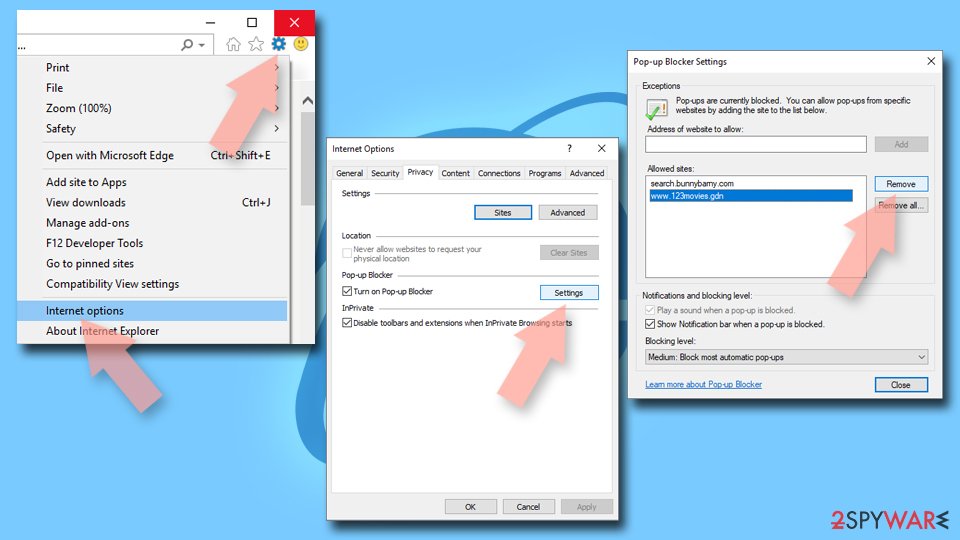
- Locate the web address in question under Allowed sites and pick Remove.

How to get rid of probable adware infections linked to Hilipinge.com
If you are constantly being taken to scam websites like Hilipinge.com, there is a good chance that adware or other unwanted software (PUPs) is to blame. These kinds of software quietly operate in the background, filling your browser with ads and sending you to dangerous pages without your knowledge.
Adware commonly gets onto computers through bundled installations, usually along with free software obtained from suspicious sources. Because the installation process often does not include adequate enough clear disclosures, users may not even realize that these applications have been installed, making detection and removal more challenging.
To safeguard your system, it's essential to perform a thorough scan using reputable anti-malware tools such as MalwarebytesMalwarebytes or SpyHunterCombo Cleaner. Before running the scan, ensure that your chosen application has the latest malware definitions so it can accurately detect the most recent threats.
Once you've eliminated any adware from your system, we recommend using FortectIntego as well to clean out your browsers. This will remove leftover cookies, tracking scripts, and any undesirable settings changes the adware could have made. It'll also restore regular browser behavior, reducing the likelihood of further redirects or data exposure.
Did this guide help?
Be the first to comment