

Ridiculous HollyCrypt ransomware demands: Bitcoins or Vodka
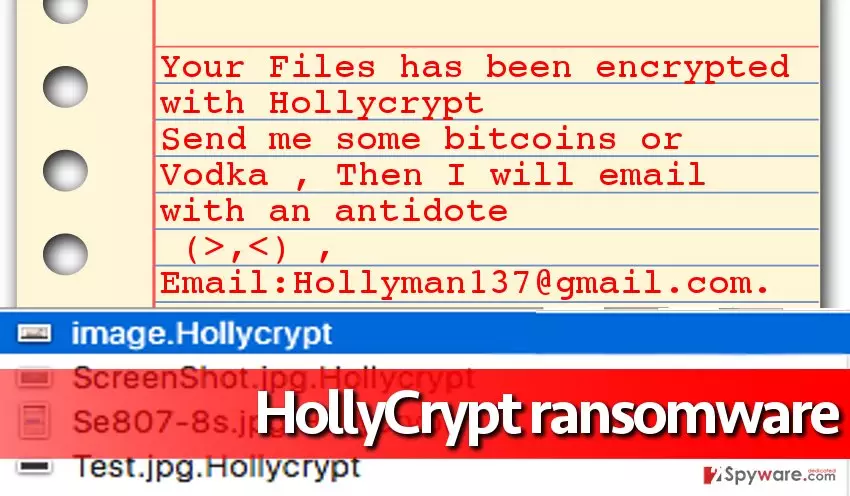
HollyCrypt virus seems to be yet another descendent of HiddenTear — the open-source ransomware which first emerged as an educational tool but was later assimilated by hackers as a basis for malicious ransomware construction. In general, this malware example is no different from other ransomware samples — it aims to get inside the target computer system silently, encrypt files there, append specific file extensions to them and drop a ransom note to inform the victim about the attack and possible consequences of it. The sample that we have analyzed adds .hollycrypt file extensions to encrypted data, and leaves a ransom note dubbed read_this_shit.txt in the C:\Users\(username)\Desktop directory. The authors of the ransom note also show off a dark sense of humour by demanding the victim to send them “some bitcoins or vodka” in exchange for the data recovery software. The email that is left in the ransom note is Hollyman137@gmail.com. Please take note that this virus differs from HolyCrypt ransomware, which first appeared in July 2016.
No matter that the cyber attack culprit promises to provide the decryption tool after the payment is made, there is no reason to believe what he/she says. You might never see your files again even after paying the ransom. We do not recommend you to take risks and strongly suggest to remove HollyCrypt malware without any doubt. Of course, a proper tool should be used for that, and we recommend using FortectIntego. We must warn you that leaving this ransomware on the system is a very bad idea because it might download additional malware on the system. Besides, ransomware can be installed together with Trojans and other types of malicious software, so to clean the computer entirely, you should initiate HollyCrypt removal as quickly as possible. Use instructions presented below the article to restart your PC in a Safe Mode with Networking and start deleting the virus right away.
The main strategies of ransomware dispersion:
HollyCrypt ransomware spreads in a bundle with malicious software updates (typically Java or Flash Player updates advertised via vague websites), also via malicious email campaigns and with the help of exploit kits. These distribution techniques help criminals inject ransom-demanding viruses into victims’ computers without their notice. The easiest and surprisingly the most efficient way to infect someone else’s computer with malware is to send a malicious email to them. Such emails typically contain a file attachment that contains ransomware payload. Once downloaded and opened, it can automatically activate malicious script and download HollyCrypt payload to the computer. Sadly, as soon as the malicious attachment is opened, there is no way back — the ransomware starts its malicious processes and ravages through the computer rapidly encrypting files. Of course, users who have decent and up-to-date anti-malware programs on their computers are less likely to be affected by such viruses.
Preparing for the HollyCrypt removal:
Before you remove HollyCrypt virus, prepare your PC for that. You might need to start the elimination in Safe Mode with Networking first to be able to activate the malware removal tool. This might be an unnecessary step, but we have provided HollyCrypt removal instructions just in case. If for some reason you cannot eliminate this virus, please contact our support team for help. We also want to add that ransomware is a complicated program and it cannot be uninstalled that easily. That is why we do not recommend to remove HollyCrypt manually, but rather use an automatic malware removal tool.
Did this guide help?
4 comments
Joshua
This is not funny. How to restore files. Please answer.
esse
Files are kaput. I cannot restore mine, too. I hope youre not planning to pay the ransom????
Joshua
no im not but hopefully someone can decrypt them for me..
Madden
I cannot believe I lost all my files like in a few seconds this virus was quick!!! oh lord what imma gonna do now...