

Beware of “Product Key – Customer Support” scammers!
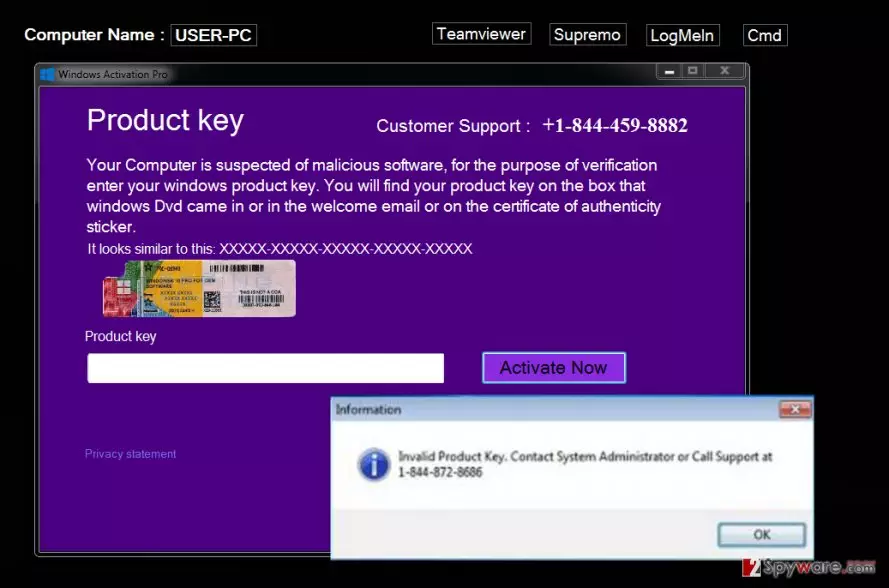
If you suddenly cannot access your computer because of a dummy “Product Key – Customer Support” lock screen, which asks you to get in touch with tech support technicians, then we have no doubts that your system is currently controlled by “Product Key – Customer Support” virus. If this fake screen has appeared on your computer screen, asking to enter a valid Windows Product key, and if none of the keys you enter work, there is no need to worry about copyrights of your software license. This fake Windows activation screen indicates that you have been infected with malware meant to promote fake technical support number, which is provided on that fake lock screen. Please, do not fall for scammers’ trickeries and do not call the number provided. Scammers working on this project seek to intimidate naive computer users, give them remote access to the computer, and, depending on scammer’s mood, either infect the system with malware or swindle money from an innocent computer user. In some cases, crooks attempt to convince the user to buy some useless “security” software.
In general, they ask the user to go to the computer, perform some tasks, open registry and make some modifications, and so on. They aim to convince the user that computer system is compromised and that he or she needs to rely on “professional” computer technicians and do as they say. However, these scammers have no good intentions, so be careful and do not fall for their tricks! You can remove “Product Key – Customer Support” malware quite easily if you use an anti-malware software. Our team recommends using FortectIntego software, however, you will need to start your PC in a Safe Mode first. You can find informative instructions explaining how to close the lock screen and run anti-malware software below this text.
How did you install this malware on the computer?
You are probably confused and seek to find out how did this “Product Key – Customer Support” hijack your computer without your knowledge. Sadly, the fact that it has managed to pass your computer protection system indicates that you should take serious actions to protect your system from such infiltrations, because currently, the computer is vulnerable to such threats. Typically, such Fake Windows Activation viruses hijack the system when installed with free programs, bogus software updates, and so on. Be very careful when you install software on the system because part of free programs available online carries additional components, such as adware, browser hijackers, or malicious applications like “Product Key – Customer Support” virus. Make sure you install programs using Advanced or Custom installation settings and deselect all unwanted items added to your download. Never rely on pre-selected options because they can trick you into installing useless or even harmful software without even knowing it.
How to remove “Product Key – Customer Support” software?
We do not recommend you to remove “Product Key – Customer Support” virus manually because you might make some mistakes and leave particular components of this malware on the system. If you wish to entirely delete this malware and leave your computer free of other critical files, then automatic “Product Key – Customer Support” removal option should be your choice. For that, you can use one of our recommended applications listed below. However, before you run them, remove the lock screen first. Instructions are provided below.
Did this guide help?
4 comments
myrthaa
Hi, I have managed to handle this virus with your help. Thanks a lot!
Bilzerian
really good information, i gotta tell my grandmother this. she still uses computer although she is 85!
Benjamin
Thanks God, I have remove this virus. I am happy that my kids havent seen this screen first - they would have called these freaks, I guess! Screw tech support scammers!
Ozzy
Its good that someone shares information like this.