

Research Soft virus is yet another program advertising fake tech support numbers
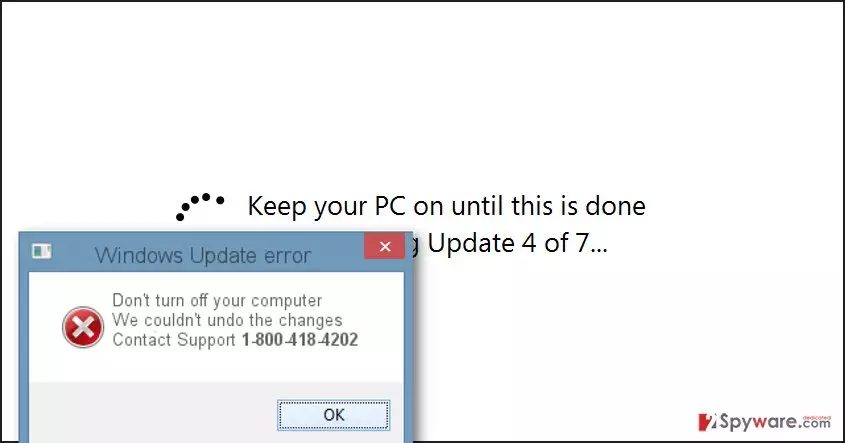
Research Soft virus is a malware variant that poses as a bogus Windows Update screen, asking the user to “keep your PC on until this is done” and pretending to be installing and applying updates. Then the virus suddenly stops the bogus operation and triggers a pop-up message stating that error occurred and the update cannot be installed. Research Soft malware also repeats the command to keep the computer on and displays the following message:
We couldn’t undo the changes
Contact Support 1-800-418-4202
However, you should NOT even think about calling this number, unless you wish to have a chit-chat with cyber criminals. These criminals work as tech support scammers, and their primary target is to swindle money from the use. Our research team member has called these scammers and pretended to be following their commands, who were trying to convince the researcher to carry out series of commands, open MSConfig, Regedit, and other panels where system settings can be altered. This way, they try to confuse the victim even more and later on, when the victim loses hope to fix the computer, they suggest a “friendly” option – they ask the victim to provide remote access to the computer so that they can fix it remotely. Do not ever try to provide such access to these scammers – they will only plant malware on your PC or access valuable documents or steal data from you. If this fake update screen pop-ups on your screen, install an anti-malware software and remove Research Soft scareware immediately. If you wish, you can use one of the anti-malware programs that we recommend – FortectIntego or SpyHunterCombo Cleaner. Do not let scammers deceive you!
How does this malware spread?
Research Soft Tech Support malware spreads along other applications and can be installed alongside them. The problem is that many free programs are bundled with additional programs that are promoted as recommended ones; however, such additions are rarely presented in a direct way. Typically, they hide under safe-looking installation settings such as Default or Standard. These settings should not be trusted, at least when installing freeware or shareware. Instead, opt for Custom or Advanced option and check what lies behind these settings. Either one or another option should provide you with a list of “recommended downloads,” which should be deselected immediately. This way, you can avoid stealthy installation of PUPs and malware. However, sometimes malware can slither into your computer as a Trojan horse – therefore, you should stay away from intrusive ads and suspicious email attachments that reach you. Clicking on such advertisements or opening concealed infectious attachments can instantly install malware on the system.
How to remove Research Soft scareware?
Remove Research Soft virus as soon as you see the message to contact tech support. This software is dangerous and poses a threat to your computer system. It’s not that easy to remove it, and we highly advise you to do that automatically. You can find full Research Soft removal instructions below.
Did this guide help?
4 comments
anna
I want to call them just for fun.
Donald
Filthy scammers! Dont call Research Soft team, they are a bunch of indian hackers....
bay28
Trying to fix my PC now with reimage. So far, everything goes smoothly
Caroline
thanks!